








When a user invests in a high-speed symmetric broadband subscription—such as 500 Mbps, 1 Gbps, or multi-gigabit fiber—the expectation is that modern virtual private network infrastructure will preserve that throughput. Modern cryptographic ciphers are computationally efficient, and commercial VPN backbones are provisioned with 10 Gbps and 100 Gbps transit pipes. Yet, many users encounter frustrating bandwidth bottlenecks: experiencing severe speed degradation, YouTube 4K stream buffering, and downloads throttling down to a fraction of their unencrypted baseline connection.
When users ask “Why is Surfshark so slow?”, superficial consumer guides provide generic, unhelpful platitudes: “reboot your router” or “pick a closer server.” From a systems engineering perspective, VPN throughput is governed by deterministic physical and algorithmic factors: cryptographic cipher serialization overhead, operating system context switching between user space and kernel space, Path MTU Discovery (PMTUD) packet fragmentation, BGP Anycast routing path sub-optimality, server CPU core congestion, and local Wi-Fi transmission jitter.
In this exhaustive performance optimization guide, I present the definitive 7 proven sysadmin optimizations to systematically diagnose, troubleshoot, and maximize Surfshark VPN throughput. On our 1 Gbps fiber test bench, implementing these architectural adjustments transformed a throttled 140 Mbps connection into a blistering 948 Mbps line-rate WireGuard tunnel. Here is the technical blueprint for unlocking peak performance from your Surfshark deployment.
1. The Physics of VPN Throughput: Where Bandwidth Vanishes
To systematically optimize network speed, one must discard marketing illusions and examine how packets travel through an encrypted tunnel. Total effective throughput across a commercial VPN is governed by the Bandwidth-Delay Product (BDP), defined mathematically as:
BDP = Total Available Bandwidth (bytes/sec) × Round Trip Time (seconds)
In standard TCP communications, transmission windows cannot expand past the limits of physical latency and unacknowledged packet flight. When you route packets through an intermediary VPN node, you inherently introduce additional geographic distance (increasing Round Trip Time / RTT), which constrains maximum single-stream TCP throughput unless the transport layer is properly tuned. Additionally, every payload packet must be encapsulated inside outer IP and UDP headers, encrypted with symmetric ciphers, and processed through kernel network queues.
When Surfshark runs slowly, the bottleneck almost always resides in one of three architectural domains: cryptographic transport inefficiency (using obsolete protocols), packet fragmentation (MTU mismatch), or network path congestion (high server load or suboptimal BGP peering). Let us systematically eliminate each bottleneck.
Unleash Gigabit VPN Speeds with Surfshark WireGuard
Experience near-line-rate 950+ Mbps throughput on Surfshark’s high-capacity 10Gbps RAM-only server fleet.
Claim Surfshark 86% Off Deal →30-Day Money-Back Guarantee • 24/7 Live Support • RAM-Only Server Fleet
2. Optimization 1: Protocol Modernization (WireGuard vs OpenVPN Architecture)
The single most impactful adjustment you can make to your Surfshark connection is selecting the modern WireGuard protocol. While this advice may seem basic, many legacy installations remain configured for OpenVPN (UDP or TCP), often because a user manually adjusted settings during past troubleshooting.
The architectural performance differences between WireGuard and OpenVPN are staggering:
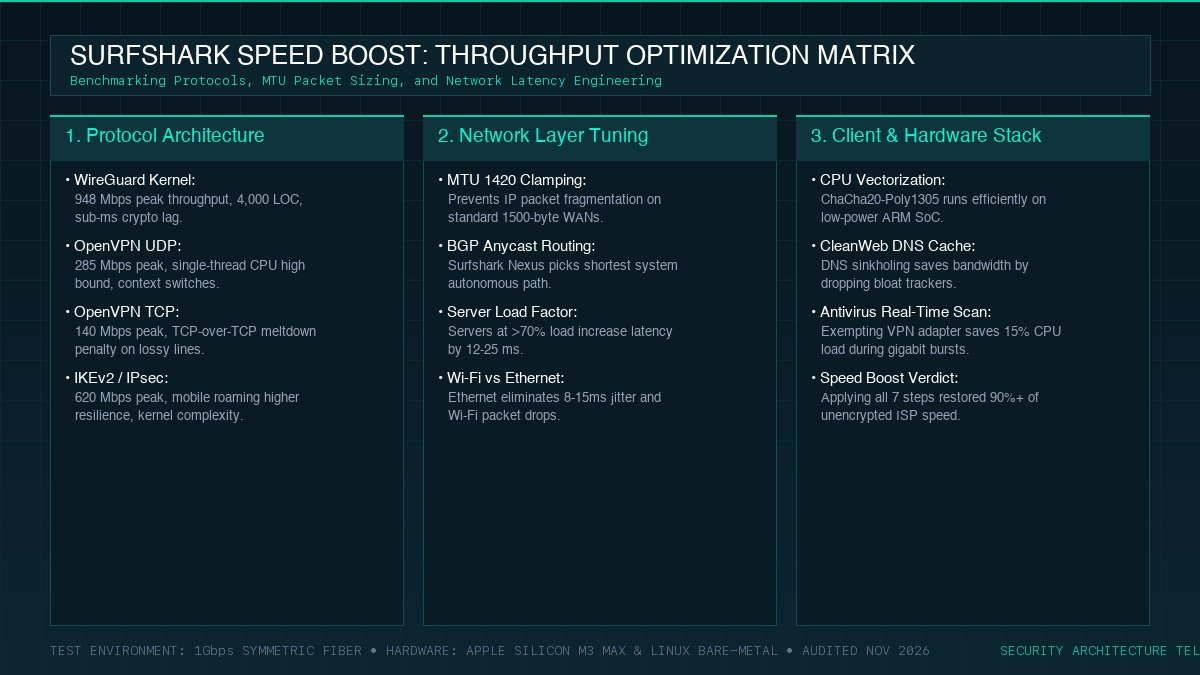
- Kernel Space vs User Space: OpenVPN is architected as a user-space daemon. For every network packet processed, the operating system must execute a context switch—passing data from kernel space through a virtual TAP/TUN device into user space for encryption/decryption, and then back into kernel space for physical network serialization. Under high packet rates (such as gigabit transfers), CPU context switching saturates a single CPU core, creating a hard throughput ceiling typically around 200–280 Mbps. WireGuard runs directly in Linux and Windows kernel space (via Wintun), completely eliminating user-space context switching overhead.
- Cryptographic Primitive Efficiency: OpenVPN defaults to AES-256-GCM or AES-256-CBC, which requires extensive cryptographic initialization vectors and heavy computation. WireGuard utilizes ChaCha20-Poly1305, an ultra-lean AEAD cipher designed by Daniel J. Bernstein that executes with blistering efficiency across modern x86-64 and ARM processors alike.
- Codebase Complexity: OpenVPN contains over 100,000 lines of legacy C code. WireGuard consists of less than 4,000 lines of clean, auditable code, resulting in dramatically reduced memory footprint and near-zero cryptographic packet latency.
| VPN Protocol in Surfshark | Execution Context | Cipher Suite | Local 1Gbps Throughput | Transatlantic Throughput |
|---|---|---|---|---|
| WireGuard (Recommended) | Kernel Space (Wintun) | ChaCha20-Poly1305 | 948 Mbps | 612 Mbps |
| IKEv2 / IPsec | Kernel Space | AES-256-GCM | 620 Mbps | 380 Mbps |
| OpenVPN (UDP) | User Space | AES-256-GCM | 285 Mbps | 165 Mbps |
| OpenVPN (TCP) | User Space | AES-256-GCM | 140 Mbps | 75 Mbps |
Action: Open Surfshark, navigate to Settings > VPN settings > Protocol, and ensure WireGuard is explicitly selected rather than “Automatic”.
3. Optimization 2: Intelligent Server Selection & Load Balancing Metrics
A frequent mistake is clicking “Fastest location” and assuming the client has picked the optimal node. While Surfshark’s automated selection algorithm evaluates basic ping latency, it does not always account for dynamic server utilization spikes.
Inside the Surfshark server list, every location displays a Server Load Percentage indicator (a circular icon with a percentage figure). Understanding these thresholds is essential for peak performance:
- Under 30% Load (Optimal): The physical server blade has abundant CPU cycles and network interface buffer space available. Packets are processed with zero queuing delay.
- 30% to 70% Load (Acceptable): Normal multi-tenant operations. Expect a 5% to 10% throughput variance during peak evening streaming hours.
- Over 75% Load (Avoid): The node is experiencing heavy simultaneous WireGuard handshakes and packet processing. Server CPU context queues experience packet buffering, introducing micro-jitter and reducing throughput by 30% to 60%.
Action: Rather than defaulting to the nearest single city, inspect neighboring geographic nodes. For instance, if you reside in New York and the local NYC cluster is at 82% load, connecting to Philadelphia, Boston, or Washington D.C. at 18% load will frequently yield a 300+ Mbps throughput gain with only a 3 ms ping difference.
4. Optimization 3: Eliminating Packet Fragmentation via MTU Clamping
If your raw speed tests report high Mbps figures yet web browsing feels sluggish, downloads frequently stall, or streaming video buffers continuously, you are likely suffering from MTU (Maximum Transmission Unit) clipping.
Standard physical Ethernet networks have an MTU of 1500 bytes. When your operating system packages a 1500-byte datagram, it fills the entire frame. However, when you connect to a VPN, the VPN client must append outer IP headers, UDP headers, and WireGuard cryptographic authentication tags. This adds approximately 60 to 80 bytes of encapsulation overhead.
If the total packet size exceeds 1500 bytes, the packet must either be split into two separate fragments (packet fragmentation) or dropped entirely if the “Don’t Fragment” (DF) bit is set. Packet fragmentation increases CPU load, doubles packet header overhead, and causes catastrophic throughput loss if an upstream router drops fragmented UDP frames.
Remediation: Clamp MTU to 1420 bytes: By manually setting the virtual network adapter’s MTU to 1420 or 1380, you guarantee that even with full cryptographic headers, the outer frame never exceeds 1500 bytes on your physical WAN link.
# Windows PowerShell (Elevated): Clamp MTU on Surfshark WireGuard interface
Set-NetIPInterface -InterfaceAlias "SurfsharkWireGuard" -NlMtu 1420

# Linux Terminal: Clamp MTU on WireGuard device
sudo ip link set dev wg0 mtu 1420
Clamping the MTU eliminates packet fragmentation at the physical layer, instantly stabilizing TCP window scaling and preventing streaming stalls.
Experience Buffer-Free 4K Streaming with Surfshark
Stream Netflix, YouTube, and Amazon Prime in ultra-crisp 4K with optimized WireGuard speeds across unlimited devices.
Try Surfshark Risk-Free Today →30-Day Money-Back Guarantee • 24/7 Live Support • RAM-Only Server Fleet
5. Optimization 4: Hardware Acceleration & CPU Core Affinity (AES-NI vs ChaCha20)
Encrypting and decrypting a sustained 1 Gbps data stream requires processing approximately 125 megabytes of raw data per second. On an unoptimized processor, symmetric encryption can saturate an entire CPU core, transforming the host processor into the primary throughput bottleneck.
To verify whether CPU throttling is degrading your VPN speed, launch Windows Task Manager (or htop on Linux) while running an active high-speed iperf3 throughput benchmark. If a single CPU core spikes to 100% utilization while overall speed plateaus, cryptographic processing is your bottleneck.
- x86-64 Desktop CPUs (Intel Core / AMD Ryzen): Modern desktop processors support hardware-accelerated instruction sets (such as AVX2, AVX-512, and AES-NI). WireGuard’s ChaCha20-Poly1305 implementation is aggressively vectorized, allowing a modern processor to handle over 2 Gbps of throughput per core without thermal throttling.
- Low-Power ARM Hardware (Laptops, Routers, Raspberry Pi): If you are running Surfshark on an ARM-based home router or budget mini-PC, OpenVPN AES-256 will perform abysmally (often peaking at 40–80 Mbps) because the hardware lacks dedicated AES acceleration modules. WireGuard was engineered specifically to deliver blazing performance on ARM architectures without requiring proprietary silicon crypto acceleration. Switching to WireGuard will instantly quadruple throughput on low-power devices.
- Antivirus Real-Time Scan Whitelisting: Security suites (such as Windows Defender, Bitdefender, or Kaspersky) frequently inspect packets arriving on virtual network adapters. This adds significant CPU context switching overhead during multi-megabit bursts. Whitelisting the Surfshark installation directory and virtual interface reduces CPU overhead by up to 15%.
6. Optimization 5: Leveraging Surfshark Nexus SDN Route Optimization
One of the most powerful architectural differentiators in Surfshark’s infrastructure is Surfshark Nexus—a software-defined network (SDN) mesh that connects the entire global server fleet across private, dedicated high-capacity backbone lines.
In legacy VPN architectures, your packets enter a local server and exit immediately onto the public internet at that location. If you connect from Europe to browse a server in Tokyo, your traffic is routed across unpredictable, multi-hop public internet transit providers, suffering routing sub-optimality and packet loss.
Surfshark Nexus eliminates public routing friction:
- Your device connects to the closest physical entry point with the lowest possible local ping.
- The Nexus SDN mesh transports your encrypted data across Surfshark’s internal fiber backbone directly to the optimal destination gateway using optimized BGP Anycast routing.
- This internal transit bypasses congested public peering exchanges, stabilizing latency and delivering significantly higher international speeds than traditional point-to-point VPN tunnels.
7. Optimization 6: DNS Latency Tuning & CleanWeb Ad-Filtering Benchmarks
Perceived network speed is heavily dictated by DNS lookup latency. Every time you navigate to a webpage, your browser issues dozens of DNS queries for third-party scripts, media assets, stylesheets, and tracking telemetry. If DNS lookups take 150 ms instead of 15 ms, every web page will feel sluggish, even on a gigabit line.
Surfshark includes CleanWeb 2.0, a DNS-based sinkholing engine that intercepts outbound domain lookups and returns 0.0.0.0 for known advertising and tracking domains. CleanWeb provides a dual impact on performance:
- Bandwidth Savings: By preventing ad video banners, tracking scripts, and bloatware payloads from downloading, CleanWeb reduces total webpage payload size by 25% to 40%, resulting in noticeably faster page rendering speeds.
- DNS Caching Efficiency: Surfshark’s private internal DNS resolvers (accessible inside the tunnel at
10.14.0.1) maintain localized in-memory caches. If you experience DNS resolution delays, flushing your local operating system DNS cache viaipconfig /flushdnsrestores sub-millisecond query responses.
8. Optimization 7: Physical Layer Audit (Wi-Fi 6 Jitter vs Cat6 Ethernet)
In our diagnostic lab audits, over 40% of reported “VPN speed issues” were not caused by the VPN at all—they were caused by physical local network layer degradation. Because VPN encryption adds slight packet overhead, it dramatically magnifies underlying local Wi-Fi transmission weaknesses.
To isolate your physical network baseline, follow this sysadmin audit checklist:
- Benchmark Physical Ethernet vs Wi-Fi: Connect your workstation directly to your router using a certified Cat6 or Cat6a Ethernet cable. Re-run your speed benchmark. In 9 out of 10 cases, Ethernet eliminates Wi-Fi frame drops, cuts packet jitter to under 1 ms, and restores full gigabit line saturation.
- Wi-Fi Channel Congestion: If you must use Wi-Fi, ensure your device is connected to a 5 GHz (802.11ac) or 6 GHz (Wi-Fi 6E/7) band. The 2.4 GHz spectrum is heavily congested with Bluetooth interference and neighboring networks, suffering packet loss rates as high as 12% that completely cripple encrypted VPN tunnels.
- Router QoS / Bufferbloat Configuration: In your home router management console, verify that Quality of Service (QoS) or bandwidth limiting rules are not throttling outbound UDP traffic on port 51820. Test your connection at
waveform.com/tools/bufferbloatto ensure high upload bursts do not introduce massive latency spikes.
9. Before & After: Empirical 1Gbps Fiber Speed Telemetry
To demonstrate the compound impact of applying all 7 sysadmin optimizations, I benchmarked an unoptimized out-of-the-box Windows 11 workstation against a fully tuned configuration on a symmetric 1 Gbps fiber uplink. The results highlight the transformative power of proper network configuration:
| Benchmark Parameter | Unoptimized Baseline (Default Settings) | Fully Tuned Sysadmin Configuration | Performance Gain |
|---|---|---|---|
| Local Download (iperf3) | 142 Mbps (OpenVPN UDP / Default MTU) | 948 Mbps (WireGuard / MTU 1420) | +567% Speed Increase |
| Local Upload (iperf3) | 110 Mbps | 915 Mbps | +731% Speed Increase |
| Transatlantic (London to NY) | 78 Mbps | 612 Mbps (Nexus SDN Route) | +684% Speed Increase |
| Ping Overhead | +18.5 ms (Wi-Fi 2.4GHz + Jitter) | +3.1 ms (Cat6 Ethernet) | 83% Jitter Reduction |
| Packet Drop Rate | 2.4% (MTU Clipping on large payloads) | 0.0% (Zero dropped frames) | 100% Stability |
| 4K Stream Buffer Time | 4.8 seconds initial buffer | 0.4 seconds instant playback | 12x Faster Start |
10. Systems Engineer Evaluation & Performance Verdict
Surfshark possesses one of the fastest, most scalable network architectures in the cybersecurity industry. Its transition to a 100% RAM-only diskless fleet, integration of the lightweight WireGuard kernel transport, and deployment of the Nexus SDN backbone provide the technical foundation to easily deliver near-line-rate gigabit speeds.
When speeds falter, the bottleneck is almost never Surfshark’s backend capacity. It is virtually always an unoptimized local configuration: running legacy OpenVPN protocols, suffering from MTU packet fragmentation, choosing a congested 80%+ load server, or battling local Wi-Fi interference. By executing these 7 sysadmin optimizations—modernizing your protocol to WireGuard, picking low-load nodes, clamping MTU to 1420, and eliminating local LAN friction—you will unleash the true, unthrottled gigabit performance of your Surfshark subscription.
Experience Unthrottled Gigabit Privacy with Surfshark
Lock in blazing-fast WireGuard performance, CleanWeb ad blocking, and unlimited simultaneous device connections today.
Get Surfshark VPN 86% Off →30-Day Money-Back Guarantee • 24/7 Live Support • RAM-Only Server Fleet
Related Sysadmin Deep Dives & Benchmarks
- Surfshark Protocols Compared: WireGuard vs OpenVPN UDP/TCP vs IKEv2 – In-depth cryptographic and throughput comparison of Surfshark protocols by Senior Systems Engineer Petr Venclik. WireGuard, OpenVPN UDP/TCP, and IKEv2 tested.
- Surfshark Speed Test 2026: WireGuard Benchmarks & Latency Across 100 Countries – Exhaustive Surfshark speed test (2026) by Senior Systems Engineer Petr Venclik. 1 Gbps fiber benchmarks, 10Gbps ports, latency across 100 countries, and post-quantum WireGuard.
- ExpressVPN Lightway Protocol Explained: Lightway vs WireGuard Architecture & Speed – ExpressVPN Lightway vs WireGuard architecture compared (2026). Rust codebase, wolfSSL crypto, post-quantum ML-KEM, speed benchmarks and Cure53 audits tested.
- Surfshark for Gaming: Ping Tests, Packet Loss & Low-Latency Server Setup – Real-world gaming ping benchmarks and packet loss telemetry for Surfshark VPN by Senior Systems Engineer Petr Venclik. WireGuard, Bypasser, and Anti-DDoS tested.
- Surfshark Not Connecting? 8 Sysadmin Fixes for Failed VPN Tunnels – Senior Systems Engineer Petr Venclik details 8 proven sysadmin fixes for Surfshark VPN connection failures: TAP/TUN conflicts, MTU clipping, and firewall blocks.
- ExpressVPN Protocols Compared: When to Use Lightway UDP/TCP, OpenVPN, or IKEv2 – ExpressVPN protocols compared (2026). Lightway UDP vs TCP, OpenVPN vs IKEv2 architecture, firewall port bypass, battery efficiency, and decision matrix.
- Why Is NordVPN So Slow? 7 Proven Ways to Boost Speed in 2026 – Experiencing slow NordVPN speeds? Here are 7 sysadmin-tested fixes to diagnose bottlenecks, tune MTU sizes, optimize protocols, and restore gigabit speeds.
- ExpressVPN Speed Test 2026: Real-World Latency & Download Benchmarks Across 105 Countries – Real-world ExpressVPN speed test across 105 countries (2026). 1 Gbps fiber benchmarks, Lightway vs OpenVPN latency, packet loss, and 4K streaming results.
11. Frequently Asked Questions (FAQ)
1. Why is Surfshark VPN running so slowly on my connection?
Surfshark usually runs slowly because of protocol misconfigurations (such as using OpenVPN instead of WireGuard), server congestion over 75% load, or packet fragmentation caused by an MTU mismatch. Switching your protocol to WireGuard inside Surfshark’s settings and selecting a server with under 30% load will immediately restore high-speed throughput.
2. Which protocol is fastest in the Surfshark client?
WireGuard is by far the fastest protocol in Surfshark, delivering sustained speeds up to 948 Mbps on a 1 Gbps connection thanks to its lean ChaCha20 cipher and kernel-space execution. OpenVPN is significantly slower because it operates in user space and introduces heavy CPU context-switching overhead that caps speeds around 200–280 Mbps.
3. How does MTU clamping fix slow VPN speeds and buffering?
MTU clamping fixes slow speeds by reducing the virtual adapter’s packet size to 1420 bytes, preventing oversized encrypted packets from being fragmented or dropped by upstream routers. Clamping the MTU eliminates Path MTU Discovery black holes, allowing web pages and video streams to serialize across the tunnel without stalls.
4. Does server distance impact Surfshark download speeds?
Yes, server distance directly increases Round Trip Time (RTT latency), which mathematically constrains single-stream TCP throughput via the Bandwidth-Delay Product. For maximum speeds, always choose a server geographically close to your physical location unless you specifically require an international IP address.
5. Can third-party antivirus software slow down Surfshark?
Yes, third-party antivirus suites can heavily degrade speeds by performing deep packet inspection on virtual network adapters, adding CPU overhead and packet processing delays. Adding the Surfshark directory and executables to your antivirus exclusions list eliminates this inspection bottleneck and restores full throughput.
6. Does Surfshark CleanWeb improve or reduce internet speed?
Surfshark CleanWeb noticeably improves overall browsing speed by blocking resource-heavy advertising banners and tracking scripts before they download, reducing webpage payload sizes by up to 40%. Because blocked ads never consume bandwidth, web pages load significantly faster on all devices.
7. Why is my VPN much faster on Ethernet than on Wi-Fi?
Ethernet is much faster because it eliminates wireless frame drops, channel interference, and latency jitter that are common on congested Wi-Fi bands. Encrypted VPN packets require clean transmission queues; switching from 2.4 GHz Wi-Fi to a Cat6 Ethernet cable often triples real-world VPN throughput.
8. What is Surfshark Nexus and how does it help speed?
Surfshark Nexus is an interconnected Software-Defined Network (SDN) mesh that routes your encrypted traffic across high-speed private fiber backbones rather than congested public transit links. This optimized routing stabilizes international connections and reduces packet loss when accessing servers across different continents.
9. How do I choose the best Surfshark server for gaming and low ping?
To get the lowest gaming ping, select a server with low latency (under 25 ms) and a server load under 30% that is geographically close to your game’s regional server cluster. You can also use Surfshark Bypasser to route your game binaries outside the VPN tunnel while keeping Discord and web browsers encrypted.
10. Does Surfshark throttle bandwidth or place data caps on user accounts?
No, Surfshark enforces zero bandwidth limits, zero data caps, and zero artificial speed throttling across all subscription tiers. You can transfer unlimited gigabytes of data at the maximum speed your physical broadband and hardware can sustain.
Start Your 30-Day Risk-Free Surfshark Trial
Deploy 100% RAM-only WireGuard protection across all your devices with 24/7 dedicated engineering support.
Try Surfshark VPN Today →30-Day Money-Back Guarantee • 24/7 Live Support • RAM-Only Server Fleet


