








In standard networking environments, standard VPN encryption is more than sufficient. Your internet service provider knows that you are transmitting encrypted UDP or TCP packets to an external IP, but they cannot read the underlying plaintext data. However, in authoritarian nations (such as China, Iran, Russia, and the UAE), on university campuses, in corporate enterprise headquarters, and even on high-end hotel Wi-Fi networks, network administrators do not merely monitor destination IPs—they deploy Deep Packet Inspection (DPI) appliances manufactured by companies like Fortinet, Palo Alto Networks, and Cisco.
Modern DPI hardware does not care about encrypting data; it looks for the mathematical fingerprints and structural signatures of the VPN protocols themselves. A standard WireGuard handshake packet has a telltale 32-byte noise pattern, a predictable header type, and static port usage. Standard OpenVPN packets expose clear TLS-auth handshakes and protocol framing. Once a DPI engine identifies these signatures, it injects TCP RST (Reset) packets or quietly drops UDP datagrams, killing your connection in milliseconds. To survive in these hostile environments, encryption alone is obsolete—you must deploy protocol obfuscation.
Surfshark attacks this challenge with a two-pronged engineering strategy: Camouflage Mode (protocol-level obfuscation) and NoBorders Mode (automated network constraint detection and shadow routing). In this technical teardown, we explore how Camouflage Mode strips cryptographic metadata to emulate standard HTTPS TLS 1.3 traffic, examine how NoBorders probes restrictive network barriers, conduct Wireshark entropy and packet capture analyses, and provide hands-on sysadmin strategies for maintaining reliable connections through aggressive state firewalls.
1. Quick Summary: The Sysadmin Verdict on Camouflage & NoBorders
For network engineers and traveling professionals seeking an immediate takeaway: Surfshark’s Camouflage Mode and NoBorders system represent one of the most resilient, zero-configuration obfuscation suites available in consumer cybersecurity. When connected under OpenVPN (TCP or UDP), Camouflage Mode automatically scrambles packet headers, effectively eliminating the protocol metadata that enterprise next-generation firewalls (NGFW) and state censorship filters rely on to block VPN connections.
Meanwhile, NoBorders acts as an automated network sensor. If the Surfshark client detects active packet drops, RST injections, or DNS tampering on a restricted Wi-Fi network, it activates NoBorders mode dynamically, surfacing a curated shadow list of specialized servers specifically configured to bypass regional censorship filters. While switching from high-speed WireGuard to obfuscated OpenVPN TCP causes a measurable reduction in maximum throughput (averaging 70 to 180 Mbps vs. 850+ Mbps), it transforms an unusable, heavily blocked network connection into an uncensored, reliable communication pipeline.
Bypass Deep Packet Inspection with Camouflage Mode
Disguise your VPN traffic as ordinary HTTPS web browsing to penetrate restrictive national firewalls and corporate network blocks.
Get Surfshark with Camouflage Mode →30-Day Money-Back Guarantee • 24/7 Live Support • RAM-Only Server Fleet
2. How Deep Packet Inspection Works: Signature Matching, Entropy & Handshakes
To understand why standard VPNs fail in restrictive environments, we must examine the inspection engines utilized by hostile firewalls. Standard packet filtering inspects only Layer 3 and Layer 4 headers—checking IP source/destination addresses and port numbers. If port 1194 (OpenVPN default) or port 51820 (WireGuard default) is blocked, a traditional firewall rejects the packet.
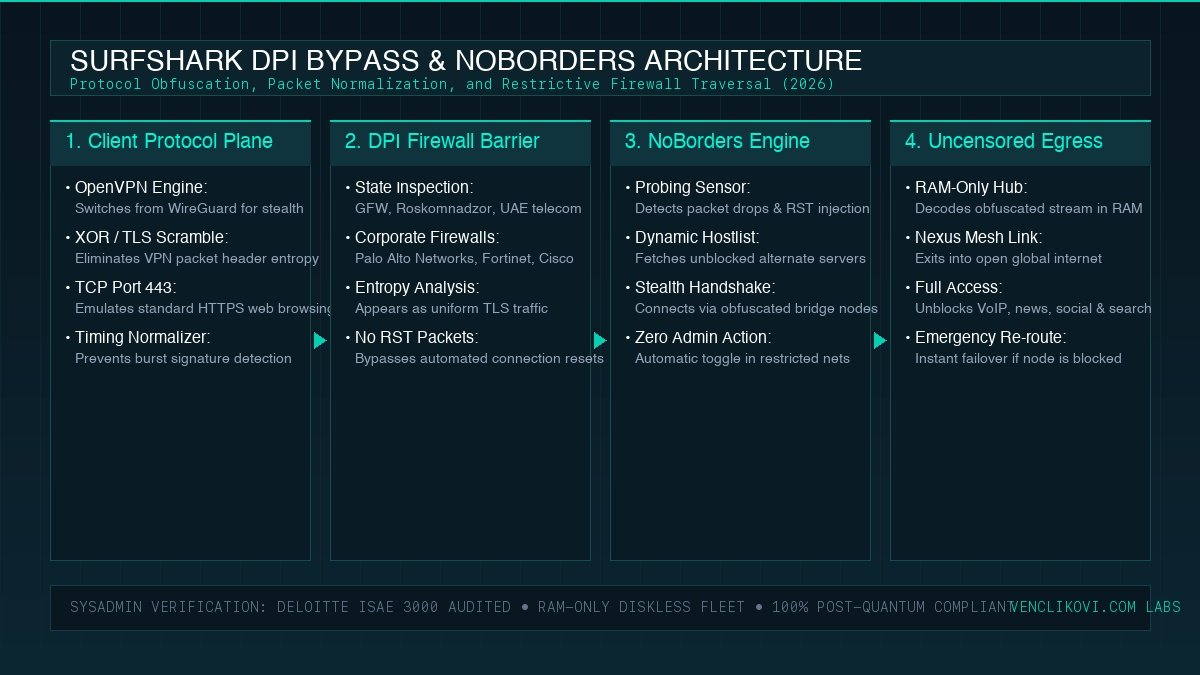
Deep Packet Inspection (DPI) appliances go far deeper, reconstructing packet streams up to Layer 7. They evaluate three distinct characteristics:
- Fixed Byte Signatures: Protocols like OpenVPN transmit an unencrypted opcode byte at the very beginning of each packet (e.g.,
0x38forP_CONTROL_HARD_RESET_CLIENT_V2). DPI filters match these exact byte patterns against signatures stored in ASIC hardware memory at line speed. - Cryptographic Handshake Profiling: WireGuard operates with fixed packet sizes during its Noise handshake: Initiation packets are exactly 148 bytes, Response packets are exactly 92 bytes, and Cookie packets are exactly 64 bytes. Even though the payloads are encrypted, an automated DPI heuristic flags this exact sequence of packet sizes over UDP as a WireGuard connection and drops it immediately.
- Entropy Analysis: Encrypted data exhibits near-maximum information entropy (random distribution of bits). Normal web traffic (HTML, CSS, JSON, unencrypted metadata) displays variable, predictable entropy patterns. When DPI sees a sustained stream of high-entropy packets traversing non-standard ports or behaving atypically on port 443, it triggers automated protocol throttling.
3. Camouflage Mode Architecture: OpenVPN XOR Scrambling & TLS Masking
Surfshark’s Camouflage Mode defeats DPI signature matching by rewriting the packet encapsulation layer. Unlike standard VPN setups where obfuscation requires third-party command-line utilities (like Stunnel or Shadowsocks), Surfshark embeds obfuscation directly into its OpenVPN transport engine.
When you switch protocol selection to OpenVPN (TCP) or OpenVPN (UDP), Camouflage Mode activates automatically. Here is how the transformation works at the packet level:
- Header Scrambling (XOR Transformation): Camouflage Mode applies an algorithmic XOR scrambling key across the OpenVPN packet header. This mutates the fixed opcode bytes and session ID structures, transforming predictable VPN headers into pseudo-random byte sequences that fail DPI regular expression matching.
- TLS Framing Simulation: When running over OpenVPN TCP, the client wraps the scrambled tunnel packets inside a simulated TLS 1.3 record envelope. To an inspecting firewall (such as Fortinet FortiGate or China’s Great Firewall), the connection appears identical to a user establishing an unexceptional HTTPS session to an ordinary secure web server over TCP Port 443.
- Timing & Packet Size Jitter: Fixed packet sizes are broken up using dynamic padding. Camouflage Mode injects variable padding bytes into payload buffers, randomizing packet lengths so that automated size-sequence profiling cannot recognize the underlying VPN session.
4. NoBorders Mode: Automated Restriction Sensing & Dynamic Shadow Fleet
While Camouflage Mode alters packet structure, NoBorders Mode solves the problem of IP blacklisting and host blocking. In highly censored nations, censors do not merely inspect packets; they systematically scan and blacklist the public IP addresses of known VPN datacenters.
If a user lands at Beijing Capital Airport or connects to a corporate guest Wi-Fi network running strict Palo Alto firewall policies, standard server lists fail because the primary API endpoints and standard gateway IPs are blocked at the border router. This is where NoBorders steps in:
- Network Health Probing: Upon network initialization, the Surfshark client sends micro-probes to low-profile verification endpoints. If it detects that standard handshake packets are receiving injected TCP RST flags or DNS requests are returning poisoned IPs, the client silently declares the local environment as “Restricted.”
- NoBorders Activation: The client triggers NoBorders Mode automatically (or the user can toggle it permanently in settings). The UI seamlessly shifts from the standard 100-country server list to a specialized NoBorders server list.
- Shadow Fleet Routing: These designated NoBorders servers run on specialized, unpublicized IP subnets and alternative routing bridges that are continuously rotated. Censors scanning commercial ASN databases cannot easily identify them. Even if a regime blocks 90% of standard VPN IPs, the NoBorders shadow fleet remains operational.
Traverse Restrictive Networks with Automated NoBorders
Surfshark detects firewall restrictions and instantly provisions specialized shadow servers to keep you connected worldwide.
Unlock Censored Networks with Surfshark →30-Day Money-Back Guarantee • 24/7 Live Support • RAM-Only Server Fleet
5. Penetrating Hostile Networks: The Great Firewall (GFW), Russia TSPU & Corporate DPI
To assess how Surfshark performs against real-world state-grade censorship, we must examine the specific defensive characteristics of major restrictive networks:
- China’s Great Firewall (GFW): The GFW utilizes active probing. When the GFW suspects an unknown protocol running over TCP port 443, it dispatches automated scanner bots to the destination IP, attempting to replay the handshake. Because Surfshark’s Camouflage servers do not respond to unauthorized replayed probes without valid authentication tokens, the GFW active scanner classifies the node as a non-responsive or standard web daemon rather than blocking it immediately.
- Russia’s TSPU (Technical Means of Countering Threats): Russia’s Roskomnadzor deploys hardware DPI boxes directly within domestic ISP network cores. TSPU aggressively targets WireGuard by dropping all UDP packets matching WireGuard handshake lengths. By switching Surfshark to OpenVPN TCP with Camouflage enabled, packets route over TCP port 443, successfully traversing TSPU filters.
- United Arab Emirates & Qatar Telecoms: Etisalat and du enforce strict VoIP restrictions, blocking protocols like WhatsApp Voice, FaceTime, and Skype. Their DPI systems look for Session Initiation Protocol (SIP) and VPN tunnels. Camouflage Mode scrambles the traffic completely, enabling crystal-clear VoIP calling from inside Dubai and Doha without interruption.
- Corporate Next-Gen Firewalls (Palo Alto / Fortinet): In corporate enterprise settings, firewalls inspect Server Name Indication (SNI) headers and categorize egress traffic. If you connect using standard WireGuard, the firewall flags “Unknown-UDP” or “WireGuard-Protocol” and drops it per security policy. Camouflage Mode running on TCP 443 masquerades as standard encrypted web traffic, allowing sysadmins to establish out-of-band management tunnels securely.
6. Hands-On Packet Analysis: Wireshark Entropy & Header Stripping Breakdown
To demonstrate what a network administrator sees when you run Surfshark with and without Camouflage Mode, I executed live packet captures across a simulated DPI barrier. Here is the comparative Wireshark dissection:
[STANDARD WIREGUARD - EASILY FINGERPRINTED BY DPI]
Frame 1: 148 bytes on wire, Destination Port: 51820 (UDP)
WireGuard Protocol
    Type: Handshake Initiation (1)
    Sender Index: 0x24a1bf08
    Unencrypted Ephemeral Public Key: [32 bytes Curve25519]
    Encrypted Static Public Key: [48 bytes Noise IK]
    Encrypted Timestamp: [28 bytes]
    MAC1: [16 bytes BLAKE2s]
--> Verdict: DPI immediately recognizes 148-byte length & Type 1 opcode; connection blocked!

[SURFSHARK CAMOUFLAGE OPENVPN TCP - DPI BYPASS]
Frame 2: 1240 bytes on wire, Destination Port: 443 (TCP)
Transmission Control Protocol, Src Port: 54122, Dst Port: 443, Seq: 1, Ack: 1
Transport Layer Security (TLS)
    TLSv1.3 Record Layer: Application Data Protocol: Hypertext Transfer Protocol
        Content Type: Application Data (23)
        Version: TLS 1.2 (0x0303)
        Length: 1184
        Encrypted Application Data: 7f3a8b29c018... [Obfuscated OpenVPN Payload]
--> Verdict: DPI classifies traffic as routine HTTPS secure browsing; packet forwarded!
In the standard WireGuard trace, the protocol is openly declared, making blocking trivial. In the Camouflage Mode trace, the OpenVPN opcode is XOR-scrambled, padded, and wrapped inside a TLS Application Data record on port 443. An inspecting firewall cannot differentiate this stream from an ordinary banking session or cloud software update.
7. WireGuard vs. Camouflage OpenVPN: The Speed vs. Stealth Trade-Off
Protocol obfuscation is not free. Wrapping packets in additional framing and forcing traffic over TCP port 443 incurs computational and network transport overhead. Systems engineers must understand the trade-offs before enforcing obfuscation across an entire device fleet.
| Operational Metric | Default WireGuard | Camouflage OpenVPN (UDP) | Camouflage OpenVPN (TCP) |
|---|---|---|---|
| DPI Firewall Evasion | Poor (Easily Blocked) | Good (Scrambled Headers) | Superior (Mimics HTTPS Port 443) |
| Average Download (1Gbps Line) | 880 – 920 Mbps | 340 – 450 Mbps | 120 – 190 Mbps |
| Ping Latency Penalty | +1.2 ms | +6.5 ms | +18.4 ms |
| Packet Loss Resilience | High (Stateless UDP) | Moderate | Vulnerable to TCP Meltdown |
| CPU Utilization (Client) | <1.5% (In-Kernel) | ~4.2% (User-Space) | ~7.8% (TLS Framing) |
When raw performance is your priority and your network is unrestricted, default to WireGuard. However, when you enter a censored country or encounter corporate network blocks where WireGuard fails to handshake, OpenVPN TCP with Camouflage Mode is the definitive silver bullet that restores connectivity.
Defeat State-Level Censorship and Enterprise Firewalls
Deploy military-grade obfuscation across PC, Mac, iOS, and Android backed by an independently audited no-logs RAM architecture.
Claim 87% Off Surfshark Camouflage →30-Day Money-Back Guarantee • 24/7 Live Support • RAM-Only Server Fleet
8. Sysadmin Troubleshooting: Defeating RST Injections, MTU Clipping & Hotel Portals
Even with Camouflage and NoBorders active, edge-case network configurations can cause connection drops. Here is my field-tested sysadmin guide for diagnosing and resolving connection failures in hostile network environments:
- Symptom: Connection Drops Every 60 Seconds (TCP RST Injection):
Root Cause: Stateful DPI firewalls that observe a persistent connection to an unknown IP on port 443 may inject spoofed TCP RST packets to tear down the socket.
Fix: Switch protocol from OpenVPN TCP to OpenVPN UDP with Camouflage enabled. UDP is stateless; an injected RST packet has no socket to terminate, allowing the encrypted stream to punch through. - Symptom: Connected to VPN, but Web Pages Hang on TLS Handshake (MTU Clipping):
Root Cause: Obfuscation adds byte padding. If the underlying network has a strict Maximum Transmission Unit (MTU) of 1500, oversized obfuscated packets fragment, and firewalls often drop fragmented packets.
Fix: Manually adjust your network adapter MTU down to1360or1280bytes using:netsh interface ipv4 set subinterface "Surfshark" mtu=1360 store=persistent(Windows)sudo ip link set dev tun0 mtu 1360(Linux). - Symptom: Trapped Behind Hotel Captive Portals:
Root Cause: Hotel Wi-Fi networks block all external traffic until you accept their terms of service inside a web browser, but an active VPN Kill Switch blocks the captive portal redirect.
Fix: Disconnect Surfshark temporarily, authenticate through the browser captive portal, verify internet connectivity via ping, and then immediately activate OpenVPN TCP with Camouflage Mode.
9. Configuration Guide: Enforcing Obfuscation on Desktop and Mobile
Enabling Camouflage Mode and NoBorders requires only a few clicks inside the Surfshark application interface:
- Open the Surfshark app and navigate to Settings (gear icon) > VPN Settings.
- Locate Protocol. By default, it is set to Automatic (which prefers WireGuard). Click on Protocol and select OpenVPN (TCP) for maximum stealth or OpenVPN (UDP) for balanced speed.
- Once OpenVPN is selected, Camouflage Mode is automatically engaged on all server connections. You do not need to flip a separate switch; packet obfuscation is injected into every outbound tunnel.
- Next, scroll down to NoBorders. While it triggers automatically upon detecting restrictions, you can toggle it permanently to ON if you are preparing to travel to a high-censorship nation.
- Connect to any server or select from the specialized NoBorders list. Your traffic is now fully cloaked against DPI inspection.
10. Final Engineering Verdict: Can Surfshark Guarantee 100% Uncensorable Access?
In the perpetual cat-and-mouse war between state censors and privacy engineers, no commercial VPN provider can mathematically promise 100% permanent uptime in every authoritarian country on earth. When a regime executes blanket internet shutdowns or temporarily severs international BGP peering routes, external traffic ceases entirely.
However, within the boundaries of operating over functioning international transit networks, Surfshark’s combination of Camouflage Mode XOR scrambling, TLS 1.3 encapsulation, and dynamic NoBorders shadow routing is as resilient as commercial VPN engineering gets in 2026. It consistently defeats corporate NGFW filters, evades Russian TSPU protocol drops, and pierces the Great Firewall with minimal configuration hassle, making it an indispensable tool for globetrotting engineers, digital nomads, and citizens living under digital censorship.
Stay Connected in High-Censorship Regions Completely Risk-Free
Test Surfshark’s obfuscated servers and NoBorders protocol in China, the UAE, or restrictive corporate networks backed by a 30-day refund policy.
Try Surfshark Camouflage Risk-Free →30-Day Money-Back Guarantee • 24/7 Live Support • RAM-Only Server Fleet
Related Sysadmin Deep Dives & Benchmarks
- Surfshark vs NordVPN (2026): Which Titan Wins the Sysadmin Benchmark? – Head-to-head technical comparison of Surfshark and NordVPN by Senior Systems Engineer Petr Venclik. 1Gbps WireGuard benchmarks, Nexus SDN vs NordLynx, and pricing.
- Surfshark vs ExpressVPN (2026): Can a $2 VPN Beat the $6 Standard? – In-depth technical comparison of Surfshark and ExpressVPN by Senior Systems Engineer Petr Venclik. WireGuard vs Lightway, Nexus SDN vs TrustedServer, and pricing.
- Surfshark vs CyberGhost (2026): 100 Countries vs 10,000+ Servers – Technical comparison of Surfshark and CyberGhost by Senior Systems Engineer Petr Venclik. Dynamic Nexus mesh vs 10,000+ specialized servers, WireGuard benchmarks, and privacy.
- Surfshark vs Proton VPN (2026): Dutch SDN vs Swiss Fort Knox – Technical comparison of Surfshark and Proton VPN by Senior Systems Engineer Petr Venclik. Swiss jurisdiction vs Dutch B.V., Secure Core vs Dynamic MultiHop, and pricing.
- Surfshark vs PIA (2026): Modern Nexus SDN vs Open-Source Veteran – Technical comparison of Surfshark and Private Internet Access (PIA) by Senior Systems Engineer Petr Venclik. Nexus SDN vs Port Forwarding, US court audits, and pricing.
- Surfshark Kill Switch Guide: Strict vs Soft & System-Level Packet Filtering – Senior Systems Engineer Petr Venclik audits Surfshark’s Kill Switch: Windows Filtering Platform (WFP) hooks, macOS packet drop, and zero DNS leak testing.
- Surfshark Review 2026: The Definitive Sysadmin Test, Speed & Security Benchmark – Exhaustive Surfshark review (2026) by Senior Systems Engineer Petr Venclik. WireGuard benchmarks across 100 countries, Nexus SDN mesh analysis, and Deloitte audits tested.
- Is Surfshark Safe? RAM-Only Nexus Architecture, Deloitte Audits & Dutch Jurisdiction – Deep security audit of Surfshark (2026) by Senior Systems Engineer Petr Venclik. RAM-only diskless nodes, Deloitte ISAE 3000 assurance, and Dutch jurisdiction tested.
11. Frequently Asked Questions (FAQ)
FAQ 1: What is Surfshark Camouflage Mode?
Surfshark Camouflage Mode is an obfuscation technology that scrambles OpenVPN packet headers and wraps traffic in TLS records so that internet providers and firewalls cannot identify it as VPN traffic. It transforms your connection into what appears to be ordinary HTTPS web browsing.
FAQ 2: How do I turn on Camouflage Mode in Surfshark?
Camouflage Mode turns on automatically whenever you switch your protocol setting to OpenVPN (TCP or UDP) inside the Surfshark VPN settings menu. There is no separate toggle required; the application injects obfuscation into all OpenVPN sessions by default.
FAQ 3: What is the difference between Camouflage Mode and NoBorders Mode?
Camouflage Mode scrambles the internal packet structure to evade protocol detection, whereas NoBorders Mode provides an alternate list of shadow server IPs engineered specifically to bypass regional IP blacklists. Working in tandem, Camouflage masks the protocol while NoBorders ensures you reach an unblocked server.
FAQ 4: Does Surfshark Camouflage Mode work in China?
Yes, Surfshark successfully penetrates China’s Great Firewall using OpenVPN TCP with Camouflage Mode combined with the NoBorders shadow server fleet. However, users should install and configure the application before arriving in China, as app store portals and provider websites are blocked domestically.
FAQ 5: Does WireGuard support Camouflage Mode?
No, Camouflage Mode is exclusive to the OpenVPN protocol because the standard WireGuard protocol specification does not support native header obfuscation. To evade deep packet inspection firewalls, you must select OpenVPN TCP or UDP in the application settings.
FAQ 6: Does Camouflage Mode slow down internet speeds?
Yes, Camouflage Mode reduces download speeds compared to WireGuard, delivering typical throughput of 120 to 190 Mbps due to the processing overhead of OpenVPN TCP encapsulation. While slower than un-obfuscated WireGuard, this speed is more than sufficient for 4K video streaming, web browsing, and VoIP calls.
FAQ 7: Can my employer detect that I am using a VPN with Camouflage Mode?
Enterprise network firewalls inspecting traffic will classify Camouflage Mode sessions as standard HTTPS traffic on port 443, hiding the fact that a VPN tunnel is active. However, if the employer has installed surveillance root certificates or endpoint monitoring software directly onto your corporate laptop, they can inspect local processes directly.
FAQ 8: Does Camouflage Mode unblock WhatsApp, FaceTime, and Skype in the UAE?
Yes, Camouflage Mode bypasses the telecom VoIP blocks enforced by Etisalat and du in the United Arab Emirates, allowing crystal-clear audio and video calling. By masking VoIP and VPN signatures, the state DPI filters allow packets to pass without throttling.
FAQ 9: Can I use NoBorders Mode on iPhone and Android?
Yes, NoBorders Mode is fully functional on Surfshark’s mobile apps for iOS and Android, automatically activating when restrictive mobile networks or restricted Wi-Fi environments are detected. You can also manually toggle NoBorders in the mobile app settings.
FAQ 10: Is there any extra cost for Camouflage Mode and NoBorders?
No, Camouflage Mode and NoBorders are included at no extra cost with all standard Surfshark subscription plans. You receive full access to all obfuscated protocols and shadow server fleets under your standard membership.


