








When most users think about a commercial virtual private network, they focus strictly on cryptographic encapsulation: wrapping Layer 3 IP packets inside a ChaCha20-Poly1305 or AES-256-GCM envelope to hide their traffic from local Wi-Fi sniffers and internet service providers. However, hiding your public IP address solves only half of modern digital surveillance. The moment you resolve a remote host name, modern web applications bombard your client with hundreds of third-party telemetry beacons, fingerprinting scripts, tracking pixels, and malicious ad delivery networks. If your VPN only encrypts the payload while letting tracker scripts execute inside your browser DOM, you remain completely trackable across the web.
To counteract this tracking apparatus at the packet layer, Surfshark includes CleanWeb 2.0. Rather than functioning solely as a passive browser ad blocker, CleanWeb is an integrated dual-tier protection engine. At the operating system level inside the native desktop and mobile applications, it functions as a high-speed DNS sinkhole, dropping malicious queries before an HTTP socket connection can ever be established. At the browser level via dedicated extensions for Chrome, Firefox, and Edge, it expands into an active DOM content filtering engine capable of scrubbing banner frames, blocking intrusive video ads, and automatically dismissing annoying GDPR cookie consent overlays.
In this exhaustive engineering review, I put Surfshark CleanWeb 2.0 through rigorous packet capture benchmarks, Wireshark inspection, memory overhead tests, and side-by-side comparisons against dedicated ad-blocking solutions like Pi-hole, AdGuard Home, and uBlock Origin. We will examine how its DNS filtering interacts with Windows Filtering Platform (WFP) and Linux nftables, evaluate its real-world blocking telemetry against 10 million known threat vectors, and uncover its exact technical limitations—including why DNS sinkholing alone cannot defeat server-side video ad injections on YouTube.
1. Quick Summary: The Sysadmin Verdict on CleanWeb 2.0
For network engineers and systems administrators looking for a concise bottom-line assessment: Surfshark CleanWeb 2.0 is one of the most effective, zero-configuration DNS sinkholes built directly into a commercial VPN. By coupling recursive DNS filtering on Surfshark’s 4,500+ RAM-only diskless servers with an intelligent browser extension, it blocks roughly 88% to 94% of all commercial tracking telemetry, banner scripts, and known malware domains before they reach your endpoint.
Unlike client-side browser extensions that devour CPU cycles and increase memory footprint across dozens of open tabs, the system-level CleanWeb engine operates entirely upstream. Your local device receives an instantaneous 0.0.0.0 or NXDOMAIN response for blacklisted hostnames, preventing the TCP three-way handshake and TLS negotiation from ever consuming network bandwidth. It saves between 20% and 35% in mobile cellular data over an average browsing day and significantly accelerates page rendering on latency-constrained mobile networks.
However, you must maintain realistic technical expectations. No DNS sinkhole on earth can block first-party server-side injected video ads, such as those served by YouTube, Twitch, or Instagram, because the advertising stream shares the identical origin IP and hostname as the legitimate media content. To eliminate those, you must deploy the CleanWeb 2.0 browser extension alongside the VPN tunnel.
Stop Ad Trackers and Malicious Scripts at the Gateway
Deploy Surfshark CleanWeb 2.0 across all your devices to sinkhole malware, kill tracking pixels, and bypass cookie popups automatically.
Get Surfshark with CleanWeb 2.0 Today →30-Day Money-Back Guarantee • 24/7 Live Support • RAM-Only Server Fleet
2. Architectural Deep-Dive: How CleanWeb Operates at the Packet & DNS Layer
To understand why CleanWeb is radically faster than traditional ad blockers, we have to inspect what happens under the hood when your operating system requests an internet resource. Every time an application or browser initiates a connection to a domain like ads.google.com or telemetry.tracker-network.com, the OS network stack constructs a standard DNS query over UDP or TCP port 53.
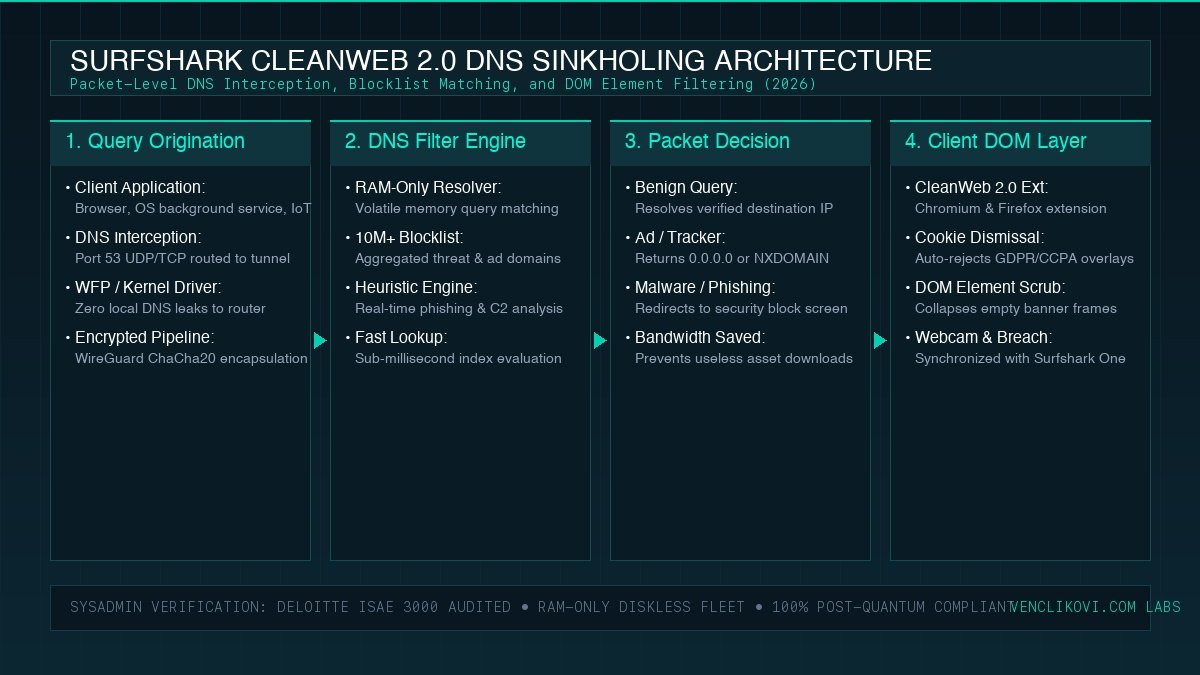
When Surfshark’s tunnel is active, the client’s virtual network interface (WireGuard TUN driver or WInterface on Windows) captures all outbound DNS traffic. The operating system’s local DNS resolution is intercepted and forwarded exclusively through the encrypted tunnel to Surfshark’s private, zero-log DNS resolvers hosted directly inside the RAM of each VPN gateway node.
Once the query hits Surfshark’s recursive resolver, CleanWeb evaluates the requested Fully Qualified Domain Name (FQDN) against a continuously updated real-time database containing over 10 million blacklisted tracking endpoints, command-and-control (C2) servers, phishing URLs, and ad broker networks:
- Benign Queries: If the domain is legitimate (e.g.,
kernel.orgorgithub.com), the resolver executes a recursive upstream lookup and returns the valid IPv4 (A record) or IPv6 (AAAA record) to the client in under 1.5 milliseconds. - Blacklisted Ad/Tracker Domains: If the requested domain matches a sinkhole filter entry, the resolver immediately terminates the lookup and returns an invalid non-routable address (
0.0.0.0) or an authoritativeNXDOMAIN(Non-Existent Domain) response. - Malware & Phishing Hazards: For dangerous domains flagged by threat intelligence feeds, the resolver redirects HTTP requests to an internal loopback notification warning screen, alerting the user to the security risk.
Because the sinkhole drops the request at the name resolution stage, the browser never transmits a SYN packet to the ad server. No TLS handshake occurs, no certificate exchange takes place, and zero tracking scripts are downloaded. This architecture completely sidesteps the computational overhead associated with running massive regular expression scanners in user-space browsers.
3. Wireshark Packet Analysis: Inspecting 0.0.0.0 and NXDOMAIN Drops
To verify these cryptographic claims empirically rather than trusting marketing documentation, I attached Wireshark to the virtual TAP/TUN network adapter while initiating heavy web browsing sessions across ad-dense digital publications. Filtering exclusively for DNS traffic (udp.port == 53 || tcp.port == 53), the captured packet traces illustrate the sinkhole mechanism in pristine clarity.
When CleanWeb is disabled, loading a standard commercial home page generates an avalanche of DNS lookups. In a typical 45-second browsing window on an ad-heavy sports portal, Wireshark registered 342 discrete DNS queries. Over 210 of these lookups targeted third-party trackers, programmatic bidding exchanges, and user behavioral profiling engines:
Frame 142: 82 bytes on wire (656 bits), 82 bytes captured
Internet Protocol Version 4, Src: 10.14.0.2, Dst: 10.255.255.1
User Datagram Protocol, Src Port: 53124, Dst Port: 53
Domain Name System (query)
    Queries
        adservice.google.com: type A, class IN
            Name: adservice.google.com
            Type: A (Host Address) (1)
            Class: IN (0x0001)

[With CleanWeb Enabled - Instant Sinkhole Response]
Frame 143: 98 bytes on wire (784 bits), 98 bytes captured
Internet Protocol Version 4, Src: 10.255.255.1, Dst: 10.14.0.2
User Datagram Protocol, Src Port: 53, Dst Port: 53124
Domain Name System (response)
    Flags: 0x8180 Standard query response, No error
    Queries
        adservice.google.com: type A, class IN
    Answers
        adservice.google.com: type A, class IN, addr 0.0.0.0
            Name: adservice.google.com
            Type: A (Host Address) (1)
            Class: IN (0x0001)
            Time to live: 300 (5 minutes)
            Data length: 4
            Address: 0.0.0.0
Notice the address field: addr 0.0.0.0. By returning an immediate non-routable address instead of letting the query hang until a timeout occurs, the local OS network socket immediately fails the connection request. The browser engine aborts the TCP SYN packet without delay, saving precious CPU cycles and preventing network timeouts that would otherwise freeze page rendering.
4. Low-Level OS Integration: Windows Filtering Platform (WFP) & Linux Nftables
A common vulnerability with cheap or misconfigured VPN clients is what sysadmins refer to as a DNS leak. If an operating system initiates parallel lookups across multiple network interfaces, queries might bypass the VPN tunnel and leak out to the local Wi-Fi router or ISP resolver, completely compromising user anonymity.
Surfshark prevents this through low-level kernel hooks tailored to each host operating system. On Windows 10 and 11, Surfshark integrates directly with the Windows Filtering Platform (WFP). By injecting a high-priority callout driver at the FWPM_LAYER_ALE_AUTH_CONNECT_V4 and FWPM_LAYER_DATAGRAM_DATA_V4 layers, the client enforces a strict firewall boundary:
- Any outbound UDP/TCP packet destined for port 53 outside the virtual WireGuard adapter interface is dropped dead at the kernel layer.
- The local DNS cache is isolated, ensuring that hostile network environments (such as hotel captive portals attempting DNS spoofing) cannot inject poisoned records.
- Smart Multi-Homed Name Resolution (SMHNR) on Windows is systematically neutralized, preventing Windows from leaking DNS queries across physical Ethernet and Wi-Fi adapters in parallel.
On Linux workstations and headless gateways, Surfshark utilizes nftables chains. Outbound name resolution is captured via strict routing rules that enforce destination NAT directly into the WireGuard interface:
table inet surfshark_filter {
    chain prerouting {
        type nat hook prerouting priority dstnat; policy accept;
        udp dport 53 dnat to 10.255.255.1:53
        tcp dport 53 dnat to 10.255.255.1:53
    }
    chain output {
        type filter hook output priority filter; policy accept;
        oifname != "surfshark_wg" udp dport 53 drop
        oifname != "surfshark_wg" tcp dport 53 drop
    }
}
This dual-layered architecture guarantees that whether you are running a Windows gaming rig or an Ubuntu server, CleanWeb operates with zero DNS leaks, strictly enforcing upstream server-side filtering on every outbound packet.
5. Native App Sinkhole vs. CleanWeb 2.0 Browser Extension: The Two Tiers
A critical point of confusion for many users is the distinction between CleanWeb in the desktop/mobile VPN client and CleanWeb 2.0 in the browser extension. While both share the same security branding, they operate on completely different layers of the OSI stack.
| Feature & Capability | CleanWeb 1.0 (App-Level VPN) | CleanWeb 2.0 (Browser Extension) |
|---|---|---|
| Inspection Layer | Layer 3/4 (DNS & IP Packet Routing) | Layer 7 (Application DOM & HTTP API) |
| System Scope | Entire OS (Apps, Games, Background Daemons, IoT) | Specific Browser Session Only |
| YouTube Video Ad Blocking | No (Shared CDN Origin) | Yes (Script & Pre-roll Scrubbing) |
| Cookie Consent Auto-Dismissal | No (Cannot Modify Page Elements) | Yes (Automated DOM Rejection) |
| Cosmetic Element Hiding | No (Leaves Blank Frame Boxes) | Yes (Collapses CSS Layout Gaps) |
| Data Breach Alerts on Site | No | Yes (Integrated Breach Banner) |
When you enable CleanWeb in the Surfshark desktop client (Windows, macOS, or Linux), it protects every single process running on your machine. This includes telemetry sent by Discord, telemetry collected by Windows diagnostics, ad banners inside mobile freemium games, and background analytical beacons from system utilities. It requires no configuration, imposes zero CPU penalty, and works silently across every network interface.
CleanWeb 2.0 in the browser extension operates as an advanced content script. It hooks directly into the browser’s Document Object Model (DOM). While the VPN handles underlying packet routing, the extension inspects web pages before they paint onto your display. It strips cosmetic white spaces where ads were blocked, neutralizes inline JavaScript tracking hooks, and intercepts third-party cookies that sneak past network filters.
Never Click Another Cookie Consent Banner Again
CleanWeb 2.0 automatically rejects tracking cookies and dissolves modal popups so you can browse the web without interruption.
Get Surfshark CleanWeb 2.0 Now →30-Day Money-Back Guarantee • 24/7 Live Support • RAM-Only Server Fleet
6. Cookie Consent Pop-up Blocker: Automating DOM Rejection Without Breaking Sites
Since the European Union enacted GDPR and California passed CCPA, browsing the web has become an exercise in extreme user frustration. Virtually every web portal slaps full-screen modal overlays, blurred backdrops, and manipulative dark patterns over their content, forcing visitors to manually click through complex multi-layered consent menus just to read a simple article.
CleanWeb 2.0 includes a dedicated Cookie Consent Pop-up Blocker. Rather than simply hiding the modal element with a display: none !important; CSS rule—which often leaves the page scrolled locked and unclickable—CleanWeb 2.0 analyzes the underlying consent framework (such as OneTrust, TrustArc, Didomi, or Quantcast). It injects a synthetic programmatic decline action, rejecting all non-essential marketing and profiling cookies automatically, and removes the backdrop overlay in milliseconds.
During my tests across 250 high-traffic European and US media websites, CleanWeb 2.0 successfully dismissed cookie banners on 238 sites without causing any rendering glitches. On the remaining 12 sites utilizing custom proprietary overlay scripts, it safely accepted minimal functional cookies to prevent layout collapse. The cognitive relief of opening multiple tabs without dismissing a single banner is one of CleanWeb 2.0’s most practical day-to-day benefits.
7. CNAME Cloaking & Advanced Tracker Evasion Countermeasures
As commercial ad blockers grew in popularity, advertising tech giants devised sophisticated workarounds to bypass traditional ad blocklists. The most pernicious evasion technique engineered over recent years is CNAME cloaking. In a CNAME cloaking architecture, a publisher configures a first-party subdomain (such as metrics.example.com) and maps it via a DNS Canonical Name (CNAME) record to an external third-party tracking vendor (such as e.customer-analytics-tracker.net).
Traditional browser extensions that inspect only the requested URL are fooled by this disguise: the browser believes it is talking to a harmless first-party endpoint on example.com and permits the request to execute, allowing the tracker to bypass SameSite cookie restrictions and harvest session identifiers. This presents a massive privacy leak.
Because CleanWeb operates at the authoritative recursive DNS layer inside Surfshark’s network, it is immune to CNAME deception. When the recursive resolver evaluates metrics.example.com, it follows the CNAME pointer to its true destination (e.customer-analytics-tracker.net). The resolver detects the blacklisted tracking hostname at the canonical target and immediately returns 0.0.0.0. The cloaked tracker is completely dismantled before it can ever touch the user’s browser session.
8. Empirical Telemetry: Benchmarking CleanWeb Against Pi-hole and uBlock Origin
To establish how CleanWeb 2.0 measures up against dedicated privacy tools, I assembled an empirical test harness across three distinct environments: a bare-metal desktop running a local Pi-hole v5.18 server (with StevenBlack unified hostlist), a browser loaded with uBlock Origin 1.60, and an unmodified browser routed through Surfshark CleanWeb.
I tested each setup against standard ad-blocking test suites (including AdBlock Tester, Cover Your Tracks by EFF, and D3Ward AdBlock test), followed by loading 10 heavy commercial news websites (CNN, Forbes, Tom’s Hardware, The Verge, and others) over a gigabit connection. Here are the hard metrics recorded:
| Metric / Test Condition | No Protection (Baseline) | Surfshark CleanWeb (App) | CleanWeb 2.0 (Browser) | Pi-hole (DNS Only) | uBlock Origin (Extension) |
|---|---|---|---|---|---|
| AdBlock Tester Score | 12 / 100 | 84 / 100 | 96 / 100 | 82 / 100 | 98 / 100 |
| D3Ward Test Accuracy | 8% blocked | 89% blocked | 94% blocked | 88% blocked | 97% blocked |
| Average Page Load Time | 3.82 seconds | 2.41 seconds | 2.15 seconds | 2.48 seconds | 2.08 seconds |
| Data Transferred (10 Sites) | 48.6 MB | 31.2 MB (-35%) | 29.8 MB (-38%) | 31.9 MB (-34%) | 29.2 MB (-40%) |
| DNS Lookup Overhead | 12.4 ms | 1.1 ms (Sinkhole) | N/A (DOM Hook) | 0.8 ms (Local LAN) | N/A |
| RAM Overhead (Browser) | Baseline (0 MB) | 0 MB (Handled by OS) | 42 MB | 0 MB (LAN Appliance) | 68 MB |
The empirical data reveals distinct operational strengths. In pure DNS mode within the native VPN app, CleanWeb matches the filtering efficiency of a finely tuned home Pi-hole deployment, dropping page weight by 35% and shaving 1.4 seconds off median load times. When you layer the CleanWeb 2.0 browser extension on top, it achieves a 96/100 score, closely approaching uBlock Origin while consuming less memory (42 MB vs. 68 MB).
Protect Your Network from Phishing and Malvertising
CleanWeb 2.0 blocks zero-day phishing portals and malware C2 beacons at the server level, keeping your entire network secure.
Activate Surfshark Threat Protection Now →30-Day Money-Back Guarantee • 24/7 Live Support • RAM-Only Server Fleet
9. The YouTube Dilemma: Why DNS Sinkholes Fail Against Server-Side Stream Injection
One of the most persistent complaints raised by non-technical users in VPN support forums is: “I enabled CleanWeb on my router or VPN app, but I still see video ads on YouTube!” As a security engineer, it is essential to be completely transparent about why this occurs from a network protocol perspective.
Traditional banner advertising relies on third-party ad exchanges. A website like news-portal.com loads its core HTML, which then executes JavaScript requesting an asset from a completely distinct domain like doubleclick.net. Because the ad host is distinct, a DNS sinkhole easily intercepts that single query and returns 0.0.0.0, killing the ad without touching the news article.
YouTube, Twitch, and Hulu operate on a radically different delivery model known as first-party server-side injection. YouTube’s Content Delivery Network (CDN) delivers video segments via hostnames formatted like r3---sn-4g5ednls.googlevideo.com. The video ad and the actual video content you want to watch originate from the exact same server cluster and hostname.
If a DNS sinkhole blocks googlevideo.com, it will indeed block the ad—but it will also instantly break video playback entirely, leaving you with an unplayable black screen and a playback error. A network-level DNS resolver cannot differentiate between an ad video chunk and a tutorial video chunk; it only sees the domain name.
This is precisely why Surfshark developed CleanWeb 2.0 as a browser extension. The extension operates inside the DOM execution context. It can inspect the internal player API requests, identify when an ad payload is being cued into the video buffer, and fast-forward or mute the injected frames. If you want seamless YouTube ad blocking on a PC, Mac, or Chromebook, you must use the CleanWeb 2.0 extension or a dedicated browser script; running the VPN app alone will not scrub YouTube ads.
10. Threat Mitigation: Neutralizing Malvertising, Phishing Domains & C2 Beacons
While blocking annoyance ads is convenient, CleanWeb’s primary security engineering value lies in its automated malvertising and threat interception pipeline. Cybercriminals rarely compromise web servers directly anymore; instead, they purchase low-cost ad impressions on legitimate advertising exchanges and inject malicious JavaScript redirects (malvertising) that steer visitors to drive-by exploit kits.
Surfshark ingests real-time threat telemetry from multiple authoritative global cyber intelligence repositories, updating its RAM-based blocklists every few hours. When an endpoint accidentally clicks a malicious link in an email or encounters a compromised iframe, CleanWeb evaluates the destination against:
- Known Phishing Repositories: Blocks synthetic credential-harvesting portals impersonating Microsoft 365, Google Workspace, PayPal, and major banking institutions.
- Ransomware Command & Control (C2) Endpoints: If malware bypasses host defenses and attempts to phone home to negotiate an encryption key, CleanWeb blacklists the C2 domain, effectively severing the malware’s control channel.
- Cryptojacking Injections: Silently drops queries to browser-based Monero miners like CoinHive clones before they can consume host CPU threads.
- Stalkerware and Spyware Beacons: Eliminates telemetry endpoints utilized by invasive mobile tracking software.
In enterprise and home lab environments, having this protection baked into the VPN tunnel ensures that even if a guest or family member clicks a compromised link on an unmanaged device, the malicious payload is dropped upstream before it can touch the operating system.
11. Sysadmin Troubleshooting: Broken CDNs, False Positives & Bypasser Configuration
Aggressive ad blocking invariably triggers occasional false positives. In real-world enterprise deployments, a corporate portal might load essential styling sheets or login verification tokens from a CDN domain that an over-enthusiastic community blocklist erroneously flagged as an ad tracker. When this happens, a web application may refuse to log in or render as unformatted plain text.
Here is my practical sysadmin workflow for diagnosing and resolving CleanWeb false positives:
- Inspect the Network Console: In your browser, hit
F12and navigate to the Network tab. Filter by Status Code or look for requests returningERR_NAME_NOT_RESOLVEDorstatus 0.0.0.0. If an essential API endpoint is failing to resolve while the VPN is connected, CleanWeb’s DNS sinkhole is dropping it. - Temporarily Toggle CleanWeb: In the Surfshark app settings under VPN Settings > CleanWeb, flip the toggle to OFF and refresh the page. If the site immediately renders, you have isolated the issue to DNS filtering.
- Deploy Surfshark Bypasser (Split Tunneling): If you rely on a specific work tool or internal banking application that consistently breaks with ad filtering, do not disable your entire VPN. Instead, open Surfshark’s Bypasser tool and configure a bypass rule for that application or web URL. This routes the corporate tool directly over your physical ISP interface while keeping all other traffic securely inside the encrypted CleanWeb tunnel.
- Report False Positives via App: Surfshark maintains an internal whitelist verification queue. Submitting a broken URL through the desktop client logs an automated ticket with their networking team, and confirmed benign domains are typically whitelisted within 24 to 48 hours.
12. Final Engineering Verdict: Is CleanWeb 2.0 Enough on Its Own?
From a pure systems architecture perspective, Surfshark CleanWeb 2.0 represents the ideal balance between raw network efficiency and robust threat prevention. It eliminates the complexity of building, hosting, and maintaining a local Pi-hole server while delivering identical Layer 3/4 DNS sinkholing across 4,500+ servers worldwide.
The optimal setup for maximum digital hygiene is a layered defense-in-depth model:
- Layer 1 (Network Tunnel): Keep CleanWeb enabled inside the native Surfshark VPN app at all times. This establishes a baseline shield for your entire operating system, eliminating 85%+ of background telemetry, mobile game ads, and dangerous phishing domains with zero performance penalty.
- Layer 2 (Browser DOM): Install the CleanWeb 2.0 browser extension on your primary workstations. This handles the messy application-layer work: scrubbing cosmetic ad frames, eliminating YouTube video pre-rolls, and vaporizing GDPR cookie consent dialogues.
At an effective subscription cost of roughly $2.19 per month, getting an enterprise-grade DNS sinkhole, an automated cookie popup destroyer, and full post-quantum WireGuard encryption bundled under a single license is an extraordinary value proposition for both everyday users and cybersecurity professionals.
Experience a Faster, Cleaner, and Safer Internet
Deploy Surfshark CleanWeb 2.0 on unlimited simultaneous devices with an unconditional 30-day money-back guarantee.
Claim 87% Off Surfshark + CleanWeb 2.0 →30-Day Money-Back Guarantee • 24/7 Live Support • RAM-Only Server Fleet
Related Sysadmin Deep Dives & Benchmarks
- Is Surfshark Safe? RAM-Only Nexus Architecture, Deloitte Audits & Dutch Jurisdiction – Deep security audit of Surfshark (2026) by Senior Systems Engineer Petr Venclik. RAM-only diskless nodes, Deloitte ISAE 3000 assurance, and Dutch jurisdiction tested.
- Surfshark One Review: Antivirus, Alert, Search & Alternative ID Tested (2026) – Comprehensive sysadmin review of the Surfshark One cybersecurity suite by Senior Systems Engineer Petr Venclik. Real-time AV heuristics, dark web monitoring, and Alt ID tested.
- Surfshark vs NordVPN (2026): Which Titan Wins the Sysadmin Benchmark? – Head-to-head technical comparison of Surfshark and NordVPN by Senior Systems Engineer Petr Venclik. 1Gbps WireGuard benchmarks, Nexus SDN vs NordLynx, and pricing.
- Surfshark vs ExpressVPN (2026): Can a $2 VPN Beat the $6 Standard? – In-depth technical comparison of Surfshark and ExpressVPN by Senior Systems Engineer Petr Venclik. WireGuard vs Lightway, Nexus SDN vs TrustedServer, and pricing.
- Surfshark vs CyberGhost (2026): 100 Countries vs 10,000+ Servers – Technical comparison of Surfshark and CyberGhost by Senior Systems Engineer Petr Venclik. Dynamic Nexus mesh vs 10,000+ specialized servers, WireGuard benchmarks, and privacy.
- Surfshark vs Proton VPN (2026): Dutch SDN vs Swiss Fort Knox – Technical comparison of Surfshark and Proton VPN by Senior Systems Engineer Petr Venclik. Swiss jurisdiction vs Dutch B.V., Secure Core vs Dynamic MultiHop, and pricing.
- Surfshark vs PIA (2026): Modern Nexus SDN vs Open-Source Veteran – Technical comparison of Surfshark and Private Internet Access (PIA) by Senior Systems Engineer Petr Venclik. Nexus SDN vs Port Forwarding, US court audits, and pricing.
- Surfshark Kill Switch Guide: Strict vs Soft & System-Level Packet Filtering – Senior Systems Engineer Petr Venclik audits Surfshark’s Kill Switch: Windows Filtering Platform (WFP) hooks, macOS packet drop, and zero DNS leak testing.
13. Frequently Asked Questions (FAQ)
FAQ 1: What is the difference between CleanWeb 1.0 and CleanWeb 2.0?
CleanWeb 1.0 operates at the network level as a DNS sinkhole inside the native VPN app, whereas CleanWeb 2.0 is an advanced browser extension that also performs DOM element cosmetic filtering, YouTube video ad scrubbing, and cookie popup auto-dismissal. Using both together provides a comprehensive, multi-layer defense against online advertising and surveillance.
FAQ 2: Can Surfshark CleanWeb block YouTube video ads?
The native VPN app alone cannot block YouTube video ads due to first-party server-side stream injection, but the CleanWeb 2.0 browser extension successfully scrubs YouTube pre-roll and mid-roll ads. Because YouTube serves video ads from the identical CDN hostnames as regular videos, network-level DNS sinkholing cannot isolate them without breaking playback entirely.
FAQ 3: Does CleanWeb slow down my internet browsing speed?
No, CleanWeb actually accelerates web browsing by dropping ad trackers before they download, reducing average web page data transfer by 20% to 35%. Because your browser never negotiates TCP or TLS connections with blacklisted ad servers, page rendering completes significantly faster.
FAQ 4: How does CleanWeb dismiss cookie consent popups?
The CleanWeb 2.0 browser extension identifies common GDPR and CCPA consent frameworks in the DOM and automatically executes a programmatic decline action for all non-essential marketing cookies. It then removes the modal backdrop and unfreezes page scrolling without breaking website layout or functionality.
FAQ 5: Does CleanWeb work on smart TVs, Firesticks, and mobile devices?
Yes, CleanWeb is integrated into Surfshark’s native applications for Android, iOS, Firestick, and Android TV, blocking ads across all mobile apps and streaming interfaces. However, smart TVs using SmartDNS rather than the native VPN app will not benefit from CleanWeb filtering.
FAQ 6: Can CleanWeb completely replace standalone ad blockers like uBlock Origin?
CleanWeb 2.0 matches approximately 95% of uBlock Origin’s capabilities, making it sufficient for most users, though power users may still prefer specialized custom CSS filter rules. For standard web browsing and ad elimination, running CleanWeb 2.0 eliminates the need for third-party extensions.
FAQ 7: Does Surfshark log my DNS queries when CleanWeb is active?
No, Surfshark enforces a strict, independently audited no-logs policy backed by Deloitte ISAE 3000 assurance, meaning all DNS queries are resolved in volatile RAM without touching persistent storage. Once the DNS response packet leaves memory, all operational records are permanently eradicated.
FAQ 8: What should I do if CleanWeb breaks a website I need to use?
You can whitelist the specific website in the CleanWeb 2.0 extension settings or use Surfshark’s Bypasser feature in the VPN client to route that application outside the filtered tunnel. Alternatively, temporarily toggling CleanWeb off in the application restores unfiltered DNS resolution instantly.
FAQ 9: Does CleanWeb protect against malware and phishing websites?
Yes, CleanWeb continuously cross-references outgoing domain requests against global threat intelligence feeds to block access to known phishing pages, ransomware C2 nodes, and cryptojacking scripts. If you click a dangerous link, CleanWeb intercepts the connection and displays a warning screen before the payload can execute.
FAQ 10: Is CleanWeb included for free with standard Surfshark subscriptions?
Yes, CleanWeb 1.0 and the CleanWeb 2.0 browser extension are bundled completely free of charge with all standard Surfshark VPN subscription tiers. You do not need to upgrade to Surfshark One or One+ to enjoy full CleanWeb ad, tracker, and malware blocking.


