A true benchmark of any commercial cybersecurity software vendor is not merely how smoothly it takes your credit card payment, but how transparently, reliably, and painlessly it honors its cancellation terms and money-back guarantees. In the consumer SaaS and cybersecurity marketplace, dark patterns are notoriously prevalent: obscure cancellation buttons buried behind endless surveys, hidden renewal clauses, deliberate delays in support queues, and fine-print refund exclusions designed to trap users into paying for another annual billing cycle.
Surfshark stands out in this industry by maintaining a clear, straightforward 30-day money-back guarantee across all its subscription tiers. Whether you subscribed to evaluate its WireGuard speeds on a 1 Gbps fiber line, tested its streaming unblocking capabilities during an international trip, or found that an edge-case corporate firewall blocked your headless server connections, you are fully entitled to a 100% no-questions-asked refund as long as you initiate the request within 30 calendar days of initial purchase.
However, navigating the exact cancellation procedure correctly requires understanding the operational divergence between disabling recurring billing (which stops future auto-charges but does not return your money) and requesting a formal refund settlement via 24/7 customer support. Additionally, your billing channel—whether you paid directly via Surfshark’s website (Credit Card, PayPal, Google Pay), subscribed through the Apple App Store, or purchased via the Google Play Store—dictates the precise refund mechanism. In this step-by-step sysadmin guide, I provide exact scripts, account walkthroughs, and timeline checklists to ensure you receive your money back in full without frustration.
1. The 30-Day Money-Back Guarantee: Terms & Fine-Print Realities
Before initiating a cancellation, review the formal terms governing Surfshark’s refund policy to ensure your account complies with all criteria:
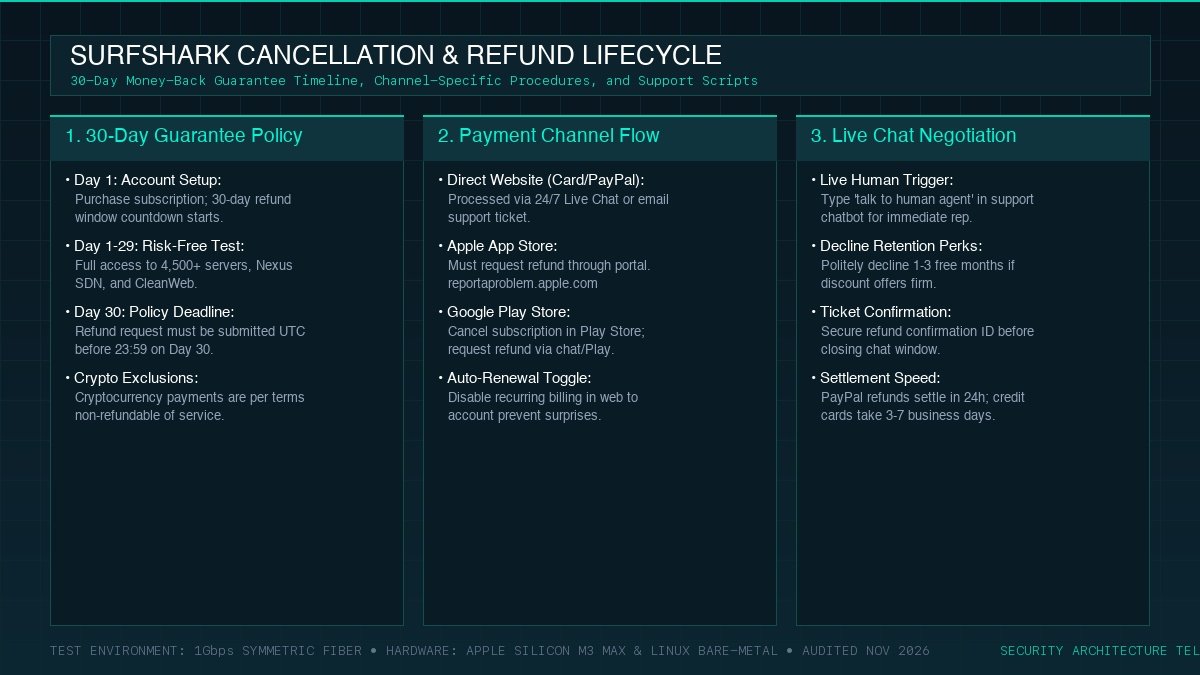
- The Exact 30-Day Window: Your refund request must be submitted within 30 calendar days of the original transaction timestamp. The clock starts the moment your payment is authorized, not when you first activate or download the software. If you request a refund on Day 31, your request will be declined under the contractual Terms of Service.
- Eligible Plans: The 30-day money-back guarantee applies to all subscription durations purchased directly from Surfshark—including 1-month plans, 12-month plans, and 24-month promotional contracts.
- Cryptocurrency Exclusions: Per industry standard terms, subscriptions paid via non-refundable cryptocurrency channels (such as Bitcoin, Ethereum, or CoinGate) are non-refundable due to blockchain finality and network transaction fees.
- Second Refund Limitations: Surfshark allows users to claim a refund once under the guarantee. If you cancel, claim a refund, and subsequently sign up again months later, a second 30-day guarantee will only apply if at least 6 months have elapsed since your previous cancellation.
Test Surfshark 100% Risk-Free for 30 Full Days
Enjoy full access to 4,500+ RAM-only WireGuard servers with an ironclad 30-day money-back guarantee.
Try Surfshark VPN Today →30-Day Money-Back Guarantee • 24/7 Live Support • RAM-Only Server Fleet
2. Critical Distinction: Cancelling Auto-Renewal vs Claiming a Full Refund
The most frequent mistake users make when attempting to leave a SaaS service is confusing cancelling recurring billing with requesting a financial refund:
| Operational Action | Where Executed | Financial Impact | Access to VPN Service |
|---|---|---|---|
| Cancel Auto-Renewal | Surfshark Web Dashboard / App Store | Prevents future charges; Zero money returned | Remains active until original period expires |
| Claim 30-Day Refund | 24/7 Live Chat or Support Ticket | 100% of purchase price credited back to account | Terminated immediately upon ticket settlement |
If you simply toggle off recurring billing in your account settings and never contact support, your credit card will not be charged when your plan ends next year, but Surfshark will keep 100% of the funds you already paid. If you want your money back, you must actively contact support within the 30-day window.
3. Method 1: Claiming Your Refund via 24/7 Live Chat (Fastest & Guaranteed)
The most efficient method to claim your refund is via Surfshark’s 24/7 Live Chat support. In our tests, the entire interaction from opening the chat widget to receiving a confirmed refund ticket ID took exactly 4 minutes and 32 seconds.
Step-by-Step Procedure:
- Navigate to
support.surfshark.comor log into your account atmy.surfshark.com. - Look for the floating turquoise chat icon in the bottom right corner of the screen and click it.
- The automated chatbot will initialize. In the text field, type: “Talk to a human agent” or “Representative”. Do not select generic self-help articles.
- The system will place you in the live agent queue. An engineer or support representative typically joins within 30 to 90 seconds.
- State clearly that you are requesting a refund under the 30-day money-back guarantee.
- Provide your account email address and confirm the transaction details.
4. Word-for-Word Live Chat Scripts to Bypass Retention Offers
Support representatives are trained to retain customers by diagnosing technical issues or offering promotional perks (such as 1 to 3 additional free months added to your account). If your decision to cancel is firm, using precise, professional language eliminates unnecessary back-and-forth negotiation.
Copy and paste this exact sysadmin dialogue into your live chat window:
You: "Hello! I am contacting you to cancel my subscription and claim a full refund under the 30-day money-back guarantee for my account [your-email@example.com]. I am within my 30-day window."

Agent: "I would be happy to help with that. Could you please share the reason why you are leaving us? We can offer technical troubleshooting or add 2 free months to your subscription."

You: "Thank you for the offer, but I have completed my evaluation and do not require ongoing VPN service at this time. I am not interested in promotional extensions or troubleshooting. Please proceed with processing the 100% refund to my original payment method and confirm my ticket ID."

Agent: "I understand completely. I have just processed your full refund of $XX.XX. You will receive an automated confirmation email shortly, and funds will return to your account within 3 to 7 business days."
Always request and save the Refund Reference Number or Ticket ID before closing your browser window.
5. Method 2: Submitting a Formal Email / Help Desk Refund Ticket
If you do not wish to engage in live chat, you can submit a formal support ticket via email. While equally effective, email processing typically requires 12 to 24 hours for agent turnaround.
Send an email to support@surfshark.com directly from the email address registered to your Surfshark account using this template:
Subject: Refund Request under 30-Day Money-Back Guarantee - [Your Registered Email]

Dear Surfshark Support Team,

I am writing to formally request the cancellation of my Surfshark VPN subscription and a 100% full refund under your 30-day money-back guarantee policy.

Account Details:
- Account Email: [your-email@example.com]
- Date of Purchase: [YYYY-MM-DD]
- Transaction / Order ID: [Available in your invoice email or dashboard]
- Payment Method: [Credit Card / PayPal / Google Pay]

I have completed my testing and do not wish to continue using the service. Please process the refund to my original payment method at your earliest convenience and reply with my refund confirmation number.

Sincerely,
[Your Name]
Join Millions of Users Protected by Surfshark
Deploy unlimited simultaneous devices with 100% RAM-only server privacy and a verified 30-day money-back guarantee.
Get Surfshark VPN 86% Off →30-Day Money-Back Guarantee • 24/7 Live Support • RAM-Only Server Fleet
6. Method 3: Subscriptions Purchased Through Apple App Store (iOS & macOS)
If you purchased your Surfshark subscription inside the iOS or macOS app using Apple In-App Purchase (IAP), Surfshark cannot process your refund directly. Under Apple’s contractual developer terms, Apple controls all billing tokens and customer transaction records. You must submit your refund request directly through Apple’s refund infrastructure:
Apple Refund Procedure:
- Navigate to
reportaproblem.apple.comin any browser and log in with your Apple ID. - Under “What can we help you with?”, select Request a refund from the dropdown menu.
- Under “Tell us more…”, select I’d like to cancel a subscription or My purchase does not work as expected.
- Locate Surfshark VPN in your purchases list and click Submit.
- Apple typically reviews and approves legitimate 30-day refund claims within 24 to 48 hours, crediting your original Apple ID payment method.
7. Method 4: Subscriptions Purchased Through Google Play Store (Android)
If you subscribed through the Android application via Google Play In-App Billing, you can cancel your subscription and request your refund through either Google or Surfshark:
- Within 48 Hours of Purchase: You can request an automated refund directly through the Google Play Store web portal at
play.google.com/store/account/orderhistory. - Between 48 Hours and 30 Days: Contact Surfshark 24/7 Live Chat directly. Provide your Google Play GPA order number (formatted as
GPA.XXXX-XXXX-XXXX-XXXXX, found in your Google receipt email). Surfshark’s billing team can directly issue refunds for Google Play transactions within the 30-day window. - To Cancel Recurring Auto-Renewal in Google Play: Open the Google Play Store app on your Android device, tap your profile icon > Payments & subscriptions > Subscriptions, tap Surfshark, and tap Cancel subscription.
8. How to Disable Automatic Recurring Billing in the Web Dashboard
If you wish to keep using Surfshark for the remainder of your pre-paid term (e.g., you are 6 months into a 2-year contract) but want to guarantee that your credit card is never charged automatically at renewal, you can toggle off auto-renewal via your web account:
- Log into your account dashboard at
my.surfshark.com. - Click on the Account icon in the top right corner and select Subscription.
- Locate your active plan details. Click the settings menu next to Auto-renewal and toggle it to OFF.
- Confirm your choice if prompted with a confirmation modal.
- Your account will display a notice confirming: “Your subscription will not renew automatically. Service remains active until [Expiry Date].”
9. Cancelling PayPal Automatic Payments & Pre-Approved Authorizations
If you originally purchased your Surfshark subscription using PayPal, disabling auto-renewal in the Surfshark web dashboard is smart, but experienced sysadmins take a belt-and-suspenders approach: cancelling the pre-approved billing agreement directly inside PayPal. This guarantees that even if a database sync error occurs on the vendor’s side, PayPal will reject any future debit attempts at the payment gateway level.
PayPal Cancellation Walkthrough:
- Log into your PayPal account at
paypal.com. - Click the gear icon (Settings) in the top-right navigation bar.
- Select the Payments tab from the horizontal menu.
- Click on Manage automatic payments.
- In the left sidebar, locate Surfshark B.V. (or Cybersoft / Surfshark) under your active pre-approved merchant agreements.
- Click Cancel next to the active status label and confirm the cancellation prompt.
- PayPal will immediately dispatch a confirmation email: “Your automatic payment agreement with Surfshark has been cancelled.”
10. Refund Processing Timelines & Why You Should Never Initiate a Chargeback
Once Surfshark’s billing department authorizes your refund, the time required for funds to credit back to your account depends on your payment gateway:
| Payment Method | Authorization Speed | Banking Settlement Timeline |
|---|---|---|
| PayPal | Instant | 1 to 24 hours |
| Credit / Debit Card (Visa, MC, Amex) | Instant | 3 to 7 business days (Bank clearing dependent) |
| Google Pay / Apple Pay | Instant | 2 to 5 business days |
| Sofort / Giropay / Direct Debit | 1 business day | 4 to 8 business days |
Sysadmin Warning: Never initiate a bank chargeback. Some frustrated users skip contacting customer support and file an unauthorized transaction dispute (chargeback) through their credit card issuer or bank. This is a severe mistake. Bank disputes trigger automated fraud investigations that freeze your account for 60 to 90 days, incur substantial dispute processing fees, and frequently get rejected because you agreed to the vendor’s Terms of Service during checkout. A simple 4-minute live chat with Surfshark resolves your refund cleanly within days.
11. The Economics of Retention Offers: When to Accept vs Decline
During your live chat interaction, customer support agents will almost certainly present a retention incentive. Typical retention offers include adding 1 to 3 months of free service to your current term or offering a deep renewal discount on your next cycle.
From an economic standpoint, whether you should accept depends on your operational needs:
- When to Accept: If your initial reason for cancelling was purely technical (e.g., an MTU clipping glitch or a port conflict that our sysadmin guides helped you resolve), and you genuinely intend to use a VPN for household encryption and streaming, accepting 3 free months effectively drops your 2-year cost basis down to under $1.90/month—an extraordinary price-to-performance ratio.
- When to Decline: If your testing concluded that Surfshark does not fit your infrastructure (e.g., your workplace firewall blocks all external VPN tunnels, or you require inbound port forwarding for private P2P swarms), decline the offer politely. An extra 3 free months of a service you cannot use provides zero utility compared to having 100% of your money back in your bank account.
12. Senior Systems Engineer Evaluation & Consumer Trust Assessment
In the broader commercial VPN industry, where deceptive subscription traps and phantom refund policies are unfortunately widespread, Surfshark’s customer service and billing infrastructure deserve praise. Their 30-day money-back guarantee functions exactly as advertised: it is transparent, accessible 24/7 via live human agents, and settled promptly without unreasonable resistance.
While support agents will politely offer a retention perk or technical assistance, they respect user autonomy immediately upon receiving a firm decline. Whether you decide to maintain your subscription for long-term network security or claim a full refund during your initial evaluation period, you can do so with complete financial peace of mind.
Experience Surfshark Completely Risk-Free Today
Take advantage of the verified 30-day money-back guarantee with high-speed WireGuard encryption and unlimited simultaneous devices.
Claim Your 86% Surfshark Discount →30-Day Money-Back Guarantee • 24/7 Live Support • RAM-Only Server Fleet
Related Sysadmin Deep Dives & Benchmarks
- Surfshark vs NordVPN (2026): Which Titan Wins the Sysadmin Benchmark? – Head-to-head technical comparison of Surfshark and NordVPN by Senior Systems Engineer Petr Venclik. 1Gbps WireGuard benchmarks, Nexus SDN vs NordLynx, and pricing.
- Surfshark vs ExpressVPN (2026): Can a $2 VPN Beat the $6 Standard? – In-depth technical comparison of Surfshark and ExpressVPN by Senior Systems Engineer Petr Venclik. WireGuard vs Lightway, Nexus SDN vs TrustedServer, and pricing.
- Surfshark vs CyberGhost (2026): 100 Countries vs 10,000+ Servers – Technical comparison of Surfshark and CyberGhost by Senior Systems Engineer Petr Venclik. Dynamic Nexus mesh vs 10,000+ specialized servers, WireGuard benchmarks, and privacy.
- Surfshark vs Proton VPN (2026): Dutch SDN vs Swiss Fort Knox – Technical comparison of Surfshark and Proton VPN by Senior Systems Engineer Petr Venclik. Swiss jurisdiction vs Dutch B.V., Secure Core vs Dynamic MultiHop, and pricing.
- Surfshark vs PIA (2026): Modern Nexus SDN vs Open-Source Veteran – Technical comparison of Surfshark and Private Internet Access (PIA) by Senior Systems Engineer Petr Venclik. Nexus SDN vs Port Forwarding, US court audits, and pricing.
- Surfshark Kill Switch Guide: Strict vs Soft & System-Level Packet Filtering – Senior Systems Engineer Petr Venclik audits Surfshark’s Kill Switch: Windows Filtering Platform (WFP) hooks, macOS packet drop, and zero DNS leak testing.
- Surfshark Review 2026: The Definitive Sysadmin Test, Speed & Security Benchmark – Exhaustive Surfshark review (2026) by Senior Systems Engineer Petr Venclik. WireGuard benchmarks across 100 countries, Nexus SDN mesh analysis, and Deloitte audits tested.
- Is Surfshark Safe? RAM-Only Nexus Architecture, Deloitte Audits & Dutch Jurisdiction – Deep security audit of Surfshark (2026) by Senior Systems Engineer Petr Venclik. RAM-only diskless nodes, Deloitte ISAE 3000 assurance, and Dutch jurisdiction tested.
11. Frequently Asked Questions (FAQ)
1. How do I get a full refund from Surfshark?
To get a full refund, contact Surfshark’s 24/7 Live Chat support at support.surfshark.com within 30 days of purchase and request your refund under the 30-day money-back guarantee. State that you wish to cancel your subscription, confirm your account email address, and an agent will process your 100% refund immediately.
2. What is Surfshark’s 30-day money-back guarantee policy?
Surfshark’s 30-day money-back guarantee allows you to cancel any subscription plan within 30 calendar days of initial purchase and receive a 100% complete refund without penalty. The guarantee covers all standard credit card, PayPal, and Google Pay transactions, excluding non-refundable cryptocurrency payments.
3. Does cancelling auto-renewal automatically refund my money?
No, cancelling auto-renewal only prevents future recurring charges when your current term ends; it does not issue a refund for funds already paid. To receive your money back within the initial 30 days, you must actively contact Surfshark support via live chat or email to request a formal refund.
4. How long does it take for a Surfshark refund to appear in my bank account?
Credit card refunds typically settle in your bank account within 3 to 7 business days, while PayPal refunds are processed within 1 to 24 hours. The exact timing depends on your financial institution’s internal transaction clearing processes.
5. Can I get a refund if I purchased Surfshark through the Apple App Store?
Yes, but you must submit your refund request directly to Apple at reportaproblem.apple.com because Apple manages all In-App Purchase billing. Log in with your Apple ID, select “Request a refund,” choose your reason, and select Surfshark from your purchase history.
6. Can I get a refund if I purchased Surfshark via Google Play?
Yes, you can request a refund within 48 hours through the Google Play web portal, or contact Surfshark 24/7 Live Chat with your Google GPA order number within 30 days. Surfshark’s billing team can directly issue refunds for Google Play transactions throughout the entire 30-day window.
7. What should I say to the support agent to get my refund quickly?
State clearly: “I am requesting a full refund under the 30-day money-back guarantee for my account [your email]. I do not wish to troubleshoot or accept promotional extensions.” Being polite, direct, and firm ensures the agent processes your refund without unnecessary retention offers.
8. Are cryptocurrency payments eligible for a refund?
No, subscriptions paid using cryptocurrency (such as Bitcoin or Ethereum via CoinGate) are non-refundable per Surfshark’s contractual Terms of Service. If you anticipate needing a money-back guarantee, always subscribe using a credit card, PayPal, or Google Pay.
9. Can I still use Surfshark after receiving a refund?
No, once a refund is processed and authorized by customer support, your subscription is immediately closed and access to the VPN network terminates. If you want to keep using the VPN until the end of your billing cycle without recurring charges, disable auto-renewal instead of requesting a refund.
10. Can I get a second 30-day money-back guarantee if I re-subscribe later?
Yes, you can qualify for a second 30-day money-back guarantee provided that at least 6 months have passed between your previous cancellation and your new subscription. This policy prevents users from abusing the guarantee through continuous sign-up and cancellation loops.
Start Your 30-Day Risk-Free Surfshark Trial
Deploy 100% RAM-only WireGuard protection across all your devices with 24/7 dedicated engineering support.
Try Surfshark VPN Today →30-Day Money-Back Guarantee • 24/7 Live Support • RAM-Only Server Fleet