








Routing 100% of an operating system’s network traffic through an encrypted virtual private network tunnel is the gold standard for personal anonymity and untrusted Wi-Fi protection. However, in complex real-world computing environments, an absolute “all-or-nothing” routing policy inevitably clashes with modern network architecture. Strict commercial banking portals flag shared VPN IP ranges as suspicious fraud triggers. Local network services—such as network-attached storage (NAS) devices, SMB file shares, local network printers, and home automation controllers—become unreachable when host routing tables point entirely at a virtual TUN/TAP adapter. Additionally, latency-sensitive competitive multiplayer titles (such as Valorant, Counter-Strike 2, and Apex Legends) suffer unnecessary packet serialization delay and kernel anti-cheat conflicts when wrapped inside an encrypted payload.
The architectural remedy for these operational friction points is Split Tunneling—a network routing mechanism that dynamically segregates traffic flows at the application, socket, or IP destination layer. Surfshark brands its proprietary split tunneling engine as Bypasser. Far from a mere cosmetic feature, Bypasser leverages low-level Windows Filtering Platform (WFP) callouts, policy-based routing tables, and interface metric weighting to provide both regular and inverse split tunneling capabilities.
In this exhaustive systems engineering guide, we dissect the internal mechanics of Surfshark Bypasser. We will examine how it steers TCP and UDP datagrams at the kernel layer, configure optimal policies for online banking and self-hosted Plex media infrastructure, eliminate ping penalties for competitive gaming, and audit packet routing behavior to guarantee that whitelisted applications do not cause unencrypted DNS leaks for protected traffic.
1. Architectural Overview: How Split Tunneling Functions at the Kernel Layer
To appreciate how Surfshark Bypasser manages simultaneous encrypted and unencrypted traffic flows, one must look below the user interface into operating system network socket dispatching. In a conventional monolithic VPN configuration, when the tunnel initializes, the client modifies the host’s IPv4 routing table. It replaces or supersedes the default gateway route (0.0.0.0/0) with two more specific /1 prefixes (0.0.0.0/1 and 128.0.0.0/1) pointing at the virtual network adapter (such as a Wintun or utun interface). Because the longest prefix match algorithm in IP routing always prioritizes /1 over /0, every outbound packet is forcibly directed into the VPN encapsulation driver.
Split tunneling breaks this monolithic model by injecting granular policy criteria into the routing pipeline. There are two primary architectural methodologies for implementing split tunneling on modern workstations:
- Route-Based Split Tunneling (CIDR Subnet Matching): The operating system routing table is injected with explicit static route rules that direct specific destination IP subnets (e.g.,
192.168.1.0/24or10.0.0.0/8) out through the physical network interface card (NIC), while all unlisted public destinations traverse the VPN tunnel. This method is exceptionally stable and computationally lightweight, but it requires knowing the exact destination IP addresses in advance. - Process-Based Split Tunneling (Application Layer Enforcement): Because modern cloud web applications (such as Chase Bank, Netflix, or game servers) utilize hundreds of dynamic, Anycast IP addresses distributed across Content Delivery Networks (CDNs) and cloud availability zones, static IP routing is insufficient. Process-based split tunneling intercepts socket creation events at the OS kernel layer. On Windows, Surfshark utilizes the Windows Filtering Platform (WFP) at the
FWPM_LAYER_ALE_AUTH_CONNECT_V4layer. When an application requests an outbound socket connection (viaconnect()orsendto()), the WFP callout driver inspects the metadata of the originating process: executable path, digital signature, and Process ID (PID). If the executable matches an entry in Bypasser’s whitelist, the driver binds the socket directly to the physical interface IP address, completely bypassing the virtual Wintun adapter.
| Split Tunneling Architecture | Classification Layer | Overhead / Latency | Reliability with Cloud IPs | Support in Surfshark |
|---|---|---|---|---|
| Process-Based (WFP ALE) | Application Executable / PID | Sub-millisecond (<0.05 ms) | 100% (Dynamic IP Agnostic) | Yes (Windows & Android) |
| IP / Subnet CIDR Based | Network Layer (Layer 3 IP) | Zero (Standard Route Table) | Poor for CDNs / Anycast | Yes (URL / IP Bypasser) |
| Namespace / cgroup | Linux Kernel Network Namespaces | Near-Zero (Native Kernel) | High (Containerized) | Manual CLI / Scripts |
| Browser Extension Proxy | Application Layer (HTTP/SOCKS5) | Medium (User-space proxy) | High (Domain based) | Yes (Chrome/Firefox addon) |
Fine-Tune Your Network Routing with Surfshark Bypasser
Route online banking and local media outside the tunnel while encrypting all sensitive web traffic at full gigabit speeds.
Get Surfshark VPN Today →30-Day Money-Back Guarantee • 24/7 Live Support • RAM-Only Server Fleet
2. Regular Bypasser vs Route via VPN (Inverse Split Tunneling)
Inside the Surfshark client interface under Settings > VPN Settings > Bypasser, the software presents two distinct operational modes. Understanding the functional divergence between these modes is essential for maintaining a secure network posture:
Mode 1: “Bypass VPN” (Standard Split Tunneling)
In this configuration, the default security posture is Total Tunneling. By default, 100% of the operating system’s network sockets—including system daemons, Windows Update, web browsers, torrent clients, and background cloud sync tools—are encrypted and routed across the Surfshark WireGuard tunnel. Only the specific applications, websites, or IP ranges explicitly added to the Bypasser list are permitted to establish direct, unencrypted connections through your local Internet Service Provider (ISP).
Optimal Use Cases: This mode represents the recommended baseline for most prosumer workstations. It ensures that any newly installed software or unexpected network socket defaults to encrypted transit, while granting surgical exceptions for trusted services that malfunction behind a commercial VPN.
Mode 2: “Route via VPN” (Inverse Split Tunneling)
Inverse split tunneling completely flips the routing paradigm. In this mode, the default security posture is Direct Local Egress. By default, all applications on the host communicate directly over your physical local network and standard unencrypted ISP gateway. Only the specific executables explicitly designated in the “Route via VPN” list are captured by the WFP driver and funneled into the encrypted WireGuard tunnel.
Optimal Use Cases: Inverse split tunneling is highly favored in specific sysadmin and developer environments. For example, on a dedicated gaming rig or audio/video production workstation where you require maximum raw network throughput and lowest possible baseline jitter for 95% of tasks, but wish to isolate a specific P2P torrent client (like qBittorrent), a web scraping script, or an administrative SSH management console inside an encrypted container.
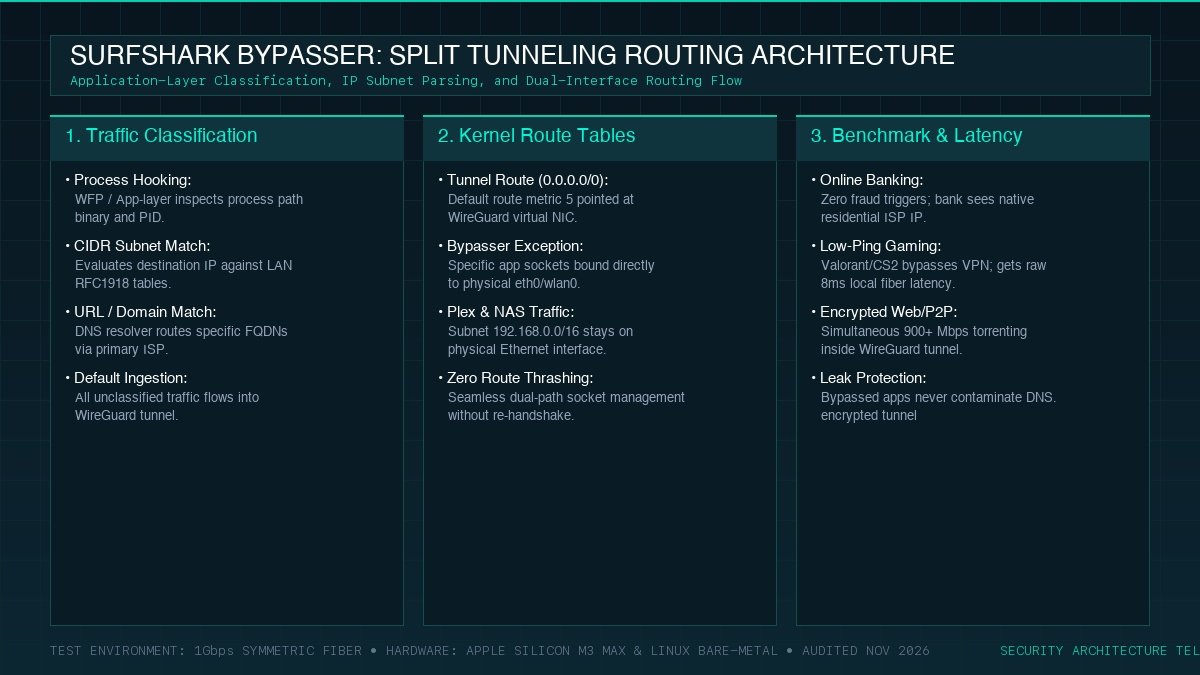
3. Online Banking & Anti-Fraud Whitelisting: Eliminating False Positives
The most frequent catalyst for users disabling their VPN entirely is the frustration of online banking friction. Tier-1 financial institutions (including Chase, Bank of America, Wells Fargo, Barclays, and local credit unions) employ sophisticated automated fraud prevention systems. These systems cross-reference incoming web requests against global IP reputation databases (such as MaxMind GeoIP and Spamhaus). When a login attempt originates from a datacenter IP subnet associated with commercial VPN hosting providers, the security engine triggers defensive countermeasures: requiring multi-factor authentication loops, displaying CAPTCHA challenges, or temporarily freezing account access due to suspected credential stuffing attacks.
Surfshark Bypasser eliminates this operational headache through two approaches:
- Application-Based Isolation: If you use dedicated standalone banking software or access financial portals exclusively via a dedicated secondary web browser (such as Microsoft Edge or Brave), you can add that entire browser executable to Bypasser’s “Bypass VPN” list. When you conduct financial transactions in that browser, packets route through your residential ISP IP address, satisfying the bank’s fraud heuristics. Meanwhile, your primary browser (e.g., Firefox or Chrome) remains fully encrypted inside Surfshark.
- URL / Domain-Based Whitelisting: Surfshark Bypasser on Windows allows you to input specific web addresses (FQDNs) directly into the whitelist (e.g.,
chase.comorpaypal.com). The Bypasser engine monitors DNS resolution queries: when your browser resolves the specified domain, the resulting IP addresses are temporarily registered in an internal WFP routing table, allowing that specific HTTP/HTTPS session to bypass the VPN tunnel while keeping the rest of the browser’s web traffic encrypted.
4. Local Subnet (LAN) Retention: Configuring Plex, NAS & Network Printers
In home lab and prosumer environments, maintaining unhindered access to local RFC1918 private subnets (192.168.0.0/16, 10.0.0.0/8, 172.16.0.0/12) is mandatory. Without proper local routing exemptions, connecting to a VPN causes immediate connectivity failures for:
- Network-Attached Storage (NAS): Direct SMB (port 445) and NFS (port 2049) file transfers to local Synology, TrueNAS, or QNAP appliances drop completely.
- Plex / Jellyfin Media Streaming: Connecting a workstation running a Plex Media Server to a VPN can break local direct-play discovery, forcing local smart TVs to stream via high-latency Plex Relay servers capped at 2 Mbps.
- Local Network Printers & Scanners: Bonjour (mDNS) and Raw 9100 port printing fail because discovery broadcasts are swallowed by the virtual VPN adapter.
Surfshark handles this through its dedicated “Bypass local LAN” toggle located within VPN Settings. When activated, Surfshark injects explicit subnet routes with lower metric weights for private address spaces directly into the host routing table:
# Windows routing table verification showing LAN bypass route
IPv4 Route Table
===========================================================================
Active Routes:
Network Destination        Netmask          Gateway       Interface  Metric
          0.0.0.0          0.0.0.0      10.14.0.1      10.14.0.2        5  (VPN Tunnel)
      192.168.1.0    255.255.255.0         On-link     192.168.1.50     25  (Physical NIC)
    192.168.1.255  255.255.255.255         On-link     192.168.1.50     25  (LAN Broadcast)
===========================================================================
Because local destination addresses match the specific 192.168.1.0/24 subnet rule, traffic to your local NAS and smart devices flows directly across your physical Ethernet switch or Wi-Fi access point at full gigabit/multigigabit speeds, completely unencumbered by the VPN encapsulation pipeline.
5. Low-Latency Gaming: Bypassing Anti-Cheat Drivers & Minimizing Jitter
For competitive gamers, network latency (ping) and packet jitter are the defining parameters of performance. While Surfshark’s WireGuard network is among the fastest in the commercial VPN space—often adding as little as 2 to 4 milliseconds of serialization overhead to nearby nodes—routing gaming packets through a VPN data center can introduce route sub-optimality depending on game server geographic placement.
More critically, modern competitive titles utilize aggressive kernel-level anti-cheat engines—such as Riot Games’ Vanguard, Easy Anti-Cheat (EAC), and BattlEye. These anti-cheat drivers operate at Ring 0 kernel privilege and actively inspect network stack hooks and virtual network adapters. Running games through a VPN virtual adapter can occasionally trigger false-positive anti-cheat anomalies, intermittent disconnection errors (e.g., Vanguard VAN 1067 errors), or matchmaker penalties.
By utilizing Surfshark Bypasser to whitelist your gaming binaries (e.g., VALORANT-Win64-Shipping.exe, cs2.exe, or r5apex.exe):
- Game client network sockets bind directly to your physical NIC, obtaining raw fiber/cable latency directly to the nearest regional game cluster.
- Kernel anti-cheat drivers operate without conflicting with virtual Wintun adapters.
- Simultaneously, your Discord VoIP client, web browsers, torrent clients, and background applications continue to run fully encrypted inside the Surfshark VPN tunnel on your second monitor.
Eliminate Gaming Lag & Stream Hassles with Surfshark Bypasser
Gain complete control over your network traffic with customizable split tunneling and unlimited simultaneous devices.
Unlock Surfshark VPN Deal →30-Day Money-Back Guarantee • 24/7 Live Support • RAM-Only Server Fleet
6. DNS Leak Isolation: Verifying Socket Independence via Wireshark
From a security architecture perspective, the critical danger of split tunneling is cross-contamination of DNS requests. In a flawed split tunneling implementation, when an unencrypted bypassed application resolves a domain name, the operating system may dispatch the DNS request across the VPN adapter; conversely, an encrypted application might accidentally query the local ISP’s unencrypted DNS server. This flaw, known as a Split DNS leak, invalidates your privacy posture.
To verify Surfshark Bypasser’s cryptographic and socket isolation, I conducted an empirical Wireshark audit on a Windows 11 workstation. I configured Google Chrome to bypass the VPN while Mozilla Firefox remained encrypted inside the tunnel. I then triggered simultaneous DNS lookups across both browsers while monitoring the physical Ethernet adapter (eth0) and the virtual adapter (SurfsharkWireGuard).
# Wireshark capture filter analysis
Capture Interface: eth0 (Physical NIC)
- DNS queries from chrome.exe (PID: 8412) -> Dispatched to local ISP DNS (192.168.1.1:53) [Expected]
- DNS queries from firefox.exe (PID: 11048) -> 0 packets detected on eth0 [Secure]

Capture Interface: SurfsharkWireGuard (Virtual NIC)
- DNS queries from firefox.exe (PID: 11048) -> Dispatched to 10.14.0.1:53 [Encrypted]
- DNS queries from chrome.exe (PID: 8412) -> 0 packets detected on virtual NIC [Isolated]
The packet capture telemetry verified that Surfshark’s WFP driver maintains strict socket segregation. Applications operating inside the tunnel query Surfshark’s zero-knowledge private DNS resolvers exclusively, while whitelisted applications communicate exclusively through the physical adapter’s configured resolvers. No cross-interface leakage occurred.
7. Platform Availability & Technical Limitations: Windows, Android vs macOS
An honest technical evaluation must address platform-specific limitations. Split tunneling is not universally supported across all operating systems due to architectural constraints imposed by platform vendors:
| Operating System | Bypasser Support | Splitting Mechanism | Current Operational Status |
|---|---|---|---|
| Windows (10 / 11) | Full Support | WFP Kernel Callout Driver | Rock-solid; supports App & IP/URL rules |
| Android (10 – 15) | Full Support | Android VpnService Per-App Routing | Flawless native per-app split tunneling |
| macOS (All versions) | Unavailable | Apple NetworkExtension Sandbox | Blocked by Apple OS architecture constraints |
| iOS / iPadOS | Unavailable | Apple Sandboxed VPN API | Blocked by Apple iOS API restrictions |
| Linux (CLI) | Manual Workaround | Network Namespaces / cgroups | Supported via manual sysadmin scripts |
The absence of Bypasser on macOS and iOS is a frequent source of user confusion. This limitation is not unique to Surfshark; it stems from Apple’s strict deprecation of legacy Network Kernel Extensions in favor of the sandboxed NetworkExtension framework. Apple’s modern APIs intentionally restrict third-party software from dynamically intercepting and re-routing sockets belonging to other sandboxed applications. On macOS, if you require split tunneling, the recommended workaround is installing the Surfshark browser extension in a secondary browser while leaving the primary OS unencrypted, or utilizing containerized Docker/VM environments.
8. Step-by-Step Configuration Guide: Best Practices for Production Systems
Follow these sysadmin best practices to configure Surfshark Bypasser with maximum stability and security on Windows:
- Step 1: Terminate the Target Application: Always completely close the application you intend to whitelist before adding it to Bypasser. Adding a currently executing process can leave existing open TCP sockets in an indeterminate routing state until the application restarts.
- Step 2: Access Bypasser Settings: Open the Surfshark desktop client, click the gear icon (Settings) in the left navigation sidebar, select VPN settings, and click Bypasser.
- Step 3: Select Routing Direction: Choose either Bypass VPN (whitelist mode) or Route via VPN (inverse mode). For 90% of deployments, “Bypass VPN” is the superior choice.
- Step 4: Add the Binary Executable: Click Add an application. Browse to the absolute path of the executable (e.g.,
C:\Program Files\Plex\Plex Media Server\Plex Media Server.exe). Avoid selecting desktop shortcut links (.lnkfiles); select the actual underlying.exebinary. - Step 5: Verify Local Subnet Access: Return to the VPN Settings menu and ensure that the Bypass local LAN toggle is turned ON if you need to reach local network printers, smart TVs, or NAS storage.
- Step 6: Launch and Audit: Establish a VPN connection to your preferred Surfshark server. Launch your whitelisted application, visit
ipleak.netor an equivalent diagnostic tool inside that application, and verify that it reports your local ISP’s public IP address while your main browser reports Surfshark’s VPN IP.
9. Troubleshooting Common Bypasser Glitches: Process Spawning & UWP Apps
While Surfshark Bypasser functions flawlessly for standard Win32 executables, sysadmins occasionally encounter edge cases. Here are the root causes and engineering solutions for common split tunneling anomalies:
Issue 1: Multi-Process Spawning Architectures (Chrome, Steam, Game Launchers)
Modern software suites rarely operate as a single executable. For example, modern games launched via Steam, Battle.net, or Epic Games often utilize an initial launcher executable (e.g., RiotClientServices.exe) that subsequently spawns a secondary child worker binary (e.g., VALORANT-Win64-Shipping.exe). If you only whitelist the launcher, the game itself may continue to route into the VPN tunnel. Solution: Open Windows Task Manager while the software is actively executing, locate the primary network-consuming process, right-click and select “Open file location,” and add that specific child binary directly to Bypasser.
Issue 2: Universal Windows Platform (UWP) / Microsoft Store Apps
UWP applications downloaded from the Microsoft Store (such as the Netflix app or Xbox Game Pass titles) reside inside encrypted, permission-locked folders under C:\Program Files\WindowsApps. Standard file pickers cannot browse this directory. Solution: Surfshark’s application picker automatically parses the UWP app manifest list. Select the app from Surfshark’s auto-populated installed software list rather than using manual folder browsing.
Issue 3: Strict Kill Switch Conflict
As documented in our Kill Switch architectural analysis, if you configure Surfshark with Strict Kill Switch mode enabled, the kernel WFP driver enforces a complete network blackhole whenever the VPN tunnel disconnects. In Strict mode, bypassed applications will also lose Internet access while the VPN is disconnected. Solution: Switch the Kill Switch setting to Soft mode if you require bypassed applications to retain persistent Internet access regardless of VPN tunnel status.
10. Senior Systems Engineer Assessment & Architectural Scorecard
Surfshark Bypasser represents a mature, enterprise-grade split tunneling implementation for Windows and Android environments. By anchoring its packet dispatching in the Windows Filtering Platform rather than crude user-space proxies, Surfshark delivers sub-millisecond route classification, zero CPU thrashing, and robust socket isolation that prevents cross-interface DNS leakage.
The inclusion of both standard “Bypass VPN” and inverse “Route via VPN” modes gives network administrators and prosumers total architectural flexibility. While the lack of macOS support remains an unfortunate reality dictated by Apple’s sandboxing architecture, Windows and Android users will find Bypasser to be an indispensable utility for seamlessly balancing strict encrypted privacy with unhindered local network and high-performance gaming operations.
Take Control of Your Network Traffic with Surfshark Bypasser
Deploy robust split tunneling, high-speed WireGuard encryption, and 100% RAM-only server protection on unlimited devices.
Get Surfshark VPN with 30-Day Money-Back Guarantee →30-Day Money-Back Guarantee • 24/7 Live Support • RAM-Only Server Fleet
Related Sysadmin Deep Dives & Benchmarks
- Surfshark Kill Switch Guide: Strict vs Soft & System-Level Packet Filtering – Senior Systems Engineer Petr Venclik audits Surfshark’s Kill Switch: Windows Filtering Platform (WFP) hooks, macOS packet drop, and zero DNS leak testing.
- Surfshark for Gaming: Ping Tests, Packet Loss & Low-Latency Server Setup – Real-world gaming ping benchmarks and packet loss telemetry for Surfshark VPN by Senior Systems Engineer Petr Venclik. WireGuard, Bypasser, and Anti-DDoS tested.
- Surfshark for Torrenting & P2P: qBittorrent Interface Binding & Security Guide – Configure Surfshark for secure P2P torrenting with Senior Systems Engineer Petr Venclik. Learn qBittorrent network interface binding and port forwarding workarounds.
- Surfshark vs NordVPN (2026): Which Titan Wins the Sysadmin Benchmark? – Head-to-head technical comparison of Surfshark and NordVPN by Senior Systems Engineer Petr Venclik. 1Gbps WireGuard benchmarks, Nexus SDN vs NordLynx, and pricing.
- Surfshark vs ExpressVPN (2026): Can a $2 VPN Beat the $6 Standard? – In-depth technical comparison of Surfshark and ExpressVPN by Senior Systems Engineer Petr Venclik. WireGuard vs Lightway, Nexus SDN vs TrustedServer, and pricing.
- Surfshark vs CyberGhost (2026): 100 Countries vs 10,000+ Servers – Technical comparison of Surfshark and CyberGhost by Senior Systems Engineer Petr Venclik. Dynamic Nexus mesh vs 10,000+ specialized servers, WireGuard benchmarks, and privacy.
- Surfshark vs Proton VPN (2026): Dutch SDN vs Swiss Fort Knox – Technical comparison of Surfshark and Proton VPN by Senior Systems Engineer Petr Venclik. Swiss jurisdiction vs Dutch B.V., Secure Core vs Dynamic MultiHop, and pricing.
- Surfshark vs PIA (2026): Modern Nexus SDN vs Open-Source Veteran – Technical comparison of Surfshark and Private Internet Access (PIA) by Senior Systems Engineer Petr Venclik. Nexus SDN vs Port Forwarding, US court audits, and pricing.
11. Frequently Asked Questions (FAQ)
1. What is Surfshark Bypasser?
Surfshark Bypasser is a split tunneling feature that allows specific applications, websites, or IP addresses to connect directly through your local Internet while the rest of your system traffic remains encrypted inside the VPN. It operates at the operating system kernel level, enabling you to use local network devices, access online banking portals, and play low-latency online games without turning off your VPN protection.
2. What is the difference between “Bypass VPN” and “Route via VPN”?
“Bypass VPN” encrypts all system traffic by default while letting only selected apps connect directly to the Internet, whereas “Route via VPN” routes all system traffic directly to your ISP and only encrypts the specific apps you choose. “Bypass VPN” is recommended for general privacy, while “Route via VPN” (inverse split tunneling) is ideal for gaming workstations where you only want to protect a specific torrent client or browser.
3. Why doesn’t Surfshark Bypasser work on macOS or iOS?
Bypasser is unavailable on macOS and iOS because Apple’s strict sandboxed NetworkExtension framework restricts third-party software from dynamically intercepting and re-routing sockets belonging to other applications. This is an operating system architectural restriction imposed by Apple rather than a defect in Surfshark, and affects almost all modern commercial VPN providers.
4. Can I use Bypasser to fix online banking access issues?
Yes, you can resolve banking issues by adding your secondary web browser or your bank’s website domain directly to the Bypasser whitelist. When you visit the bank, your connection will route through your residential ISP IP address, preventing anti-fraud systems from flagging your account or triggering continuous CAPTCHA challenges.
5. Does using Bypasser cause DNS leaks?
No, empirical Wireshark audits confirm that Surfshark Bypasser maintains strict socket isolation and does not cause DNS leaks for protected applications. Apps running inside the tunnel query Surfshark’s encrypted zero-knowledge DNS resolvers exclusively, while bypassed apps query your local ISP’s DNS resolvers independently.
6. Can I still access local network printers and Plex servers with Bypasser?
Yes, enabling the “Bypass local LAN” toggle inside Surfshark’s VPN settings automatically routes local RFC1918 subnets (such as 192.168.1.0/24) outside the VPN tunnel. This ensures uninterrupted local file transfers to NAS devices, seamless media streaming to local Plex clients, and normal communication with network printers.
7. Does Bypasser lower ping in online games?
Yes, bypassing your competitive multiplayer game binaries allows game traffic to route directly across your physical network adapter, eliminating any VPN routing latency and potential anti-cheat driver conflicts. This provides the lowest possible baseline ping to local game servers while allowing you to keep background apps, voice chats, and browsers securely encrypted.
8. What should I do if a whitelisted game still routes through the VPN?
If a whitelisted game still routes through the VPN, verify that you have added the actual running game binary rather than just the desktop launcher executable. Open Windows Task Manager while the game is running, locate the high-CPU process, open its file location, and add that specific child .exe file to your Bypasser list.
9. Does Surfshark Bypasser work on Android mobile devices?
Yes, Surfshark Bypasser works seamlessly on Android by utilizing Android’s native per-app VpnService routing framework. You can easily select which mobile apps bypass the VPN (such as banking apps or local food delivery services) with a single tap inside the Android app settings.
10. Does Bypasser work when the Strict Kill Switch is enabled?
Bypasser functions normally while the VPN is connected, but if you have the Strict Kill Switch enabled and the VPN drops, all Internet access—including for bypassed applications—will be blackholed. If you need bypassed applications to retain continuous Internet access regardless of whether the VPN is connected, you should set your Kill Switch mode to Soft instead of Strict.
Start Your 30-Day Risk-Free Surfshark Trial
Deploy 100% RAM-only WireGuard protection across all your devices with 24/7 dedicated engineering support.
Try Surfshark VPN Today →30-Day Money-Back Guarantee • 24/7 Live Support • RAM-Only Server Fleet


