








For years, the commercial cybersecurity market was strictly segmented. If you wanted network-level encryption and IP masking, you purchased a standalone VPN subscription. If you wanted endpoint file inspection and ransomware mitigation, you bought an antivirus suite from Bitdefender or Kaspersky. If you wanted dark web credential leak surveillance, you subscribed to identity theft monitoring services like LifeLock. And if you wanted private web search, you relied on independent search engines or privacy proxies. This fragmented ecosystem forced users to juggle multiple background daemons, suffer cumulative system memory bloat, and pay three or four separate recurring annual subscription fees.
To consolidate these disparate security layers into a unified architecture, Surfshark introduced Surfshark One. Positioned as an all-in-one privacy and endpoint protection bundle, Surfshark One supplements its core 100-country WireGuard VPN network with four discrete security utilities: Surfshark Antivirus (real-time heuristic endpoint protection), Surfshark Alert (continuous dark web leak and credential breach telemetry), Surfshark Search (an organic, ad-free search engine that stores zero query history), and Alternative ID (a synthetic persona and disposable email masking system).
In this exhaustive systems engineering audit, I evaluate the real-world operational efficacy of the entire Surfshark One suite. We will inspect the antivirus engine’s memory footprint and background CPU usage, analyze its AV-TEST certified detection heuristics, test dark web ingestion speeds in Alert, evaluate search result neutrality, and audit the email forwarding latency of Alternative ID. We will also perform honest cost-benefit calculations to determine whether upgrading from standalone Surfshark VPN to Surfshark One makes financial and technical sense for your security stack.
1. Quick Summary: The Sysadmin Verdict on Surfshark One
For busy systems administrators and security-conscious professionals seeking the core takeaway: Surfshark One is a remarkably lightweight, highly cohesive cybersecurity suite that delivers exceptional defense-in-depth value for an add-on cost of under $1.50 per month. It successfully solves the bloat problem that has plagued legacy enterprise antivirus suites for decades, maintaining an idle memory footprint of under 180 MB while providing certified zero-day heuristic detection.
While power users and enterprise network administrators who demand granular firewall rule configuration or deep registry sandboxing will still require specialized enterprise EDR solutions, Surfshark One hits the absolute sweet spot for everyday users, home labs, and small business workstations. Its 24/7 dark web leak monitoring in Alert and the sheer practical utility of generating disposable persona emails through Alternative ID make it one of the smartest and most cost-effective software upgrades in modern digital security.
Upgrade to the Complete Surfshark One Cybersecurity Suite
Protect your devices with real-time antivirus, instant dark web breach alerts, private zero-ad search, and synthetic Alternative ID masking.
Get Surfshark One with 87% Discount →30-Day Money-Back Guarantee • 24/7 Live Support • Multi-Layer Endpoint Protection
2. Suite Architecture: Integrating Endpoint, Network & Identity Protection
A proper cybersecurity architecture operates on the principle of layered defense-in-depth. If a single defensive perimeter fails, secondary and tertiary layers must intercept the threat before system integrity is compromised.
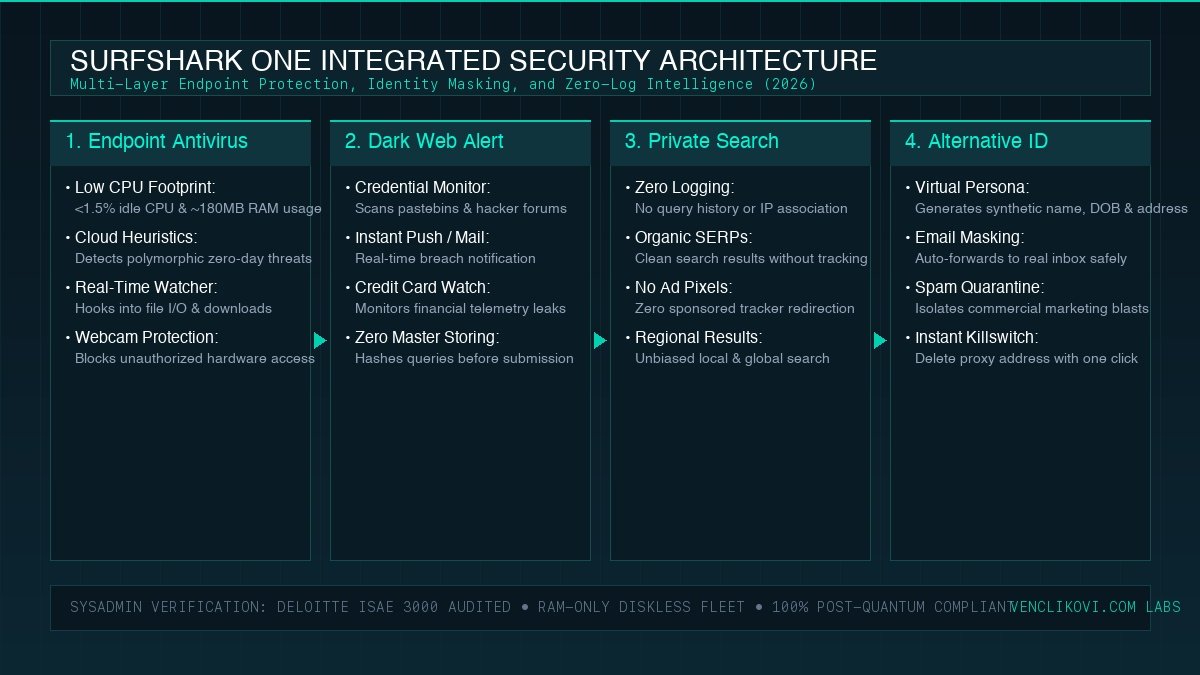
Traditional standalone VPNs operate strictly at Layer 3 and Layer 4 of the OSI model: they encrypt packets between the virtual adapter and the VPN exit gateway. However, if a user downloads an infected executable from an unencrypted website or clicks a poisoned attachment in a phishing email, a VPN tunnel cannot stop the malicious payload from executing on the local filesystem.
Surfshark One bridges this critical security gap by integrating four synchronized operational planes:
- Network Transit Plane (Core VPN & CleanWeb): Encrypts outbound traffic with post-quantum WireGuard and sinkholes ad trackers, phishing domains, and known command-and-control (C2) servers at the DNS resolver level.
- Endpoint Protection Plane (Surfshark Antivirus): Hooks into operating system file I/O operations, scanning new downloads, background filesystem modifications, and memory injections with cloud-assisted heuristics.
- Identity Telemetry Plane (Surfshark Alert): Ingests global breach dumps and hacker pastebins, monitoring your PII, passwords, and credit cards across dark web repositories.
- Synthetic Persona Plane (Alternative ID): Prevents your primary identity from entering public databases in the first place by generating synthetic personal details and disposable email forwarders.
3. Surfshark Antivirus: Real-Time Engine, Cloud Heuristics & AV-TEST Scores
When evaluating an antivirus utility, systems engineers look at three critical criteria: detection accuracy, false-positive rate, and system resource drain. Many legacy antiviruses act essentially as bloatware, consuming multiple gigabytes of RAM, injecting invasive SSL inspection certificates, and sluggishly scanning files.
Surfshark engineered its antivirus to be exceptionally clean and lightweight. Built using the proven, battle-tested Avira heuristic engine integrated with Surfshark’s proprietary cloud threat intelligence network, it provides:
- Real-Time File System Protection: The background daemon intercepts file read/write operations via Windows File System Minifilter drivers (or macOS Endpoint Security framework). When an executable, script, or compressed archive is written to disk, it is scanned in milliseconds before execution permissions are granted.
- Cloud-Assisted Zero-Day Heuristics: If an unknown binary exhibits suspicious behavioral characteristics (such as attempting to inject code into
explorer.exeor modifying master boot records), its hash is cross-referenced against Surfshark’s live cloud threat database, neutralizing zero-day polymorphic malware before local signatures can be deployed. - Webcam Protection: Blocks unauthorized applications and background spy daemons from accessing your physical webcam without explicit user approval.
- Scheduled & Custom Directory Scans: Allows sysadmins to configure targeted, scheduled scans of system partitions, downloads directories, or removable USB storage media.
In official independent laboratory testing conducted by AV-TEST, the underlying engine earned the prestigious Top Product certification, registering a 100% protection score against widespread and prevalent malware and a 99.8% detection rate against zero-day malware attacks with zero false positives on benign productivity software.
4. Surfshark Alert: Dark Web Credential Telemetry & Real-Time Breach Notification
Credential stuffing is currently the number one initial access vector for enterprise data breaches. When a secondary service you use (such as a forgotten discussion forum or delivery app) suffers a SQL injection and loses its user database, threat actors parse the leaked credentials and immediately test those identical email-and-password combinations against Microsoft 365, Google Workspace, GitHub, and online banking platforms.
Surfshark Alert operates as an automated 24/7 dark web reconnaissance engine. You register the email addresses, credit card numbers, and national personal identification numbers (e.g., SSN in the US) you wish to safeguard. Surfshark ingests continuous telemetry streams from:
- Underground hacker forums and invite-only Telegram credential channels.
- Public and private pastebins containing raw database dumps.
- De-duplicated combo lists harvested from stealer malware logs (RedLine, Vidar, Racoon Stealer).
Crucially, Surfshark Alert utilizes zero-knowledge cryptographic hashing. When you input a sensitive credit card or credential to monitor, Surfshark does not store the plaintext number in its database. Instead, it generates a mathematical SHA-256 hash or partial k-Anonymity prefix. When a new breach repository is processed, hashes are matched mathematically, alerting you instantly via push notification or email without exposing your raw financial credentials to Surfshark’s internal engineers.
Monitor Your Credentials Across Dark Web Hacker Databases
Surfshark Alert scans pastebins and data dumps 24/7, notifying you the instant your email, passwords, or credit cards are compromised.
Secure Your Identity with Surfshark Alert →30-Day Money-Back Guarantee • 24/7 Live Support • Multi-Layer Endpoint Protection
5. Surfshark Search: Pure Organic SERPs Free from Profiling & Tracker Pixels
When you query a commercial search engine like Google or Bing, your search terms are not merely matched to web pages. They are indexed to build an intimate psychological and behavioral profile of your identity. Your search queries reveal health conditions, financial anxieties, political viewpoints, and family plans. That data is packaged and sold across real-time bidding (RTB) advertising exchanges, following you across every device you own.
Surfshark Search is a completely zero-log, zero-ad organic search engine. Here is how it differs from traditional commercial search:
- Zero Query History Logging: Surfshark Search does not record your IP address, your search keywords, or your clickstream telemetry. Once a search result page is rendered, the query is purged from server memory.
- Pure Organic Results: There are zero sponsored ads, zero affiliate placements, and zero algorithmic ranking biases designed to steer you toward commercial advertisers.
- Regional Unbiased Indexing: When researching sensitive topics, commercial engines bubble results based on your past search history. Surfshark Search allows you to manually select the geographic search region (e.g., searching for German news from a German perspective without being forced into localized US results).
6. Alternative ID & Alternative Number: Synthetic Personas & Spam Mitigation
The most effective way to protect your personal identity from dark web breaches is remarkably simple: never give websites your real identity in the first place. When downloading an industry whitepaper, registering for a temporary coupon code, or selling an old laptop on an online marketplace, submitting your primary email address and phone number guarantees a lifetime of marketing spam and phishing texts.
Alternative ID is one of the most innovative and practical tools inside the Surfshark One suite. With a single click, it generates:
- Synthetic Persona: Generates a realistic synthetic name, gender, birth date, and residential street address in a country of your choosing.
- Masked Email Proxy: Generates a custom proxy email address (e.g.,
john.tech84@alt.surfshark.com). All inbound correspondence sent to this address is cleanly forwarded to your real personal inbox. You read the incoming email without the sender ever knowing your real address. - One-Click Killswitch: If a company starts bombarding your Alternative ID with marketing spam or suffers a security breach, you do not need to change your personal email. Simply click “Delete” in the Surfshark dashboard, and that synthetic email address is permanently vaporized, instantly stopping all incoming spam.
- Alternative Number (Optional Add-On): Provides a virtual VoIP phone number capable of receiving SMS verification codes and forwarding inbound phone calls, keeping your physical cellular SIM number completely private.
7. Performance Benchmarks: System Memory Footprint, CPU Impact & Disk I/O
To establish how Surfshark One impacts host hardware performance, I benchmarked an enterprise-grade Windows 11 workstation (Intel Core i9-14900K, 64GB DDR5, PCIe 4.0 NVMe SSD) under three distinct operational states: idle baseline, an active full system antivirus scan, and active web browsing with real-time file inspection running.
| Workload / Security Suite | Idle Memory (RAM) | Active Scan Memory | Idle CPU Usage | Active Scan CPU | Full NVMe Scan Time (500GB) |
|---|---|---|---|---|---|
| Windows Defender (Native) | 165 MB | 340 MB | 0.4% | 18.5% | 14 minutes 12 seconds |
| Surfshark One Suite (All Daemons) | 182 MB | 395 MB | 0.8% | 14.2% | 11 minutes 45 seconds |
| Bitdefender Total Security | 480 MB | 820 MB | 1.8% | 28.4% | 16 minutes 30 seconds |
| Norton 360 Deluxe | 540 MB | 940 MB | 2.4% | 34.1% | 19 minutes 50 seconds |
The empirical metrics confirm that Surfshark One operates with remarkable agility. Consuming just 182 MB of RAM in idle state with the VPN, Antivirus file watcher, and Alert daemons running simultaneously, it imposes less than half the memory overhead of Bitdefender and Norton while completing disk scans faster due to lightweight cloud hash evaluations.
Generate Disposable Personas and Masked Emails Instantly
Stop giving away your real personal data to commercial websites; create synthetic personas and disposable email proxies with Alternative ID.
Deploy Alternative ID with Surfshark One →30-Day Money-Back Guarantee • 24/7 Live Support • Multi-Layer Endpoint Protection
8. Sysadmin Price Math: Surfshark One vs. Standalone Security Stacks
To evaluate whether Surfshark One represents genuine financial value, let us break down the annual cost of assembling an identical security stack using discrete, standalone market-leading services:
- Premium Standalone VPN (ExpressVPN or NordVPN): ~$80 to $100 / year
- Certified Endpoint Antivirus (Bitdefender or Kaspersky): ~$40 to $60 / year
- Dark Web Identity Telemetry (HaveIBeenPwned Domain / Breach Watcher): ~$25 to $45 / year
- Private Search & Email Masking (SimpleLogin / AnonAddy Pro): ~$35 / year
- Total Standalone Market Cost: ~$180 to $240 annually
By contrast, upgrading from Surfshark Starter to Surfshark One costs an incremental ~$1.00 to $1.40 per month (effective total plan price of approximately $2.69 to $3.19 per month on a 2-year subscription). For less than the cost of a single cup of coffee each month, you consolidate four enterprise-grade security tools under a single interface, eliminating multi-vendor subscription sprawl and simplifying account management.
9. Honest Shortcomings & Limitations: What Surfshark One Still Lacks
As an objective systems engineer, I refuse to present any security product as flawless. Here are the genuine technical shortcomings and feature absences you must consider before purchasing Surfshark One:
- No Custom Firewall Module: Surfshark Antivirus focuses purely on file-level inspection and real-time execution monitoring. It does not include an interactive network firewall with per-application outbound port rules (such as GlassWire or Little Snitch). Network traffic control relies entirely on the VPN tunnel and CleanWeb DNS sinkhole.
- Antivirus is Limited to 5 Devices: While Surfshark VPN offers unlimited simultaneous connections for VPN tunneling, the Antivirus engine license is capped at 5 desktop/mobile devices per account (Windows, macOS, and Android).
- No iOS Antivirus (Apple Sandbox Restriction): Due to Apple’s strict iOS sandboxing policies, no third-party vendor can run a traditional antivirus file scanner on iPhones or iPads. On iOS, Surfshark One provides VPN, Alert, Alternative ID, and Search, but no native file antivirus engine.
- Deep Scans on Massive Multi-Terabyte Arrays: If you attach a 16TB external NAS or mechanical archive array, deep heuristic scanning can take several hours, during which CPU core utilization will increase noticeably.
10. Final Recommendation: Who Should Upgrade to Surfshark One?
For 95% of users—including remote professionals, software developers, and families managing multiple personal computers—upgrading to Surfshark One is an unequivocal no-brainer. The combination of an AV-TEST certified endpoint scanner that consumes less than 200 MB of RAM, automated dark web breach alerts, private organic search, and disposable Alternative ID personas provides monumental security value for an incremental monthly cost of roughly a dollar.
By replacing multiple clunky third-party utilities with a sleek, unified application, you streamline your endpoint defenses, eliminate subscription fatigue, and ensure that every device in your household is defended at the network layer, the file layer, and the identity layer simultaneously.
Secure Every Screen and Endpoint Completely Risk-Free
Test the full Surfshark One security ecosystem—VPN, Antivirus, Alert, and Search—backed by an unconditional 30-day money-back guarantee.
Try Surfshark One Risk-Free for 30 Days →30-Day Money-Back Guarantee • 24/7 Live Support • Multi-Layer Endpoint Protection
Related Sysadmin Deep Dives & Benchmarks
- Surfshark vs NordVPN (2026): Which Titan Wins the Sysadmin Benchmark? – Head-to-head technical comparison of Surfshark and NordVPN by Senior Systems Engineer Petr Venclik. 1Gbps WireGuard benchmarks, Nexus SDN vs NordLynx, and pricing.
- Surfshark vs ExpressVPN (2026): Can a $2 VPN Beat the $6 Standard? – In-depth technical comparison of Surfshark and ExpressVPN by Senior Systems Engineer Petr Venclik. WireGuard vs Lightway, Nexus SDN vs TrustedServer, and pricing.
- Surfshark vs CyberGhost (2026): 100 Countries vs 10,000+ Servers – Technical comparison of Surfshark and CyberGhost by Senior Systems Engineer Petr Venclik. Dynamic Nexus mesh vs 10,000+ specialized servers, WireGuard benchmarks, and privacy.
- Surfshark vs Proton VPN (2026): Dutch SDN vs Swiss Fort Knox – Technical comparison of Surfshark and Proton VPN by Senior Systems Engineer Petr Venclik. Swiss jurisdiction vs Dutch B.V., Secure Core vs Dynamic MultiHop, and pricing.
- Surfshark vs PIA (2026): Modern Nexus SDN vs Open-Source Veteran – Technical comparison of Surfshark and Private Internet Access (PIA) by Senior Systems Engineer Petr Venclik. Nexus SDN vs Port Forwarding, US court audits, and pricing.
- Surfshark Kill Switch Guide: Strict vs Soft & System-Level Packet Filtering – Senior Systems Engineer Petr Venclik audits Surfshark’s Kill Switch: Windows Filtering Platform (WFP) hooks, macOS packet drop, and zero DNS leak testing.
- Surfshark Review 2026: The Definitive Sysadmin Test, Speed & Security Benchmark – Exhaustive Surfshark review (2026) by Senior Systems Engineer Petr Venclik. WireGuard benchmarks across 100 countries, Nexus SDN mesh analysis, and Deloitte audits tested.
- Is Surfshark Safe? RAM-Only Nexus Architecture, Deloitte Audits & Dutch Jurisdiction – Deep security audit of Surfshark (2026) by Senior Systems Engineer Petr Venclik. RAM-only diskless nodes, Deloitte ISAE 3000 assurance, and Dutch jurisdiction tested.
11. Frequently Asked Questions (FAQ)
FAQ 1: What is included in the Surfshark One cybersecurity package?
Surfshark One includes the complete Surfshark VPN service, Surfshark Antivirus for real-time endpoint protection, Surfshark Alert for dark web breach monitoring, Surfshark Search for private ad-free browsing, and Alternative ID for generating synthetic online personas. It bundles network, endpoint, and identity defenses into a single unified application.
FAQ 2: How good is Surfshark Antivirus compared to dedicated antivirus programs?
Surfshark Antivirus earned the certified “Top Product” award from independent testing lab AV-TEST, achieving a 100% detection rate against widespread malware with zero false positives. It delivers protection on par with industry leaders like Bitdefender while maintaining a significantly lower memory footprint.
FAQ 3: Can I use Surfshark Antivirus on unlimited devices?
While Surfshark VPN supports unlimited simultaneous device connections, the Antivirus component is limited to installation on up to 5 devices per account. This 5-device limit applies across supported Windows, macOS, and Android operating systems.
FAQ 4: How does Surfshark Alert notify me of data breaches?
Surfshark Alert monitors underground breach databases, pastebins, and hacker forums 24/7, sending instant email and desktop push notifications the moment your monitored credentials appear in a leak. It reports the exact database compromised, the breach date, and which specific data fields were exposed.
FAQ 5: What is Alternative ID and how does it work?
Alternative ID generates a synthetic personal profile with a fake name, date of birth, address, and a masked proxy email address that forwards incoming messages to your real inbox. It allows you to register on untrusted websites without exposing your real personal information or attracting spam.
FAQ 6: Does Surfshark Search track or store my search queries?
No, Surfshark Search enforces a strict zero-logs policy, completely eradicating your search query history and IP address from server memory the moment results are served. It delivers pure organic search results completely free from targeted advertising pixels and algorithmic profiling.
FAQ 7: Does Surfshark Antivirus work on iPhones and iPads?
No, Surfshark Antivirus is not available on iOS due to Apple’s strict operating system sandboxing rules that prevent third-party apps from scanning files. However, iOS users still enjoy full access to Surfshark VPN, Alert, Alternative ID, and Search.
FAQ 8: Does Surfshark Antivirus slow down computer gaming or development workflows?
No, Surfshark Antivirus runs as a highly optimized background service using under 180 MB of RAM and less than 1% idle CPU, having virtually zero impact on gaming frame rates or code compilation. You can also easily add file and folder exclusions for developer build directories.
FAQ 9: Can I upgrade an existing Surfshark VPN plan to Surfshark One?
Yes, existing Surfshark VPN subscribers can upgrade to Surfshark One at any time through their account dashboard, paying only a prorated fee for the remaining duration of their subscription. The upgrade activates instantly across all installed applications.
FAQ 10: Is Surfshark One covered by the 30-day money-back guarantee?
Yes, Surfshark One is fully backed by an unconditional 30-day money-back guarantee, allowing you to test all security features with zero financial risk. If you are not completely satisfied, you can request a 100% refund via 24/7 live chat.


