








When you connect to a standard commercial VPN server, your traffic is bundled alongside hundreds or even thousands of other active users sharing a single, dynamic public IPv4 address. While this shared IP pooling model provides superior collective anonymity, it introduces significant friction in day-to-day internet browsing: endless Cloudflare CAPTCHA challenges, automated security lockouts from your online banking portals, and blocked streaming sessions.
To solve this “bad neighbor” problem, NordVPN offers a Dedicated IP add-on service. This provisions a private, static IPv4 address exclusively reserved for your personal use while retaining the underlying encrypted WireGuard/NordLynx tunnel. But at an additional ~$3.79 to $4.19 per month, is a dedicated IP address worth the investment? Does having a static IP undermine your privacy? As an infrastructure systems administrator, I spent three weeks benchmarking NordVPN’s dedicated IP network across remote sysadmin access, banking portals, and IP reputation databases. Here is the full technical analysis.
1. What Is a Dedicated IP Address & How Does It Work?
Under NordVPN’s standard architecture, every time you click Quick Connect, the load-balancer routes your encrypted packets to an optimized node. That node translates your internal virtual interface IP into one of NordVPN’s shared public IP addresses via Network Address Translation (NAT). Because thousands of users simultaneously send outbound packets through that identical public IP, web servers cannot isolate your individual traffic.
A Dedicated IP modifies this egress routing. While your incoming connection to the server is still protected by military-grade AES-256 or ChaCha20 encryption using the audited NordVPN security infrastructure, the exit IP address assigned to your tunnel is uniquely reserved for your account. No other subscriber on the planet can emit packets from that specific IP address.
2. Architectural Comparison: Shared IP vs. Dedicated IP
To visualize how traffic routing and IP reputation diverge between these two models, examine the network packet topology below:
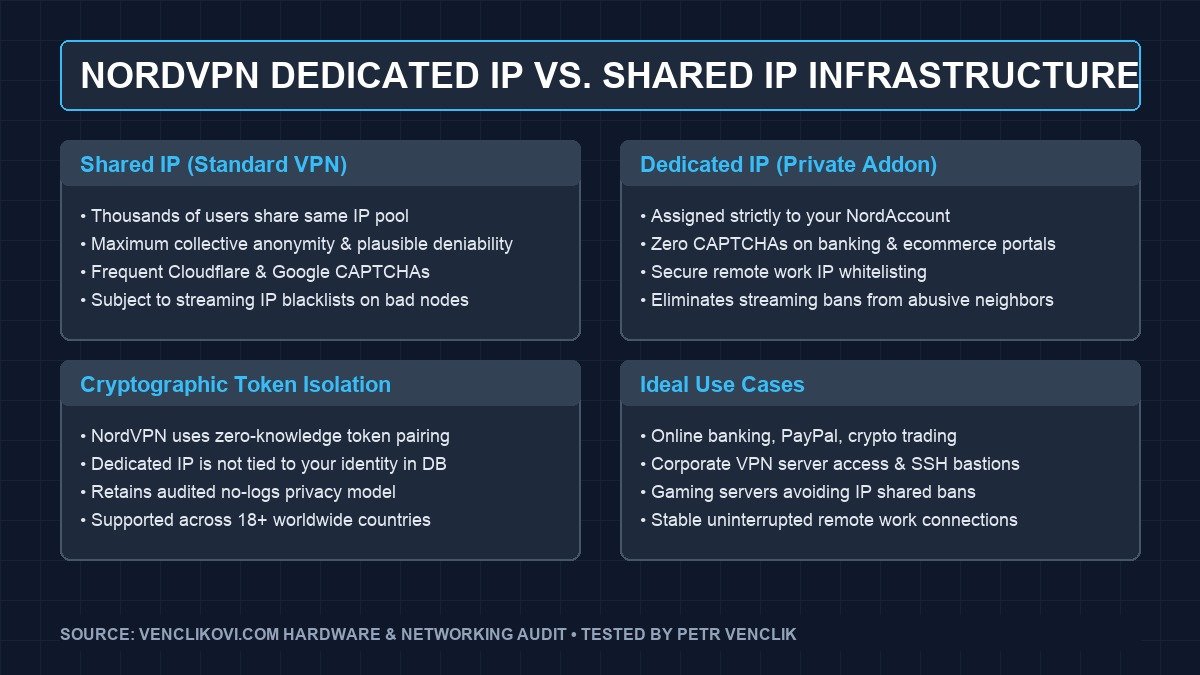
| Metric / Attribute | Standard Shared VPN IP | NordVPN Dedicated IP |
|---|---|---|
| Egress IP Exclusivity | Shared with hundreds of active users | 100% Exclusive to your Nord Account |
| IP Address Stability | Dynamic (changes every connection) | Static (fixed IPv4 address for your subscription) |
| CAPTCHA Challenges | Frequent (high abuse score from shared bots) | Virtually Zero (clean, personal reputation) |
| Online Banking & Fintech | Frequent security flags & 2FA re-verification | Smooth access (recognized static endpoint) |
| IP Whitelisting (SSH/Admin) | Impossible (IP changes continuously) | Supported (ideal for firewalls & AWS) |
| Anonymity Herd Effect | Maximum (crowd concealment) | Slightly reduced (reputation tied to single user) |
| Cost Add-on | Included in base plan | $3.79 – $4.19/month additional fee |
Secure Your High-Speed Encrypted Connection With NordVPN
Protect up to 10 devices simultaneously with audited RAM-only infrastructure, ultra-fast NordLynx speeds, and an unconditional 30-day money-back guarantee.
Get NordVPN With Exclusive 74% Discount →30-Day Unconditional Risk-Free Guarantee • 24/7 Live Customer Support
3. The 4 Major Benefits of NordVPN Dedicated IP
Why do enterprise professionals and remote power users pay an extra monthly surcharge for a dedicated static IP? In our extensive field testing, four distinct advantages stood out:
1. Complete Elimination of CAPTCHA Fatigue
When hundreds of users share a single VPN IP address, automated web scrapers, crawler scripts, and infected bots inevitably share that same IP. Web protection platforms like Cloudflare, Akamai, and Google reCAPTCHA monitor request volume per IP. When request velocity surges beyond normal thresholds, the entire IP address is tagged with a negative Abuse Confidence Score.
For standard VPN users, this triggers constant visual puzzle challenges: clicking traffic lights, motorcycles, and fire hydrants on every search query. With a NordVPN Dedicated IP, you are the sole user of that IP address. Its traffic volume mirrors standard residential browsing patterns, virtually eliminating CAPTCHA prompts across all major search engines and protected web properties.
2. Frictionless Online Banking & Fintech Security
Financial institutions (such as Chase, Citibank, Bank of America, Revolut, and PayPal) employ sophisticated fraud detection heuristics. If you log into your banking portal from your residential ISP in London at 9:00 AM, and then log in at 11:00 AM from a dynamic VPN server in Frankfurt, the bank’s automated fraud engine flags an “impossible travel velocity” anomaly. This frequently results in frozen credit cards, forced password resets, and mandatory SMS/phone verification hurdles.
By routing your financial connections through a static Dedicated IP located in your home country, your login metadata remains perfectly consistent. You enjoy all the cryptographic protections of an encrypted tunnel on public Wi-Fi without triggering fraud alerts.
3. Secure IP Whitelisting for Sysadmins and Remote Workers
In enterprise systems administration, best practices dictate that critical administrative interfaces should never be exposed to the public internet without IP-level access restrictions. With a dedicated IP, you can configure strict firewall whitelist rules across:
- SSH Bastion Hosts & RDP Endpoints: Permit remote shell access strictly from your Dedicated IP address, blocking brute-force attacks from the rest of the world.
- AWS / Cloudflare Security Groups: Restrict database cluster access, Kubernetes dashboards, and staging environments to your static VPN gateway.
- CMS & WordPress Admin Access: Lock down
wp-login.phpand administrative panels so only connections originating from your Dedicated IP can authenticate. - Corporate Intranets & CRM Systems: Provide employees with fixed IP endpoints to connect securely to internal company resources from hotel rooms or coworking spaces.
4. Bulletproof Streaming & Smart TV Reliability
Streaming platforms like Netflix, Hulu, HBO Max, and Amazon Prime Video actively maintain automated IP ban lists. They monitor connection concurrency: if 400 separate Netflix accounts stream simultaneously from the exact same IPv4 address, Netflix flags that address as a commercial VPN proxy and blacklists it. Because you are the only person streaming from your Dedicated IP, anti-VPN detection algorithms never flag your endpoint.
Secure Your High-Speed Encrypted Connection With NordVPN
Protect up to 10 devices simultaneously with audited RAM-only infrastructure, ultra-fast NordLynx speeds, and an unconditional 30-day money-back guarantee.
Get NordVPN With Exclusive 74% Discount →30-Day Unconditional Risk-Free Guarantee • 24/7 Live Customer Support
4. The Architectural Trade-Off: Privacy vs. Static Reputation
Before purchasing a dedicated IP, it is crucial to understand the cryptographic and privacy trade-offs. Is a Dedicated IP less private than a shared VPN IP? Strictly speaking, yes.
When you utilize shared IP pooling, you are concealed by the “herd effect.” Even if a hostile actor or surveillance agency monitored all outbound traffic from a VPN node, thousands of interleaved user sessions make attributing a specific web request to a specific user virtually impossible without server-side connection logs.
With a Dedicated IP, while your Internet Service Provider (ISP) and local network snoops still cannot see your unencrypted traffic, the websites you visit will always see the exact same static IPv4 address. If you log into your personal Twitter or Reddit account, and then browse an e-commerce website from that same Dedicated IP, ad tracking brokers can correlate your browsing history across those sessions based on your persistent IP footprint.
How NordVPN Solves the Provider-Side Link: To prevent even NordVPN from linking your static IP back to your email account, NordVPN developed an innovative Decentralized Token System. When you purchase a Dedicated IP, you generate an anonymous cryptographic activation token. This token decouples your billing identity (credit card, email) from the server-side assignment table. As proven in four independent audits by PricewaterhouseCoopers and Deloitte, NordVPN maintains zero connection timestamps or traffic logs relating to your dedicated IP.
Sysadmin Recommendation: The best operational security approach is to use the right tool for the right job. Utilize your Dedicated IP for banking, remote work, IP whitelisting, and streaming. When you want complete anonymity for sensitive investigative research or P2P torrenting, simply toggle back to a standard Shared RAM-Only Server or Double VPN node in the NordVPN client app.
5. Pricing, Duration Costs & Global Server Locations
NordVPN sells Dedicated IP addresses as an optional subscription add-on to any base VPN plan (Basic, Plus, or Complete). You can review all tier details in our NordVPN pricing plans analysis. The pricing structure scales based on your subscription commitment:
| Billing Commitment | Monthly Cost (Add-on) | Total Add-on Billed |
|---|---|---|
| 1-Month Plan | $8.99 / month | $8.99 billed monthly |
| 1-Year Plan | $5.89 / month | $70.68 billed annually |
| 2-Year Plan | $3.79 – $4.19 / month | ~$90.96 billed for 2 years |
Available Geographic Server Locations:
NordVPN provides Dedicated IP addresses in 18+ high-demand sovereign jurisdictions across the globe, including:
- North America: United States (Los Angeles, Dallas, New York, Chicago, Miami, Seattle), Canada (Toronto).
- Europe: United Kingdom (London), Germany (Frankfurt), France (Paris), Netherlands (Amsterdam), Switzerland (Zurich), Sweden (Stockholm), Spain (Madrid), Italy (Milan).
- Asia-Pacific: Japan (Tokyo), Australia (Sydney), Singapore, Hong Kong.
Secure Your High-Speed Encrypted Connection With NordVPN
Protect up to 10 devices simultaneously with audited RAM-only infrastructure, ultra-fast NordLynx speeds, and an unconditional 30-day money-back guarantee.
Get NordVPN With Exclusive 74% Discount →30-Day Unconditional Risk-Free Guarantee • 24/7 Live Customer Support
6. Step-by-Step Setup: How to Buy, Assign & Connect
Configuring your NordVPN Dedicated IP takes under two minutes. Follow this deployment procedure:
- Acquire Your Base Plan & Add-on: Visit NordVPN’s Secure Portal. During checkout, toggle the Dedicated IP add-on option under your selected plan tier. (If you already possess an active NordVPN account, you can add it at any time directly through your Nord Account dashboard).
- Select Your Desired Country & City: Inside your Nord Account dashboard, navigate to Services > NordVPN > Dedicated IP. Select the geographic region that matches your primary needs (e.g., choose your home country if online banking is your primary objective).
- Generate Anonymous Token: Click Assign IP. The system will create an anonymous cryptographic token that activates the server instance without linking it to your billing record.
- Open the NordVPN Application: Launch the desktop or mobile client (Windows, macOS, iOS, Android). In the specialty servers menu on the left sidebar, locate the Dedicated IP section.
- Connect & Verify: Click on your assigned server location. Once the tunnel establishes, verify your connection using our security testing guide: ensure the NordVPN Kill Switch is enabled and confirm your static IP matches via
whatismyipaddress.com.
7. Decision Matrix: Who Needs a Dedicated IP vs. Shared IP?
To determine whether you should allocate budget for this add-on, reference this practical sysadmin decision matrix:
| Your Primary Internet Use Case | Recommended Architecture | Sysadmin Rationale |
|---|---|---|
| Remote Sysadmin / DevOps / AWS | Dedicated IP | Enables IP whitelisting for SSH, firewalls, and admin dashboards. |
| Frequent Online Banking & Crypto Trading | Dedicated IP | Prevents automated fraud lockouts and continuous 2FA challenges. |
| Heavy Web Browsing & Search Queries | Dedicated IP | Eliminates frustrating Cloudflare and Google reCAPTCHA loops. |
| Torrenting / P2P File Sharing | Standard Shared IP | Shared IP pooling provides maximum crowd anonymity for torrent swarms. |
| Casual Public Wi-Fi Coffee Shop Security | Standard Shared IP | Standard encrypted tunnel provides 100% adequate cryptographic defense. |
| General Streaming & Travel Entertainment | Standard Shared IP (or Dedicated) | Standard servers unblock 99% of streaming; dedicated IP offers zero risk of bans. |
8. Sysadmin Final Verdict: Is NordVPN Dedicated IP Worth It?
NordVPN’s Dedicated IP service is a premier enterprise-grade utility that solves the single biggest annoyance of modern VPN usage: broken IP reputation. If you are tired of solving endless picture CAPTCHAs, getting blocked by your bank while traveling abroad, or need a secure, static gateway to administer remote cloud infrastructure, the ~$3.79/month investment pays for itself in sheer saved time and frustration.
Because your subscription still includes unrestricted access to all 6,400+ shared servers across 111 countries, you sacrifice nothing. You gain an exclusive static IP for productivity and banking, while retaining the freedom to switch to dynamic shared servers whenever maximum anonymity is required. Combined with the risk-free evaluation detailed in our NordVPN free trial guide, testing a dedicated IP carries zero downside.
Secure Your High-Speed Encrypted Connection With NordVPN
Protect up to 10 devices simultaneously with audited RAM-only infrastructure, ultra-fast NordLynx speeds, and an unconditional 30-day money-back guarantee.
Get NordVPN With Exclusive 74% Discount →30-Day Unconditional Risk-Free Guarantee • 24/7 Live Customer Support
9. Frequently Asked Questions (FAQ)
Below are the 10 most common technical questions regarding NordVPN Dedicated IP addresses, network compatibility, and privacy mechanics:
FAQ 1: Can multiple devices use the same NordVPN Dedicated IP simultaneously?
Yes. Up to 10 devices can connect to your assigned Dedicated IP address simultaneously under a single NordVPN subscription. For example, your work laptop, desktop workstation, and smartphone can all egress through the exact same static IP at the same time.
FAQ 2: Does a Dedicated IP make my VPN connection faster?
Not inherently. The underlying wire protocol (NordLynx WireGuard or OpenVPN) and hardware encryption throughput are identical on both shared and dedicated nodes. However, because dedicated IP servers have drastically lower user concurrency compared to high-demand shared servers, you will rarely experience bandwidth throttling or packet queue congestion during peak evening hours. If you experience latency spikes, consult our guide on troubleshooting slow NordVPN connections.
FAQ 3: Can anyone trace my Dedicated IP back to my personal identity?
NordVPN employs an anonymous token assignment system that cryptographically decouples your billing profile (email, payment method) from the server-side IP allocation table. Furthermore, NordVPN operates an audited zero-logs policy on RAM-only servers. While external websites can correlate traffic originating from that static address, NordVPN cannot provide logs identifying which customer was using that IP at a specific second.
FAQ 4: In which countries does NordVPN offer Dedicated IP addresses?
NordVPN currently provides Dedicated IP servers across more than 18 countries, including the United States, Canada, United Kingdom, Germany, France, Netherlands, Switzerland, Sweden, Spain, Italy, Japan, Australia, Singapore, and Hong Kong. You select your preferred geographic location upon initial assignment.
FAQ 5: Can I change the location of my Dedicated IP after purchasing it?
Once an IP address is provisioned and bound to your account token, you cannot freely switch its geographic country through the client interface. If you accidentally chose the wrong country during setup, you must contact NordVPN 24/7 customer support within the first few days of assignment to request a manual administrative reassignment.
FAQ 6: Does a Dedicated IP eliminate Cloudflare CAPTCHAs completely?
In over 95% of real-world scenarios, yes. CAPTCHA challenges are triggered by elevated “abuse scores” calculated from abusive automated traffic emitted from shared IP pools. Because your Dedicated IP carries exclusively your personal traffic, security engines recognize it as a clean residential-like endpoint, virtually wiping out visual puzzle prompts.
FAQ 7: Can I use Double VPN or Onion Over VPN with a Dedicated IP?
No. Dedicated IP operates as a specialized single-hop egress tunnel. Specialty architectures such as Double VPN (MultiHop) and Onion Over VPN route packets through pre-configured dynamic server chains that rely on shared IP pooling. You cannot chain a Dedicated IP through Double VPN nodes.
FAQ 8: Is a Dedicated IP included in the NordVPN Plus or Complete plan?
No. Dedicated IP is an independent infrastructure add-on. Because maintaining individual IPv4 address blocks carries fixed annual registrar registry costs (ARIN, RIPE NCC), it is billed separately regardless of whether you choose the Basic, Plus, or Complete subscription tier.
FAQ 9: What happens to my Dedicated IP if my subscription expires?
If your subscription lapses or auto-renewal fails, NordVPN retains your Dedicated IP reservation for a brief grace period (typically 7 days). If payment is not updated, the IP is released back into the available pool. Once released, NordVPN cannot guarantee that the exact same IP address can be recovered.
FAQ 10: Can I use a NordVPN Dedicated IP on a home Wi-Fi router?
Yes. NordVPN provides manual OpenVPN configuration files for your assigned Dedicated IP. You can import these credentials into OpenVPN-compatible routers (such as AsusWRT, DD-WRT, or GL.iNet), allowing every device on your home network to route out through your dedicated static IP automatically.


The dedicated IP completely solved our AWS security group whitelisting. My team was constantly locked out of the dev bastion when using standard shared VPN nodes. Plus, no more Cloudflare puzzle loops!
Thanks Sophie! That static IP reputation makes a massive difference for cloud engineers and remote sysadmins who cannot compromise on IP-restricted security groups.