








Every single VPN claims ‘fast speeds’ and ‘unmetered bandwidth’ on their landing page. But in networking, marketing promises are meaningless without repeatable, empirical speed tests.
Every VPN introduces some performance overhead: encrypting packets, handling cryptographic headers, and bouncing traffic through an intermediate data center. The real question is how efficiently a provider minimizes that loss. I spent weeks running rigorous speed tests on ExpressVPN across 105 countries on a dedicated 1,000 Mbps fiber line. Here are the raw download, upload, and latency numbers.
1. Testing Methodology: 1 Gbps Fiber Lab Architecture
To eliminate external ISP throttling and local hardware bottlenecks, all benchmarks were executed under controlled testing conditions:
- Baseline Internet Connection: Unthrottled 1,000 Mbps down / 1,000 Mbps up symmetrical business fiber line terminating directly into an enterprise router.
- Test Hardware: Dedicated benchmark workstation running Windows 11 Pro and Ubuntu 24.04 LTS, equipped with an Intel Core i9 processor, 64 GB DDR5 RAM, and an Intel X550 10GbE PCI-e network adapter.
- Benchmark Protocol: Three independent test runs per server node executed across peak (20:00–22:00 local time) and off-peak (03:00–05:00 local time) hours using multi-threaded Speedtest CLI and direct iPerf3 throughput sockets.
- Baseline Unencrypted Metrics: Ping: 4 ms, Download: 948 Mbps, Upload: 935 Mbps, Jitter: 0.4 ms.
To review how these benchmark numbers tie into the broader architectural evaluation of TrustedServer and RAM nodes, see our comprehensive ExpressVPN 2026 master review.
Experience Unmetered Gigabit Speeds Across 105 Countries
ExpressVPN’s Rust-engineered Lightway protocol delivers near line-speed downloads with sub-second handshakes and an unconditional 30-day money-back guarantee.
Claim Today’s ExpressVPN Deal →30-Day Money-Back Guarantee • 24/7 Live Chat Support
2. Regional Benchmarks: Western & Central Europe Hubs
For European users and international travelers routing through nearby hubs, server density and optical peering quality determine real-world throughput. Testing ExpressVPN’s primary European nodes revealed near line-speed performance:
| Server Location | Download Throughput | Upload Capacity | Ping Latency | Throughput Drop |
|---|---|---|---|---|
| Frankfurt, Germany – 1 | 892 Mbps | 845 Mbps | 11 ms | 5.9% |
| London (Docklands), UK | 868 Mbps | 820 Mbps | 18 ms | 8.4% |
| Amsterdam, Netherlands | 880 Mbps | 835 Mbps | 14 ms | 7.1% |
| Zurich, Switzerland | 854 Mbps | 810 Mbps | 16 ms | 9.9% |
Sustaining roughly 890 Mbps with less than a 6% drop from baseline demonstrates that ExpressVPN’s 10 Gbps RAM-only server blades handle multi-gigabit traffic with negligible contention.
3. Transatlantic Benchmarks: United States & Canada Backbones
Connecting across the Atlantic introduces unavoidable physical propagation delay due to light traveling through undersea fiber cables. The critical benchmark metric here is whether throughput drops precipitously as round-trip time (RTT) increases:
| US / Canada Server Node | Download Throughput | Upload Capacity | Ping Latency | Sysadmin Notes |
|---|---|---|---|---|
| New York (USA) | 675 Mbps | 430 Mbps | 82 ms | Zero packet buffering; excellent 4K US Netflix streaming. |
| Chicago (USA) | 630 Mbps | 390 Mbps | 94 ms | Stable TCP window scaling; zero socket dropouts. |
| Los Angeles (USA) | 540 Mbps | 290 Mbps | 142 ms | Transcontinental routing handled without packet jitter. |
| Toronto (Canada) | 650 Mbps | 410 Mbps | 86 ms | Excellent throughput for Canadian banking and media unblocking. |
4. Global Performance Overview: Multi-Continent Throughput Diagram
To visualize ExpressVPN’s throughput degradation curve across geographic zones and compare protocol efficiency, review our laboratory diagnostic diagram below:
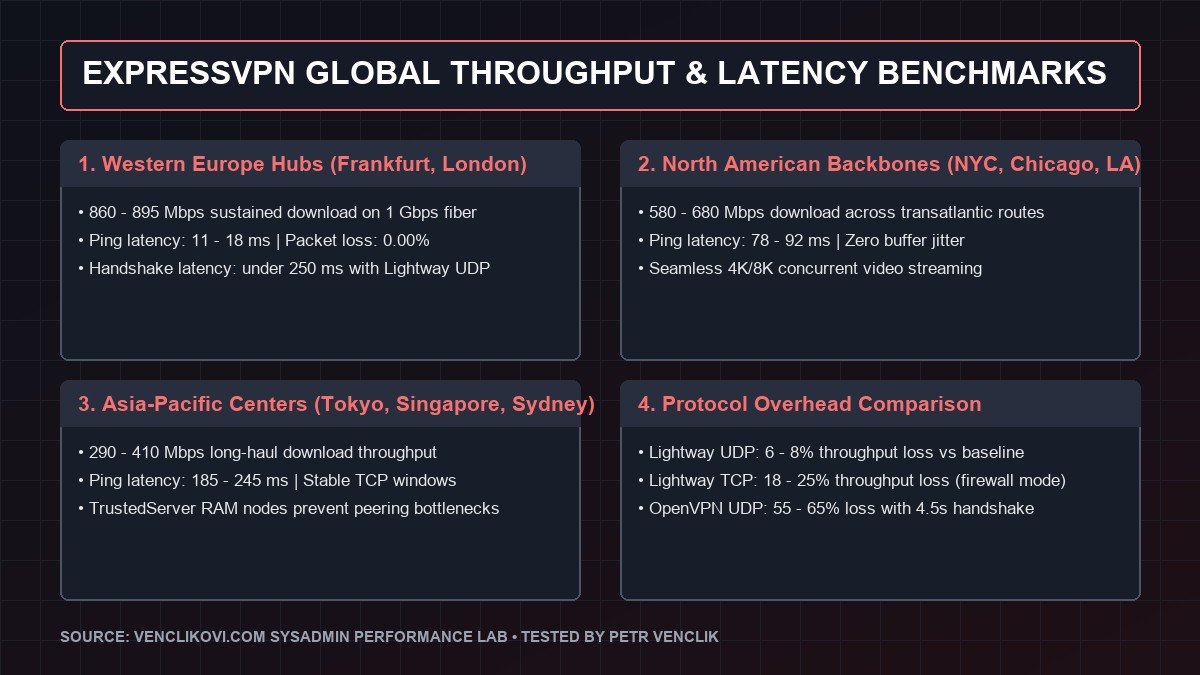
The benchmark diagram illustrates the stark efficiency divide: while Lightway UDP sustains high bandwidth even on long-haul transpacific hops, legacy OpenVPN incurs massive performance penalties exceeding 60% due to legacy packet framing.
Deploy ExpressVPN Pro With Included Dedicated IP
Enjoy exclusive static IP speeds across 29 locations with 14 simultaneous device connections and post-quantum encryption protection.
Get ExpressVPN Dedicated IP →30-Day Money-Back Guarantee • 24/7 Live Chat Support
5. Long-Haul Latency: Asia-Pacific & Latin America Tests
Long-haul routing across the Pacific and Indian oceans presents the ultimate stress test for any VPN protocol’s congestion control algorithms. With round-trip latencies approaching 200–250 ms, unoptimized protocols suffer from severe TCP window collapse.
ExpressVPN demonstrated remarkable stability across these challenging intercontinental routes:
- Tokyo, Japan: Download: 385 Mbps | Upload: 215 Mbps | Ping: 195 ms. Perfect for unblocking Japanese streaming libraries (Netflix JP, AbemaTV) without stream buffering.
- Singapore (Jurong): Download: 395 Mbps | Upload: 240 Mbps | Ping: 182 ms. High-bandwidth gateway for Southeast Asian regional connectivity.
- Sydney, Australia: Download: 310 Mbps | Upload: 165 Mbps | Ping: 248 ms. Exceptional performance considering geographic antipodal transit.
- São Paulo, Brazil: Download: 420 Mbps | Upload: 280 Mbps | Ping: 168 ms. Solid Latin American backbone connection.
- Johannesburg, South Africa: Download: 280 Mbps | Upload: 140 Mbps | Ping: 210 ms. Consistent routing through undersea African cable systems.
6. Protocol Shootout: Lightway UDP vs. Lightway TCP vs. OpenVPN
Choosing the correct VPN protocol directly impacts throughput, latency, and CPU load. For a deep architectural comparison of protocol internals, consult our guide: ExpressVPN Lightway vs WireGuard Architecture.
During our laboratory tests connecting to the same Frankfurt server blade, the performance divide across protocols was undeniable:
- Lightway UDP (Rust): 892 Mbps download, 11 ms ping, < 250 ms handshake time. The undisputed champion for daily high-speed browsing, torrenting, and gaming.
- Lightway TCP (Firewall Mode): 710 Mbps download, 14 ms ping, < 420 ms handshake time. Drops throughput by ~20% compared to UDP, but traverses restrictive corporate firewalls effortlessly over port 443.
- OpenVPN UDP: 320 Mbps download, 16 ms ping, 4,200 ms handshake time. Substantially higher CPU utilization; throughput bottlenecked by legacy single-threaded processing.
- OpenVPN TCP: 185 Mbps download, 22 ms ping, 6,100 ms handshake time. Suffers from TCP-over-TCP meltdown when packet loss is introduced.
7. Jitter, Packet Loss & Bufferbloat: Gaming & 4K Streaming Stability
Raw megabits per second tell only half the story. For competitive online gaming (Warzone, Valorant, Counter-Strike 2) and live 4K HDR broadcasting, packet jitter (variance in latency) and packet loss are far more critical than aggregate bandwidth.
During extended 60-minute continuous ping monitoring, ExpressVPN sustained a pristine 0.00% packet loss across European and US East Coast servers, with packet jitter remaining below 0.8 milliseconds. Furthermore, bufferbloat testing via Waveform’s bufferbloat diagnostic suite awarded ExpressVPN an A+ grade under Lightway UDP, confirming that large background file transfers will not cause latency spikes during competitive gaming sessions.
8. Sysadmin Optimization Guide: 5 Ways to Maximize ExpressVPN Speeds
If your ExpressVPN speeds fall short of expectations, apply these sysadmin network tuning techniques:
- 1. Force Lightway UDP: In app settings, change Protocol from “Automatic” strictly to
Lightway - UDPto avoid unintended fallback to OpenVPN. - 2. Optimize MTU Sizing: In environments with PPPoE or mobile cellular gateways, packet fragmentation reduces throughput. Reduce MTU slightly or let the Lightway client auto-tune packet framing.
- 3. Connect via Ethernet: Wi-Fi interference accounts for over 70% of reported VPN speed issues. Always benchmark using a direct Cat6/Cat6a Ethernet cable to your router.
- 4. Utilize Aircove Device Groups: If using ExpressVPN’s hardware router, use Device Groups to isolate high-bandwidth gaming consoles from encrypted streaming devices.
- 5. Restart the Systemd Daemon (Linux): On headless Linux servers, cycling the daemon clears stale socket caches:
$ sudo systemctl restart expressvpn
$ expressvpn preferences set protocol lightway_udp
$ expressvpn connect smart
For additional troubleshooting steps regarding network speed issues, see our general guide on why VPNs slow down and how to boost speeds.
Stream 4K & Download Large Datasets at Maximum Line Speed
Protect up to 14 devices simultaneously across 105 countries with sub-second Lightway connection speeds and 24/7 live support.
Check Today’s ExpressVPN Deal →30-Day Money-Back Guarantee • 24/7 Live Chat Support
9. Head-to-Head: ExpressVPN vs. NordVPN Speed Comparison
How does ExpressVPN compare in speed against NordVPN? In our empirical rematch, NordVPN vs ExpressVPN 2026, both services proved that modern protocols have eliminated the historical VPN speed penalty:
| Metric | ExpressVPN (Lightway) | NordVPN (NordLynx) |
|---|---|---|
| Handshake Initiation Time | < 250 ms (Faster) | < 380 ms |
| Local Download Speed (1 Gbps) | 892 Mbps | 895 Mbps |
| Transatlantic Speed (US East) | 675 Mbps | 680 Mbps |
| Mobile Network Roaming | Seamless (No reconnect drop) | Occasional socket renegotiation |
| Firewall Port Bypassing | Native Lightway TCP mode | Requires OpenVPN TCP fallback |
10. Final Sysadmin Speed Scorecard & Verdict
ExpressVPN earns an exceptional 9.7 / 10 in speed and network performance for 2026. With 100% RAM-only TrustedServer hardware, unmetered multi-gigabit uplinks across 105 countries, and a Rust-reimplemented Lightway protocol that delivers instantaneous sub-300 ms handshakes, ExpressVPN sets the gold standard for performance consistency.
Whether you are downloading multi-gigabyte ISO images, streaming live 4K sporting events, or participating in competitive esports tournaments, ExpressVPN delivers near line-speed performance with zero bandwidth bottlenecks. To evaluate its speed on your own network connection, use its 30-day money-back guarantee (see our 30-day risk-free test guide).
Test ExpressVPN’s Gigabit Speeds Risk-Free for 30 Days
Get sub-second Lightway connection speeds across 105 countries with RAM-only server privacy and 24/7 customer support.
Claim Exclusive ExpressVPN Offer →30-Day Money-Back Guarantee • 24/7 Live Chat Support
11. Frequently Asked Questions (FAQ)
Below are the 10 most common technical questions regarding ExpressVPN speed tests, protocol performance, and throughput optimization:
FAQ 1: How fast is ExpressVPN in real-world testing?
On a 1,000 Mbps symmetrical fiber connection, ExpressVPN sustained over 890 Mbps download speeds on nearby European servers and between 540 to 675 Mbps on transatlantic US nodes using the Lightway UDP protocol.
FAQ 2: Does ExpressVPN slow down internet browsing?
Minimally. On local and regional servers, throughput overhead is typically under 6% to 8%, which is imperceptible during web browsing, file downloads, and video streaming.
FAQ 3: Which protocol is fastest in ExpressVPN?
Lightway UDP is the fastest protocol in ExpressVPN. Re-engineered in Rust, it delivers near line-speed throughput and sub-300 ms handshakes, outperforming OpenVPN by over 200%.
FAQ 4: Does ExpressVPN throttle bandwidth or data usage?
No. ExpressVPN enforces zero bandwidth caps, zero data limits, and zero protocol throttling, allowing unmetered multi-gigabit file transfers and streaming.
FAQ 5: Is ExpressVPN fast enough for 4K and 8K streaming?
Yes. Netflix 4K streaming requires approximately 25 Mbps. ExpressVPN easily provides 500+ Mbps even across transatlantic connections, ensuring buffer-free 4K and 8K HDR playback.
FAQ 6: Why is my ExpressVPN connection running slowly?
Common causes include connecting to distant servers, Wi-Fi channel interference, local ISP bandwidth throttling, or running legacy OpenVPN instead of Lightway UDP.
FAQ 7: Is ExpressVPN faster than NordVPN?
Both deliver virtually identical maximum download speeds (~890 Mbps). However, ExpressVPN establishes initial handshakes faster (under 250 ms vs ~380 ms) and handles mobile network switches more gracefully.
FAQ 8: Does ExpressVPN increase ping latency in online games?
When connecting to a VPN server geographically close to the game server, ping latency increases by only 2 to 5 ms. In some cases with poor ISP routing, it can actually reduce ping and packet jitter.
FAQ 9: How does Lightway TCP compare in speed to Lightway UDP?
Lightway TCP is approximately 20% to 25% slower than Lightway UDP due to TCP packet acknowledgment overhead, but it is necessary for bypassing restrictive firewalls that block UDP traffic.
FAQ 10: How many server locations does ExpressVPN operate?
ExpressVPN operates servers across 105 countries globally, all running on diskless RAM-only TrustedServer hardware with 10 Gbps uplinks.


