








Search for “ExpressVPN free trial” and you will find a mess of half-truths: coupon sites promising a free month, YouTube videos pushing modded APKs, and forum posts swearing the trial “doesn’t exist.” The reality is simpler and, honestly, more useful. ExpressVPN has no free tier, but it does give you a full month to break the product in whatever way you like and get every cent back if it fails your tests.
I am Petr Venclik, a Senior Systems Engineer and Security Architect, and I don’t trust a VPN until I have watched its traffic in a packet capture. For this guide I bought ExpressVPN directly on the website, ran it for 30 days across Windows, macOS, Android, an iPhone and an Apple TV, ran leak, speed and kill-switch tests, then requested a refund through live chat and tracked how long the money took to come back. Below is the exact playbook, including the message I sent to support.
1. The Truth About the ExpressVPN Free Trial
ExpressVPN does not offer a free plan, a data-capped tier, or an ad-supported version. Every connection to its network runs on a paid subscription. What people call the “ExpressVPN free trial” is one of two things: a short in-app trial on mobile, or the 30-day money-back guarantee that applies when you buy directly from expressvpn.com.
- Mobile in-app trial: new users on iOS or Android are sometimes offered a free trial through the App Store or Google Play. In my experience it is usually 3 days, occasionally 7, depending on the store, region and current promotion. It converts into a paid subscription unless you cancel at least 24 hours before it ends.
- 30-day money-back guarantee: you pay upfront on the website, use the full product on every platform, and ask for a refund within 30 days. This is the option I recommend and the one I tested.
The key difference is who holds your money. With an app-store trial, Apple or Google is the merchant, so ExpressVPN cannot refund you. With a direct purchase, ExpressVPN processes the refund itself, and in my test it did so without a single follow-up question. If you want the full product picture before you start, my complete ExpressVPN review covers the benchmarks in depth.
Start Your Own 30-Day ExpressVPN Test
Buy directly, get the full product on every device, and keep the refund option open for a full month.
Try ExpressVPN Risk-Free →30-Day Money-Back Guarantee • 24/7 Live Chat Support
2. App-Store Trial vs. 30-Day Money-Back Guarantee
Here is how the two routes compare on the points that matter for a real evaluation:
| Criterion | Mobile App-Store Trial | 30-Day Money-Back Guarantee |
|---|---|---|
| Length | Usually 3 days, sometimes 7 (store/region dependent) | 30 days from purchase |
| Upfront payment | No charge during trial, payment method required | Yes, full plan price |
| Platforms usable | Account works on other apps too, but the window is short | All apps, router firmware, MediaStreamer, extensions |
| How to stop paying | Cancel in Apple/Google subscription settings 24 h+ before end | Ask live chat for a refund within 30 days |
| Who refunds | Apple or Google, under their policies | ExpressVPN directly |
| Best for | A quick look at the mobile app | A proper test of speed, leaks, streaming and devices |
Three days is not enough to judge a VPN. You won’t see how it behaves on hotel Wi-Fi, whether the streaming catalog you care about stays unblocked, or whether the kill switch holds up when your laptop wakes from sleep. Thirty days covers all of that. Which plan you buy also matters, because the refund is for the full amount you paid. I break down the tiers in my ExpressVPN pricing and plans guide.
3. Step-by-Step Signup for a Risk-Free Month
This is the exact sequence I followed. It takes about five minutes.
- Open the ExpressVPN website on a desktop browser, not the mobile app. That keeps the purchase out of the app stores.
- Pick a plan. At checkout in November 2026 I was quoted roughly $2.79–$3.49/mo for Basic, $3.59–$4.49/mo for Advanced and $5.99–$7.49/mo for Pro on the 2-year term, billed upfront. If you only want to test, the cheapest plan gives you the same network and Lightway protocol. Choose Pro if you also want to evaluate the dedicated IP (see my ExpressVPN dedicated IP setup review).
- Enter an email address you actually check. Activation codes and refund confirmations go there.
- Pay with a card or PayPal. Both refund back to the original source cleanly. Crypto via BitPay works but makes refunds slower and more complicated (see Section 7).
- Screenshot the order confirmation and write down the purchase date. Day 30 is your hard deadline, and I set a calendar reminder for day 25.
- Turn off auto-renew in the account dashboard right away. It doesn’t affect the refund, but it protects you from a renewal charge at a higher price if you forget about the subscription later.
- Install the apps on every device you plan to use and sign in with the activation code from the dashboard.
4. The Refund Workflow at a Glance
The diagram below shows both paths. The main path (direct purchase) is the one I used. The side branch shows what happens if you start from an App Store or Google Play trial instead.
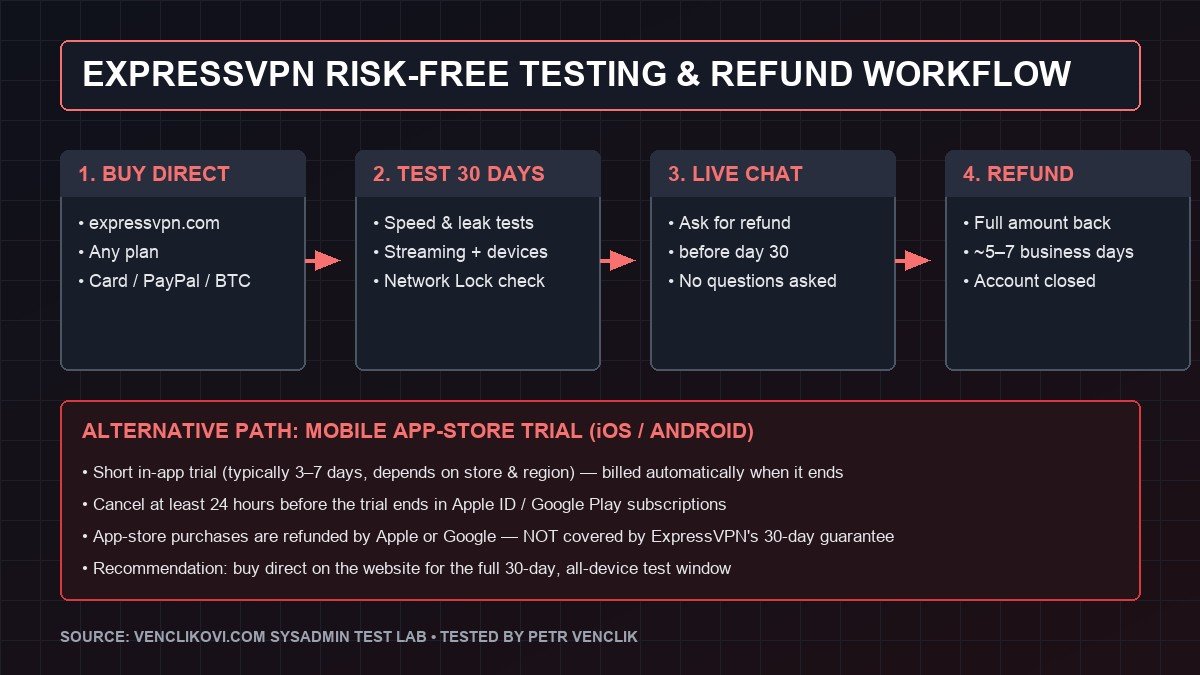
- Direct path: buy on expressvpn.com → run the 30-day test checklist → open live chat and ask for a refund → money back in roughly 5–7 business days.
- App-store branch: start the in-app trial → cancel in your Apple ID or Google Play subscriptions at least 24 hours before it ends → if you were charged, any refund request goes to Apple or Google, not ExpressVPN.
Test It on Your Own Network for 30 Days
Run your own leak and speed tests. If ExpressVPN doesn’t pass, a single live chat message gets your money back.
Check Today’s ExpressVPN Deal →30-Day Money-Back Guarantee • 24/7 Live Chat Support
5. My 30-Day Test Plan Checklist
A refund window is only valuable if you use it to collect evidence. This is the plan I follow for every VPN I evaluate, split across four weeks so nothing gets rushed in the last two days.
Week 1: Speed and Latency Baseline
Measure your raw connection first, then compare Lightway UDP, Lightway TCP and OpenVPN against nearby, transatlantic and Asia-Pacific servers. Test at different times of day, because evening congestion is what users actually feel. On my 1 Gbps fiber, these were my typical results:
| Test | Result in My Runs | Pass Criterion |
|---|---|---|
| Lightway UDP, nearby EU node | ≈ 750–900 Mbps | At least 70 % of baseline |
| Lightway UDP, transatlantic | ≈ 450–650 Mbps | Stable 4K streaming, no stalls |
| Lightway UDP, Asia-Pacific | ≈ 250–400 Mbps | Usable for video calls and downloads |
| OpenVPN UDP, nearby node | ≈ 250–400 Mbps | Fallback only |
| Connect time | Lightway ≈ 0.3–0.8 s vs. OpenVPN 4–8 s | Under 2 s on Lightway |
| DNS / WebRTC / IPv6 leaks | None detected on current app versions | Zero leaks, every platform |
Week 2: Leak Tests (DNS, WebRTC, IPv6)
Browser leak-test sites are a good start, but I also check from the command line so I can see what the OS resolver is really doing. With the VPN connected, every query should be answered by ExpressVPN’s private DNS and your public IPv4 should belong to the VPN server. IPv6 should either be tunneled or blocked:
# Public IPv4 should be the VPN server, not your ISP
curl -4 https://ifconfig.co
# IPv6 should time out or show a VPN address, never your ISP prefix
curl -6 --max-time 5 https://ifconfig.co
# Which resolver answers? (macOS/Linux)
dig +short whoami.akamai.net
# Watch for any plaintext DNS escaping the tunnel
sudo tcpdump -ni en0 port 53
For WebRTC, open a WebRTC leak test in Chrome and Firefox with the VPN connected and confirm that no local or ISP-assigned public address appears. On Windows, I also test with split tunneling enabled, because that is where ExpressVPN had a DNS leak issue in 2024 (since fixed). If you plan to use Remote Desktop, update to the current build. A 2025 Windows bug let RDP traffic on TCP 3389 bypass the tunnel in some versions, and it was fixed in v12.101.0.45. My ExpressVPN security and privacy audit review covers both incidents in detail.
Week 3: Streaming and Network Lock
- Streaming: test the exact services and regions you pay for, on the exact devices you use. A Netflix library that works in Chrome may behave differently in the Fire TV or Apple TV app. Write down which servers worked.
- MediaStreamer: if you have a console or smart TV without a VPN app, register your IP in the dashboard and test the Smart DNS.
- Network Lock: start a large download, then kill the connection by switching Wi-Fi networks or pulling the cable. Traffic should stop dead until the tunnel reconnects. Repeat after the laptop wakes from sleep, which is the scenario most kill switches get wrong.
- Network roaming: on the phone, walk out of Wi-Fi range and confirm Lightway hands over to LTE without dropping the session.
Week 4: Devices, Router and Decision
Connect every device you own at the same time and confirm the plan’s limit (10, 12 or 14 devices depending on tier) works the way you expect. Try the Linux CLI, the browser extension and, if you own one, a compatible router. Then decide by day 25 at the latest. That leaves five days of buffer if support asks a question or the chat is busy.
6. How I Requested My Refund via Live Chat
On day 27 I opened the live chat from the ExpressVPN website’s support page while signed in to my account. No forms, no email ping-pong. This is what I typed:
Hi, I purchased ExpressVPN directly on your website on [DATE]
using [EMAIL]. I'd like to cancel my subscription and request a
full refund under the 30-day money-back guarantee.
Please confirm the refund amount and the expected timeline.
The agent replied in under two minutes and asked if anything had gone wrong, offering to help with server recommendations. That is a standard retention question, not a condition. I said “No thanks, I’d just like to proceed with the refund,” and the refund was confirmed in the same chat, followed by a confirmation email a few minutes later. The whole exchange took about six minutes.
- Be specific: include the purchase date and account email so the agent doesn’t have to look them up.
- You don’t need a reason: the guarantee doesn’t require you to justify the request. Politely declining troubleshooting is enough.
- Save the transcript: ask for it to be emailed, or screenshot the confirmation. If the money doesn’t arrive, that is your evidence.
- Your access ends: once the refund is processed, the subscription is cancelled and the apps sign out.
7. Refund Timelines by Payment Method
ExpressVPN approves the refund instantly in chat, but how fast the money shows up depends on how you paid. These are the timelines I saw in my own test and in earlier refunds, hedged because banks vary:
| Payment Method | Typical Refund Time | Notes |
|---|---|---|
| Credit / debit card | ≈ 5–7 business days | Mine landed on business day 5 as a credit on the statement. |
| PayPal | Often faster, from a few hours to a few days | If PayPal charged a linked card, the card leg can take longer. |
| Bitcoin / crypto (BitPay) | Variable | You’ll typically need to provide a wallet address. Exchange-rate differences can change the amount you receive. |
| App Store / Google Play | Per Apple/Google policy | Request via reportaproblem.apple.com or Google Play order history. ExpressVPN can’t process these. |
A Refund Process That Took Me Six Minutes
Buy direct with a card or PayPal so the money-back guarantee stays simple and fast.
Start My 30-Day ExpressVPN Test →30-Day Money-Back Guarantee • 24/7 Live Chat Support
8. Pitfalls That Can Cost You the Refund
- Buying through the App Store or Google Play: this is the most common mistake. If you subscribe inside the iOS or Android app, the 30-day guarantee from ExpressVPN doesn’t apply. Apple and Google decide on refunds, and they’re far less predictable.
- Forgetting to cancel the mobile trial: the trial converts automatically. Cancel at least 24 hours before it ends under Settings → Apple ID → Subscriptions on iOS or Play Store → Payments & subscriptions on Android. Deleting the app doesn’t cancel anything.
- Filing a chargeback first: disputing the charge with your bank instead of asking ExpressVPN usually gets the account suspended and drags things out for weeks. Use live chat first and only escalate if the refund never arrives.
- Refer-a-friend bonus days: referral rewards add free time to both accounts, but the guarantee applies to what you paid, not to bonus days. In my experience, refunding a referred purchase can also cancel the reward for the person who referred you. Ask support before you rely on it.
- Missing day 30: the window counts from the purchase date, not from when you first connected. Don’t leave it to the last evening.
- Repeat refunds: the guarantee is meant for genuine first-time evaluations. Buying, refunding and re-buying in a loop is likely to be refused, so treat it as a one-time test.
- Third-party resellers: gift cards or bundles bought from other retailers may follow the reseller’s refund terms instead.
9. Avoid “Free ExpressVPN” Cracked APKs and Fake Accounts
If you search hard enough, you’ll find “ExpressVPN Premium MOD APK,” “lifetime free activation codes” and shared account lists. From a security standpoint, these are the worst possible way to get a VPN. A VPN client sits between your device and every packet you send, so a tampered build is the perfect place to hide spyware, credential stealers or a residential-proxy botnet that rents out your connection.
- Modified APKs are signed with a different key than ExpressVPN’s, so they bypass Google Play Protect and get no security updates.
- Shared or “leaked” accounts are often stolen with credential stuffing. They get revoked quickly and can expose you to whoever controls the account.
- Fake “ExpressVPN free” sites phish for card details or install adware bundles.
Download only from expressvpn.com, the Apple App Store, Google Play or the Amazon Appstore. If you want to verify what you’re running, ExpressVPN publishes its Lightway protocol code on GitHub. The legitimate 30-day guarantee costs you nothing if you cancel in time. A cracked APK can cost you your accounts.
10. ExpressVPN vs. NordVPN Free Trial
NordVPN is the provider people most often compare ExpressVPN against, and its trial setup is very similar. I ran the same playbook in my NordVPN free trial guide. Here’s how the two compare side by side:
| Feature | ExpressVPN | NordVPN |
|---|---|---|
| Free tier | No | No |
| Mobile in-app trial | Usually 3 days, sometimes 7, store/region dependent | Typically 7 days on Android |
| Money-back guarantee | 30 days, all plans bought direct | 30 days, all plans bought direct |
| Refund channel | 24/7 live chat | 24/7 live chat or email |
| Protocol to test | Lightway (Rust core, post-quantum hybrid) | NordLynx (WireGuard-based) |
| Entry price (2-year, intro) | Roughly $2.79–$3.49/mo at time of writing | Comparable intro pricing, see NordVPN plans explained |
In practice, both refund policies are equally safe if you buy direct. The real question is which product fits your network and devices, and I compare them benchmark by benchmark in my NordVPN vs. ExpressVPN comparison. If you can’t decide, test them back to back: one month with ExpressVPN, then one month with NordVPN, each refunded or kept on its merits.
11. Final Verdict: Is the 30-Day Test Worth It?
Yes. The ExpressVPN free trial isn’t free in the “no card required” sense, but the 30-day money-back guarantee is a genuinely risk-free way to evaluate the service. In my test, the refund took six minutes in live chat, nobody pushed back, and the money reached my card on business day 5. That’s as good as it gets in this industry.
My advice comes down to four rules. Buy direct, not through an app store. Pay with a card or PayPal. Run a structured checklist instead of casual browsing. Decide by day 25. If ExpressVPN passes your leak tests, holds speed on your connection and unblocks what you need, keep it and switch off auto-renew so you control the renewal price. If it doesn’t, you’ve lost nothing but a few evenings of testing. For the full scoring, go back to my ExpressVPN review.
Run the Checklist, Then Decide
Thirty days of full access on every platform. Keep it if it passes, and get a full refund if it doesn’t.
Get ExpressVPN With the 30-Day Guarantee →30-Day Money-Back Guarantee • 24/7 Live Chat Support
12. Frequently Asked Questions (FAQ)
These are the questions readers ask me most often about testing ExpressVPN without paying for it long term.
FAQ 1: Does ExpressVPN have a free trial?
Not a free tier. Mobile users are sometimes offered a short in-app trial through the App Store or Google Play, usually 3 days and occasionally 7. The more useful option is the 30-day money-back guarantee on direct website purchases.
FAQ 2: Do I need a credit card for the ExpressVPN free trial?
Yes. The app-store trial needs a payment method on your Apple or Google account, and the money-back route requires paying upfront. PayPal and crypto also work for direct purchases.
FAQ 3: Is the ExpressVPN 30-day money-back guarantee real?
Yes. I tested it myself. The refund was approved in a six-minute live chat without questions, and the money was back on my card within five business days.
FAQ 4: How do I cancel ExpressVPN and get a refund?
Open the 24/7 live chat on the ExpressVPN website, give your purchase date and account email, and ask for a full refund under the 30-day guarantee. Politely decline troubleshooting offers and save the chat transcript as proof.
FAQ 5: How long does an ExpressVPN refund take?
Card refunds typically take about 5–7 business days, depending on your bank. PayPal is often faster, while crypto refunds vary and may need a wallet address.
FAQ 6: Can I get a refund if I subscribed through the App Store?
Not from ExpressVPN. App Store and Google Play purchases are billed by Apple or Google, so you have to request the refund through them, under their own rules. That’s why I recommend buying directly on the website.
FAQ 7: Which ExpressVPN plan should I pick for the test?
Basic is enough to test speed, leaks, streaming and the kill switch. Choose Advanced or Pro if you also want to evaluate extras like ExpressVPN Keys, identity features or the dedicated IP included with Pro.
FAQ 8: Are free ExpressVPN APKs or shared accounts safe?
No. Modified APKs can hide malware and get no updates, and shared accounts are often stolen and revoked quickly. Use only the official apps and the legitimate 30-day guarantee.
FAQ 9: Can I use the ExpressVPN trial on multiple devices?
Yes. With a direct purchase you get the full device allowance of your plan, from 10 devices on Basic up to 14 on Pro. That’s the best way to test Windows, macOS, phones, TVs and routers within one refund window.
FAQ 10: Is ExpressVPN’s trial better than NordVPN’s?
They are nearly identical: no free tier, a short mobile trial and a 30-day guarantee on direct purchases. NordVPN’s Android trial is typically a bit longer, while ExpressVPN’s live chat refund was one of the fastest I’ve tested. Pick based on the product, not the trial.


