








When users configure a commercial VPN connection, they almost universally route traffic through shared gateway nodes. In standard operation, hundreds of simultaneous users share the exact same external public IPv4 address. For general anonymity, this “crowd blending” mechanism is advantageous because third-party observers cannot correlate outbound network packets with a single subscriber. However, for systems engineers managing remote infrastructure, corporate employees logging into IP-restricted cloud portals, or anyone frustrated by relentless Cloudflare verification challenges, shared VPN IP pools present acute operational headaches.
To address this friction, ExpressVPN introduced its official Dedicated IP feature, bundled natively into its top-tier Pro Plan and offered as an add-on for other tiers. As an infrastructure engineer who configures firewall access control lists (ACLs) and manages remote server clusters daily, I spent weeks evaluating ExpressVPN’s static IP architecture across 29 international locations. In this guide, I dissect how its zero-knowledge cryptographic token setup works, evaluate the cost-to-benefit ratio, and analyze whether an ExpressVPN dedicated IP makes sense for your operational workflow.
1. What Is an ExpressVPN Dedicated IP? (Shared vs. Static Architecture)
To understand the utility of a dedicated IP, one must examine standard VPN egress routing. When connecting to an ExpressVPN node using standard settings—as detailed in our definitive ExpressVPN master review—your traffic is multiplexed through a public gateway IP shared with hundreds or thousands of active sessions. While this provides excellent crowd concealment, it creates three distinct operational drawbacks:
- IP Blacklisting (The “Bad Neighbor” Effect): If another subscriber on that shared exit node conducts aggressive web scraping, sends spam, or triggers rate-limiting heuristics, major platforms (Google, Cloudflare, payment gateways) flag that entire IP block. Consequently, innocent users face unending picture CAPTCHAs and fraud checkpoints.
- Access Control Impossibility: Systems engineers cannot whitelist a standard VPN IP address on corporate bastions, SSH servers, database clusters, or internal AWS security groups because the IP changes dynamically each time a connection is re-established.
- Financial Fraud Detection Triggers: Online banking platforms and merchant accounts (such as Stripe and PayPal) monitor geo-location shifts. Logging into an account from a London residential IP and thirty minutes later from a shared Frankfurt VPN IP frequently results in automated security lockouts.
An ExpressVPN Dedicated IP assigns a persistent, exclusive static IPv4 address to your account. Every time you connect to that specific endpoint, you exit to the public internet using the exact same IP address, combining the robust end-to-end encryption of the Lightway protocol with the administrative predictability of a static residential or business IP.
Eliminate CAPTCHAs & Secure Remote Server Access
Get an exclusive, zero-knowledge Dedicated IP bundled directly with ExpressVPN Pro. Protect up to 14 devices with military-grade Lightway encryption.
Get ExpressVPN Pro With Dedicated IP →30-Day Money-Back Guarantee • 24/7 Live Chat Support
2. The Cryptographic Privacy Model: Blind-Token Assignment Explained
The primary technical objection to dedicated IP addresses within cybersecurity circles is privacy de-anonymization. If a VPN provider maintains a direct database entry linking user account ID #84920 to static IP 185.220.101.45, any legal subpoena served to that provider could immediately associate all traffic originating from that static IP with the user’s billing identity.
ExpressVPN addresses this architectural vulnerability through a blind-token zero-knowledge assignment mechanism. Rather than statically coupling your subscription account to the allocated IP address inside its provisioning database, ExpressVPN decouples authorization from identity:
- Cryptographic Blind Tokens: When you purchase or activate a Dedicated IP, ExpressVPN’s billing service issues a blinded cryptographic token. This token acts as a cryptographic voucher proving you are entitled to access a static node without revealing who you are.
- Decoupled Authentication: When your client application initializes the tunnel to the dedicated IP gateway, it presents the blind token. The gateway server verifies the validity of the token through mathematical proof, but has no technical visibility into your email, credit card details, or primary account ID.
- RAM-Only TrustedServer Operation: Just like ExpressVPN’s shared server fleet, all dedicated IP nodes run on diskless TrustedServer infrastructure. System state runs purely in volatile RAM, and any residual routing state is purged upon reboot (reviewed thoroughly in our audit: Is ExpressVPN Safe? Security Audits & TrustedServer).
While no dedicated IP can ever offer the mathematical plausible deniability of hiding among thousands of simultaneous torrent swarms, ExpressVPN’s blind-token implementation represents the gold standard in privacy-preserving static IP architecture.
3. Pricing & Economics: Bundled in Pro Plan vs. Paid Add-On
Understanding the cost structure of an ExpressVPN Dedicated IP requires examining its revised subscription tiering. ExpressVPN structures Dedicated IP access in two distinct formats: included automatically inside the Pro Plan, or available as an optional monthly add-on for subscribers on Basic or Advanced tiers (detailed in our analysis of ExpressVPN pricing plans and discounts).
Below is the complete economic breakdown based on 2026 pricing:
| Deployment Route | Effective Monthly Cost | Billing Term | Device Limit | Sysadmin Value Assessment |
|---|---|---|---|---|
| ExpressVPN Pro Plan (Best Value) | $5.24 / mo | 28 Months ($146.80 upfront) | 14 Devices | Dedicated IP is bundled at no extra charge alongside 14 devices and identity protection. |
| Basic / Advanced + Add-On | ~$2.44 + ~$3.99 / mo | Separate Recurring Add-on | 10–12 Devices | Purchasing Dedicated IP separately on lower tiers often costs more than simply upgrading to Pro. |
| Month-to-Month Pro Plan | $19.99 / mo | Billed Monthly | 14 Devices | Useful for short-term overseas remote work deployments, but expensive long-term. |
From a pure ROI calculation, purchasing the Pro Plan on the promotional 2-year commitment is by far the most economical approach. At an effective rate of roughly $5.24 per month, you receive the complete flagship VPN network, 14 simultaneous connections, identity theft protection tools, and an exclusive static IP for less than the cost of a standalone dedicated IP add-on with many legacy providers.
4. Global Server Locations: 29 Regions Across 22 Countries
Unlike shared server locations—which span more than 105 countries—dedicated IP servers require specialized physical subnet allocations and dedicated hardware isolation. ExpressVPN currently offers dedicated IP endpoints across 29 key metropolitan locations in 22 countries:
| Geographic Region | Available Dedicated IP Countries | Specific Metropolitan Locations |
|---|---|---|
| North America | United States, Canada | Chicago, Houston, Los Angeles, Miami, New York, San Francisco, Seattle, Toronto |
| Western & Northern Europe | UK, Germany, France, Netherlands, Ireland, Belgium, Denmark, Norway, Sweden | London (Docklands & Midlands), Frankfurt, Paris, Amsterdam, Dublin, Brussels, Copenhagen, Oslo, Stockholm |
| Central & Southern Europe | Austria, Switzerland, Poland, Portugal, Spain, Italy | Vienna, Zurich, Warsaw, Lisbon, Madrid, Cosenza |
| Asia-Pacific & Africa | Australia, Japan, Singapore, Hong Kong, South Africa | Sydney, Tokyo, Jurong, Hong Kong, Johannesburg |
When provisioning your static address, always select the geographic region closest to your primary target services (e.g., your corporate server infrastructure or the domestic bank where your accounts are held) to minimize network transit latency.
5. Architectural Comparison: Shared IP vs. Dedicated IP
To visualize the operational distinctions and privacy trade-offs between standard shared routing and ExpressVPN’s dedicated IP architecture, examine the diagram below:
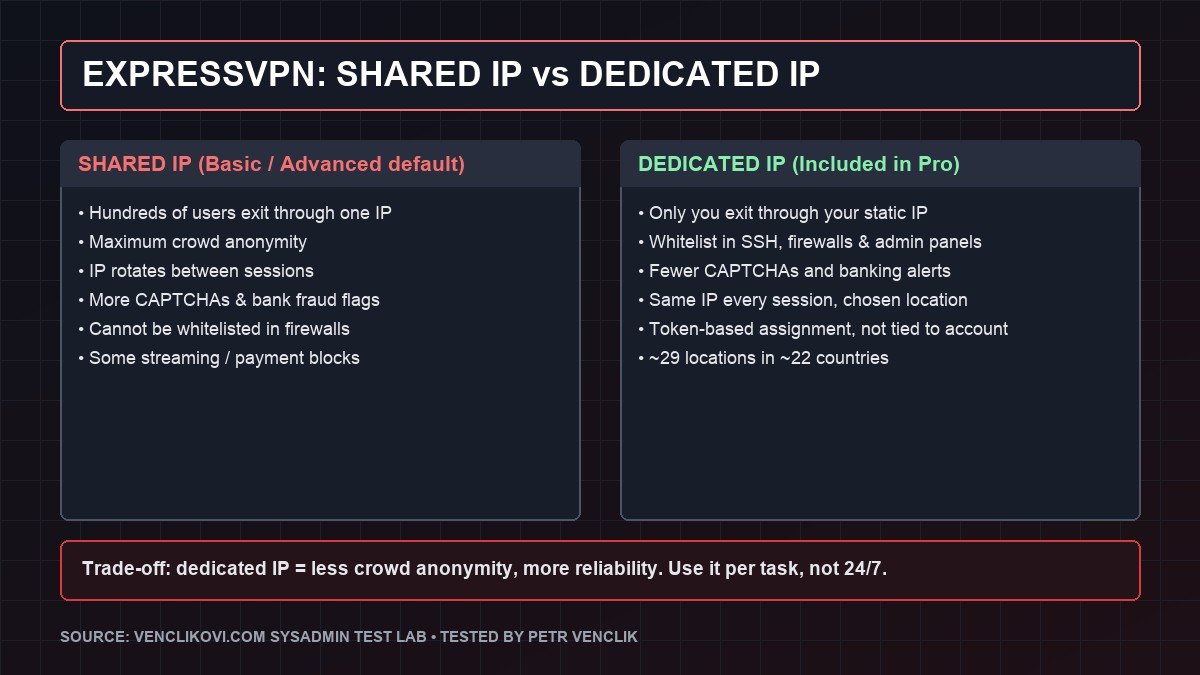
As illustrated, standard shared IPs funnel multiple distinct user sessions through a single public IP. While this maximizes crowd anonymity, it increases the likelihood of bot detection flags. In contrast, ExpressVPN’s Dedicated IP isolates your encrypted tunnel to an exclusive exit IP, eliminating CAPTCHA friction and enabling seamless firewall whitelisting without linking the IP back to your user account.
Whitelist Your Personal Dedicated IP Across Corporate Firewalls
Protect remote SSH sessions, access online banking without fraud alerts, and bypass endless CAPTCHA challenges with ExpressVPN Pro.
Claim Your Dedicated IP Today →30-Day Money-Back Guarantee • 24/7 Live Chat Support
6. Real-World Use Cases: Firewall Whitelisting, Banking & CAPTCHA Relief
A dedicated IP address is not necessary for every internet user, but for specific professional and technical workflows, it is an indispensable tool:
- Firewall & SSH Access Control Lists (ACLs): In enterprise IT administration, opening SSH port 22 or internal web dashboards (such as phpMyAdmin, Proxmox, or Kubernetes ingress) to
0.0.0.0/0is an egregious security violation. With an ExpressVPN dedicated IP, you can lock down ingress security groups in AWS, Cloudflare Zero Trust, oriptablesstrictly to your static IP address:# Example: Restricting SSH ingress strictly to your ExpressVPN Dedicated IP iptables -A INPUT -p tcp -s 185.220.101.45 --dport 22 -j ACCEPT iptables -A INPUT -p tcp --dport 22 -j DROP - Eliminating CAPTCHA Fatigue: Cloudflare, Google reCAPTCHA, and Arkose Labs monitor traffic volume per IP. When dozens of users browse through the same shared VPN node, IP reputation scores drop, forcing users to click fire hydrants and traffic lights endlessly. A dedicated IP maintains a clean reputation score because only your devices generate traffic through it.
- Uninterrupted Online Banking & Payment Processing: Financial portals employ aggressive geolocation and IP intelligence filters. Logging in through an unshared static IP located in your home country ensures two-factor authentication loops and fraud lockouts are minimized.
- Secure Remote Working & Database Management: Connecting to production PostgreSQL, MySQL, or internal Jira clusters requires fixed, trusted IP origins. A dedicated IP allows developers and consultants to work securely from coffee shops or hotel networks while presenting a trusted static IP to corporate gateways.
7. Step-by-Step Setup: Activating Dedicated IP on Windows, Mac & Mobile
Activating an ExpressVPN Dedicated IP is straightforward and requires no manual OpenVPN configuration file editing. Once you subscribe to the Pro plan or purchase the add-on, follow these steps:
- Step 1 (Select Location): Log into your account dashboard on the official ExpressVPN website. Navigate to the Dedicated IP section and select your desired metropolitan endpoint from the 29 supported locations. Confirm the selection to generate your blind token.
- Step 2 (Update Application): Ensure you are running the latest version of the ExpressVPN client on Windows, macOS, iOS, Android, or Linux.
- Step 3 (Connect via Location Picker): Open the ExpressVPN client, click the server location picker, and navigate to the new Dedicated IP tab located adjacent to Recommended and All Locations.
- Step 4 (Verify Static Assignment): Click your assigned dedicated node and connect. To confirm proper routing, open a terminal or command prompt and execute:
$ curl -4 icanhazip.com
185.220.101.45 # Confirms traffic is exiting through your designated static IP
If you ever need to test your connection without financial commitments, you can follow our walkthrough on how to test ExpressVPN risk-free for 30 days to evaluate dedicated IP routing under real-world conditions.
8. Technical Limitations: Router Support, Anonymity Trade-offs & Streaming
Before deploying a dedicated IP, systems administrators and power users must account for several structural limitations:
- Reduced Crowd Anonymity: If your threat model involves evading sophisticated state surveillance or preventing any single website from fingerprinting your recurring browsing sessions, a dedicated IP is counterproductive. Because you are the sole user of that IP, advertising networks can build a unified behavioral profile across visits. For pure anonymity, always use ExpressVPN’s standard shared server pools.
- Router Firmware Constraints: At present, ExpressVPN’s dedicated IP is designed primarily for desktop (Windows, Mac, Linux) and mobile (iOS, Android) applications. Direct integration with the **Aircove** router or third-party Asus/DD-WRT OpenVPN router profiles remains limited; router setups generally default to shared server endpoints.
- Fixed Geographic Commitment: Once you assign your dedicated IP to a specific region (e.g., London), you cannot arbitrarily switch that static address to New York on the fly. To route traffic through other countries, you must toggle back to standard shared server locations inside the app.
- P2P Torrenting Caution: While ExpressVPN allows P2P traffic on dedicated IPs, torrenting swarms publicly record the IP address of every active peer. Using a static IP that belongs exclusively to you eliminates the shared-pool obfuscation that protects torrent users from targeted DMCA tracking.
Deploy Dedicated Static IP Protection Across 14 Devices
Avoid automated IP reputation flags, maintain seamless banking access, and encrypt all your traffic with ExpressVPN’s Lightway protocol.
Check Dedicated IP Availability →30-Day Money-Back Guarantee • 24/7 Live Chat Support
9. Head-to-Head: ExpressVPN Dedicated IP vs. NordVPN Dedicated IP
How does ExpressVPN’s static IP feature compare against its primary competitor, NordVPN? In our in-depth audit of NordVPN Dedicated IP pricing and performance, both providers scored highly, but with distinct technical variations:
| Comparison Dimension | ExpressVPN Dedicated IP | NordVPN Dedicated IP |
|---|---|---|
| Plan Packaging | Bundled natively in Pro Plan (or add-on) | Purely a paid add-on ($3.79–$5.89/mo extra) |
| Geographic Locations | 29 locations across 22 countries | 30+ locations across 18+ countries |
| Protocol Support | Lightway (UDP/TCP) with post-quantum crypto | NordLynx (WireGuard) & OpenVPN |
| Anonymity Decoupling | Cryptographic blind-token architecture | Decoupled token-based assignment |
| Simultaneous Device Quota | 14 Devices (Pro Plan) | 10 Devices |
For an overarching look at how both ecosystems perform across speeds, streaming, and audits, consult our NordVPN vs ExpressVPN 2026 comparison.
10. Final Sysadmin Scorecard & Recommendation
ExpressVPN’s Dedicated IP is a masterclass in blending enterprise utility with privacy engineering. By employing a blind-token assignment mechanism on 100% RAM-only TrustedServer nodes, ExpressVPN ensures that having a static IP address does not require sacrificing zero-logs anonymity.
If you are a remote sysadmin who requires static firewall whitelisting, an online entrepreneur tired of solving Cloudflare verification grids, or an expat who needs seamless online banking access without fraud locks, ExpressVPN Pro with Dedicated IP earns our highest endorsement. For casual users who simply want to browse Wikipedia and stream Netflix, standard shared servers remain more than sufficient.
Secure Your High-Speed Encrypted Dedicated IP With ExpressVPN Pro
Protect up to 14 devices simultaneously with exclusive static IP access across 29 locations, audited RAM-only infrastructure, and an unconditional 30-day money-back guarantee.
Get ExpressVPN Dedicated IP →30-Day Money-Back Guarantee • 24/7 Live Chat Support
11. Frequently Asked Questions (FAQ)
Below are the 10 most common technical, operational, and billing questions regarding ExpressVPN’s Dedicated IP service:
FAQ 1: What is an ExpressVPN Dedicated IP?
An ExpressVPN Dedicated IP is a static public IPv4 address reserved exclusively for your connection. Unlike shared VPN servers where hundreds of users share an IP, your dedicated IP remains constant across every session while maintaining full Lightway encryption.
FAQ 2: How much does an ExpressVPN Dedicated IP cost?
Dedicated IP is bundled directly inside the ExpressVPN Pro plan, which starts around $5.24 per month on the 28-month promotional term. If purchased separately as an add-on on Basic or Advanced plans, it typically costs an additional $3.99 per month.
FAQ 3: Does a Dedicated IP reduce my privacy compared to shared servers?
Yes, in terms of crowd blending. Because you are the only user routing through that specific IP, websites can correlate multiple visits to the same source. However, ExpressVPN uses a blind-token assignment system so their own backend cannot link the IP to your billing account.
FAQ 4: In which countries can I get an ExpressVPN Dedicated IP?
ExpressVPN offers dedicated IPs across 29 locations in 22 countries, including the US (7 cities), UK (London and Midlands), Canada, Germany, France, Netherlands, Japan, Australia, Singapore, and Switzerland.
FAQ 5: Does a Dedicated IP stop Google and Cloudflare CAPTCHAs?
Yes. Automated CAPTCHA challenges occur when hundreds of users trigger security heuristics on a shared IP address. With a dedicated IP, your clean traffic history ensures automated bot detection systems do not flag your connection.
FAQ 6: Can I use my Dedicated IP on all my devices?
Yes. Under the Pro plan, you can configure your Dedicated IP across up to 14 devices simultaneously, including your Windows PC, MacBook, iPhone, Android smartphone, and Linux workstations.
FAQ 7: Can I change the location of my Dedicated IP after purchase?
No. A dedicated IP token binds to the specific metropolitan location you select upon activation. If you need an address in another country, you must switch back to the standard shared server list or provision a separate dedicated IP add-on.
FAQ 8: Does ExpressVPN Dedicated IP work on Wi-Fi routers?
Currently, ExpressVPN’s dedicated IP feature is supported natively on desktop and mobile client applications. Direct integration within the Aircove router firmware is limited, meaning router connections generally default to shared server pools.
FAQ 9: Is a Dedicated IP good for torrenting and P2P downloading?
While technically supported, it is not recommended. In a public torrent swarm, every peer can log your IP. Using a static IP that only you use makes DMCA tracing significantly easier than using ExpressVPN’s standard shared server pools.
FAQ 10: Is ExpressVPN’s Dedicated IP better than NordVPN’s?
Both offer excellent decoupled token assignment. ExpressVPN’s major advantage is that Dedicated IP is bundled directly into the Pro plan for up to 14 devices, whereas NordVPN requires a separate paid add-on on top of any base plan tier.


