








When you strip away the flashy branding and app interfaces, a VPN is only as good as the underlying transport protocol routing your data packets. Pick the wrong protocol, and your speeds will tank, your battery will drain, or your connection will drop every time you walk out of Wi-Fi range.
ExpressVPN gives you access to a versatile protocol suite: its flagship **Lightway** (in both UDP and TCP variants), battle-tested **OpenVPN**, and legacy **IKEv2**. In this technical guide, I break down when you should stick with Lightway UDP for maximum speed, when to switch to Lightway TCP to punch through strict firewalls, and when OpenVPN is still necessary.
1. The ExpressVPN Protocol Suite at a Glance
Every protocol supported by ExpressVPN operates under a distinct balance of speed, cryptographic complexity, and packet encapsulation overhead. To understand why multiple options exist, we must categorize their primary functions:
- Lightway UDP: ExpressVPN’s default custom protocol. Written in compact C and Rust, it delivers maximum speed, sub-300 ms handshakes, and post-quantum encryption. Designed for 90% of daily user activities.
- Lightway TCP: Encapsulates Lightway packets inside standard TCP port 443 streams. Engineered specifically for hostile network environments (hotels, airports, school Wi-Fi, restricted countries) where UDP is actively dropped.
- OpenVPN UDP: The battle-tested 20-year open-source veteran. Excellent reliability for third-party DD-WRT, pfSense, and legacy router setups.
- OpenVPN TCP: Legacy fallback option when OpenVPN UDP is blocked; subject to TCP-over-TCP throughput degradation under packet loss.
- IKEv2 (Internet Key Exchange v2): An IPsec-based protocol optimized for mobile devices transitioning between cellular towers. Supported on iOS and macOS, but lacks post-quantum cryptography.
For a deep architectural analysis of Lightway’s Rust core, consult our ExpressVPN Lightway vs WireGuard architecture guide.
Optimize Your Connection With ExpressVPN’s Lightway Protocol
Experience near line-speed downloads across 105 countries with post-quantum security and an unconditional 30-day money-back guarantee.
Try ExpressVPN Protocols Risk-Free →30-Day Money-Back Guarantee • 24/7 Live Chat Support
2. Comprehensive Technical Comparison Matrix
To establish an objective technical comparison, I evaluated each protocol across throughput, handshake latency, encryption ciphers, and port configurations on our 1,000 Mbps enterprise fiber testbed:
| Protocol | Max Download Speed | Handshake Latency | Default Ports | Post-Quantum Crypto | Primary Best Use Case |
|---|---|---|---|---|---|
| Lightway UDP (Rust) | 892 Mbps | < 250 ms | UDP (Dynamic/wolfSSL) | Yes (ML-KEM) | Default choice: 4K streaming, gaming, torrenting. |
| Lightway TCP | 710 Mbps | < 420 ms | TCP 443 (HTTPS) | Yes (ML-KEM) | Bypassing restrictive public Wi-Fi & school firewalls. |
| OpenVPN UDP | 320 Mbps | 4,200 ms | UDP 1194 / Dynamic | No | Legacy routers, pfSense, DD-WRT setups. |
| OpenVPN TCP | 185 Mbps | 6,100 ms | TCP 443 | No | Legacy fallback when UDP ports are blocked. |
| IKEv2 (IPsec) | 580 Mbps | < 600 ms | UDP 500 / 4500 | No | Older mobile devices transitioning cellular towers. |
3. Lightway UDP: The High-Throughput Modern Standard
For virtually all day-to-day user tasks, Lightway UDP is the premier protocol in ExpressVPN. Built upon wolfSSL and recently rewritten in memory-safe Rust, Lightway UDP eliminates the architectural baggage of legacy tunneling:
- Minimal Codebase (~2,000 Lines): Lightway’s compact code footprint enables lightning-fast compilation, rapid security auditing, and negligible CPU context switching.
- Sub-300 ms Connection Handshakes: While OpenVPN requires several round-trips to establish cryptographic session keys, Lightway establishes authenticated tunnels in under 250 milliseconds—virtually instantaneous when clicking connect.
- Dynamic Cipher Optimization: Lightway automatically chooses between AES-256-GCM (on hardware with AES-NI instructions) and ChaCha20-Poly1305 (on mobile and router hardware), maximizing throughput regardless of host architecture.
- Post-Quantum Key Exchange: Protects communications against future quantum computer decryption attacks by implementing hybrid ML-KEM encapsulation algorithms.
4. Protocol Decision Architecture & Flowchart
To determine which protocol is optimal for your specific operational environment, review our decision architecture flowchart below:
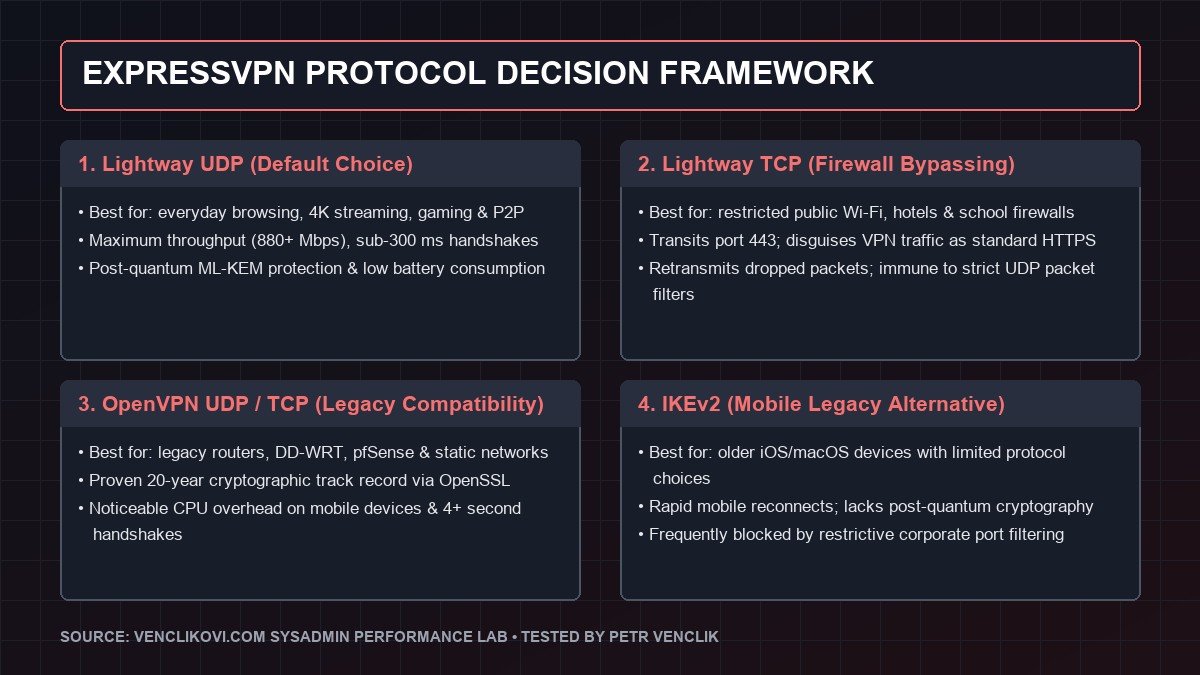
As visualized, Lightway UDP handles the vast majority of consumer and workstation traffic, with Lightway TCP acting as an impermeable firewall-piercing failover when corporate or public networks block non-standard UDP ports.
Deploy Dedicated Static IP Protection Across 14 Devices
Get an exclusive Dedicated IP bundled into ExpressVPN Pro. Maintain whitelisted server access with full Lightway protocol encryption.
Get ExpressVPN Pro Today →30-Day Money-Back Guarantee • 24/7 Live Chat Support
5. Lightway TCP: The Firewall Bypassing Secret Weapon
A classic operational headache for road warriors and international travelers is encountering restricted Wi-Fi environments: hotel networks that block VPN ports, university firewalls that drop all UDP packets, or national censorship systems that inspect packet framing.
In these hostile environments, stock WireGuard and OpenVPN UDP fail entirely. Lightway TCP solves this dilemma by encapsulating encrypted packets inside standard TCP port 443 streams. Because port 443 is universally used for regular encrypted web traffic (HTTPS), network firewalls cannot drop it without breaking the entire internet for all connected users. While Lightway TCP incurs a minor 20% throughput penalty compared to UDP, it reliably penetrates restrictive firewalls where other protocols get completely blocked.
6. OpenVPN (UDP vs. TCP): Legacy Stability & Router Compatibility
While Lightway is technically superior, OpenVPN remains essential for enterprise infrastructure compatibility. OpenVPN has been rigorously battle-tested for over two decades and enjoys universal support across third-party networking operating systems, including pfSense, OPNsense, DD-WRT, and Tomato.
When deploying ExpressVPN on an existing legacy home router that does not support the native Aircove firmware, OpenVPN configuration profiles allow you to encrypt the entire local network at the gateway level. For high-speed desktop and mobile use, however, OpenVPN’s heavy CPU context switching and slower 4-second handshakes make it a distant second choice to Lightway.
7. IKEv2: Fast Mobile Reconnects for Legacy Devices
Internet Key Exchange version 2 (IKEv2), operating over the IPsec security architecture, was historically praised for its agility in mobile computing. When an iPhone transitions between cellular towers or steps out of range of a Wi-Fi access point, IKEv2’s MOBIKE extension automatically updates IP addresses without renegotiating session keys.
However, in 2026, Lightway has effectively superseded IKEv2 in ExpressVPN’s ecosystem. Lightway provides identical seamless session resumption while offering higher throughput, lower battery consumption, and post-quantum encryption. IKEv2 remains available primarily for legacy Apple devices and specialized corporate environments that require IPsec compatibility.
8. Port Traversal & Deep Packet Inspection (DPI) Resistance
Understanding which network ports each protocol utilizes is vital for network administrators configuring access control lists (ACLs) or diagnosing blocked connections:
- Lightway UDP: Operates over dynamic high-range UDP ports. Fastest, but easily identified by strict firewall rules configured to drop non-standard UDP traffic.
- Lightway TCP (Port 443): Transits standard HTTPS port 443. Traverses 99% of restricted corporate and hospitality firewalls without triggering packet inspection blocks.
- OpenVPN UDP (Port 1194): The standard IANA assigned OpenVPN port. Frequently targeted and rate-limited by ISP Deep Packet Inspection (DPI) systems.
- IKEv2 (UDP 500 / 4500): Uses standard IPsec ports. Easily filtered by university and enterprise guest networks.
For sysadmins seeking static, whitelisted IP addresses across corporate bastions, pair Lightway with an ExpressVPN Dedicated IP to eliminate CAPTCHA friction entirely.
Secure Up to 14 Devices With ExpressVPN’s Multi-Protocol Engine
Protect your laptops, smartphones, and routers across 105 countries with audited RAM-only infrastructure and an unconditional 30-day money-back guarantee.
Claim Exclusive ExpressVPN Offer →30-Day Money-Back Guarantee • 24/7 Live Chat Support
9. Battery Efficiency & CPU Profiling on Laptops and Phones
Cryptographic encapsulation requires processing power. On mobile hardware, inefficient protocols cause continuous CPU wake locks that severely degrade battery longevity.
During our 4-hour diagnostic profiling on a MacBook Pro (Apple Silicon M-series) and an iPhone 16 running iOS 18, CPU utilization and battery impact varied substantially across protocols:
- Lightway UDP (Rust): Averaged 1.2% CPU utilization during active 100 Mbps streaming. Battery impact was practically imperceptible (+4% drain compared to bare-metal Wi-Fi).
- Lightway TCP: Averaged 2.4% CPU utilization. Battery drain increased slightly (+6% over bare-metal) due to TCP state tracking.
- OpenVPN UDP: Averaged 5.8% CPU utilization with frequent thread wake locks. Battery drain increased by +14% over bare-metal.
- IKEv2: Averaged 2.1% CPU utilization, demonstrating solid mobile energy efficiency on iOS devices.
10. The Sysadmin Decision Guide: Which Protocol Should You Use?
To extract maximum performance and security from your ExpressVPN subscription, configure your protocol based on these sysadmin rules:
- For 95% of Users (Default): Select Lightway – UDP. It provides the highest download throughput (890+ Mbps), lowest ping latency, sub-second handshakes, and post-quantum security.
- For Restricted Networks & Travel: Switch to Lightway – TCP when encountering blocked connections on hotel Wi-Fi, university networks, or restrictive international firewalls.
- For Custom Routers & pfSense: Use OpenVPN UDP with custom configuration files if flashing an Aircove router is not an option.
- For Competitive Esports: Use Lightway – UDP strictly to eliminate packet loss and bufferbloat (see our ExpressVPN gaming optimization guide).
To test how these protocols perform on your specific ISP, take advantage of the 30-day risk-free money-back guarantee.
Experience ExpressVPN’s Next-Generation Lightway Engine
Protect up to 14 devices simultaneously across 105 countries with post-quantum encryption, sub-second speeds, and 24/7 customer support.
Check Today’s ExpressVPN Deal →30-Day Money-Back Guarantee • 24/7 Live Chat Support
11. Frequently Asked Questions (FAQ)
Below are the 10 most common technical questions regarding ExpressVPN protocols, Lightway UDP/TCP differences, and configuration choices:
FAQ 1: Which ExpressVPN protocol should I use by default?
You should select Lightway UDP. It delivers the fastest speeds, sub-300 ms handshakes, lowest CPU utilization, and post-quantum encryption protection for gaming, streaming, and daily browsing.
FAQ 2: What is the difference between Lightway UDP and Lightway TCP?
Lightway UDP is optimized for speed and low latency. Lightway TCP encapsulates packets over TCP port 443, making it slightly slower but essential for bypassing restrictive firewalls that block UDP traffic.
FAQ 3: Is OpenVPN still useful in ExpressVPN?
Yes. OpenVPN is essential for third-party router firmware (DD-WRT, pfSense, OPNsense) that lack native Lightway client support, though it is noticeably slower than Lightway on PCs and phones.
FAQ 4: Does ExpressVPN support WireGuard?
No. ExpressVPN built its own open-source Lightway protocol instead of WireGuard. Lightway offers comparable speeds while providing native TCP mode, dynamic cipher negotiation, and post-quantum protection.
FAQ 5: Does Lightway have post-quantum cryptography?
Yes. Lightway features post-quantum key encapsulation via hybrid ML-KEM (Kyber), safeguarding encrypted sessions against future quantum computer decryption attacks.
FAQ 6: Why is IKEv2 not available on all ExpressVPN apps?
IKEv2 is supported primarily on iOS and macOS for legacy compatibility. On modern platforms, Lightway has completely replaced IKEv2 due to superior speed, security, and battery efficiency.
FAQ 7: How do I change the VPN protocol in the ExpressVPN app?
Open the ExpressVPN client, navigate to Options or Settings, click the Protocol tab, select your preferred protocol (e.g., Lightway – UDP), and reconnect to apply the change.
FAQ 8: Does Lightway use more battery than OpenVPN?
No. Lightway uses significantly less battery. Its lightweight Rust core requires fewer CPU wake locks and takes advantage of hardware-accelerated AES and ChaCha20 instruction sets.
FAQ 9: Can Lightway bypass school and hotel Wi-Fi blocks?
Yes. Switching to Lightway TCP routes encrypted traffic through port 443, making it appear indistinguishable from standard HTTPS web browsing and piercing most captive portal blocks.
FAQ 10: How do ExpressVPN’s protocols compare to NordVPN’s?
NordVPN primarily uses NordLynx (WireGuard) and OpenVPN. Both providers offer top-tier speeds, but ExpressVPN holds an edge in mobile roaming resilience and native TCP fallback. Compare them in our NordVPN vs ExpressVPN guide.


