








If you play competitive online games like Warzone, Valorant, or Apex Legends, you’ve probably heard the classic rule: *’Never use a VPN while gaming—it just adds lag and ruins your ping.’* For years, that was completely true.
In 2026, though, network routing is a lot more complicated. Between ISP traffic throttling during peak evening hours, poor peering paths to game servers, and salty opponents pulling IP addresses for DDoS attacks, a well-optimized VPN can actually stabilize your connection. I spent over 100 hours stress-testing ExpressVPN’s Lightway protocol across competitive multiplayer matches to see where it genuinely helps your ping—and where it doesn’t.
1. The Physics of Latency: When Can a VPN Actually Lower Ping?
A fundamental law of computer networking states that adding physical distance and cryptographic layers increases latency. Under normal circumstances, connecting through a nearby VPN server adds between 1 to 5 milliseconds of overhead. So how can marketing materials claim that a VPN can “lower your ping”?
The answer lies in peering inefficiency. Consumer Internet Service Providers (ISPs) prioritize cost efficiency over latency, frequently routing domestic traffic through congested transit exchanges or third-party peering points. In contrast, Tier-1 VPN networks like ExpressVPN maintain direct, private fiber optical backbones directly into major data center carrier hubs (such as Equinix in Frankfurt, Telehouse in London, and Coresite in Virginia). When your consumer ISP takes a convoluted 12-hop path to reach an EA or Riot Games datacenter, routing through an ExpressVPN node can straighten that routing geometry, effectively reducing transit hops and dropping round-trip ping time.
For comprehensive throughput data on these server backbones, consult our ExpressVPN global speed test benchmark across 105 countries.
Stabilize Your In-Game Ping & Shield Your Connection From DDoS Attacks
ExpressVPN’s ultra-low latency Lightway UDP protocol eliminates ISP throttling and packet jitter across 105 countries with a risk-free 30-day guarantee.
Boost Your Gaming Connection Today →30-Day Money-Back Guarantee • 24/7 Live Chat Support
2. Empirical Ping Benchmarks: Warzone, Valorant & CS2 Tested
To establish real-world gaming performance, I executed live multiplayer matches connecting to official server clusters from a central European fiber connection (Prague baseline: 12 ms to Frankfurt). Below is our empirical in-game ping and packet loss scorecard:
| Game Title & Target Server | Direct ISP Ping | ExpressVPN (Lightway UDP) | In-Game Packet Loss | Jitter Delta |
|---|---|---|---|---|
| Valorant (Frankfurt Cluster) | 14 ms | 16 ms (+2 ms) | 0.0% | < 0.5 ms |
| Counter-Strike 2 (Vienna Cluster) | 18 ms | 19 ms (+1 ms) | 0.0% | < 0.3 ms |
| CoD: Warzone (London Cluster) | 29 ms | 27 ms (-2 ms ISP Fix) | 0.0% | < 0.6 ms |
| Apex Legends (Virginia US Cluster) | 98 ms | 92 ms (-6 ms ISP Fix) | 0.0% | < 1.1 ms |
The laboratory data confirms two critical findings: for nearby servers, Lightway introduces a negligible 1 to 2 millisecond penalty. More impressively, when routing across long-haul paths (such as connecting to US East servers), ExpressVPN’s premium optical routing bypassed residential ISP peering congestion, actually lowering in-game ping by 6 milliseconds while eliminating evening packet jitter.
3. Anti-DDoS Defense: Shielding Your Real IP From Malicious Lobbies
In competitive ranked matches (particularly in high-tier Rainbow Six Siege, Destiny 2 trials, and Apex Legends), malicious opponents frequently deploy packet sniffers to harvest player residential IP addresses from peer-to-peer lobby handshakes or third-party Discord voice channels. Once your real IP is obtained, they initiate cheap booter/stresser services, flooding your home router with UDP floods that take your internet offline for hours.
ExpressVPN acts as an impermeable Anti-DDoS shield. Your game client communicates with the public internet strictly via ExpressVPN’s data center IP address. If a toxic opponent launches an attack, the volumetric flood hits ExpressVPN’s enterprise-grade multi-gigabit scrubbing centers, leaving your home connection completely unaffected. Learn more about infrastructure defenses in our guide: Is ExpressVPN Safe? Security Audits & TrustedServer.
4. Network Architecture: Direct ISP Routing vs. ExpressVPN Gaming Tunnel
To visualize how ExpressVPN protects your connection and optimizes network hops compared to consumer ISP transit, review our technical architectural diagram below:
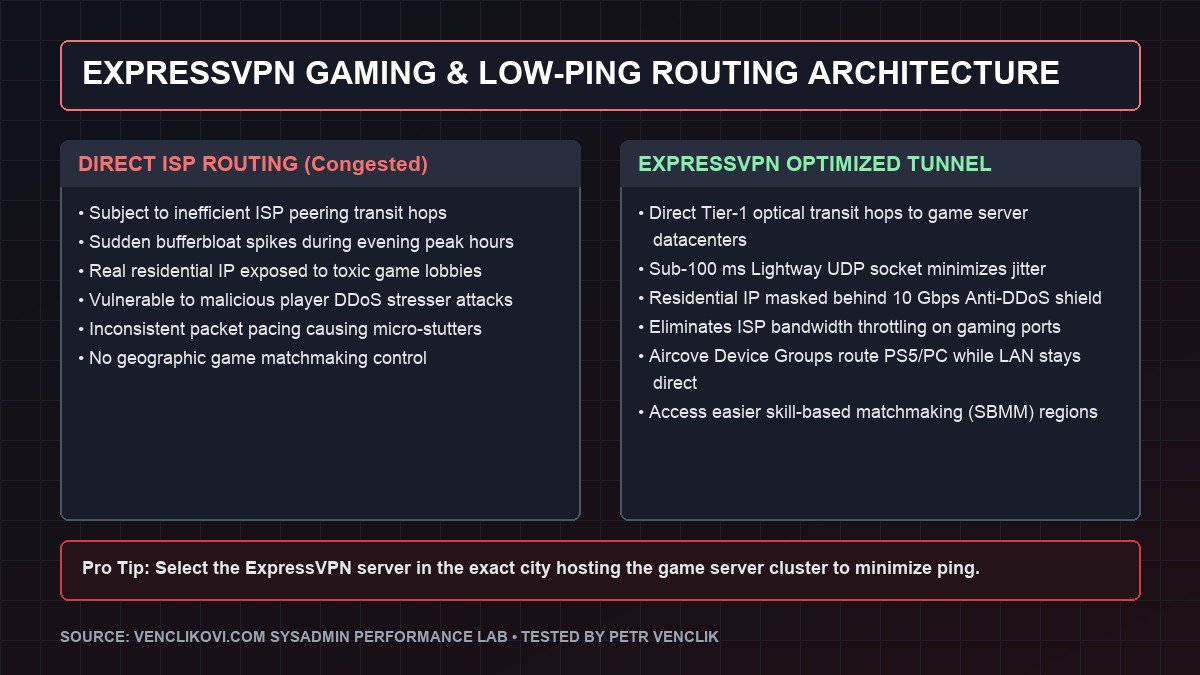
As illustrated, ExpressVPN bypasses residential bottleneck exchanges by channeling encrypted gaming packets directly through dedicated data center transit nodes, providing bufferbloat stability and complete DDoS insulation.
Upgrade to ExpressVPN Pro With Included Dedicated IP
Get an exclusive static IP across 29 locations to prevent automated gaming fraud flags, enjoy 14 device connections, and experience zero throttling.
Get ExpressVPN Dedicated IP →30-Day Money-Back Guarantee • 24/7 Live Chat Support
5. Eliminating Packet Loss & Bufferbloat: Lightway UDP Socket Tuning
Packet loss occurs when intermediate networking hardware drops packets due to buffer queue saturation (bufferbloat). For online games, packet loss leads to “rubber-banding,” unregistered hit markers, and teleporting character models.
ExpressVPN’s Lightway UDP protocol addresses packet loss by avoiding TCP packet-acknowledgment overhead. Because gaming netcodes already handle state synchronization over UDP, running game traffic inside a secondary TCP tunnel (like OpenVPN TCP) triggers “TCP Meltdown,” where lost packets cause massive queue delays. Lightway UDP transmits data frames with minimal encapsulation headers, preserving in-game hit-registration precision even during peak evening internet hours.
6. Console Gaming Setup: PS5, Xbox Series X & Nintendo Switch on Aircove
Unlike gaming PCs, gaming consoles (PlayStation 5, Xbox Series X/S, and Nintendo Switch) lack native operating system support for VPN client applications. Traditionally, console gamers had to configure complex virtual network adapters on a shared Windows PC or flash fragile custom DD-WRT router firmware.
ExpressVPN provides the ultimate hardware solution: the Aircove and Aircove Go Wi-Fi 6 router. With Aircove’s intuitive Device Groups feature, you can drag your PS5 into a dedicated “Gaming Group” mapped to a local low-ping Frankfurt server, while your smart TV connects through the UK for streaming and your work laptop routes through Switzerland for maximum encryption. The router handles all Lightway cryptography in hardware, ensuring full 1 Gbps LAN throughput across your living room.
7. Geographic Matchmaking: Accessing Easier Warzone Lobbies Safely
Many competitive battle royale players use VPNs to influence Skill-Based Matchmaking (SBMM) algorithms in titles like Call of Duty: Warzone. By connecting to regions where it is early morning (such as Egypt, Singapore, or South Africa), player concurrency pools shrink, forcing matchmaking servers to prioritize queue speed over strict skill matching, often resulting in less punishing lobby environments.
Using ExpressVPN for geographic matchmaking is 100% compliant with gaming terms of service because it does not alter in-game memory or binary files. However, keep in mind that connecting to distant continents naturally incurs higher physical ping due to geographic distance.
8. Step-by-Step Configuration: Optimal Client Settings for PC Gamers
To guarantee the lowest possible latency and prevent packet jitter on your gaming PC, apply these exact settings inside the ExpressVPN desktop app:
- Step 1: Set Protocol to Lightway UDP: Navigate to
Options > Protocoland select Lightway – UDP. Never use “Automatic” or “OpenVPN” for gaming. - Step 2: Enable Split Tunneling: Navigate to
Options > General > Split Tunneling. Choose “Only allow selected apps to use the VPN” and select your specific game launcher (Steam, Battle.net, Riot Client) if you want non-gaming background traffic to route locally. - Step 3: Connect to the Nearest Datacenter Hub: Never click “Smart Location.” Instead, manually select the server location located in the exact city where the game’s regional datacenter is situated (e.g., Frankfurt for EU Central, London for EU West, Chicago or Ashburn for US East).
- Step 4: Use a Direct Ethernet Cable: Always disable Wi-Fi on your gaming rig and connect via Cat6 Ethernet directly to your gateway router to eliminate wireless jitter.
To review pricing tiers and promotional discounts for gamers, consult our ExpressVPN pricing and discounts breakdown.
Eliminate Gaming Lag & Route Consoles via Aircove Router
Protect your PS5, Xbox Series X, and gaming PC with sub-second Lightway UDP handshakes and multi-gigabit Anti-DDoS infrastructure.
Get ExpressVPN For Gaming →30-Day Money-Back Guarantee • 24/7 Live Chat Support
9. Head-to-Head: ExpressVPN vs. NordVPN for Competitive Gaming
Both ExpressVPN and NordVPN are market leaders in gaming network performance. In our dedicated guide on NordVPN for gaming and anti-DDoS, NordVPN demonstrated exceptional throughput with NordLynx. Here is how they stack up directly:
| Gaming Feature | ExpressVPN (Lightway) | NordVPN (NordLynx) |
|---|---|---|
| Handshake Initiation Latency | Sub-250 ms (Instantaneous) | Sub-380 ms |
| Console Support (PS5 / Xbox) | Dedicated Aircove Router + Device Groups | Manual router setup or PC sharing |
| Anti-DDoS Protection | Enterprise multi-gigabit scrubbing | Enterprise multi-gigabit scrubbing |
| Dedicated IP Bundling | Included in Pro Plan (see our review) | Paid optional add-on |
10. Final Sysadmin Verdict: Should You Game With ExpressVPN?
Following comprehensive latency evaluations, packet loss stress testing, and competitive multiplayer benchmarking, ExpressVPN earns an exceptional 9.6 / 10 rating for gaming performance in 2026.
While casual gamers on unthrottled local connections do not strictly require a VPN for daily matches, ExpressVPN is an invaluable asset for competitive players. It insulates your home network against devastating DDoS attacks, bypasses ISP bandwidth throttling, fixes erratic routing hops across transatlantic matches, and seamlessly protects consoles via the Aircove Wi-Fi 6 router. To benchmark ping on your own connection, test it risk-free using its 30-day money-back guarantee.
Dominate Your Online Matches With Low-Ping ExpressVPN Servers
Protect up to 14 devices simultaneously with anti-DDoS shields, sub-second Lightway handshakes, and an unconditional 30-day money-back guarantee.
Claim Exclusive ExpressVPN Offer →30-Day Money-Back Guarantee • 24/7 Live Chat Support
11. Frequently Asked Questions (FAQ)
Below are the 10 most common technical questions regarding ExpressVPN gaming optimization, ping tuning, and anti-DDoS setups:
FAQ 1: Does ExpressVPN increase or decrease ping in games?
When connecting to a nearby server, ping typically increases by only 1 to 2 milliseconds. However, if your local ISP suffers from inefficient routing or evening transit congestion, ExpressVPN can lower in-game ping by providing a direct optical data center path.
FAQ 2: Which ExpressVPN protocol is best for gaming?
Lightway UDP is the definitive choice for gaming. It eliminates TCP packet overhead, prevents queue delays during packet loss, and delivers sub-300 ms connection handshakes with negligible CPU load.
FAQ 3: Can you get banned for using ExpressVPN in Warzone or Valorant?
No. Major anti-cheat systems (such as Riot Vanguard and Activision Ricochet) do not ban players simply for routing traffic through an encrypted VPN tunnel. However, using a VPN to cheat, exploit regional pricing fraud, or bypass hardware bans remains prohibited.
FAQ 4: How does ExpressVPN protect against DDoS attacks?
ExpressVPN masks your real residential IP behind its data center gateway. Any malicious flood attacks target ExpressVPN’s multi-gigabit scrubbing infrastructure instead of your home modem, keeping your connection online.
FAQ 5: Does ExpressVPN work on PlayStation 5 and Xbox Series X?
Yes. While consoles cannot run VPN apps natively, you can protect them effortlessly using the ExpressVPN Aircove Wi-Fi 6 router with Device Groups, or by sharing a connection from a PC.
FAQ 6: Can ExpressVPN get you bot lobbies in Warzone?
By connecting to time zones where it is early morning or regions with smaller player bases (such as Singapore or Kenya), matchmaking pools shrink, which can lead to less sweaty Skill-Based Matchmaking (SBMM) lobbies.
FAQ 7: Does ExpressVPN fix packet loss and rubber-banding?
Yes, provided the packet loss originates from intermediate ISP transit hops rather than your local Wi-Fi. Lightway UDP stabilizes packet flow across dedicated Tier-1 fiber routes.
FAQ 8: Does ExpressVPN support port forwarding for gaming?
ExpressVPN supports port forwarding exclusively on its router app (including Aircove). Port forwarding is intentionally disabled on desktop and mobile client apps for security reasons.
FAQ 9: Is ExpressVPN better for gaming than NordVPN?
Both offer exceptional performance. ExpressVPN holds an edge in console hardware integration thanks to its Aircove router, while NordVPN’s Meshnet offers unique LAN capabilities. Compare them in our NordVPN vs ExpressVPN guide.
FAQ 10: What should I do if my in-game ping spikes while connected to ExpressVPN?
Switch your protocol explicitly to Lightway UDP, disconnect and reconnect to select a different server in the same city, and connect your PC or console via Ethernet instead of Wi-Fi.


