








You open NordVPN on your Mac, find the protocol menu, and suddenly a simple connection has become a small alphabet exam. NordLynx, OpenVPN UDP, OpenVPN TCP. You just wanted your internet to work.
Start with NordLynx for everyday use. Keep OpenVPN UDP as an alternative, and try OpenVPN TCP when a network will not cooperate with UDP. The useful question is which option connects reliably and performs well on your connection.
This guide combines a Mac speed comparison with practical settings you can use yourself. There is also an important update for restrictive networks: NordVPN has changed how its Obfuscated Servers work.
NordLynx vs OpenVPN: the quick choice
| Option | When to try it | What to remember |
|---|---|---|
| NordLynx | Your first choice for normal browsing, downloads, and everyday work. | Built around WireGuard; uses UDP. |
| OpenVPN UDP | An alternative when NordLynx behaves poorly on your network. | A useful starting point when you specifically need OpenVPN. |
| OpenVPN TCP | A fallback when UDP connections fail. | Extra delivery handling can affect performance. |
| NordWhisper | Restrictive networks that interfere with VPN connections. | Now powers NordVPN’s Obfuscated Servers; outside this speed comparison. |
A protocol change is a troubleshooting tool, not a promise of a particular speed. A nearby server, your Wi-Fi connection, and the route to the service you use all matter.
Want to try these settings on your own Mac? Check NordVPN’s current plans, then follow the protocol steps below.
What actually changes when you switch protocols?
NordLynx: WireGuard inside NordVPN
NordLynx is NordVPN’s WireGuard-based protocol, with NordVPN’s own double NAT system. NordVPN describes it as the recommended default in its apps. You select it in the app without downloading a separate configuration file.
WireGuard sends its packets over UDP and uses modern cryptography, including ChaCha20 with Poly1305. That describes how it works; it does not prove that a particular connection will be faster or more private than every alternative. The underlying details are in WireGuard’s protocol documentation.
OpenVPN UDP and TCP: the same family, different delivery
OpenVPN can carry its tunnel over UDP or TCP. TCP provides ordered delivery and retransmits missing data. UDP does not add that same delivery process at the tunnel’s transport layer; applications can still handle reliability themselves.
That is why UDP is often a sensible performance choice. With TCP inside a TCP-based VPN tunnel, the two layers can interact poorly when packets are lost. OpenVPN explains this in its TCP-over-TCP guidance.
TCP still has a job. If UDP traffic is blocked or unreliable on a network, a TCP connection may work. Think of it as another route into the building, not an automatic speed upgrade.
The Mac speed test: setup and results
The test setup uses macOS 26.3.1 and NordVPN 10.14.1. The comparison covers a connection without the VPN, NordLynx, OpenVPN UDP, and OpenVPN TCP, using Apple’s built-in networkQuality tool.
The command is networkQuality -s -M 60 -c. It measures upload and download sequentially, sets a maximum test duration of 60 seconds, and produces JSON output. The VPN location is Czech Republic/Prague.
Measured on November 3, 2026: three consecutive runs per setting, 12 completed runs in total. The order was no VPN, NordLynx, OpenVPN UDP, then OpenVPN TCP. The order was not randomized, and the baseline was measured before the VPN groups.
The table shows the median of three runs. The smaller numbers under download and upload are the minimum–maximum range; idle round-trip latency is shown as a median only.
| Setting | Download (Mbps) | Upload (Mbps) | Idle RTT (ms) |
|---|---|---|---|
| No VPN | 70.9 69.0–71.5 | 21.9 20.7–26.5 | 46.2 |
| NordLynx | 71.5 68.0–72.4 | 25.2 20.0–28.2 | 64.6 |
| OpenVPN UDP | 67.2 61.4–70.6 | 23.2 19.2–25.7 | 57.9 |
| OpenVPN TCP | 61.9 61.3–63.3 | 29.5 22.8–32.5 | 160.2 |
The app connected to Prague servers Czech Republic #116 for NordLynx, #202 for OpenVPN UDP, and #124 for OpenVPN TCP. These were different servers, so this is a comparison of the resulting connections, not a test that holds everything except the protocol constant.
Median responsiveness under load is reported separately for the download and upload phases:
| Setting | Download RPM | Upload RPM |
|---|---|---|
| No VPN | 312.4 | 29.8 |
| NordLynx | 113.3 | 28.2 |
| OpenVPN UDP | 83.8 | 30.1 |
| OpenVPN TCP | 77.2 | 40.3 |
The practical result: NordLynx had the highest median download speed at 71.5 Mbps, close to the 70.9 Mbps baseline. OpenVPN UDP reached 67.2 Mbps and TCP 61.9 Mbps. TCP had the highest median upload speed, 29.5 Mbps, so there was no single winner across every metric.
The no-VPN connection had the highest median download-phase responsiveness. TCP’s idle latency varied from 50.2 to 253.0 ms, which shows why one run can give a misleading impression. These are observations from this session, not universal properties of the protocols.
The desktop remained in ordinary use during the session, so background activity was not tightly controlled. Overlapping ranges describe variability, not statistical significance. A figure above the baseline also does not establish that the VPN made the connection faster.
What the numbers tell you
Download speed matters when you fetch large files. Upload speed matters when you send them. Both are reported here in Mbps, so you can compare them with your usual connection speed without reaching for a calculator.
Responsiveness under load answers a different question: how well does the connection respond while it is busy? Apple’s tool expresses this in RPM, or round trips per minute. Higher is better. This is different from an idle ping measurement, as Apple explains in its network responsiveness presentation.
Do not treat RPM as a prediction of your ping in a specific game. A download test also cannot establish Netflix access, call quality, CPU usage, or battery life; those need their own tests.
Keep the result in proportion
This is a practical comparison of app settings on one Mac and connection. Selecting the same VPN country does not guarantee the same server: the app may choose different servers between protocols. Apple’s test endpoint is selected automatically rather than pinned to one fixed host.
Those differences mean the figures reflect the whole connection path, including server choice and routing. They cannot isolate the protocol’s contribution. Look for a repeatable difference across runs, and be cautious when a small gap sits inside a wide spread of results.
How to change the VPN protocol on your Mac
- Open the NordVPN app and disconnect the current VPN connection.
- Open its settings and find the VPN protocol selector.
- Select NordLynx, OpenVPN UDP, or OpenVPN TCP. If automatic selection is enabled, choose the specific protocol you want to compare.
- Reconnect to the same country and city, where a city choice is available.
- Wait until the app confirms the connection, then repeat the task that was causing trouble.
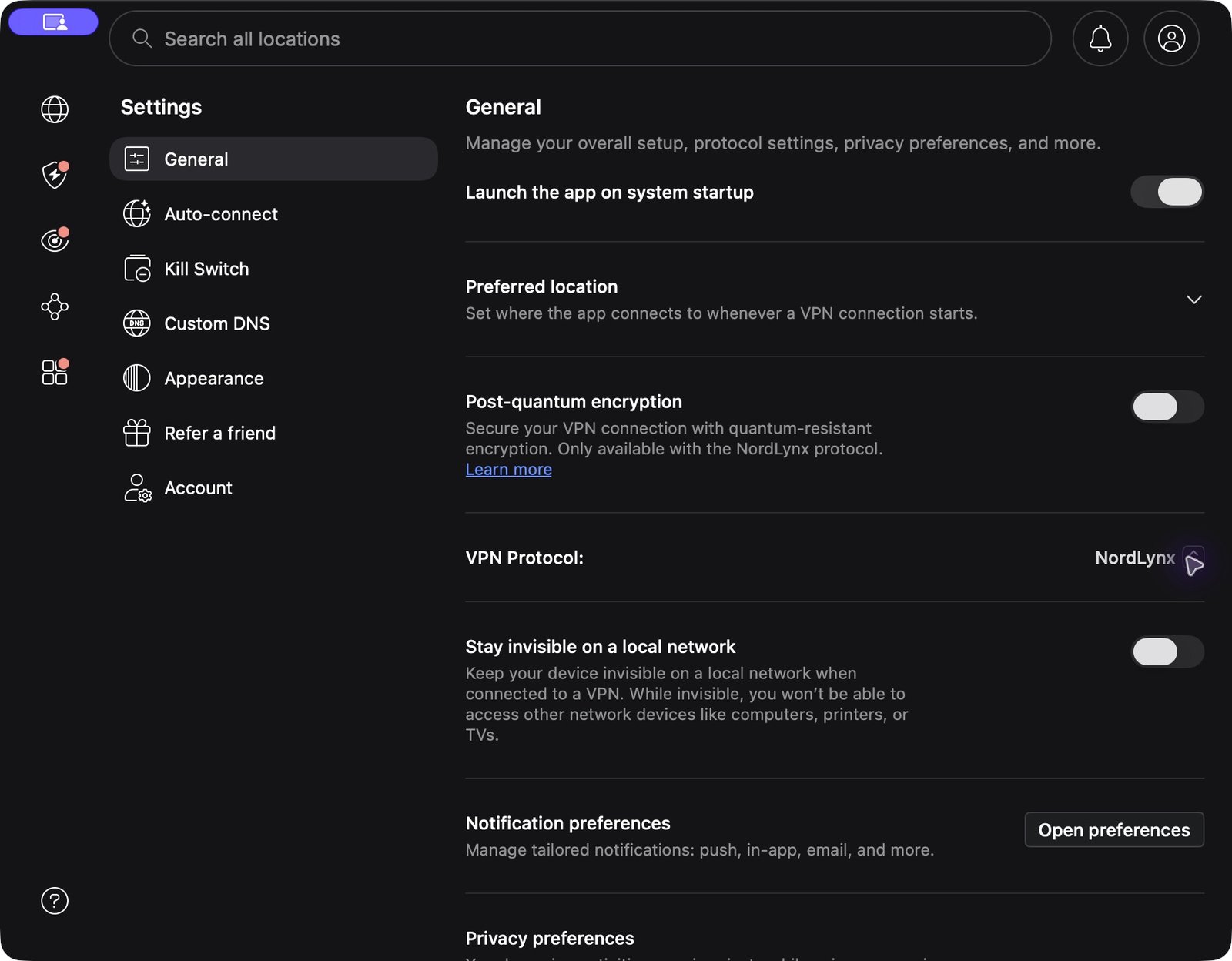
Change one setting at a time. If you also change the server country, browser, and Wi-Fi network, you might fix the problem without finding out what helped. Useful for getting back to work; less useful for a comparison.
For your own speed check, pause large downloads and cloud backups, stay in the same place if you use Wi-Fi, and repeat each setting several times. Keep all the results, including the disappointing ones. A single unusually fast run is a poor reason to change your everyday setup. If every protocol looks slow, check the connection without the VPN again before blaming the protocol menu.
If you are installing the app for the first time, follow the NordVPN setup guide before experimenting with protocols.
What changed with Obfuscated Servers and NordWhisper?
Older instructions often tell you to switch to OpenVPN TCP or UDP before using NordVPN’s Obfuscated Servers. That advice needs updating.
According to NordVPN’s current upgrade notice, the Obfuscated Servers category now runs on NordWhisper. The category remains available in the app, but the protocol behind it has changed. Manual OpenVPN connections can no longer connect to those obfuscated servers.
If your problem is a network that interferes with VPN traffic, this is the relevant option to investigate. If the hotel has not yet let you online at all, deal with its sign-in page first; complete the network’s own welcome page before troubleshooting the VPN tunnel. For broader connection problems, see our NordVPN connection troubleshooting guide.
Two settings myths worth retiring
“WireGuard always means using the NordVPN app”
NordVPN now publishes manual WireGuard setup instructions for Windows, macOS, Linux, Android, and iOS. Its app still uses NordLynx, and the manual setup is a separate route.
For a router, check the instructions for your exact model and firmware. A router supporting a protocol does not, by itself, establish that a particular NordVPN configuration is supported. Avoid old blanket claims in either direction.
“Switching protocols enables split tunneling on Mac”
It does not. NordVPN’s current platform guidance explicitly says its macOS app does not support split tunneling. Choosing OpenVPN will not reveal a hidden switch to exclude individual Mac apps.
Likewise, a website showing the wrong country is not automatically a protocol issue. Compare your public IP country with your selected VPN country, then check device location permissions and account settings. Our guide to changing your IP country explains the basic connection workflow.
Which protocol should you keep?
Use NordLynx as your starting point. If it connects reliably and your usual tasks work well, there is little reason to keep adjusting it. Try OpenVPN UDP when you need an alternative, TCP when UDP struggles, and NordWhisper for restrictive networks.
The best setting is the one that solves your actual problem consistently. For the wider picture beyond protocols, read our NordVPN review.
If you are considering NordVPN, check the current offer and review the total price and renewal terms before choosing a plan.
Affiliate links: we may earn a commission if you buy through these links.
FAQ
Is NordLynx always faster than OpenVPN?
No. It is a sensible first choice, but server load, distance, network conditions, and routing affect the result. Test both on your connection if performance is disappointing.
Should I choose OpenVPN UDP or TCP?
Start with UDP when you want to use OpenVPN. Try TCP if UDP cannot connect or behaves poorly. TCP’s delivery handling does not automatically make it the fastest option.
Is NordLynx more secure because it is faster?
No. Throughput is not a security measurement. A speed comparison does not evaluate implementation security, audit results, or a provider’s data-handling practices.
Can I compare protocols with Apple’s networkQuality tool?
Yes. Repeat the same test for each setting, include a no-VPN baseline, and record server and network details. Read the results as a comparison of those connections, especially when the server or test endpoint changes.
Do I still need OpenVPN for NordVPN’s Obfuscated Servers?
No. NordVPN’s updated Obfuscated Servers use NordWhisper. Follow the current app instructions rather than an older OpenVPN-based guide.