








ExpressVPN has always been the provider people describe as “excellent, but expensive.” That reputation is partly outdated. Since the move to three tiers – Basic, Advanced and Pro – the ExpressVPN pricing page looks more like a SaaS menu than a single VPN subscription, and the gap between the cheapest and the most sensible choice can easily be $100 over the life of a contract. The headline monthly number is the least useful figure on that page.
I’m Petr Venclik, a Senior Systems Engineer and Security Architect, and I treat VPN subscriptions the way I treat any infrastructure purchase: total cost of ownership, renewal terms and cost per endpoint. For this guide I walked through checkout for all three tiers and all three billing terms in November 2026, tracked the renewal line items, tested refund handling and compared the numbers against NordVPN. Below is the math, the traps and the tier I actually recommend for each type of user.
1. ExpressVPN Pricing at a Glance (November 2026)
Prices move with promotions, currency and local taxes, so read every figure below as “what I was quoted at checkout in November 2026, before VAT/sales tax.” The structure, however, has been stable for a while: three tiers, three billing terms, and the 2-year plan carries bonus months that pull the effective monthly price down sharply.
| Tier | Monthly Billing | 1-Year (per month) | 2-Year + Bonus (per month) | Devices |
|---|---|---|---|---|
| Basic | ≈ $12.95 | ≈ $4.99 | ≈ $2.79–$3.49 | 10 |
| Advanced | ≈ $15.99 | ≈ $5.99 | ≈ $3.59–$4.49 | 12 |
| Pro | ≈ $19.99 | ≈ $9.99 | ≈ $5.99–$7.49 | 14 |
The lower end of each 2-year range is what I saw during the Black Friday window; the upper end is the “normal” promotional price. All plans are billed upfront for the full term. If you want the full product context – speeds, protocols, apps – before you look at money, start with my complete ExpressVPN review.
See the Exact ExpressVPN Price for Your Region
Promotions and bonus months change frequently. Check the live checkout price before you commit to a tier or term.
Check Today’s ExpressVPN Deal →30-Day Money-Back Guarantee • 24/7 Live Chat Support
2. Basic vs Advanced vs Pro: What You Actually Pay For
The most important thing to understand: the VPN itself is identical in every tier. Same 105-country network, same RAM-only TrustedServer infrastructure, same Lightway protocol with post-quantum (ML-KEM) key exchange, same Network Lock kill switch, same split tunneling and same 24/7 live chat. You are not buying faster servers by going up a tier. You are buying device slots and bundled extras.
| Feature | Basic | Advanced | Pro |
|---|---|---|---|
| Simultaneous devices | 10 | 12 | 14 |
| Full VPN network, Lightway (post-quantum) | Yes | Yes | Yes |
| Threat Manager (ads / malicious sites) | Basic blocking | Advanced (trackers, adult filter) | Advanced |
| ExpressVPN Keys password manager | No | Yes | Yes |
| Identity monitoring / theft coverage | No | ID alerts (US-centric) | Extended coverage + data removal (US) |
| eSIM data bonus | No | Small | Larger |
| Dedicated IP | Paid add-on | Paid add-on | Included |
Basic: the pure VPN
Basic is the version most people should start with. Ten devices covers a laptop, a desktop, two phones, a tablet, a smart TV and a router with room to spare – and remember that a VPN on an Aircove or any supported router counts as a single connection for everything behind it.
Advanced: the bundle play
Advanced adds ExpressVPN Keys, the stronger Threat Manager profile and identity alerts. It only makes financial sense if those extras replace something you pay for today. If you already run Bitwarden or 1Password and a Pi-hole at home, the extra dollar a month buys you nothing you didn’t already have.
Pro: the Dedicated IP tier
Pro’s real value is the bundled Dedicated IP, assigned with a token-based approach designed so the IP isn’t directly tied to your account identity. If you need a static, clean address for allow-listed firewalls, banking or fewer CAPTCHAs, read my ExpressVPN Dedicated IP setup review before deciding – it covers locations and the configuration in detail.
3. Monthly vs 1-Year vs 2-Year: The Contract Math
The monthly price is a marketing number. What hits your card is the upfront total, and what matters for comparison is the effective cost per month of actual coverage. The 2-year plan typically includes bonus months (I saw four extra months during my checkout, giving 28 months total), which is where most of the “hidden” savings live.
| Tier / Term | Months Covered | Upfront Total (approx.) | Effective Monthly | Saving vs Monthly |
|---|---|---|---|---|
| Basic – monthly | 1 | $12.95 | $12.95 | – |
| Basic – 1 year | 12 | $59.88 | $4.99 | ≈ 61% |
| Basic – 2 years + 4 | 28 | $97.72 | $3.49 | ≈ 73% |
| Advanced – 2 years + 4 | 28 | $125.72 | $4.49 | ≈ 72% |
| Pro – 2 years + 4 | 28 | $209.72 | $7.49 | ≈ 63% |
I don’t trust marketing percentages, so I recompute them. If you want to plug in the price your checkout shows (with your local VAT), this one-liner does the job:
# effective monthly cost and saving vs month-to-month
python3 -c "
upfront, months, monthly = 97.72, 28, 12.95
eff = upfront / months
print(f'effective: \${eff:.2f}/mo, saving: {(1 - eff/monthly)*100:.0f}%')
"
# effective: $3.49/mo, saving: 73%
My rule: monthly billing only makes sense for a short trip or a one-off project. Three months on the monthly plan already costs about $39 – more than a third of the entire 28-month Basic contract. If you are unsure whether you’ll keep it, buy the 2-year plan and lean on the 30-day guarantee instead of paying the monthly premium.
4. Cost per Device: The Tier Comparison Matrix
In enterprise environments I budget per endpoint, and the same logic exposes a lot about ExpressVPN cost. Higher tiers add device slots, so the per-device price rises much more slowly than the sticker price.
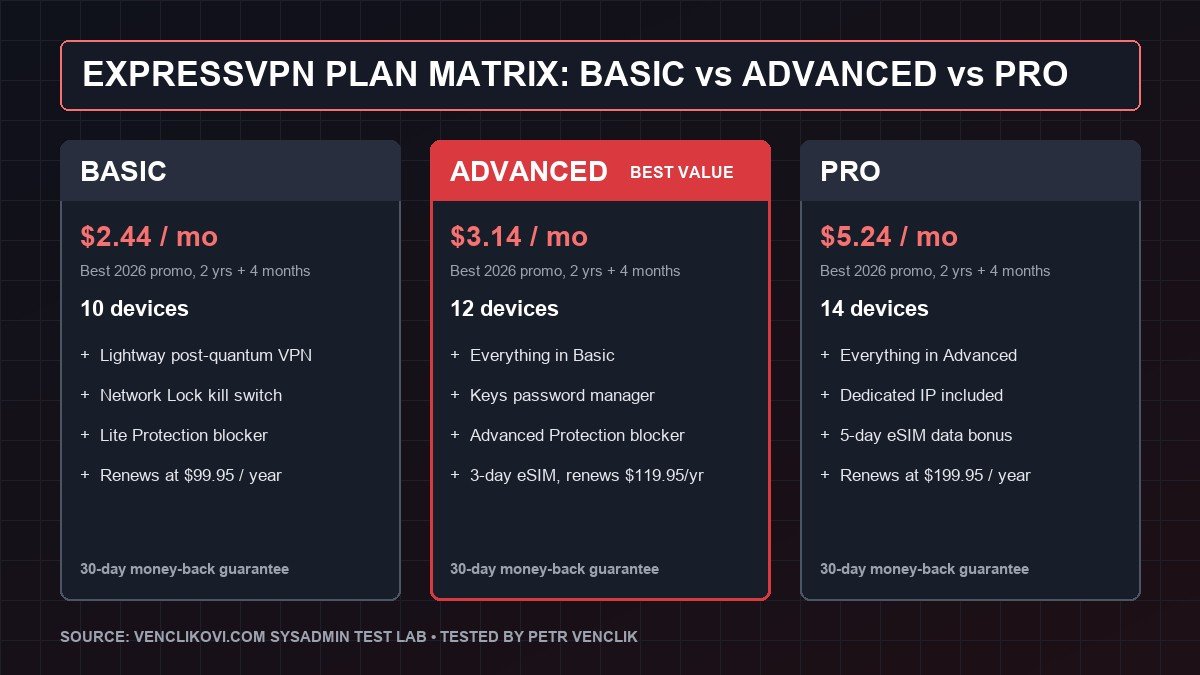
| Plan (2-year + bonus) | Devices | Cost per Device (28 months) | Cost per Device per Month |
|---|---|---|---|
| Basic ($97.72) | 10 | $9.77 | ≈ $0.35 |
| Advanced ($125.72) | 12 | $10.48 | ≈ $0.37 |
| Pro ($209.72) | 14 | $14.98 | ≈ $0.53 |
| Basic monthly ($12.95) | 10 | – | ≈ $1.30 |
Basic and Advanced are nearly identical per device; if your household genuinely fills 11–12 slots, Advanced is effectively free extra capacity plus the bundled tools. Pro costs noticeably more per device, which is why I only recommend it when you’ll use the Dedicated IP – the extra devices alone don’t justify it. And if you are close to the limit, a router installation is the cheaper fix than any upgrade.
Lock In the 2-Year Bonus Months
The longest term gives the lowest cost per device – and you can still cancel within 30 days for a full refund.
Compare ExpressVPN Plans Now →30-Day Money-Back Guarantee • 24/7 Live Chat Support
5. The Renewal-Price Trap & How to Control Auto-Renew
Every major VPN does this, ExpressVPN included: the introductory price applies only to the first term. When the plan renews, it does so at a higher standard rate, and the bonus months don’t come back. The checkout page states the renewal terms in small print under the order summary – read that line before you pay, because it’s the number you’ll see on your statement in two years.
My standard procedure, which I follow for every SaaS subscription:
- Right after purchase, sign in to your ExpressVPN account on the website and open the subscription settings.
- Turn off automatic renewal. Your service keeps running until the paid term ends; nothing is cut early.
- Put a calendar reminder about three weeks before expiry.
- When the reminder fires, compare the renewal quote with the current new-customer deal and with competitors. Often contacting live chat or simply buying a fresh promotional plan beats the renewal price.
If you subscribed through the App Store or Google Play, auto-renew is controlled by Apple or Google, not ExpressVPN – manage it under your store subscriptions. Also budget for taxes: in the EU, VAT is added on top of the advertised price, which pushed my Czech quote roughly 21% above the US number.
6. Where the “Hidden” ExpressVPN Discounts Are
ExpressVPN rarely runs coupon codes, and the “secret promo code” sites are mostly recycled affiliate links. The real discounts are structural:
- 2-year bonus months: The largest and most consistent discount. The number of free months varies by campaign (I have seen anywhere from three to six over the years), so it pays to check before buying.
- Black Friday / Cyber Monday and seasonal promos: Late November is reliably the cheapest point of the year; that’s where the lower end of my price ranges came from. Smaller campaigns appear around New Year and mid-year sales.
- Refer-a-friend: ExpressVPN has long run a referral program where both you and the friend get free time (historically 30 days) when the friend buys a plan. Check your account dashboard for the current terms.
- Student and regional pricing: ExpressVPN doesn’t advertise a permanent student discount, and occasional student offers come through third-party verification platforms. Displayed prices also vary by currency and region; I don’t recommend changing location to game checkout – it can violate the terms and complicate refunds.
- Bundle value: Advanced and Pro are themselves discounts if you’d otherwise pay separately for a password manager or a Dedicated IP add-on.
Want to try before you buy? ExpressVPN has no free VPN tier, but there are legitimate ways to test it at no cost – I lay them out in my ExpressVPN free trial and 30-day test guide.
7. Payment Methods: Cards, PayPal & Bitcoin
ExpressVPN accepts major credit and debit cards, PayPal, and Bitcoin plus other cryptocurrencies via BitPay, with additional local payment options depending on region. For privacy-minded buyers, crypto combined with a dedicated email address keeps your banking identity away from your VPN account. ExpressVPN’s no-logs design means connection data isn’t tied to that account anyway, but layering helps – my ExpressVPN security audit and privacy review goes into the PwC and KPMG assurance reports behind that claim.
Practical note on refunds: card and PayPal refunds were the smoothest in my experience; crypto refunds are possible but handled differently, since exchange rates move between purchase and refund. If refund flexibility matters to you, pay with a card or PayPal during the first 30 days.
8. ExpressVPN Cost vs NordVPN: The ROI Comparison
The obvious alternative is NordVPN, whose own tier structure I’ve broken down in my NordVPN pricing plans guide. On pure entry price, NordVPN’s 2-year Basic plan usually lands a little below ExpressVPN Basic. The comparison gets more interesting when you look at what each dollar buys.
| Value Factor | ExpressVPN | NordVPN |
|---|---|---|
| Entry tier devices | 10 (up to 14 on Pro) | 10 |
| Entry-tier 2-year price | ≈ $2.79–$3.49/mo | Typically slightly lower |
| Dedicated IP | Included in Pro | Paid add-on |
| Proprietary protocol | Lightway (open-source, Rust core) | NordLynx (WireGuard-based) |
| Native router hardware | Aircove / Aircove Go | Manual router setup |
| Money-back window | 30 days | 30 days |
In my runs on 1 Gbps fiber, Lightway UDP delivered roughly 750–900 Mbps to nearby EU nodes with sub-second connects, so the performance gap between the two is small. My ROI conclusion: if you need a Dedicated IP, ExpressVPN Pro is often the better deal because the add-on would otherwise be a separate monthly line item. If you only need a plain tunnel at the lowest possible price, NordVPN tends to win by a dollar or so a month. The full head-to-head, including speed and streaming, is in my NordVPN vs ExpressVPN comparison.
Need a Static IP Without Paying Extra?
ExpressVPN Pro bundles a Dedicated IP with 14 device slots and the full Lightway network.
Get ExpressVPN Pro With Dedicated IP →30-Day Money-Back Guarantee • 24/7 Live Chat Support
9. Which Tier I Recommend for Whom
- Most individuals and households → Basic, 2-year. Same VPN, same security, lowest per-device price. This is what I’d buy for my parents.
- Families with many devices and no password manager → Advanced, 2-year. The extra slots and ExpressVPN Keys pay for themselves if they replace another subscription.
- Remote workers, admins and frequent travelers who hit IP allow-lists → Pro, 2-year. The bundled Dedicated IP is the reason to buy it; US residents also get the most out of the identity-theft and data-removal extras.
- One trip or a short project → Basic, monthly. Accept the premium, cancel when you’re home.
- Budget-only buyers → compare first. Check NordVPN and other alternatives; ExpressVPN’s selling points are TrustedServer, Lightway and polish, not the lowest price.
One thing I’d avoid: upgrading to Advanced purely for “better protection.” The tunnel, encryption and kill switch are identical across tiers. The stronger Threat Manager is a convenience filter, not a security boundary.
10. The 30-Day Money-Back Guarantee in Practice
Plans bought directly on the ExpressVPN website come with a 30-day money-back guarantee. I tested it: I opened live chat, asked for a refund, answered a single optional “why are you leaving?” question, and the request was confirmed in a few minutes. The money reached my card within about a week, in line with the typical 5–7 business days.
The important exception: purchases made through the App Store or Google Play – including the short in-app mobile trials – are refunded by Apple or Google under their own rules, not by ExpressVPN. If you want the cleanest refund path, buy on the website. Combined with the guarantee, that’s why the 2-year plan carries little risk: you get the lowest price and a full month to change your mind.
11. Final Verdict: Is ExpressVPN Worth the Cost?
Yes – on the right term and the right tier. On a 2-year Basic plan, ExpressVPN costs roughly $0.35 per device per month for an audited, RAM-only network with its own open-source protocol and a server seized by Turkish authorities in 2017 that yielded no logs. That’s no longer premium pricing; it’s mid-market pricing for a premium product. The monthly plan, by contrast, is poor value, and the renewal rate is the trap that turns a good deal into an average one if you forget about it.
My recommendation: buy Basic on the 2-year term (ideally during Black Friday), turn off auto-renew on day one, and upgrade to Pro only if you need a Dedicated IP. Not fully convinced? Use the 30-day guarantee and run your own tests.
Test ExpressVPN for 30 Days – Your Way
Pick the tier that fits your devices, run your own speed and leak tests, and claim a full refund if it doesn’t deliver.
Try ExpressVPN Risk-Free →30-Day Money-Back Guarantee • 24/7 Live Chat Support
12. Frequently Asked Questions (FAQ)
These are the ExpressVPN pricing questions I get most often from readers and colleagues.
FAQ 1: How much does ExpressVPN cost per month in 2026?
At checkout in November 2026 I was quoted roughly $2.79–$3.49 per month for Basic on the 2-year plan, $3.59–$4.49 for Advanced and $5.99–$7.49 for Pro. Monthly billing ranges from about $12.95 to $19.99 depending on tier. Prices exclude VAT or sales tax and change with promotions.
FAQ 2: What is the difference between ExpressVPN Basic, Advanced and Pro?
The VPN service is identical in all three. Higher tiers add device slots (10, 12, 14) and extras: Advanced adds ExpressVPN Keys, advanced Threat Manager and ID alerts, while Pro adds a bundled Dedicated IP, extended US identity coverage and data removal.
FAQ 3: Is the 2-year ExpressVPN plan worth it?
For most people, yes. With bonus months it covers around 28 months for roughly the price of eight monthly payments. Because the 30-day money-back guarantee still applies, the longer commitment carries little risk.
FAQ 4: Does ExpressVPN get more expensive when it renews?
Yes. The introductory price applies only to the first term, and renewal happens at a higher standard rate without bonus months. Turn off auto-renew in your account right after purchase and compare offers before your plan expires.
FAQ 5: Are there ExpressVPN coupon codes?
Genuine coupon codes are rare. The real savings come from 2-year bonus months, Black Friday and seasonal promotions, and the refer-a-friend program. Treat “secret code” sites with skepticism.
FAQ 6: Does ExpressVPN offer a student discount?
There’s no permanently advertised student discount. Occasional student offers have appeared through third-party verification platforms, so check those around the start of the academic year. For most students, the regular 2-year Basic deal is already the cheapest option.
FAQ 7: Can I pay for ExpressVPN with Bitcoin?
Yes. ExpressVPN accepts Bitcoin and other cryptocurrencies via BitPay, alongside cards and PayPal. Crypto keeps your bank details separate from your VPN account, though refunds work differently than with card payments.
FAQ 8: Is ExpressVPN more expensive than NordVPN?
At the entry level, NordVPN is usually slightly cheaper on comparable 2-year terms. ExpressVPN Pro can be better value if you need a Dedicated IP, since it’s included rather than sold as an add-on. Both offer a 30-day money-back guarantee.
FAQ 9: How do I get a refund from ExpressVPN?
Contact 24/7 live chat within 30 days of a website purchase and request a refund. In my test it was confirmed within minutes and arrived in about a week. App Store and Google Play purchases must be refunded through Apple or Google.
FAQ 10: Which ExpressVPN plan should I buy?
Basic on the 2-year term is the best value for most users. Choose Advanced if you need more than 10 devices and want a bundled password manager, and Pro only if you’ll use the included Dedicated IP.


