You’re back from Bangkok, the suitcase still smells faintly of sunscreen, and there’s one Thai show you haven’t finished. You open the website, press play, and get a message about your location. Apparently, your laptop didn’t get the memo that you’re not quite ready to leave Thailand.
A Thai IP address can help with websites that use your internet location to decide what to show you. The easiest way to get one is to connect to a VPN location for Thailand. You can do that from your laptop or phone without changing your SIM card or touching your router.
Here’s how to set it up, which providers offer a Thailand location, and what to check when the website still thinks you’re somewhere else.
Why Would You Want a Thai IP Address?
Your IP address is one of the location clues websites see. Connect through a Thai VPN location and your public-facing IP changes to a Thai one. Your device is still sitting on the same desk; your connection has simply taken a different route.
That can be useful in a few everyday situations:
- You live outside Thailand: you want to use Thai websites with an IP associated with home.
- You follow Thai television: you want to check whether a location restriction is preventing access to a particular program.
- You manage a website or online shop: you want to see how it behaves for visitors connecting from Thailand.
- You travel with several devices: you want an encrypted VPN connection on hotel and café networks while choosing your online location.
Start with the broadcaster’s official service. Thai PBS has an official live page, for example. Try the program normally first: not every Thai website or video needs a Thai IP. A VPN is a useful tool, not an entrance fee to the entire Thai internet.
Outside Thailand or Already There? Pick the Right Location
If you’re in London and need a Thai IP, choose Thailand. If you’re in Phuket and need a connection associated with your home country, choose that country instead. The label on the VPN button should match where you want your connection to appear.
For ordinary browsing on shared Wi-Fi, you don’t need to insist on Thailand. A nearby location may offer a shorter route. For a Thai location requirement, however, a fast server in another country won’t do the same job.
A VPN encrypts traffic between your device and the VPN server. Keep using HTTPS websites and normal account security too. The little connected icon doesn’t inspect every link you click or stop you typing a password into a fake login page.
Thailand VPN Options at a Glance
| VPN | Thailand location | Why consider it? |
|---|---|---|
| NordVPN | Virtual Thailand location | A straightforward country-selection workflow |
| ExpressVPN | Virtual Thailand location | Simple location picker and Lightway protocol |
| Surfshark | Bangkok | Unlimited simultaneous device connections |
Compare the full subscription price, renewal terms and device support before paying. A low monthly equivalent can still mean paying for a long subscription upfront.
How to Get a Thai IP Address with NordVPN
Best starting point if you already use NordVPN. There’s no need to buy another subscription just to try the Thailand location.
- Open NordVPN and sign in.
- Open the location list or search field.
- Search for Thailand and select the result.
- Wait until the app confirms that the connection is active.
- Use an IP-location checker to confirm that your public IP is identified as Thai, then open the website you need.
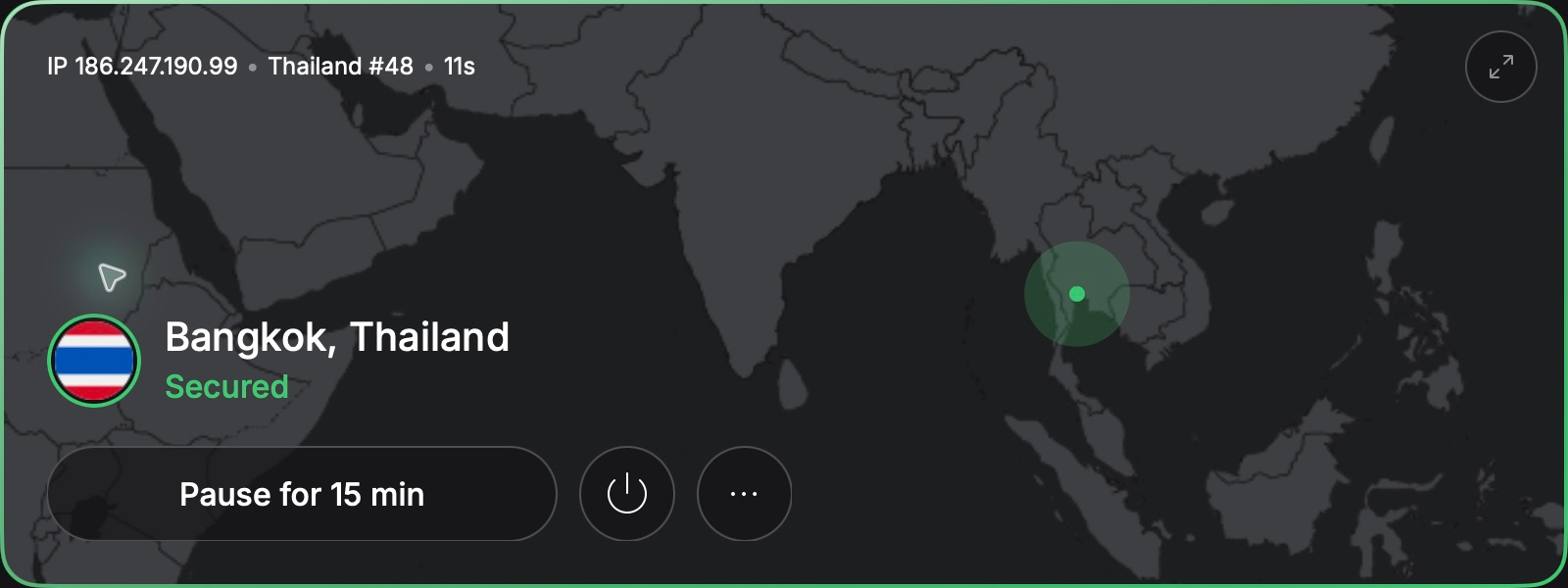
NordVPN describes Thailand as a virtual location hosted in Singapore. That means the physical equipment is elsewhere while the assigned IP represents Thailand. You select Thailand in the app, not Singapore. NordVPN explains its Thailand location here.
If you’re setting up the app for the first time, follow our full NordVPN setup guide.
Check the current NordVPN offer
Two More Ways to Get a Thai IP
ExpressVPN: A Simple Thailand Connection
ExpressVPN lists a Thailand location and its Lightway protocol. Its virtual-location documentation places the Thailand connection through Singapore.
- Install the ExpressVPN app and sign in.
- Open the location picker and find Thailand.
- Connect, check your public IP location, and reopen the website.
Check the current ExpressVPN offer
Surfshark: Handy When Everyone Brings a Device
One laptop becomes two phones, a tablet and a streaming stick remarkably quickly. Surfshark offers unlimited simultaneous connections and lists Bangkok on its Thailand server page.
- Install Surfshark and log in.
- Search for Thailand in Locations.
- Select Bangkok, wait for the connection, and check your IP.
Choosing between this and Nord? Our NordVPN versus Surfshark comparison looks at their broader differences.
Check the current Surfshark offer
Keep Your Thai Viewing Routine Simple
Bookmark the official program page you actually use, rather than searching for a new stream every evening. Thai PBS separates its live player from its program archive, so decide whether you want what is on now or an episode you missed. A working homepage alone does not tell you whether that particular video is available.
Before settling in, check the app’s connection status and open the program once. If you move from hotel Wi-Fi to your phone’s hotspot, check again after the network switch. It is a small habit that saves the familiar routine of blaming the laptop, then the router, then the entire internet.
Connected, but the Website Still Doesn’t Work?
Before clicking Connect seventeen more times, work through these checks:
- Check the country: being connected to a VPN is different from being connected to Thailand. Quick Connect may choose somewhere else.
- Restart the session: close the affected app or try a private browser window. If needed, clear that website’s stored data; this may sign you out.
- Try another Thai connection: reconnect or select another Thailand server if the app offers one.
- Read the actual error: an expired subscription, unsupported payment method or unavailable program isn’t fixed by changing IP.
- Ask support: provide the website, error and device, without sharing your password.
Cookies can retain information from earlier sessions; NordVPN’s cache and cookies guide explains why changing your connection doesn’t clear them automatically. Apps may also use account details or device location. Follow the service’s access rules and subscription terms.
A Few Clicks Closer to Thailand
Getting a Thai IP is usually the easy part: choose a provider with a Thailand location, connect, and verify the result. Then check the particular service you actually came for.
Start with a VPN you already own. Spend a minute choosing the correct country and checking the IP before spending money on something new. You can save the complicated planning for the next Bangkok itinerary.
Ready for the next step? Check the current NordVPN offer and follow the Thailand setup above.
FAQ
Does a virtual Thailand server still give me a Thai IP?
That is the purpose of the virtual location: the IP represents Thailand even though the hardware is elsewhere. Geolocation databases can disagree, so check the result if a website shows the wrong country.
Will this unlock every Thai streaming service?
No. Services may detect VPN addresses, require an eligible subscription or restrict particular programs. A Thai IP changes one location signal; it doesn’t grant viewing rights or replace an account.
Can I get a Thai IP on my phone?
Yes, through a VPN app offering Thailand on your phone’s platform. Connect before reopening the affected app. Your GPS position and SIM country do not automatically change with your public IP.
Will a Thai IP fix my banking login?
Don’t assume so. A bank may challenge or reject a shared VPN address. Keep your normal verification method available and follow the bank’s own guidance rather than repeatedly switching locations.
Should I keep Thailand selected for everything?
Only when you need that location. For other browsing, a suitable nearby server may perform better. To appear in your home country while traveling in Thailand, select your home country instead.
Need an IP Address Somewhere Else?
The same basic approach works with other country locations. Follow our guides to getting a Japanese IP address, a Mexican IP address, a Spanish IP address or a Portuguese IP address for the relevant setup and local considerations.
Exploring another destination? Our guide to getting a Bahamas IP address covers the same idea for an island getaway.