You are sitting in a café overseas, checking a Mexican website you use all the time. Yesterday it behaved normally. Today it has a different offer, a different page, or a polite message telling you that you are in the wrong country.
Your laptop has not developed a personality. Your IP address changed when you traveled, and the website noticed.
A VPN with a Mexico location can give your connection a Mexican public IP. That is useful for browsing local versions of websites, checking regional content, and keeping a familiar connection country while away. Here is how to set it up with NordVPN, what the alternatives offer, and which problems an IP change will actually solve.
Why a Mexican IP Address Can Be Useful
Think of your public IP as one location clue attached to your internet connection. Websites use it alongside account information and other signals to decide what to show you.
A Mexico VPN routes your connection through a Mexican location, replacing the public address websites normally see. You can use that connection for:
- Mexican websites while abroad. Some services offer different pages or availability depending on connection country.
- Regional website checks. If you manage an online business, you can inspect Mexican localization, promotional pages, and country-based messages.
- Travel privacy. A VPN adds encryption between your device and its server when you use hotel, airport, or café Wi-Fi.
- A consistent browsing country. Useful when moving between networks, although the actual IP may change between VPN sessions.
There are two different travel situations here. A Mexican resident visiting Europe might want a Mexico connection. A visitor in Cancún who needs a service from home might want a US, UK, or another home-country connection. Choose the destination that matches the service, not automatically the place where your suitcase is sitting.
Streaming, Shopping, and Banking: Keep Expectations Realistic
A Mexican IP can affect what a website sees, but it does not turn every service into an open door.
For streaming, the broadcast rights, your subscription, and the platform’s VPN rules still matter. Netflix says VPN connections may show only globally licensed titles, and VPNs are unsupported for its advertising experience and live events. Do not buy a long subscription based solely on a promise to unlock one match or series.
For shopping, compare the final price including currency conversion, taxes, and delivery. A Mexican IP does not create a Mexican billing address or guarantee a lower price.
For banking, follow your bank’s travel and authentication guidance. A shared VPN address can trigger additional security checks. Keep your registered verification method available and contact the bank if access is blocked; repeatedly switching countries can make troubleshooting harder.
Quick Comparison: VPN Options for Mexico
All three providers below confirm Mexico on their official country pages. They offer different apps and connection locations, so start with compatibility and practical needs rather than an impressive-looking server count.
| VPN | Mexico location | Useful distinction | Current offer |
|---|---|---|---|
| NordVPN | Confirmed | Manual country selection; detailed setup below | Check current offer |
| ExpressVPN | Mexico City listed | Clear location selection workflow | Check current offer |
| Surfshark | Querétaro listed | Connect through Querétaro | Check current offer |
Before paying, compare the total charge, renewal amount, device support, and refund conditions.
How to Get a Mexican IP Address with NordVPN
NordVPN confirms Mexico servers and supports selecting the country from its map or server list. You do not need to manually edit network addresses.
- Choose a plan and download the official app. Use NordVPN’s website or your device’s official app store.
- Install and sign in. Accept the operating system’s VPN configuration request when prompted.
- Search for Mexico in the location list. Choose Mexico manually. Automatic connection may pick a faster nearby country instead.
- Connect and wait for confirmation. Do not assume the country changed while the app still shows it is connecting.
- Check your public IP. Open an IP-checking page and confirm that its country result is Mexico.
- Open the service you need. If it was already running, close and reopen it after connecting.
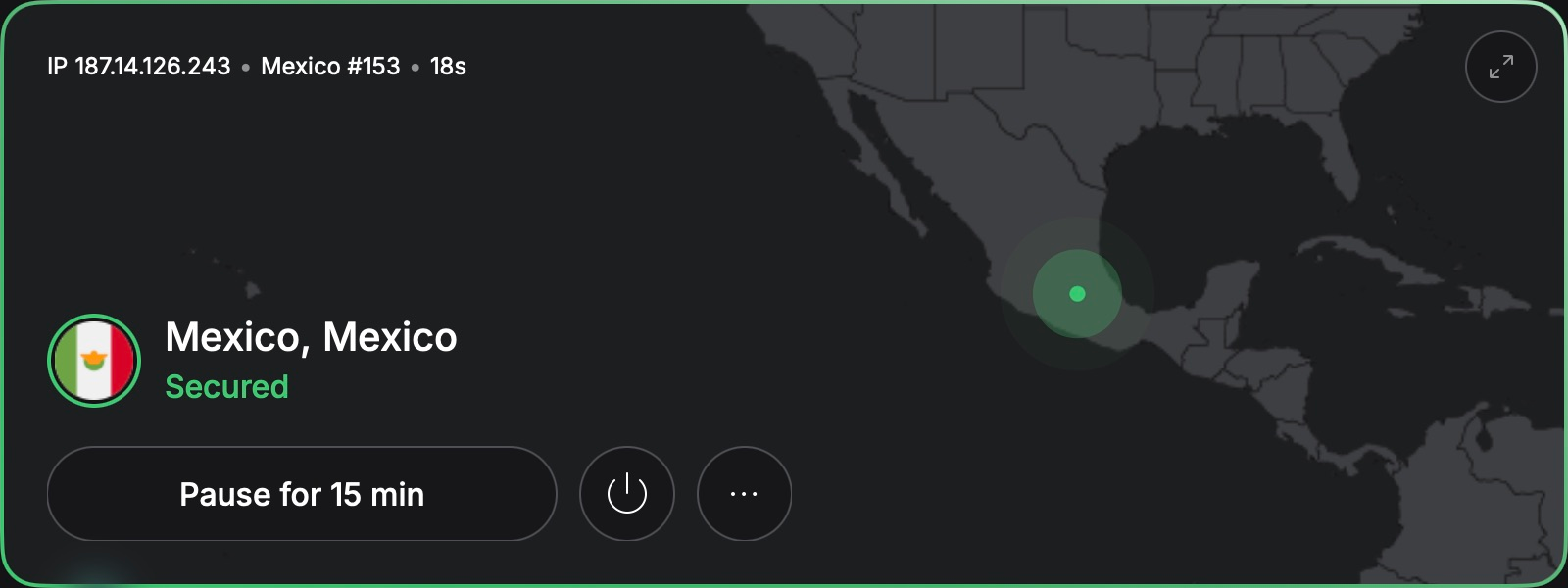
That is the core setup. Our full NordVPN installation guide goes further into the app and its settings.
If you enable a kill switch, check how it works on your device. It can block traffic when the VPN drops, which helps avoid accidentally continuing through your normal connection. If the hotel internet suddenly seems dead, check the VPN status before blaming reception.
How the Other Two Providers Fit In
ExpressVPN: Connect Through Mexico City
The official ExpressVPN Mexico page identifies Mexico City as the location to select. Install the app, sign in, open the location selector, choose Mexico City, and connect.
Check your resulting IP before trying a location-sensitive service. An app can connect successfully while an old browser session still carries information from your previous country.
Surfshark: A Mexican Connection Through Querétaro
Surfshark lists its Mexico servers in Querétaro. Download the official app, sign in, search for Mexico, and connect to the available location. Then verify the country shown by an IP checker.
The city does not have to match the city where your Mexican account was created. For a site checking country alone, the relevant signal is Mexico. Other services can use more detailed checks.
What to Try When the Mexican IP Does Not Seem to Work
Separate the VPN connection from the website’s decision. They are related, but they are not the same test.
- The IP checker shows your original country: verify that Mexico is connected and that your browser is not excluded through split tunneling.
- The checker shows Mexico but a website does not: try a fresh browser session, remove cookies for that site, and check account-country settings. These can outlast an IP change.
- The VPN will not connect: complete the hotel’s Wi-Fi login page first. Then reconnect. Try another network to identify a local network problem.
- Everything is slow: compare another available Mexican server, pause downloads, and try the provider’s recommended protocol. A VPN cannot improve a weak Wi-Fi signal.
- A payment or bank login fails: keep your genuine billing details and use the service’s support or verification process. Do not keep retrying with different countries.
For more background, read our guide to changing your IP address to another country. The country selection changes; the verification habit stays useful everywhere.
Final Thoughts
Getting a Mexican IP is usually the easy part: choose a confirmed Mexico location, connect, and verify. Choosing the right expectation saves more time than hunting for a mysterious perfect server.
Use the VPN for the connection change it provides, keep normal account security in place, and test the service that matters to you. Then you can get back to your coffee while it is still warm.
For other destinations, follow our guides to a Japanese IP address, Thai IP address, Spanish IP address, or Portuguese IP address.
Ready to set it up? Check the current NordVPN offer and get your Mexican connection ready before your next trip.
FAQ
Can I get a Mexican IP from the US or Europe?
Yes. A VPN with a Mexico location can assign your connection a Mexican public IP while you are abroad. Check the country after connecting.
Is a Mexico City server better than Querétaro?
Both can provide a Mexican IP. Performance depends on routing, load, and your location. Try the available options instead of choosing purely by city name.
Will it change my Netflix account to Mexico?
No. A VPN does not automatically change your account’s country or subscription. Netflix also restricts what is available over VPN connections.
Does a Mexican IP make online banking work abroad?
It may affect location checks, but it is not a guaranteed fix. Banks can require additional authentication or flag shared VPN addresses.
Can I use the same VPN on hotel Wi-Fi?
Usually, yes. Complete any hotel login page first, then connect the VPN. Keep HTTPS and normal device security enabled; a VPN does not make every website safe.
Exploring another destination? Our guide to getting a Bahamas IP address covers the same idea for an island getaway.