You have the tea, the headphones, and exactly one quiet hour. You open a Japanese website from your apartment overseas, click the familiar button, and get a location error. Apparently, your internet connection forgot to pack its passport.
A Japanese IP address can help websites recognize your connection as coming from Japan. Getting one is straightforward: use a VPN with a Japan location, connect, and check the result. The useful part is understanding when that change helps—and when a website is checking more than your IP.
Here is how to set it up, which providers to consider, and how to avoid spending your evening reconnecting to servers instead of doing what you came online to do.
Why Would You Want a Japanese IP Address?
Your public IP is one of the clues websites use to estimate your location. Connect to Japan in your VPN app, and your connection takes a route through its Japanese location. Websites usually see the VPN address instead of your normal public IP.
That makes a Japanese connection useful in several practical situations:
- You live abroad and use Japanese services. A local IP can help with services that make decisions based on connection country, although account restrictions still apply.
- You manage a website or online store. You can inspect how your pages, language prompts, or regional messages appear to a visitor connecting from Japan.
- You are traveling around Japan. A nearby VPN connection adds encryption between your device and the VPN server while keeping your apparent country in Japan.
- You want more privacy on shared Wi-Fi. The network sees a VPN connection rather than the destinations carried inside the tunnel. Choose a VPN provider you trust.
The distinction matters: someone visiting Kyoto who needs a home-country service should connect to their home country. Someone outside Japan who needs a Japanese connection should select Japan. The same app handles both jobs; the country button decides which one you get.
Japanese Streaming: Know What the IP Can Actually Do
It is tempting to treat a Japanese IP as a universal remote for Japanese television. The reality has a few more buttons.
TVer says its videos are available only within Japan and that viewing through a VPN is unsupported. Netflix also explains that VPN users may see only titles with worldwide rights, with additional restrictions for its advertising experience and live events. See Netflix’s VPN guidance before buying anything for one particular show.
A service may check your subscription, account country, payment details, device settings, and whether the address belongs to a VPN. Changing your IP changes one signal. It does not purchase access, change your account region, or guarantee playback.
Quick Comparison: Three VPNs to Consider
NordVPN, ExpressVPN, and Surfshark publish official Japan location pages. Compare how each fits your devices and the services you actually use.
| VPN | Japan availability | Why consider it | Next step |
|---|---|---|---|
| NordVPN | Confirmed on official Japan page | Country selection with Tokyo and Osaka options | Check current offer |
| ExpressVPN | Confirmed on official Japan page | A straightforward location-and-connect workflow | Check current offer |
| Surfshark | Confirmed on official Japan page | Tokyo connection option | Check current offer |
Check the full amount charged upfront, renewal price, supported devices, and refund conditions. A tiny monthly equivalent can still mean a much larger payment today.
How to Get a Japanese IP Address with NordVPN
NordVPN’s Japan page lists Tokyo and Osaka and explains how to select Japan from the country list or map. Here is the practical workflow:
- Choose your plan and install the official app. Download it from NordVPN or your device’s official app store.
- Sign in. Allow the VPN configuration permission when your device requests it.
- Search for Japan. Select the country deliberately. Automatic connection may choose somewhere closer to you.
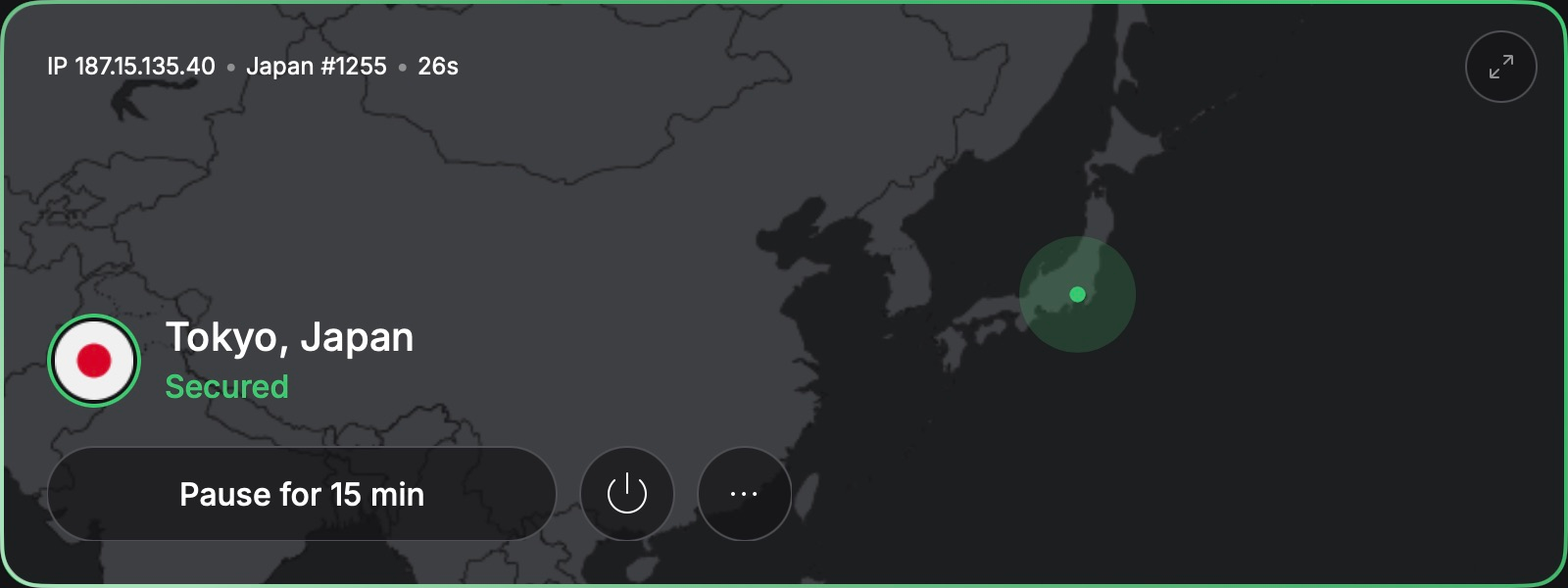
- Connect. Wait for the app to show an active connection. Where offered, you can select Tokyo or Osaka.
- Check your public IP. Use an IP-checking page and confirm that the detected country is Japan.
- Open your intended website. Test it before settling into a long session.
For a closer walkthrough of installation and settings, see our NordVPN setup guide. Enable the kill switch where supported if you want traffic blocked when the VPN connection drops; behavior varies by platform.
Two Other Ways to Connect
ExpressVPN: A Simple Location Choice
ExpressVPN’s official Japan page confirms Japanese IP availability. Install the app, sign in, open the location selector, choose a Japan location, and connect. Verify the country before opening your destination site.
This is a sensible alternative when you want a short setup process. Compare its actual checkout terms with the other options instead of assuming the headline deal tells the whole story.
Surfshark: Select Japan, Then Verify
Surfshark lists servers in Tokyo. Install its official app, sign in, find Japan under locations, and connect. Check that your browser’s public IP now appears Japanese.
If an excluded app uses split tunneling, it may still use your normal connection. Check that setting if the VPN looks connected but one app continues to detect your original country.
Connected, but Something Still Does Not Work?
Start with the symptom. Reinstalling everything is a dramatic opening move for what may be one stale browser session.
- The IP check shows your home country: confirm the VPN is connected and that the browser is not excluded through split tunneling.
- The IP says Japan, but the website disagrees: reopen the site in a private window or remove that site’s cookies. Existing account information and location permissions can still influence it.
- The connection feels slow: compare another Japanese server, use a stable network, and pause large downloads. Distance still affects latency.
- A bank requests extra verification: use its normal verification process. Shared VPN addresses can trigger checks themselves; a local IP does not replace identity verification.
- A stream reports a VPN error: check the platform’s policy and ask support about supported access. A working Japanese IP does not guarantee the service accepts it.
For the underlying mechanics, our guide to changing your IP address to another country covers the general process.
Final Thoughts
A Japanese IP is useful when you need a connection that appears to originate in Japan. Choose a provider with a confirmed location, connect manually, and verify the result. Then check your actual website—not just the green connection icon.
Planning a wider trip? The same distinction between your physical location and your VPN country appears in our guides to a Thai IP address, Mexican IP address, Spanish IP address, and Portuguese IP address.
Ready to get connected? Check the current NordVPN offer, choose Japan, and follow the steps above.
FAQ
Can I get a Japanese IP while outside Japan?
Yes. Connect to a VPN’s Japan location and check the public IP assigned to your connection. You still need an internet connection of your own.
Will a Japanese IP unlock every Japanese streaming service?
No. Platforms can detect VPNs and enforce account, subscription, and territorial restrictions. TVer explicitly says VPN viewing is unsupported.
Should I choose Tokyo or Osaka?
Try the available location that performs better on your connection. Both can provide a Japanese IP; the fastest route depends on where you are and current network conditions.
Does the VPN change my GPS location?
Changing your public IP does not automatically change GPS, device permissions, or the country saved in an account.
Can I use a free VPN?
Possibly, but check whether the free plan lets you choose Japan, along with its data allowance and privacy terms.
Exploring another destination? Our guide to getting a Bahamas IP address covers the same idea for an island getaway.