





If you have kids close in age, you know exactly what our living room looks like when Minecraft is on: one laptop, one tablet, a million questions (“Can I have diamonds?” “Why did you blow up my house?!”), and sometimes pure teamwork magic. My two boys started by playing together on our home Wi-Fi, building silly things side by side and learning the ropes. It was easy, safe, and honestly hilarious to watch.
But soon, the questions started:
“Dad, can we join my friend’s world from school?”
“Why can’t I play on this server? It says I’m banned.”
“What’s Hypixel?”
The first time they wanted to play together from different rooms, I set up a LAN game. The excitement when they realized they could each have their own screen—and still build together—was priceless. But things changed the moment they tried to join “real” online servers.
Suddenly, I was reading server rules, watching chats fill up with strange usernames, and hearing about “some kid who just keeps spamming mean things.”
I’ll never forget the day my seven-year-old came running in, a little upset, because someone on a public server called him names and sent a weird link in the chat. My four-year-old, blissfully unaware, just wanted to build a giant lava slide. That was the first time I really started to think: “Okay, it’s not just about building blocks anymore—how do I actually keep them safe online?”
Why I Started Looking Into VPNs for My Kids’ Minecraft
Honestly, I always thought VPNs were just for techies, or maybe people who wanted to watch Netflix shows from other countries. But Minecraft changed that fast.
Here are a few moments that made me stop and reconsider how my boys were playing:
- Unfair bans: On our family Wi-Fi, if someone else in the house (or even a neighbor on the same shared network) did something sketchy, my boys could end up banned from a favorite server—without ever breaking a rule themselves.
- Toxic chat and links: Even on kid-friendly servers, not every player is friendly. One day, my oldest got spammed with weird links and “join my Discord!” invites from strangers. He didn’t click—but he could have.
- Account safety: As they started to care more about their Minecraft skins and earned items, I realized just how quickly a stolen or hacked account could ruin their fun. Suddenly, privacy, phishing, and online identity felt a lot more real.
I wanted a way to give my kids more privacy, protect their location and data, and honestly, give myself some peace of mind—without making things more complicated for them.
What a VPN Can Actually Change: Real Benefits for Kids (and Parents)
Getting a VPN set up for my sons was a bigger deal than I expected—in a good way. Here’s what actually changed in our daily Minecraft adventures:
1. No more “random bans” from shared IPs
Before using a VPN, it sometimes happened that my boys were blocked from a server because someone else on our Wi-Fi (or another family in our apartment building) got caught cheating. With a VPN, their IP address is unique and private. If someone else gets banned, it doesn’t follow us.
Example:
Last spring, my seven-year-old came crying, “Dad, it says I’m banned! I didn’t do anything!” It turned out someone else on our network had been using mods the server didn’t allow. After switching to a VPN, no more guilt by association—problem solved.
2. Safety from toxic players and hidden risks
Minecraft chat isn’t always rainbows and good sportsmanship. My boys have gotten weird messages and link spam, even on servers labeled “family friendly.” With a VPN, their real IP is hidden, making it nearly impossible for a troll or bully to track them, launch DDoS attacks, or find out where they’re actually playing from.
Example:
On holiday last summer, we played Minecraft on hotel Wi-Fi. Some kid kept threatening in chat to “leak IPs and crash people.” My boys? Totally unaffected. The VPN kept our connection safe, and I had one less thing to worry about.

3. Account and data privacy
Kids are curious and sometimes a bit too trusting. They might click weird links, try to log in to “free skin” sites, or share details without thinking. Using a VPN gives their connection a basic privacy shield—even if they make a mistake, it’s much harder for attackers to target their real device or home network.
4. Peace of mind for parents (and fewer tech headaches!)
For me, the biggest change was just feeling more relaxed. I didn’t have to explain every ban, panic over strange messages, or check every Wi-Fi network we used for “safety.” Setting up the VPN on their devices (even my four-year-old’s iPad) took a few minutes and didn’t mess with their games at all.
How We Set Up a VPN at Home: A Step-by-Step Guide for Parents
Let’s be honest: when you hear “VPN,” it sounds like something only IT pros should touch. But I promise—it’s easier than you think, even if you’re more “Minecraft dad” than “tech expert.” Here’s exactly how I did it for my two sons:
1. Choosing the right VPN
I tested several options, but for Minecraft and families, the three I liked best are:
NordVPN (fast and stable, simple apps),
Surfshark (unlimited devices, easy for all ages),
ExpressVPN (super quick for servers worldwide).
| My 3 Best VPN for Minecraft | Offer + Discount | URL |
|---|---|---|
| NordVPN | 77% off + 3 months free | Try NordVPN |
| ExpressVPN | 61% off + 6 months free | Try ExpressVPN |
| SurfShark | 87% off + 2 months free | Try SurfShark |
I looked for:
- Good reviews for privacy and safety
- User-friendly apps (even on tablets)
- Reliable customer support in case I got stuck
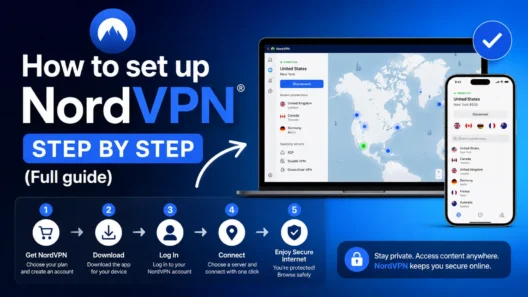
2. Creating an account and installing the app
- Go to the official VPN website
- Choose a plan (I usually go for yearly—it’s cheaper)
- Download and install the app on the devices my kids use for Minecraft (laptop, tablet, even the family desktop)
3. Setting up the VPN on kids’ devices
- Open the app, sign in, and show the boys how to click “Connect”
- Let them pick a server close to our country for the best speed (they love clicking on the map!)
4. Explaining to kids what the VPN does (in kid language)
I told them, “This button gives you a magic cloak online. It helps keep out mean players, protects your stuff, and lets you play on more servers.” They loved that explanation.
5. Making it part of our Minecraft routine
- VPN goes on before they launch Minecraft—every time
- If a server doesn’t allow VPNs, we just pick another one (it’s rare, but happens)
6. First games with VPN: what changed?
- No difference in how Minecraft looks or plays—except fewer random disconnects and bans
- Connection is just as fast as before, sometimes even better (especially on public Wi-Fi)
7. Tips for parents who aren’t tech wizards
- Let your kids help—mine learned to connect the VPN before I did!
- Keep the VPN app updated for security
- Don’t be afraid to ask support for help—they’re used to questions from parents
How VPN Helped My Kids (and Me) in Real-Life Minecraft Situations
Honestly, I didn’t expect a simple app to make such a difference. But here are a few real stories from our family’s Minecraft adventures where having a VPN changed everything:
1. The Unfair Ban That Wasn’t the End
A few months ago, my older son was suddenly banned from his favorite creative server. He was almost in tears—he’d built a huge city with his brother and a few friends, and now he couldn’t log in. I found out someone else on the same Wi-Fi (maybe a neighbor’s kid) got banned, and because they shared an IP, my son got “caught in the net.”
With the VPN, he got a new IP instantly and was able to log in again. Crisis averted, city saved.
2. Trolls and “Mean Kids” Online
It’s sad, but even kid servers sometimes have players who just want to ruin someone’s day. Once, some random player started threatening to “hack” anyone who wouldn’t give them diamonds.
My seven-year-old got spooked, but I knew—thanks to the VPN—nobody could see his real IP or location. We talked about not clicking weird links and reporting trolls, but having that extra protection made us both relax.
3. Playing on Public Wi-Fi Without Worries
Traveling, sleepovers, or even just playing at grandma’s house—public Wi-Fi is everywhere, but not always safe. With the VPN, I knew my boys’ logins, messages, and game data were private, even if the network wasn’t.
They could enjoy Minecraft anywhere without me hovering over their shoulder.
4. Peace of Mind for a Minecraft Dad
Maybe the biggest win: I stopped stressing over every little thing. No more explaining bans I couldn’t fix, no more panic if they wanted to try a new server, and no more double-checking Wi-Fi settings every trip.
The VPN became a normal part of our “start up Minecraft” routine—like opening a lunchbox or putting on a helmet before biking.
Here Are My Top 5 VPNs I Use Daily and Can Honestly Recommend
| VPN for Minecraft | Main Minecraft Benefits | My Personal Tip/Experience |
|---|---|---|
| NordVPN | Fast and stable connection, easy IP change, DDoS protection, reliable even on public Wi-Fi | I use it at home and when traveling, never had issues with bans or lag. |
| Surfshark | Unlimited devices, easy to use, MultiHop for extra privacy, works on all platforms | Perfect when I’m gaming on multiple devices or need a quick IP change mid-game. |
| ExpressVPN | Extra fast servers, stable on international servers, strong privacy protection | My go-to for international minigames and servers—never any lag or downtime. |
Conclusion: Minecraft, Safety, and Peace of Mind—All in One
For my family, using a VPN turned out to be one of the best decisions we made for safe, stress-free Minecraft fun. My boys can play, build, and explore without random bans or worries about bullies and hackers.
And for me? I get to relax, knowing their online world is just a little bit safer—so I can enjoy their Minecraft adventures almost as much as they do.
If you’re a parent with Minecraft kids and have questions or your own experience, feel free to share in the comments. We’re all learning as we go—and every tip helps another family.
FAQ: Common Questions Parents Ask About VPNs and Minecraft
Is it legal and safe for kids to use a VPN?
Absolutely. VPNs are legal in most countries and are used by millions of families, businesses, and schools to protect privacy. Just make sure to choose a trustworthy provider and talk with your kids about using it responsibly.
Will a VPN slow down Minecraft or cause lag?
Not if you pick a good VPN and connect to a nearby server! In our experience, there was no noticeable lag—sometimes, the connection was even faster, especially on crowded public Wi-Fi.
Can kids use VPNs to “cheat” or break server rules?
A VPN is just a privacy tool, not a hacking tool. My boys know that VPN isn’t for cheating, but for safety. I always remind them: respect server rules and play fair.
Is it possible to set up a VPN on our home router to protect the whole house?
Yes! Some VPN providers (like NordVPN and ExpressVPN) offer apps or instructions for installing VPN on your home router. This way, every device at home is protected—even smart TVs and tablets.
Which VPN do you recommend for young Minecraft players?
My top picks are NordVPN, Surfshark, and ExpressVPN. They’re easy to use, have great privacy features, and work perfectly for Minecraft. Try their free trial or money-back guarantee if you want to test before committing.