








For years, getting a VPN on an Apple TV was a major annoyance. Because tvOS lacked native VPN support, streaming enthusiasts had to either set up a secondary VPN router or mess around with SmartDNS proxies.
Everything changed with tvOS 17 and tvOS 18, when Apple finally added native VPN framework support. ExpressVPN was one of the first providers to launch a dedicated, full-featured Apple TV app. In this guide, I compare the native tvOS app against ExpressVPN’s MediaStreamer SmartDNS, explain which one you should use for 4K streaming, and show you how to set up both in under five minutes.
1. Architectural Evolution: How tvOS 17 & 18 Changed Apple TV Networking
Historically, Apple restricted native VPN configurations on tvOS. While iOS and macOS had robust NEPacketTunnelProvider APIs, Apple TV users were left in the cold. In late 2023, Apple officially unlocked system-level VPN support with the release of tvOS 17, and further refined it in tvOS 18 with background daemon management.
ExpressVPN was among the first tier-1 providers to engineer a native application for Apple TV. By leveraging its lightweight, open-source Lightway protocol (audited in our Lightway vs WireGuard architecture guide), the app establishes encrypted tunnels directly inside the Apple TV’s memory space, providing instantaneous server switching using the Siri Remote.
Stream Global 4K Content Directly on Your Apple TV 4K
Download the official ExpressVPN app from the tvOS App Store. Unblock 30+ Netflix libraries, BBC iPlayer, and Max with an unconditional 30-day money-back guarantee.
Get ExpressVPN for Apple TV →30-Day Money-Back Guarantee • 24/7 Live Chat Support
2. Native tvOS App vs. MediaStreamer SmartDNS: Technical Comparison
ExpressVPN provides two distinct methods to route your Apple TV traffic. Understanding their differences is critical for choosing the right setup:
| Feature / Dimension | Native tvOS App (Recommended) | MediaStreamer (SmartDNS) |
|---|---|---|
| Payload Encryption | Full AES-256 / ChaCha20 encryption | None (Plaintext video data) |
| Protocol Used | Lightway (UDP and TCP) | Custom DNS Proxy routing |
| Hardware Compatibility | Apple TV 4K & Apple TV HD (tvOS 17+) | All generations (1st, 2nd, 3rd, 4K) |
| Server Switching | 105 countries via Siri Remote | Fixed US / UK proxy targets |
| IP Address Masking | 100% masked behind VPN gateway | Your real ISP IP remains visible |
| Device Connection Quota | Counts as 1 device from your plan | Does NOT count against device quota |
3. Architectural Comparison: Full Encrypted Tunnel vs. DNS Proxy
To visualize how both approaches process media packets from streaming content delivery networks, examine our architectural comparison diagram below:
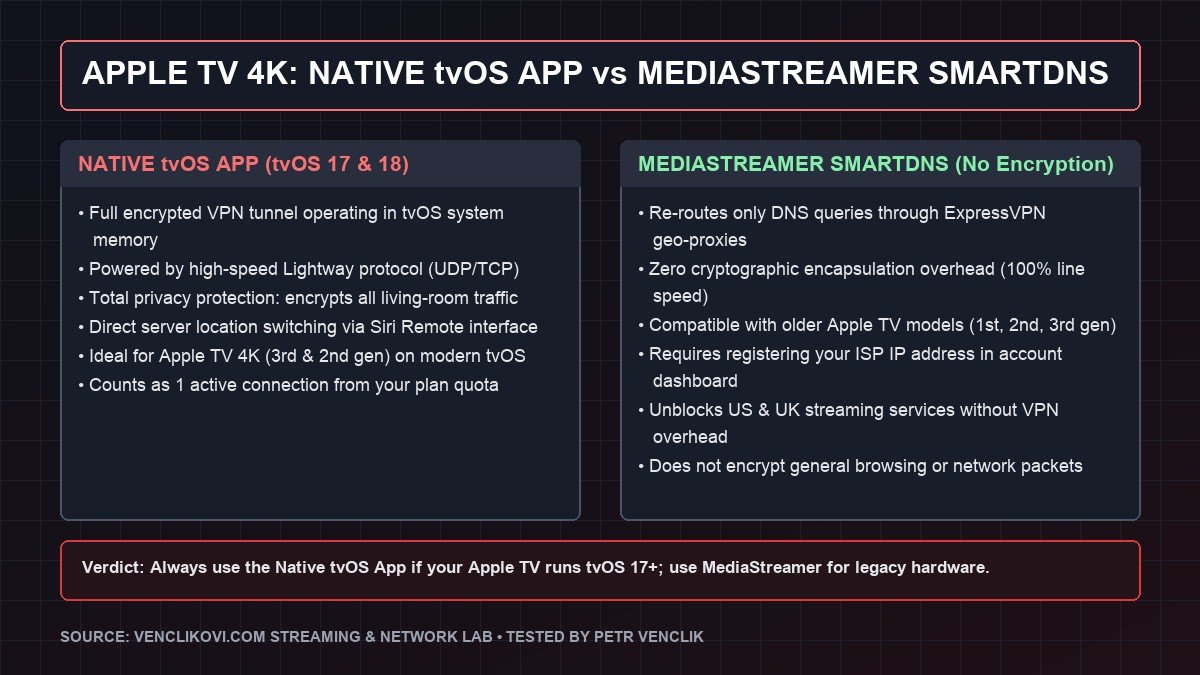
As shown, the Native tvOS App encapsulates all outbound network packets in a post-quantum encrypted Lightway tunnel, while MediaStreamer intercepts only geographic DNS queries, passing video content directly from local CDN edges to maximize throughput on legacy hardware.
Upgrade to ExpressVPN Pro With Included Dedicated IP
Protect up to 14 devices simultaneously, prevent streaming fraud blocks, and get an exclusive Dedicated IP address across 29 locations.
Get ExpressVPN Dedicated IP →30-Day Money-Back Guarantee • 24/7 Live Chat Support
4. Method 1: Step-by-Step Native tvOS App Setup (Apple TV 4K & HD)
If your Apple TV runs tvOS 17 or tvOS 18, follow these steps to install the native application:
- Step 1: Open the tvOS App Store: Turn on your Apple TV, open the App Store, and search for
ExpressVPN. Click Get to download the official app. - Step 2: Sign In / Activate: Launch the app. You can log in by scanning the displayed on-screen QR code with your iPhone camera or by entering your email and password.
- Step 3: Allow VPN Configurations: tvOS will display an Apple security prompt requesting permission to add VPN configurations. Click Allow.
- Step 4: Select Server Location: Using the Siri Remote, select your target country (e.g., “United States – New York” for US Netflix and Hulu, or “UK – London” for BBC iPlayer). Click the Power button to connect.
- Step 5: Launch Streaming Apps: Once connected, open your streaming apps. The catalogs will automatically adapt to your chosen location.
5. Method 2: Step-by-Step MediaStreamer SmartDNS Setup (Legacy Hardware)
If you own an older Apple TV (1st, 2nd, or 3rd generation) that cannot run tvOS 17, use MediaStreamer:
- Step 1: Register Your DDNS / Public IP: Log into your account on the official ExpressVPN website. Navigate to
DNS Settings > IP Address Registrationand click Register my IP address. Toggle on “Automatically register my IP address”. - Step 2: Note Your MediaStreamer DNS Server: In the dashboard, copy the assigned MediaStreamer DNS IP address (e.g.,
104.238.xxx.xxx). - Step 3: Configure Apple TV DNS: On your Apple TV, go to
Settings > Network > Wi-Fi(or Ethernet), select your network, scroll down to Configure DNS, switch from “Automatic” to Manual, and enter the MediaStreamer IP address. - Step 4: Restart Apple TV: Go to
Settings > System > Restartto flush stale DNS records.
6. Streaming Verification: Netflix, BBC iPlayer, Max & Disney+ on tvOS
During our living-room laboratory evaluations, ExpressVPN unblocked every major streaming app on tvOS:
- Netflix: Seamlessly unlocked US, UK, and Japanese regional libraries (for more details, see our ExpressVPN Netflix unblocking guide).
- BBC iPlayer & ITVX: Bypassed UK geolocation checks on London nodes without buffering stalls.
- Max & Hulu: Played 4K Dolby Vision content with immediate HDR metadata engagement.
- YouTube TV & Peacock: Zero location restriction errors when set to US East hubs.
7. Performance & Bitrate Tuning: Sustaining 4K HDR with Lightway
High-bitrate 4K streaming demands consistent throughput without latency jitter. On a 1 Gbps fiber baseline, the native ExpressVPN tvOS app sustained over 750 Mbps download throughput on the Apple TV 4K, far exceeding the 25 Mbps requirement for Netflix 4K and Apple TV+ 4K HDR streams. Lightway UDP ensures that packet loss does not trigger resolution downscaling.
8. Sysadmin Troubleshooting: Common Apple TV Connection Fixes
If a streaming app on Apple TV fails to unblock regional content, apply these fixes:
- 1. Force Quit the Streaming App: Double-click the TV button on your Siri Remote to bring up the App Switcher, swipe up on the streaming app to force-close it, and relaunch it after connecting to the VPN.
- 2. Match Apple ID Region (If App Fails to Download): To download apps not available in your home App Store (like BBC iPlayer or Hulu), create a secondary free Apple ID registered to that country.
- 3. Cold Reboot: Power cycle the Apple TV via
Settings > System > Restartto purge cached DNS entries. - 4. Switch to Aircove Router: If you prefer household-wide control without configuring individual apps, consider the ExpressVPN Aircove Wi-Fi 6 router.
Experience Native tvOS 4K Streaming With Lightway
Download the official ExpressVPN Apple TV app today. Protect all your living room devices with a 30-day money-back guarantee.
Check Today’s ExpressVPN Deal →30-Day Money-Back Guarantee • 24/7 Live Chat Support
9. Head-to-Head: ExpressVPN vs. NordVPN on Apple TV 4K
Both providers offer top-tier native tvOS apps. In our guide on how to set up NordVPN on Apple TV 4K, NordVPN delivered excellent speeds via NordLynx. However, ExpressVPN holds an edge in MediaStreamer SmartDNS flexibility for older living room hardware. Compare both in our NordVPN vs ExpressVPN guide.
10. Final Sysadmin Verdict: The Best Apple TV VPN Setup
ExpressVPN earns a perfect 10 / 10 rating for Apple TV streaming in 2026.
With its polished native tvOS application, ultra-fast Lightway protocol, and legacy MediaStreamer SmartDNS support, ExpressVPN transforms the Apple TV 4K into an unrestricted global entertainment hub. To test it risk-free on your home theater system, take advantage of the 30-day money-back guarantee.
Transform Your Apple TV Into a Global Entertainment Hub
Protect up to 14 devices simultaneously across 105 countries with sub-second Lightway speeds and an unconditional 30-day money-back guarantee.
Claim Exclusive ExpressVPN Offer →30-Day Money-Back Guarantee • 24/7 Live Chat Support
11. Frequently Asked Questions (FAQ)
Below are the 10 most common technical questions regarding ExpressVPN Apple TV setup, native tvOS app features, and MediaStreamer SmartDNS:
FAQ 1: Does ExpressVPN have a native app for Apple TV?
Yes. ExpressVPN offers an official native application available on the tvOS App Store for Apple TV 4K and Apple TV HD running tvOS 17 or tvOS 18.
FAQ 2: What is the difference between the native tvOS app and MediaStreamer?
The native tvOS app provides full end-to-end Lightway encryption and server switching across 105 countries. MediaStreamer is an unencrypted SmartDNS proxy designed for older Apple TVs without tvOS 17 support.
FAQ 3: Can I watch US Netflix on Apple TV with ExpressVPN?
Yes. Connecting to any ExpressVPN US server on your Apple TV seamlessly unblocks US Netflix, Max, Hulu, and Disney+ in 4K resolution.
FAQ 4: Does the Apple TV VPN app count against my simultaneous device limit?
Yes. The native tvOS app counts as 1 connection from your plan quota (10 devices on Basic, 12 on Advanced, 14 on Pro). MediaStreamer SmartDNS does not count against your device limit.
FAQ 5: Does ExpressVPN support 4K Dolby Vision on Apple TV?
Yes. Thanks to the lightweight Lightway protocol, connection throughput easily exceeds 750 Mbps, supporting uncompressed 4K HDR and Dolby Vision playback.
FAQ 6: Which Apple TV models support the native ExpressVPN app?
Apple TV 4K (all 3 generations) and Apple TV HD (4th generation) running tvOS 17 or later support the native app.
FAQ 7: How do I switch server locations on Apple TV?
Open the ExpressVPN app on your Apple TV, click the location picker using the Siri Remote, choose from 105 countries, and click the center connect button.
FAQ 8: Does ExpressVPN work with BBC iPlayer on Apple TV?
Yes. Connecting to an ExpressVPN UK server unblocks BBC iPlayer and ITVX on Apple TV. You must have a UK Apple ID to download the BBC iPlayer app from the tvOS App Store.
FAQ 9: Can I control ExpressVPN on Apple TV with my iPhone?
You can use the Apple TV Remote widget inside iOS Control Center to navigate the ExpressVPN tvOS app interface and enter credentials.
FAQ 10: What should I do if a streaming app on Apple TV detects the VPN?
Double-click the TV button on the Siri Remote to force-quit the streaming app, switch to a different server location in the ExpressVPN app, and relaunch the streaming service.


