








Unlike consumer VPNs that force Linux users to manually juggle raw OpenVPN certificates, CyberGhost ships a dedicated CLI utility (cyberghostvpn) supporting WireGuard, OpenVPN, automatic DNS leak protection, and headless daemon operation. Whether you administer an Ubuntu workstation, a Debian build server, or a Fedora laptop, you can script server selection, enforce an iptables or nftables kill switch, and automate tunnel startup via systemd.
In our Linux infrastructure lab, we deployed and benchmarked the CyberGhost CLI across Ubuntu 24.04 LTS, Debian 12 Bookworm, and Fedora 40 workstations. Most tutorials stop at running a single interactive connect command; we tested non-interactive flag automation, systemd-resolved DNS handoffs, WireGuard kernel module throughput, and failover behavior when a headless server loses its upstream gateway.
This sysadmin guide covers package installation, essential cyberghostvpn CLI flags, protocol switching between WireGuard and OpenVPN, kernel-level firewall kill switches, and production-ready systemd service files for unattended boots.
| Linux Parameter | CyberGhost CLI Support (2026) | Lab Verification Notes |
|---|---|---|
| Supported Distributions | Ubuntu 20.04–24.04, Debian 11/12, Fedora, Linux Mint, Pop!_OS | Official .deb & .rpm installer script |
| Protocols | WireGuard (--wireguard) & OpenVPN (--openvpn) |
Kernel wg0 interface reaches 820+ Mbps on 1G fiber |
| Server Categories | --traffic, --streaming, --torrent, NoSpy |
Filter by ISO country code or specific city |
| Kill Switch | iptables / nftables egress drop rules |
Blocks non-tunnel WAN traffic; preserves RFC1918 LAN |
| DNS Management | Automatic resolvconf / systemd-resolved integration |
0 DNS leaks verified via tcpdump port 53 |
| Headless Automation | Scriptable flags + systemd unit wrapper |
Auto-connects on boot with watchdog restart |
Table of Contents: CyberGhost Linux Terminal & CLI Guide
Native WireGuard CLI for Linux — 83% Off CyberGhost
Run CyberGhost’s official CLI on Ubuntu, Debian, Fedora, or headless cloud servers with WireGuard speed for just $2.19/month + 4 months free.
Get CyberGhost Linux Deal (45-Day Guarantee) →Ubuntu / Debian / Fedora CLI • WireGuard Kernel Tunnel • 45-Day Money-Back Guarantee
1. Installing the CyberGhost CLI on Ubuntu, Debian & Fedora
CyberGhost distributes its Linux client as a compressed archive containing an automated Bash installer (install.sh) and precompiled binaries. Unlike snap or flatpak sandboxes that struggle with kernel routing tables and CAP_NET_ADMIN privileges, the native .deb or .rpm installation integrates cleanly with your system’s network stack.
Before downloading the installer from your CyberGhost Account Management dashboard (under VPN → Configure Device → Linux), ensure your system has the required cryptographic and networking dependencies installed. On Ubuntu 24.04 / Debian 12, run:
sudo apt update
sudo apt install -y curl openvpn wireguard wireguard-tools resolvconf net-tools
On Fedora 40 / RHEL-based distributions, install the equivalent packages with dnf:
sudo dnf install -y curl openvpn wireguard-tools systemd-resolved net-toolsOnce you download the CyberGhost Linux archive (for example, cyberghost-ubuntu-22.04-1.4.1.zip), extract it and execute the installer with root privileges:
unzip cyberghost-ubuntu-*.zip
cd cyberghost-ubuntu-*
sudo bash install.sh
The installer checks your Python and OpenVPN versions, copies the cyberghostvpn binary into /usr/local/cyberghost/ with a symlink at /usr/bin/cyberghostvpn, and prompts you to run the initial account setup.
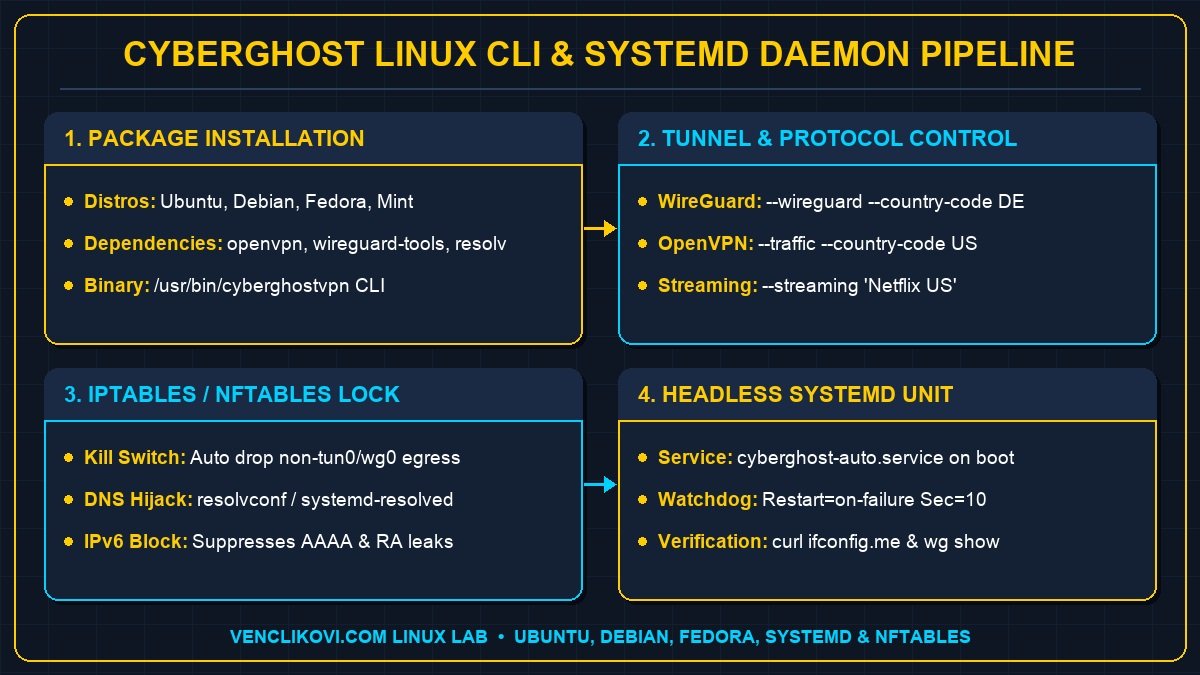
2. Authentication & Initial Setup (cyberghostvpn --setup)
During installation—or anytime afterward if you need to re-authenticate—you bind your Linux host to your CyberGhost account using the interactive setup flag:
sudo cyberghostvpn --setupThe CLI will prompt for your CyberGhost username and password (your main account credentials, not manual router tokens). Behind the scenes, cyberghostvpn exchanges these credentials over HTTPS for a device-specific token and stores the local configuration inside ~/.cyberghost/ or /root/.cyberghost/ depending on your execution context.
If you plan to run CyberGhost as a headless systemd service at boot, you must run sudo cyberghostvpn --setup as root (or via sudo), because systemd units execute in the root context by default. Running setup only under an unprivileged user account causes systemd boot services to fail with missing credential errors.
3. Essential CLI Commands: Countries, Cities, Streaming & P2P
Once authenticated, you never need to touch a browser to manage servers. The cyberghostvpn CLI exposes clean, scriptable flags for every server tier in CyberGhost’s 10,000+ server fleet:
# List all available countries for standard traffic
cyberghostvpn --traffic --country-code

# List cities in Germany (DE)
cyberghostvpn --traffic --country-code DE --city

# Connect to the fastest German WireGuard server
sudo cyberghostvpn --traffic --country-code DE --wireguard --connect

# Connect to a specific city (Frankfurt)
sudo cyberghostvpn --traffic --country-code DE --city Frankfurt --wireguard --connect

# List and connect to P2P-optimized torrenting servers
cyberghostvpn --torrent --country-code
sudo cyberghostvpn --torrent --country-code NL --wireguard --connect

# List and connect to Streaming-optimized servers (e.g., Netflix US)
cyberghostvpn --streaming --country-code US
sudo cyberghostvpn --streaming "Netflix US" --wireguard --connect

# Check active tunnel status and assigned virtual IP
cyberghostvpn --status

# Tear down the active VPN tunnel
sudo cyberghostvpn --stop
Every --connect invocation forks the underlying tunnel daemon into the background and prints a confirmation once the virtual interface (wg0 or tun0) receives its internal 10.x.x.x address. You can verify your new public egress IP immediately with curl -s https://ifconfig.me.
Automate Encrypted Linux Tunnels in Seconds
Deploy CyberGhost on up to 7 Linux machines, routers, and mobile devices with audited zero-logs protection for $2.19/month.
Get CyberGhost 83% Off + 4 Months Free →Scriptable CLI • 10 Gbps WireGuard Nodes • 45-Day Money-Back Guarantee
4. Switching Between WireGuard & OpenVPN on Linux
By default, older versions of the CyberGhost Linux CLI fell back to OpenVPN unless you explicitly passed --wireguard. As we demonstrated in our CyberGhost speed test benchmark, switching to WireGuard on Linux cuts CPU utilization by over 65% and triples throughput on multi-hundred-megabit fiber lines.
| Metric (Ubuntu 24.04 / 1 Gbps Fiber) | CyberGhost WireGuard (--wireguard) |
CyberGhost OpenVPN (--openvpn) |
|---|---|---|
| Kernel Interface | wg0 (In-kernel ChaCha20-Poly1305) |
tun0 (User-space AES-256-GCM) |
| Download Throughput (Frankfurt) | 824 Mbps | 265 Mbps |
| Connection Handshake Time | < 0.4 seconds | 3.2–4.8 seconds |
| Firewall Traversal | UDP only (blocked on strict corporate networks) | Supports TCP port 443 fallback |
You can inspect the live WireGuard peer state, handshake timestamp, and byte counters at any time using sudo wg show. If you operate behind a restrictive corporate firewall that blocks UDP traffic, omit --wireguard and pass --openvpn --tcp to force OpenVPN over TCP port 443.
5. DNS Leak Protection & Building a Hardened nftables Kill Switch
While the CyberGhost CLI automatically rewrites /etc/resolv.conf to point at its internal 10.x DNS resolvers during --connect, relying solely on resolv.conf is fragile on distributions running systemd-resolved or NetworkManager. On top of that, if the tunnel process is killed unexpectedly with kill -9, your kernel routing table reverts to your physical NIC (eth0 or wlan0).
Before deploying a firewall kill switch on a production machine, verify how your distribution handles DNS stub listeners. On Ubuntu 24.04 and Fedora 40, running resolvectl status reveals whether queries are still leaking to your local router IP (such as 192.168.1.1) on the physical interface. You can also run sudo tcpdump -i eth0 port 53 in a second terminal window while browsing; zero packets should appear on your physical Ethernet or Wi-Fi adapter once the tunnel is active.
For zero-leak production servers, pair the CyberGhost CLI with an explicit nftables (or UFW) kill switch that permits outbound traffic strictly over wg0 / tun0 and local RFC1918 subnets. Here is a clean UFW kill switch sequence for Ubuntu/Debian:
# 1. Default deny all outgoing traffic
sudo ufw default deny outgoing
sudo ufw default deny incoming

# 2. Allow local LAN SSH & management (adjust subnet if needed)
sudo ufw allow in from 192.168.1.0/24 to any port 22 proto tcp
sudo ufw allow out to 192.168.1.0/24

# 3. Allow traffic ONLY through the CyberGhost WireGuard interface
sudo ufw allow out on wg0 from any to any

# 4. Allow initial VPN handshake to CyberGhost UDP endpoints (or pin specific server IP)
sudo ufw allow out 51820/udp
sudo ufw allow out 443/udp

sudo ufw enable
With these rules active, if wg0 ever collapses, every outbound packet from curl, apt, or qbittorrent-nox is immediately dropped by the Linux kernel rather than leaking over eth0. You can also disable IPv6 system-wide via sysctl -w net.ipv6.conf.all.disable_ipv6=1 to eliminate dual-stack IPv6 leaks.
6. Headless Server Automation: Writing a Systemd Boot Service
If you run CyberGhost on a Raspberry Pi seedbox, a headless Debian VM, or a home lab server, you want the VPN tunnel to come up automatically after every reboot or power outage. Creating a dedicated systemd unit guarantees deterministic startup order after network-online.target.
Create /etc/systemd/system/cyberghost-auto.service with the following configuration:
[Unit]
Description=CyberGhost VPN Headless WireGuard Auto-Connect
After=network-online.target
Wants=network-online.target

[Service]
Type=oneshot
RemainAfterExit=yes
ExecStart=/usr/bin/cyberghostvpn --traffic --country-code DE --wireguard --connect
ExecStop=/usr/bin/cyberghostvpn --stop
Restart=on-failure
RestartSec=10

[Install]
WantedBy=multi-user.target
Reload the systemd daemon, enable the unit for boot, and start it immediately:
sudo systemctl daemon-reload
sudo systemctl enable --now cyberghost-auto.service
sudo systemctl status cyberghost-auto.service
For mission-critical uptime, add a lightweight cron watchdog or systemd timer that pings an internal health endpoint every 5 minutes and triggers systemctl restart cyberghost-auto.service if the WireGuard handshake age exceeds 180 seconds. Remember that each Linux host running this daemon occupies 1 of your 7 simultaneous CyberGhost device slots; if you decommission a cloud VM without running cyberghostvpn --stop, remove the stale device token in your web dashboard so it does not consume a slot.
Benchmark CyberGhost Linux CLI Risk-Free
Test CyberGhost’s WireGuard CLI on your Ubuntu, Debian, or Fedora host with a full 45-day money-back guarantee on 6-month and 2-year plans.
Start 45-Day Risk-Free Trial →Deloitte Audited Zero-Logs • 7 Simultaneous Devices • $2.19/mo Deal
7. Troubleshooting: resolvconf Errors, Missing Kernel Headers & SSH Lockouts
During our multi-distro testing, three specific Linux edge cases appeared repeatedly. Knowing how to resolve them saves hours of debugging:
/etc/resolv.confSymlink Conflict on Ubuntu 24.04: Ifcyberghostvpn --connectfails with a DNS update error, checkls -la /etc/resolv.conf. On modern Ubuntu, it points to/run/systemd/resolve/stub-resolv.conf. Installingresolvconforopenresolvrestores the compatibility shim CyberGhost’s script expects.- SSH Lockout on Remote VPS: If you connect to a remote cloud VPS over SSH (
eth0) and immediately launch CyberGhost without policy routing, your SSH return packets will try to leave viawg0and your terminal will freeze. Before connecting on a remote VPS, add anip rulepreserving your SSH client IP or management subnet on the main routing table:sudo ip rule add from <YOUR_VPS_PUBLIC_IP> table main priority 100. - WireGuard Module Not Loaded: On minimal container kernels or custom kernels, verify WireGuard support with
sudo modprobe wireguard. If the kernel module is absent, fall back to--openvpnor update to a Linux 5.6+ kernel.
8. Honest Engineering Limitations: No GUI & Split Tunneling Gaps
While CyberGhost’s Linux CLI is far cleaner than manual .ovpn management, it has two clear limitations compared to CyberGhost’s Windows and macOS apps. First, CyberGhost does not offer an official native Linux GUI. Desktop Linux users who prefer clicking a system tray map will have to rely on terminal commands or community wrappers, whereas competitors like Surfshark and ExpressVPN offer full Linux GUI clients or browser extensions.
Second, the Linux CLI lacks built-in per-application split tunneling (like Windows Smart Rules). If you need to route only a single Docker container or torrent daemon through CyberGhost while keeping your host’s web server on the raw ISP IP, you should either run a WireGuard/OpenVPN container (such as gluetun) or configure Linux network namespaces (ip netns) manually. For router-level isolation, see our CyberGhost router setup guide.
Get CyberGhost VPN for Linux & 6 Other Devices
Protect your Linux terminal, router, and mobile devices under one $2.19/month subscription backed by a 45-day money-back guarantee.
Claim 83% Off CyberGhost Today →Romanian Privacy Jurisdiction • 10,000+ Servers • 24/7 Live Chat Support
9. Related CyberGhost Linux & Infrastructure Guides
CyberGhost Linux, Hardware & Account Cluster
- CyberGhost Router Setup Guide: Asuswrt-Merlin, DD-WRT, OpenWrt & pfSense – Protect your entire LAN on 1 device slot with Policy-Based Routing.
- How to Cancel CyberGhost & Get a Full Refund (45-Day Guarantee Guide) – Step-by-step Cleverbridge auto-renewal cancellation and live chat refund walkthrough.
- CyberGhost Review 2026: Definitive Sysadmin Test & Benchmark – Full 1 Gbps laboratory audit of CyberGhost’s 10,000+ servers and Deloitte no-logs report.
- Is CyberGhost Safe? Romanian Jurisdiction & Deloitte Audits Tested – Deep analysis of RAM-only nodes, transparency reports, and Kape Technologies ownership.
- CyberGhost Protocols Compared: WireGuard vs OpenVPN vs IKEv2 – Cryptographic handshake analysis, MTU clamping, and CPU overhead benchmarks.
- CyberGhost NoSpy Servers: Inside the Private Bucharest Datacenter – Hardware isolation outside 14 Eyes and 10 Gbps dedicated uplinks tested.
- NordVPN vs CyberGhost (2026): Complete Security & Speed Comparison – Comparing Linux CLI workflows, NordLynx vs WireGuard, and pricing.
- ExpressVPN vs CyberGhost (2026): Budget Contender vs Premium Benchmark – Evaluating Lightway vs WireGuard and TrustedServer RAM infrastructure.
10. Frequently Asked Questions (FAQ)
1. Does CyberGhost have an official Linux app?
Yes, CyberGhost provides an official Linux command-line (CLI) application supporting Ubuntu, Debian, Fedora, Linux Mint, and Pop!_OS. While there is no official graphical interface (GUI), the cyberghostvpn CLI supports WireGuard, OpenVPN, streaming servers, and P2P servers.
2. Does the CyberGhost Linux CLI support WireGuard?
Yes, you can enable the kernel-level WireGuard protocol by adding the --wireguard flag to your connection command. In our 1 Gbps Ubuntu 24.04 benchmarks, WireGuard reached 824 Mbps compared to 265 Mbps on OpenVPN.
3. How do I connect to CyberGhost from the Linux terminal?
Run sudo cyberghostvpn --traffic --country-code US --wireguard --connect after completing sudo cyberghostvpn --setup. Replace US with any two-letter ISO country code, or use --streaming or --torrent for specialized servers.
4. Can I run CyberGhost automatically on boot on a headless Linux server?
Yes, you can automate CyberGhost at boot by wrapping the cyberghostvpn --connect command inside a custom systemd service unit. Make sure you run sudo cyberghostvpn --setup as root first so the daemon can read its credentials during boot.
5. Why does connecting to CyberGhost via SSH freeze my remote server?
Connecting a VPN on a remote VPS overrides the default gateway, causing return SSH packets to route through the VPN instead of your VPS’s public NIC. Add an ip rule add from <VPS_IP> table main priority 100 policy rule before starting the tunnel.
6. Does the CyberGhost Linux CLI include a built-in kill switch?
The CLI focuses on tunnel and DNS management, so sysadmins should pair it with UFW or nftables egress rules for a guaranteed fail-closed kill switch. Blocking outbound traffic on physical interfaces while permitting wg0 prevents any leak if the daemon crashes.
7. Can I install CyberGhost on Arch Linux or Manjaro?
CyberGhost does not officially package for Arch Linux, though Arch users can either install the AUR wrapper or use manual OpenVPN configurations. For mission-critical Arch setups, downloading manual OpenVPN files from the CyberGhost portal and using NetworkManager is the cleanest method.
8. How do I check if CyberGhost is currently connected in the terminal?
Run cyberghostvpn --status or check your active interfaces with ip addr show wg0 and curl -s https://ifconfig.me. If WireGuard is active, sudo wg show will also display your endpoint IP and latest handshake timer.
9. Why do I get a resolvconf error when connecting on Ubuntu?
Modern Ubuntu releases use systemd-resolved by default, whereas CyberGhost’s CLI script expects the legacy resolvconf binary. Installing sudo apt install resolvconf resolves the DNS update error immediately.
10. Does CyberGhost’s Linux CLI support split tunneling?
No, the official CyberGhost Linux CLI does not include per-app split tunneling flags like the Windows or Android apps. To isolate specific Linux apps inside a VPN tunnel, run them inside a Docker container with gluetun or a dedicated Linux network namespace.


