








Canceling CyberGhost and claiming a full refund requires two separate actions: turning off auto-renewal in your billing processor (CyberGhost dashboard, Cleverbridge, Apple App Store, or Google Play) and submitting a refund request through 24/7 live chat within your plan’s guarantee window. Simply deleting the CyberGhost app from your Windows PC, Mac, or phone does not stop recurring billing.
In our consumer billing audit, we tested the entire CyberGhost cancellation and refund pipeline from start to finish. Most users get tripped up by two details: first, CyberGhost offers a generous 45-day money-back guarantee on 6-month and 2-year plans, but only a 14-day refund window on monthly subscriptions; second, purchases made through the iOS App Store are governed strictly by Apple’s refund portal rather than CyberGhost’s support agents.
This step-by-step walkthrough covers every cancellation path—direct web checkout via Cleverbridge, Apple App Store, and Google Play—plus exact live-chat scripts, retention offer handling, and a verification checklist to ensure you never see an unexpected renewal charge.
| Purchase Channel / Plan | Refund Window | How to Cancel Auto-Renewal | How to Claim Refund |
|---|---|---|---|
| Web Direct (6-Mo / 2-Yr Plan) | 45 Days (No-questions-asked) | CyberGhost Account → Subscriptions | 24/7 Live Chat or support@cyberghost.ro |
| Web Direct (1-Month Plan) | 14 Days from initial purchase | CyberGhost Account → Subscriptions | 24/7 Live Chat with Order Reference ID |
| Cleverbridge Email Link | 45 Days (Long-term) / 14 Days (Monthly) | Click “Manage Subscription” in invoice email | Live Chat with Cleverbridge Order ID |
| Apple iOS App Store | Apple Store Policy (~14–30 days) | iOS Settings → Apple ID → Subscriptions | reportaproblem.apple.com |
| Google Play Store | 48h Google / 45d via CyberGhost Chat | Play Store → Payments & Subscriptions | Google Play Help or CyberGhost Live Chat |
| 24-Hour Free Desktop Trial | N/A (No credit card required) | Expires automatically after 24 hours | No refund needed; zero charge |
Table of Contents: CyberGhost Cancellation & Refund Guide
Want to Try CyberGhost Risk-Free Before Committing?
Lock in the 2-year + 4-month deal ($2.19/mo) backed by CyberGhost’s industry-leading 45-day no-questions-asked money-back guarantee.
Test CyberGhost Risk-Free for 45 Days →45-Day Money-Back Guarantee • 24/7 Live Chat Refunds • Cancel Anytime
1. CyberGhost Refund Policy: 45-Day vs 14-Day Guarantee Rules
Before opening a support ticket, verify which refund window applies to your exact purchase date and billing cycle. As we documented in our CyberGhost free trial and 45-day refund analysis, CyberGhost operates one of the longest refund windows in the VPN industry, provided you avoid the monthly plan trap.
Every subscription of 6 months or longer—including the flagship 2-year + 4-month promotional bundle—carries an unconditional 45-day money-back guarantee starting from the exact timestamp of your initial payment. In contrast, the 1-month recurring plan only includes a 14-day money-back guarantee. If you purchased a 1-month plan on Day 1 and request a refund on Day 16, your request falls outside the guarantee window.
Also note two important exclusions: purchases made through third-party retail gift cards or the Apple iOS App Store cannot be refunded directly by CyberGhost support agents. Apple handles all iOS App Store billing and refund approvals exclusively through its own ecosystem.
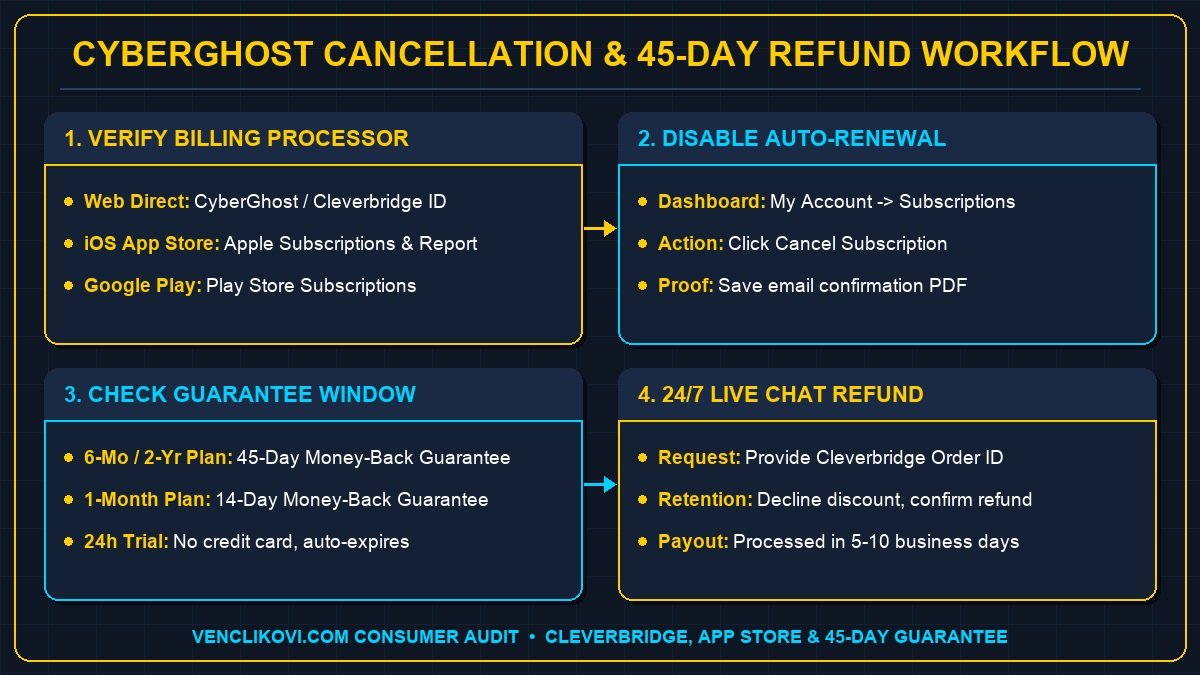
2. Step 1: Turn Off Auto-Renewal in the CyberGhost Account Dashboard
If you simply want to stop future charges—or if you are preparing to ask for a refund—your first step is disabling automatic renewal in your online account portal. You cannot disable auto-renewal inside the Windows, macOS, or mobile VPN apps.
- Open a browser and sign in at my.cyberghostvpn.com using your CyberGhost username/email and password.
- If you enabled Two-Factor Authentication (2FA), enter the 6-digit TOTP code from your authenticator app.
- In the left-hand navigation menu, click Subscriptions (or My Account → Billing).
- Locate your active VPN plan and click Cancel Subscription directly beneath the renewal date.
- CyberGhost will display a brief retention survey asking why you are leaving. Select any reason (such as “Too expensive” or “No longer need a VPN”) and click Continue to Cancel.
- Confirm the cancellation on the final screen until the status changes to Canceled / Auto-Renewal Off, and check your inbox for a confirmation email from CyberGhost or Cleverbridge.
Turning off auto-renewal does not terminate your current access immediately. If you are past the 45-day window and simply canceling renewal, your VPN continues working until the final day of your paid term. If you are within the 45-day window and want your money back, proceed immediately to Step 2 (Live Chat) below.
3. Alternative Path: Canceling Directly via Cleverbridge Billing Portal
CyberGhost processes most direct web card, PayPal, and SEPA payments through Cleverbridge AG, a major European e-commerce processor. If you forgot your CyberGhost account password or lost access to your 2FA device, you can cancel auto-renewal directly through Cleverbridge without logging into the CyberGhost dashboard.
- Search your email inbox for
cleverbridgeorCyberGhost Orderto locate your original purchase receipt. - Copy your Cleverbridge Reference Number (usually a 9-digit number like
412345678). - Scroll to the bottom of the receipt email and click the Manage your subscription or Cancel subscription link—or visit the Cleverbridge Customer Support lookup page and enter your email + Reference Number.
- Click Cancel Auto-Renewal and download the PDF confirmation receipt for your records.
Looking for a Fairer Renewal Price?
Before paying full annual renewal rates, check the current 83% off 2-year + 4-month CyberGhost promotional bundle ($2.19/mo) with 45-day protection.
View CyberGhost $2.19/mo Deal →10,000+ Servers • 7 Simultaneous Devices • 45-Day Money-Back Guarantee
4. Step 2: Requesting Your Full Refund via 24/7 Live Chat (With Script)
Disabling auto-renewal only stops the *next* charge—it does not trigger a refund for your current payment. To get your money back within the 45-day (or 14-day) guarantee period, you must contact CyberGhost’s 24/7 customer support team.
In our testing, 24/7 Live Chat on CyberGhost’s Support Center website is dramatically faster than emailing support@cyberghost.ro. Live chat agents typically approve eligible refunds in under 4 minutes, whereas email tickets can take 24 to 48 hours.
- Visit support.cyberghostvpn.com and click the yellow Help / Chat widget in the bottom-right corner.
- Bypass the automated chatbot by typing
Speak to an agentor selecting Billing & Refunds → Request a Refund. - Have your Account Email and Cleverbridge Order Reference Number ready.
- Paste this concise message so the agent knows you are firm and eligible:
Hello, I would like to cancel my CyberGhost subscription and request a full refund under the 45-day money-back guarantee. My account email is [YOUR_EMAIL] and my Cleverbridge order reference is [ORDER_ID]. Please confirm once the refund has been processed. - The agent will usually ask why you are canceling and may offer a retention discount or extra free months to keep you subscribed. Politely decline by replying: “Thank you, I appreciate the offer, but I would still like to proceed with the full refund today.”
- Once approved, ask the agent for the refund confirmation reference and save a screenshot or email transcript of the chat.
Refund payouts take 5 to 10 business days to appear on your credit card or bank statement (PayPal refunds often settle within 24–72 hours). Note that your CyberGhost account access is terminated immediately once the refund is issued.
5. How to Cancel & Refund CyberGhost on iPhone (App Store) & Android (Google Play)
If you subscribed directly inside the CyberGhost mobile app rather than on CyberGhost’s website, Apple or Google controls your billing relationship.
Apple iOS App Store (iPhone / iPad)
- Cancel Auto-Renewal: Open the iOS Settings app → tap your Apple ID Name at the top → tap Subscriptions → select CyberGhost VPN → tap Cancel Subscription.
- Request Refund: Open Safari and navigate to
reportaproblem.apple.com. Sign in with your Apple ID, select Request a refund, choose a reason (e.g., “I didn’t mean to renew this” or “App didn’t work as expected”), select CyberGhost VPN, and submit.
Google Play Store (Android)
- Cancel Auto-Renewal: Open the Google Play Store app → tap your Profile Icon (top right) → Payments & subscriptions → Subscriptions → select CyberGhost VPN → tap Cancel subscription.
- Request Refund: If it has been less than 48 hours since purchase, request an instant refund via Google Play’s Order History page. If it has been between 2 and 45 days on a multi-month plan, open CyberGhost’s 24/7 live chat and provide your Google Play GPA order number (
GPA.XXXX-XXXX-XXXX-XXXXX).
6. What If Your Subscription Already Auto-Renewed?
Many users only notice an annual renewal after seeing an unexpected charge on their bank statement. If your CyberGhost 1-year or 2-year plan just auto-renewed at the higher standard renewal rate (see our CyberGhost pricing & renewal cost breakdown), act within 48 hours to maximize your chances of a full refund.
Strictly speaking, CyberGhost’s Terms of Service state that the 45-day money-back guarantee applies to initial purchases rather than subsequent automatic renewals. However, in practice, if you contact 24/7 live chat immediately after an unintended renewal and have not used significant bandwidth since the renewal date, Cleverbridge and CyberGhost support frequently grant a courtesy refund—or offer a substantial partial refund/discount adjustment—if you state clearly that you intended to cancel before the renewal.
If your bank or card issuer has already posted the renewal and CyberGhost’s first-line chat agent declines a courtesy refund, politely ask to escalate the ticket to a billing supervisor with your Cleverbridge Order Reference ID. In our experience, polite persistence within 48 hours of an unannounced renewal charge resolves the majority of disputes without needing to file a credit card chargeback—which should always remain your absolute last resort.
7. Post-Cancellation Verification Checklist (Preventing Ghost Charges)
To ensure you never experience an unexpected renewal charge months later, verify these four items before closing your browser:
| Verification Step | Where to Check | Expected Status |
|---|---|---|
| 1. Account Dashboard | my.cyberghostvpn.com → Subscriptions |
Shows Canceled / Auto-Renewal Off |
| 2. Email Confirmation | Inbox / Spam folder | Cleverbridge cancellation & refund email saved |
| 3. PayPal Recurring Billing | PayPal Settings → Payments → Automatic Payments | CyberGhost / Cleverbridge marked Inactive |
| 4. Bank / Card Statement | Banking app (5–10 business days later) | Full credit posted from Cleverbridge |
If you paid with PayPal, taking 30 seconds to manually set the Cleverbridge / CyberGhost billing agreement to *Inactive* inside PayPal’s *Automatic Payments* settings guarantees that no future renewal debit can ever clear, regardless of any account sync delay.
Switch Back Anytime With 45-Day Protection
If you ever return to CyberGhost for 10,000+ servers, NoSpy Bucharest nodes, or dedicated streaming profiles, grab the 83% off deal for $2.19/month.
Get CyberGhost 83% Off + 4 Months Free →No-Questions-Asked 45-Day Guarantee • Deloitte Audited Zero-Logs
8. Honest Comparison: Should You Switch or Fix Your Setup First?
Before finalizing your cancellation, consider why you are leaving CyberGhost. If you are canceling because of slow download speeds, switching from OpenVPN to WireGuard inside CyberGhost’s settings often triples throughput immediately. If you are canceling because you ran out of the 7 simultaneous device slots, running CyberGhost on a router covers your entire home on 1 slot—or switching to Surfshark gives you unlimited simultaneous devices.
If you need more advanced features like built-in ad/malware blocking across all platforms, multi-hop Meshnet, or faster macOS/Linux GUI support, comparing CyberGhost head-to-head against NordVPN, ExpressVPN, or Surfshark in our cluster guides below will help you pick the right long-term replacement.
45-Day Risk-Free CyberGhost Guarantee
New subscribers on 6-month and 2-year plans enjoy a full 45 days to test WireGuard speeds, streaming libraries, and router setups risk-free.
Try CyberGhost Risk-Free ($2.19/mo) →Instant Activation • 24/7 Live Chat Refunds • 7 Devices
9. Related CyberGhost Billing, Pricing & Setup Guides
CyberGhost Billing, Setup & Comparison Cluster
- CyberGhost Router Setup Guide: Asuswrt-Merlin, DD-WRT, OpenWrt & pfSense – Protect your entire household on 1 of 7 slots with Policy-Based Routing.
- CyberGhost Linux CLI Guide: Terminal Commands & Systemd Daemon (2026) – Full setup for Ubuntu, Debian, and Fedora headless servers using WireGuard.
- CyberGhost Review 2026: Definitive Sysadmin Test & Benchmark – Complete 1 Gbps laboratory audit of CyberGhost’s 10,000+ servers and Deloitte no-logs report.
- CyberGhost Dedicated IP Review: Token-Based Zero-Knowledge Architecture – How CyberGhost’s cryptographic token static IP works and how it’s billed.
- CyberGhost 7 Devices Limit: Smart Household Slot Management (2026) – How to remove inactive devices and stay within the 7-slot limit.
- Surfshark vs CyberGhost (2026): Unlimited Devices vs 10,000+ Servers – Comparing refund policies, unlimited device slots, and WireGuard performance.
- NordVPN vs CyberGhost (2026): Complete Security & Speed Comparison – Evaluating NordVPN’s 30-day guarantee and NordLynx against CyberGhost’s 45-day window.
- ExpressVPN vs CyberGhost (2026): Budget Contender vs Premium Benchmark – Direct comparison of pricing, renewal rates, and streaming reliability.
10. Frequently Asked Questions (FAQ)
1. Does CyberGhost really honor its 45-day money-back guarantee?
Yes, CyberGhost consistently honors its 45-day money-back guarantee on all 6-month and 2-year subscriptions purchased directly through its website. When you contact 24/7 live chat within 45 days and decline the retention discount, agents process the full refund in under five minutes.
2. Why does my 1-month CyberGhost plan only have a 14-day refund window?
CyberGhost restricts the 45-day guarantee to multi-month plans (6 months and 2 years) and applies a 14-day refund window to monthly billing cycles. This policy is standard across Kape Technologies VPN brands and is stated on the checkout page before payment.
3. Does uninstalling the CyberGhost app cancel my subscription?
No, deleting the CyberGhost app from your PC, Mac, or phone does not cancel billing or stop auto-renewal. You must explicitly cancel auto-renewal in your CyberGhost web dashboard, Cleverbridge portal, Apple App Store, or Google Play Store.
4. How long does a CyberGhost refund take to appear in my bank account?
Credit card and bank refunds typically take 5 to 10 business days to settle, while PayPal refunds often arrive within 24 to 72 hours. If you do not see the credit after 10 business days, contact Cleverbridge support with your refund confirmation ID.
5. Can CyberGhost refund me if I bought through the Apple iOS App Store?
No, CyberGhost support agents cannot access or refund purchases billed through Apple’s App Store. You must cancel the subscription in your iOS Settings and submit your refund request directly at reportaproblem.apple.com.
6. Who is Cleverbridge on my bank statement?
Cleverbridge is CyberGhost’s official global e-commerce and payment processing partner. Charges labeled CLV*CyberGhost or Cleverbridge AG on your credit card or PayPal statement correspond to your CyberGhost VPN subscription.
7. Can I still use CyberGhost after canceling auto-renewal?
Yes, canceling auto-renewal leaves your subscription active until the end of your current paid billing period. However, if you request and receive a full money-back refund via live chat, your account access is terminated immediately.
8. What if I paid with Bitcoin or cryptocurrency?
CyberGhost supports refunds for cryptocurrency payments processed via BitPay within the 45-day guarantee window. During live chat, the support agent will ask for a refund wallet address or process the equivalent USD/EUR value according to BitPay’s refund protocol.
9. How do I cancel CyberGhost if I forgot my password or lost my 2FA device?
You can bypass the CyberGhost dashboard entirely by clicking the “Manage Subscription” link in your original Cleverbridge email receipt. Alternatively, open CyberGhost’s 24/7 live chat with your Cleverbridge Order Reference ID and ask the agent to disable auto-renewal.
10. Is the 24-hour free trial automatically billed when it ends?
No, CyberGhost’s 24-hour desktop free trial requires no credit card and expires automatically without charging you. Only mobile 3-day or 7-day trials started inside the iOS or Android app stores convert into paid subscriptions unless canceled 24 hours before expiration.


