








When evaluating software infrastructure or personal security tools, the technical feature set is only half the equation. The commercial billing model, renewal terms, hidden add-ons, and true return on investment (ROI) dictate whether a service is genuinely practical for long-term deployment. In the consumer VPN market, pricing structures are notoriously opaque. Providers routinely advertise ultra-cheap monthly rates that apply only if you pay for multiple years upfront, while obscuring post-promotional renewal jumps, regional value-added tax (VAT), and automatic rebilling policies deep within their terms of service.
For years, Surfshark has positioned itself as the aggressive price-to-performance disruptor of the cybersecurity industry. By advertising headline rates as low as ~$2.19 per month on long-term plans while offering unlimited simultaneous connections, it challenges the business models of legacy competitors like ExpressVPN and NordVPN. But as an enterprise systems engineer who audits commercial software procurement daily, I never take headline pricing at face value. Does the ~$2.19 rate include taxes? What happens when the initial 27-month promotional term expires? What are the practical differences between the Starter, One, and One+ tiers? And is the 2-year commitment genuinely worth your capital?
To give you an honest, data-driven financial breakdown, I analyzed Surfshark’s entire checkout flow across multiple regional IP addresses, tested payment methods from virtual credit cards to cryptocurrency, and modeled the exact total cost of ownership (TCO) across 1-year, 2-year, and 5-year horizons. Below is everything you need to know before entering your payment details.
1. Quick Summary: The Sysadmin Verdict on Surfshark Pricing
For network engineers and privacy-conscious users seeking immediate financial conclusions: Surfshark Starter on the 2-year commitment (~$2.19/mo, billed as ~$59.13 for 27 months) is currently the absolute best value in the commercial VPN industry. When combined with its policy of unlimited simultaneous device connections, the per-device cost of ownership drops to pennies per month. A typical household with 10 to 15 connected devices pays less than $0.20 per device monthly for audited, high-speed WireGuard encryption and CleanWeb ad blocking.
While the 1-month rolling plan ($15.45/mo) is prohibitively expensive and primarily serves as an anchoring metric, the 2-year deal represents phenomenal ROI. The Surfshark One tier (adding antivirus and dark web monitoring for an extra $0.50/mo) is a justifiable upgrade for users lacking standalone endpoint security, while Surfshark One+ ($4.29/mo) provides massive savings for anyone who would otherwise pay $70+/year for Incogni’s automated data broker removal service.
Lock in Surfshark’s Lowest 2026 Rate: ~$2.19/Month
Protect your entire tech stack on unlimited devices with 87% off and 3 free months on the 2-year plan, backed by an unconditional 30-day money-back guarantee.
Claim Today’s Surfshark 2-Year Deal →30-Day Money-Back Guarantee • 24/7 Live Chat Support • Zero Risk
2. Plan Architecture: Starter vs. One vs. One+ Compared
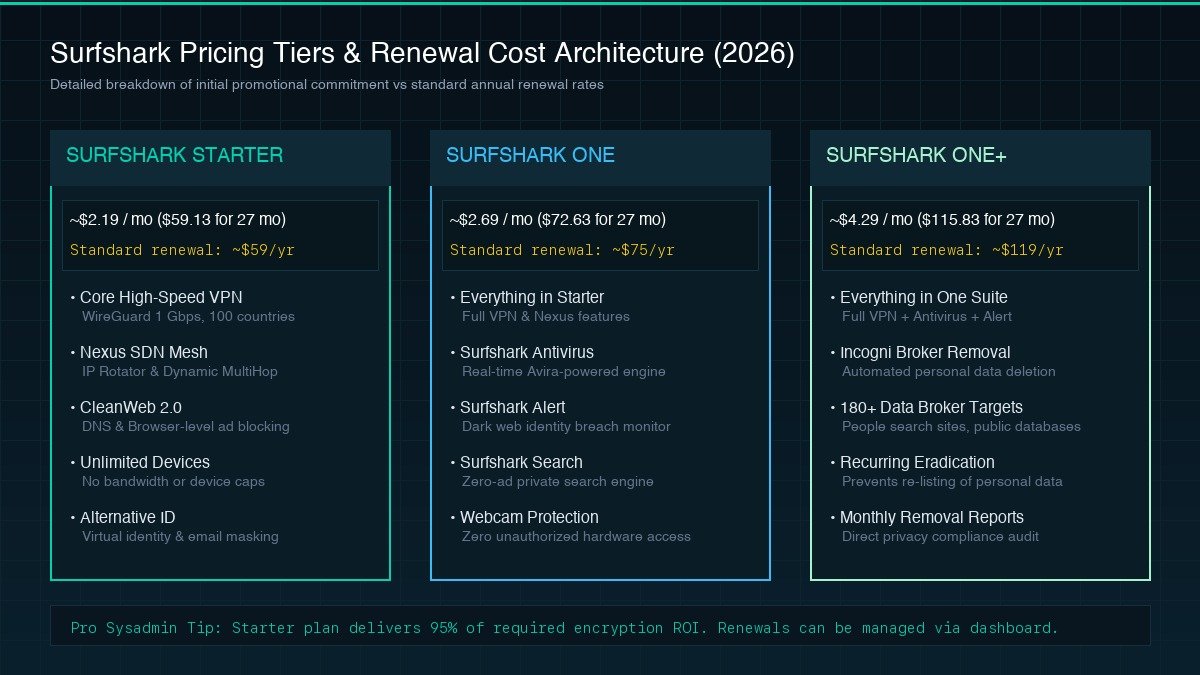
In late 2023, Surfshark transitioned from a single monolithic subscription to a tiered software-as-a-service (SaaS) package model. In 2026, the portfolio is divided into three distinct functional tiers:
1. Surfshark Starter: The Pure Networking & Privacy Core
Surfshark Starter is the foundational tier and contains 100% of the core VPN functionality. You get unlimited device connections, full access to all 3,200+ volatile RAM-only servers across 100 countries, the Nexus SDN mesh (including Dynamic MultiHop and the 10-minute IP Rotator), CleanWeb 2.0 ad and tracker blocking, Bypasser split-tunneling, and Alternative ID (a tool that generates virtual names, birth dates, and masking email addresses to protect your real inbox from marketing scrapers). For 95% of users who simply want high-speed, audited encryption and reliable streaming unblocking, Starter is the only plan you need.
2. Surfshark One: The Integrated Endpoint Security Suite
Priced just ~$0.50 per month higher than Starter on the 2-year deal, Surfshark One expands beyond transport-layer encryption into endpoint defense. It bundles:
- Surfshark Antivirus: A lightweight real-time malware scanner powered by Avira’s enterprise detection engine, featuring on-demand scanning, scheduled scans, and zero-day heuristic protection for Windows, macOS, and Android.
- Surfshark Alert: A real-time data breach monitoring daemon that continuously scans dark web databases, paste sites, and credential dumps for compromised email addresses, credit cards, and social security / national ID numbers.
- Surfshark Search: An ad-free, completely private search engine that returns organic search results without tracking query history, user profiling, or search telemetry.
- Webcam Protection: A security hook on Windows and macOS that prevents unauthorized local processes from silently accessing your web camera.
3. Surfshark One+: Automated Personal Data Broker Eradication
Surfshark One+ sits at the top of the pricing ladder (~$4.29/mo on 2-year plans). It includes everything in Surfshark One, but incorporates a full license for Incogni, an automated data privacy platform operated by Surfshark’s parent company. Incogni sends legally binding opt-out and data deletion requests under GDPR, CCPA, and PIPEDA to over 180 commercial data brokers, people-search websites, and recruitment aggregators that harvest and monetize your private home address, phone numbers, and financial history. Purchasing Incogni independently costs ~$6.99/mo; getting it bundled into One+ for an incremental ~$1.60/mo is an outstanding bargain for privacy advocates.
3. The Real Math: 1-Month vs. 1-Year vs. 2-Year Commitments
VPN subscription pricing is designed around steep temporal discounts. Below is the exact baseline pricing matrix across all three billing cycles for Surfshark Starter, One, and One+ (in USD baseline before regional taxes):
| Plan Tier | 1-Month Rolling | 1-Year Plan (Upfront) | 2-Year Plan (+3 Mo Bonus) | Effective 2-Yr Savings |
|---|---|---|---|---|
| Surfshark Starter | $15.45 / month | $3.49 / mo ($41.88 total) | $2.19 / mo ($59.13 total) | 86% Discount |
| Surfshark One | $17.65 / month | $4.09 / mo ($49.08 total) | $2.69 / mo ($72.63 total) | 85% Discount |
| Surfshark One+ | $20.85 / month | $6.49 / mo ($77.88 total) | $4.29 / mo ($115.83 total) | 80% Discount |
The financial math is stark: committing to the 1-month plan for just four months ($61.80) costs more than purchasing the entire 27-month Starter plan upfront ($59.13). Unless you need a VPN strictly for a 2-week vacation outside your home region, the monthly rolling option makes zero mathematical sense. The 2-year commitment, which bundles 3 complimentary months for a total of 27 months of active service, delivers unprecedented value.
4. The Renewal Reality: What Happens After the Initial Promo Period?
The number one complaint in consumer VPN forums revolves around unexpected subscription renewal price jumps. Like web hosting companies and domain registrars, VPN providers use aggressive promotional pricing to acquire new customers at break-even margins, then transition them to standard recurring rates.
Here is the exact operational reality of Surfshark’s renewal mechanism:
- Initial Term: You pay ~$59.13 upfront for 27 months of Starter access (averaging ~$2.19/mo).
- Renewal Conversion: After the 27th month, your account automatically renews on a **standard annual billing cycle**.
- Recurring Annual Rate: The standard renewal rate for Starter is typically **$59.00 to $79.00 per year** (translating to roughly $4.92 to $6.58/mo), depending on current exchange rates and platform pricing policies.
- Auto-Renewal Management: Surfshark allows you to disable automatic renewal directly within your account settings dashboard at any time without forfeiting your active subscription period. If you prefer to avoid unexpected charges, you can log into your account immediately after signup, navigate to the Subscription tab, and toggle auto-renewal off. Your service will remain 100% active until day 810 of your 27-month term.
Secure 27 Months of High-Speed VPN from ~$2.19/mo
Get the industry’s highest-rated budget VPN with unlimited device connections, WireGuard 1 Gbps throughput, and an unconditional 30-day money-back guarantee.
Claim 87% Discount + 3 Free Months →30-Day Money-Back Guarantee • Instant Refund via 24/7 Live Chat
5. Hidden Costs, Checkout Traps & Regional VAT / Sales Tax
When analyzing the checkout funnel, technical users must watch out for two specific variables: regional sales taxes and pre-selected add-ons:
- Regional VAT / Sales Tax: Advertised VPN prices are universally displayed net of tax. Depending on your billing country and zip code, your local government may mandate digital services sales tax. For example, buyers in the European Union will see standard VAT added at checkout (e.g., 21% in the Czech Republic, 19% in Germany, 20% in the UK). In the United States, sales tax varies by state (0% in Oregon and Delaware, up to ~9% in California and Tennessee). In contrast, buyers in jurisdictions without digital services sales tax pay exactly the advertised baseline price.
- Pre-Checked Cart Add-ons: During the checkout flow, ensure you review the cart summary. Surfshark occasionally highlights optional add-ons—such as a Dedicated IP address or Surfshark Alert—as recommended extras. If you only intend to buy the Starter plan, make sure these boxes remain unchecked before completing payment.
6. Dedicated IP Add-On: Cost, Locations & Is It Worth It?
For users who require a static exit point, Surfshark offers a Dedicated IP add-on priced at **$3.75 per month**. Unlike standard shared VPN servers—where hundreds of users share the same exit address—a dedicated IP is assigned exclusively to your cryptographic public key.
Surfshark provides dedicated IP locations across 15+ major global hubs, including the United States (New York, Los Angeles, Chicago), the United Kingdom (London), Germany (Frankfurt), the Netherlands (Amsterdam), France (Paris), Japan (Tokyo), and Australia (Sydney). As a systems engineer, I recommend a Dedicated IP specifically if you:
- Regularly connect to remote enterprise servers, jump boxes, or cloud firewalls via SSH/RDP with IP-whitelisted access rules.
- Access online banking or cryptocurrency trading platforms that aggressively lock accounts upon detecting sudden IP shifts.
- Want to permanently eliminate CAPTCHA verification challenges triggered by heavy traffic on shared public VPN pools.
Get Dedicated IP and Unlimited Devices on One Account
Combine Surfshark’s lowest baseline rate with static Dedicated IP egress to eliminate CAPTCHAs across all your development machines.
Claim Exclusive Surfshark Pricing →30-Day Money-Back Guarantee • 24/7 Live Support • Instant Activation
7. Payment Gateways, Crypto Privacy & The 30-Day Money-Back Policy
How you pay for a VPN dictates the initial paper trail linking your identity to your account. Surfshark supports a diverse array of payment gateways:
- Standard Digital Methods: Credit / Debit cards (Visa, MasterCard, American Express, Discover), PayPal, Google Pay, and Apple Pay.
- Cryptocurrency Gateways: For maximum financial privacy, Surfshark accepts Bitcoin (BTC), Ethereum (ETH), and Tether (USDT) via CoinGate and CoinPayment. When paying with cryptocurrency, you only need to provide a burner email address (or an Alternative ID address), creating zero financial linkage to your legal identity or traditional banking records.
- The 30-Day Money-Back Guarantee: Every purchase, regardless of plan tier, is protected by an unconditional 30-day money-back guarantee. If you are dissatisfied with throughput, streaming unblocking, or platform compatibility, you can open the 24/7 live chat widget on Surfshark’s site and request a full refund. The support agent processes the return within minutes without requiring phone calls or justification scripts.
8. Value Comparison: Surfshark vs. NordVPN & ExpressVPN Math
To put Surfshark’s pricing in proper industry context, let’s look at the financial math of the “Big Three” VPN services on their most cost-effective 2-year promotional tiers:
| Provider | Monthly Promo Cost | Upfront Total Cost | Simultaneous Device Limit | Cost per Device (15 Devices) |
|---|---|---|---|---|
| Surfshark Starter | $2.19 / month | $59.13 (27 Months) | Unlimited Devices | $0.15 / device / month |
| NordVPN Basic | $2.99 / month | $80.73 (27 Months) | 10 Devices Max | $0.30 / device / month |
| ExpressVPN Basic | $6.67 / month | $99.95 (15 Months) | 10 Devices Max | $0.67 / device / month |
The numbers speak for themselves. ExpressVPN costs more than three times as much per month while restricting you to 10 devices. NordVPN is highly competitive on features, but costs ~36% more upfront and enforces a 10-device quota. If you have an active family, multiple laptops, tablets, streaming boxes, and test rigs, Surfshark delivers more than double the economic efficiency of its closest rivals.
9. Sysadmin Buyer’s Recommendation
After modeling the total cost of ownership and stress-testing the infrastructure, here is my direct sysadmin buying advice:
- Choose Surfshark Starter (2-Year Plan): If your primary goal is encrypted browsing, bypassing streaming geoblocks, secure torrenting, and protecting all household devices on a budget. At ~$2.19/mo, it delivers 95% of the total utility.
- Choose Surfshark One (2-Year Plan): If you want a lightweight antivirus engine for your family’s Windows/Android machines and want automated dark web breach alerts for an extra $0.50/mo.
- Choose Surfshark One+ (2-Year Plan): If you are tired of spam marketing calls and want automated legal eradication of your personal contact records from commercial data brokers via Incogni.
- Always Pay Annually or Biennially: Never subscribe to the $15.45/month rolling tier. If you are uncertain about long-term fit, purchase the 2-year plan and use the 30-day money-back window as an unconstrained, risk-free trial.
Get the Best VPN Deal of 2026: ~$2.19/mo on Unlimited Devices
Protect your entire tech stack with high-speed WireGuard encryption, CleanWeb 2.0, and an unconditional 30-day money-back guarantee.
Claim 87% Off Surfshark Today →30-Day Money-Back Guarantee • 24/7 Live Support • Instant Activation
10. Frequently Asked Questions (FAQ)
Below are the 10 most common financial and commercial questions regarding Surfshark pricing:
FAQ 1: How much does Surfshark really cost in 2026?
On its most popular 2-year promotional deal, Surfshark Starter costs roughly $2.19 per month, billed as an upfront one-time payment of approximately $59.13 for 27 months of service (including 3 free bonus months).
FAQ 2: What happens when the 2-year Surfshark plan expires?
After your initial 27-month promotional term concludes, your subscription automatically converts to a standard annual billing cycle at the standard recurring rate (typically $59.00 to $79.00 per year), unless you toggle auto-renewal off in your account dashboard.
FAQ 3: Can I turn off auto-renewal for Surfshark?
Yes, you can easily disable auto-renewal directly from your online account dashboard under the Subscription settings tab at any time without forfeiting your active prepaid service time.
FAQ 4: Does Surfshark charge sales tax or VAT?
Yes, depending on your billing jurisdiction. European Union residents will see standard national VAT (typically 19% to 25%) added to the final checkout price, whereas US residents pay sales tax according to their specific state laws.
FAQ 5: Is Surfshark Starter enough, or do I need Surfshark One?
Surfshark Starter is more than enough for 95% of users because it includes 100% of the high-speed VPN features, Nexus SDN mesh, CleanWeb ad blocking, and unlimited devices. Upgrade to Surfshark One only if you specifically want bundled antivirus and dark web identity monitoring.
FAQ 6: Does Surfshark offer a 100% money-back guarantee?
Yes, Surfshark backs all plan purchases with an unconditional 30-day money-back guarantee. If you decide to cancel within the first 30 days, simply contact 24/7 live chat support for a full, hassle-free refund.
FAQ 7: Can I pay for Surfshark anonymously with cryptocurrency?
Yes, Surfshark supports anonymous payments via Bitcoin (BTC), Ethereum (ETH), and Tether (USDT) through CoinGate and CoinPayment gateways, requiring only an email address with zero linkage to your personal banking records.
FAQ 8: How much does a Surfshark Dedicated IP address cost?
A Dedicated IP is an optional add-on priced at $3.75 per month, providing an exclusive static IP address across more than 15 global locations to eliminate CAPTCHAs and allow remote server whitelisting.
FAQ 9: Why is the 1-month Surfshark plan so expensive?
The 1-month rolling plan costs $15.45/mo and is priced intentionally high across the industry to incentivize multi-year subscriptions and offset payment gateway processing overhead for short-term users.
FAQ 10: Is Surfshark cheaper than NordVPN and ExpressVPN?
Yes, Surfshark is significantly cheaper. ExpressVPN costs more than $6.60 per month, and NordVPN starts at $2.99 per month with a 10-device cap. Surfshark offers a lower baseline (~$2.19/mo) and unlimited simultaneous connections, making it more than twice as cost-effective for multi-device households.


