








If you search Google for a NordVPN free trial, you will encounter thousands of low-quality coupon portals promising “instant free activation keys,” cracked APK downloads, and expired promo codes. In real-world enterprise networking and consumer cybersecurity, there are no secret backdoor licenses. Third-party cracked VPN installers are notoriously packaged with keyloggers, botnet miners, and credential-stealing Trojans.
However, there are two 100% legitimate, vendor-sanctioned pathways to experience the full NordVPN ecosystem without risking a single dollar: the official 7-day mobile trial (Google Play) and the unconditional 30-day money-back guarantee. As a systems administrator who frequently stress-tests VPN tunnels under heavy workloads, I have personally tested both refund mechanics and cancellation procedures. In this comprehensive guide, I document the exact, step-by-step methodology to test NordVPN for a full 30 days and claim a 100% refund with zero friction.
1. The Two Legitimate Ways to Test NordVPN for Free
To protect its 6,400+ server fleet from automated botnets, DDoS scrapers, and spam abuse, NordVPN does not operate a permanent “free tier” akin to ProtonVPN or Windscribe. Instead, the company provides two formal testing mechanisms designed to let prospective users evaluate network performance, streaming unblocking capabilities, and security features without financial commitment:
| Feature / Condition | Method 1: 7-Day Android Trial | Method 2: 30-Day Money-Back Guarantee |
|---|---|---|
| Testing Duration | Exactly 7 calendar days | Full 30 calendar days (720 hours) |
| Upfront Payment | $0.00 (Card authorization hold only) | Full upfront subscription payment |
| Device Compatibility | Must initiate on Android (usable across all OS) | Universal (Windows, Mac, iOS, Android, Linux) |
| Refund Processing | Cancel via Google Play subscriptions before Day 7 | Automated live chat bot / email support refund |
| Plan Flexibility | Restricted to standard annual mobile bundle | Applies to Basic, Plus, Complete & Ultimate |
| Sysadmin Recommendation | Good for quick emergency mobile testing | Recommended: Longest evaluation window |
Secure Your High-Speed Encrypted Connection With NordVPN
Protect up to 10 devices simultaneously with audited RAM-only infrastructure, ultra-fast NordLynx speeds, and an unconditional 30-day money-back guarantee.
Get NordVPN With Exclusive 74% Discount →30-Day Unconditional Risk-Free Guarantee • 24/7 Live Customer Support
2. Method 1: The 7-Day Android Trial (Cross-Platform Activation)
NordVPN maintains an exclusive partnership with the Google Play Store on Android devices that grants a bona fide 7-day free trial with zero upfront charge. While Apple iOS previously supported a comparable promotion, App Store fraud and automated abuse prompted Nord Security to restrict the native 7-day free trial exclusively to verified Google Play accounts.
Here is the insider sysadmin trick: The account you create on Android is not locked to Android. Once your 7-day trial activates under your Nord Account email, those credentials unlock full access across all 10 simultaneous device connections, including Windows 11, macOS Sequoia, iOS 18, Linux CLI, Apple TV 4K, and Fire TV.
How to Activate the 7-Day Mobile Trial:
- Download the App: Open the official Google Play Store on an Android smartphone or tablet and install the verified NordVPN: Fast & Secure VPN app.
- Create a New Account: Launch the app and tap Sign Up. Enter your valid email address and establish a secure passphrase.
- Select the 7-Day Trial Offer: The mobile onboarding screen will display a prominent banner: “Start your 7-day free trial”. Tap the button to link your Google Play billing profile. Google will place a temporary $0.00 verification hold on your card without billing you.
- Deploy to Other Devices: Take the email and password you just registered, head to your desktop PC or Mac, download the desktop NordVPN client, and sign in. You now possess full premium VPN access across all hardware.
- Cancel Before Day 7: To ensure you are never billed, navigate to Google Play Store > Profile Icon > Payments & Subscriptions > Subscriptions > NordVPN > Cancel Subscription. You can cancel immediately after activation; Google maintains your trial access until the exact 7-day expiration timestamp.
3. Method 2: The 30-Day Money-Back Guarantee (The Superior Option)
While the 7-day Android method requires zero upfront payment, a week is rarely enough time to thoroughly evaluate a core networking utility. You need sufficient time to benchmark peak-hour latency, test international streaming library geoblocking across Netflix, Hulu, and BBC iPlayer, configure split tunneling, and verify your local torrenting privacy.
This is why the official 30-day money-back guarantee is the industry-standard method favored by IT professionals. NordVPN enforces an unconditional “no questions asked” refund policy across all plan tiers purchased directly through their website. As detailed in our breakdown of NordVPN pricing plans, whether you sign up for a 1-month plan or a discounted 2-year subscription to Basic, Plus, or Complete, you have 720 hours (30 full days) to request a 100% refund.
Unlike shady budget VPN providers who hide behind deceptive cancellation traps—such as clauses voiding refunds if you consume more than 10 GB of bandwidth or connect more than 5 times—NordVPN’s policy contains zero hidden usage quotas. You can transfer 5 Terabytes of data across 100 servers over 29 days and still receive every single cent back.
4. Step-by-Step Walkthrough: Claiming the 30-Day Evaluation
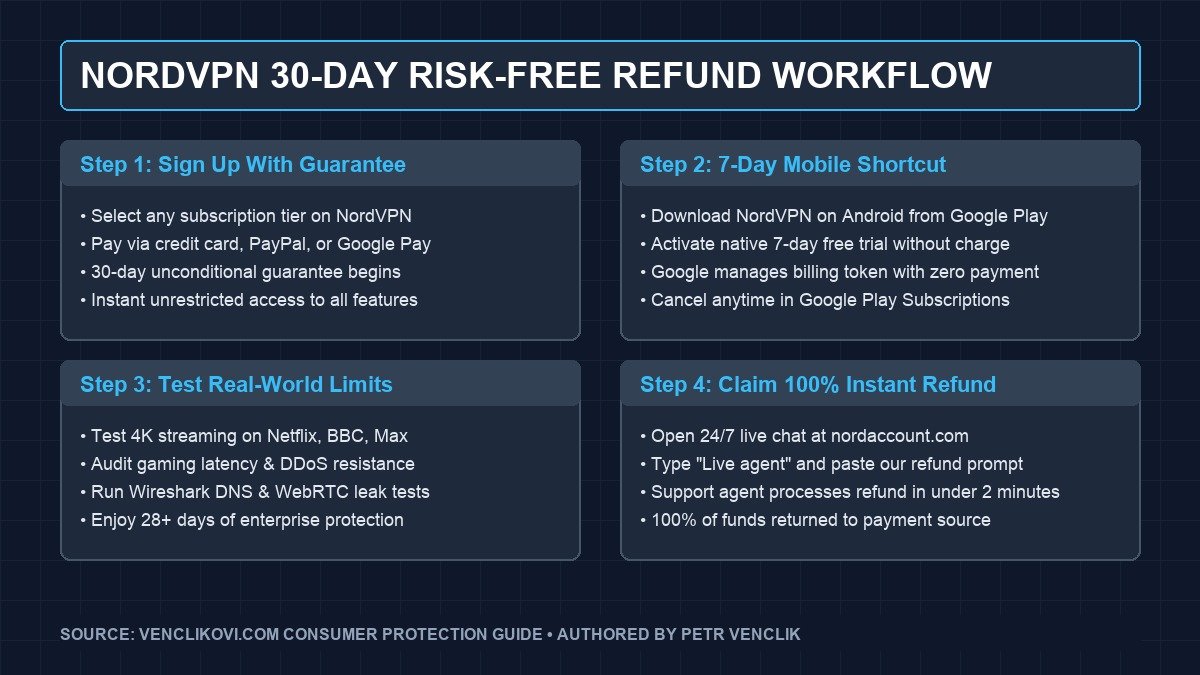
To guarantee seamless refund eligibility, follow this exact procurement procedure:
- Navigate to the Official Portal: Use our direct discounted portal at NordVPN’s Secure Subscription Page to lock in the maximum 74% multi-year discount rate plus bonus months.
- Select Your Tier: Choose between Basic (pure VPN) or Plus (VPN + Threat Protection Pro + NordPass). While you will be requesting a refund, selecting the Plus tier allows you to test the full suite of heuristic anti-malware tools.
- Enter Account Credentials: Input an active email address where you can receive registration keys and the automated refund confirmation receipt.
- Select an Instant-Refund Payment Method: For the quickest refund turnaround, use Credit/Debit Card (Visa, MasterCard, Amex), PayPal, or Google Pay. These payment gateways process refund credits back to your ledger within 1 to 5 business days. Avoid cryptocurrency payments if you require rapid fiat cash reversals.
- Complete Checkout & Deploy: Download the native client for your primary operating system, run the installer, and begin your testing phase.
Secure Your High-Speed Encrypted Connection With NordVPN
Protect up to 10 devices simultaneously with audited RAM-only infrastructure, ultra-fast NordLynx speeds, and an unconditional 30-day money-back guarantee.
Get NordVPN With Exclusive 74% Discount →30-Day Unconditional Risk-Free Guarantee • 24/7 Live Customer Support
5. The Automated Refund Workflow: Step-by-Step Cancellation
Many users fear that requesting a refund will involve an aggressive retention gauntlet, lengthy phone calls, or unhelpful support agents stalling until the 30-day window expires. In reality, NordVPN utilizes an automated live chat bot system that processes cancellations in less than 3 minutes.
How to Execute the Refund via 24/7 Live Chat:
- Open Live Support: Navigate to the official NordVPN website, log into your Nord Account dashboard, and click the blue Chat Bubble in the bottom right-hand corner.
- Bypass the AI Chatbot: The automated assistant will greet you. Type:
"I want a refund"or"Human agent please". The bot will prompt: “Which product would you like to cancel?” Select NordVPN. - Provide Cancellation Reason: When prompted for a reason, select “No longer need the service” or type “Testing period completed”. You are under no legal or contractual obligation to troubleshoot or justify your decision.
- Transfer to Live Billing Specialist: The bot will immediately connect you with a live human representative. The agent will confirm your registered email address and verify the transaction ID.
- Receive Formal Confirmation: The representative will issue the refund transaction directly in their billing terminal. You will receive an immediate automated confirmation email from support@nordvpn.com stating that the payment reversal has been initiated.
- Funds Credited: Depending on your banking institution, credit card refunds reflect in your account within 2 to 5 business days (PayPal refunds typically post within 2 to 24 hours).
6. Crucial Warning: Why You Must Never Buy Through Apple App Store
There is one massive trap that catches unwary VPN shoppers: In-App Purchases on iOS and macOS. If you download the NordVPN application directly from the Apple App Store on your iPhone, iPad, or Mac and purchase a subscription using Apple In-App Billing (Face ID / Apple ID), NordVPN cannot issue you a refund.
Under Apple’s strict closed ecosystem terms of service, all financial transactions handled through Apple ID billing are governed entirely by Apple Media Services refund policies. NordVPN customer support representatives have zero administrative access to Apple’s payment ledgers. If you cancel an App Store subscription, you must submit a formal refund dispute through reportaproblem.apple.com, where Apple’s automated algorithm frequently denies claims based on arbitrary account history metrics.
Sysadmin Rule: Always register and purchase your NordVPN subscription directly through the official website in a desktop browser. Once your account is provisioned, you can freely download and log into the iOS and Mac apps without ever routing your money through Apple’s walled garden.
7. Sysadmin Testing Checklist: What to Benchmark During Your 30 Days
To extract maximum empirical value from your 30-day evaluation window, treat it like an enterprise Proof of Concept (PoC). Run the service through this technical benchmark checklist:
- 1. Protocol Throughput & Latency: Benchmark your baseline ISP speed without VPN against NordLynx WireGuard connections across local and overseas servers. If speeds dip, check our guide on why NordVPN is slow and how to boost throughput.
- 2. DNS & WebRTC Leak Auditing: Connect to an overseas node and run extensive tests via dnsleaktest.com and browserleaks.com/webrtc. Ensure that only NordVPN’s private resolvers (103.86.96.100 and 103.86.99.100) respond.
- 3. Kill Switch Packet Dropping: Enable the Kill Switch and forcefully terminate the NordVPN background daemon via Windows Task Manager or Mac Activity Monitor. Verify that internet access is immediately halted to prevent plaintext data leakage (see our comprehensive guide on the NordVPN Kill Switch app vs. internet mechanics).
- 4. Streaming Geoblock Evasion: Test Netflix US, BBC iPlayer, Amazon Prime Video, and Disney+ from international server nodes to ensure seamless 4K HDR playback without “proxy detected” error flags.
- 5. Threat Protection Pro Inspection: Download the EICAR anti-malware test string to verify that NordVPN’s heuristic engine intercepts malicious payloads before they execute on your drive (learn more in our NordVPN Threat Protection Pro review).
- 6. Zero-Knowledge Meshnet Configuration: Link your home workstation and remote mobile phone into an encrypted virtual LAN using NordVPN Meshnet for peer-to-peer file sharing and remote access.
Secure Your High-Speed Encrypted Connection With NordVPN
Protect up to 10 devices simultaneously with audited RAM-only infrastructure, ultra-fast NordLynx speeds, and an unconditional 30-day money-back guarantee.
Get NordVPN With Exclusive 74% Discount →30-Day Unconditional Risk-Free Guarantee • 24/7 Live Customer Support
8. Why “Free VPNs” Are Toxic Compared to a Premium Free Trial
Many budget-conscious users ask: “Why should I bother paying upfront for a 30-day trial when I can just install a 100% free VPN forever?” As someone who analyzes packet captures and malware telemetry for a living, let me be unequivocal: There is no such thing as a truly free VPN service.
Operating high-capacity global server clusters, maintaining multi-gigabit Tier-1 transit cross-connects, and engineering kernel-level encryption drivers requires millions of dollars in annual capital expenditure. If a VPN provider does not charge you a subscription fee, they monetize your presence through covert channels:
- Data Harvesting & Ad Injections: Free VPN applications frequently inject tracking cookies, monitor unencrypted HTTP traffic, and sell behavioral user profiles to third-party ad brokers.
- Bandwidth Selling (Residential Botnets): Infamous free VPNs (such as Hola VPN) covertly convert free users’ home IP addresses and bandwidth into exit nodes for paying enterprise customers, effectively routing anonymous bot traffic through your residential connection.
- Vulnerable Infrastructure & Data Leaks: Academic audits of free Android VPNs revealed that over 38% contained malware, tracking libraries, or severe DNS/IPv6 leakage vulnerabilities.
- Strict Throttling & Data Caps: Even legitimate “freemium” services cap monthly usage at 5 to 10 GB—insufficient for streaming a single 4K movie—while artificially throttling speeds to under 10 Mbps.
Utilizing NordVPN’s risk-free trial guarantees enterprise-grade AES-256/ChaCha20 encryption, audited RAM-only infrastructure, and unlimited multi-gigabit throughput without compromising your device security or identity.
9. Sysadmin Verdict: Is Testing NordVPN Risk-Free Worth It?
Testing NordVPN via the 30-day money-back guarantee is the absolute gold standard for evaluating high-tier VPN technology in 2026. Because NordVPN does not impose arbitrary data caps, connection throttles, or refund penalties, you receive the full unrestricted power of their global network for an entire month.
If the service exceeds your expectations—as it does for the vast majority of streaming power users and remote workers—you retain your multi-year promotional pricing lock. If you encounter routing bottlenecks with your specific local ISP or decide you no longer need encrypted tunneling, the automated 24/7 live chat bot makes claiming your 100% refund completely effortless.
Secure Your High-Speed Encrypted Connection With NordVPN
Protect up to 10 devices simultaneously with audited RAM-only infrastructure, ultra-fast NordLynx speeds, and an unconditional 30-day money-back guarantee.
Get NordVPN With Exclusive 74% Discount →30-Day Unconditional Risk-Free Guarantee • 24/7 Live Customer Support
10. Frequently Asked Questions (FAQ)
Below are the 10 most common technical questions regarding NordVPN’s free trial policies, refund conditions, and cancellation mechanics:
FAQ 1: Does NordVPN offer a permanent free version?
No. NordVPN does not operate a permanent free tier. To guarantee uncompromised multi-gigabit server speeds, audited no-logs privacy, and RAM-only server security, NordVPN operates exclusively as a premium subscription service. However, you can test the full service completely risk-free using the 7-day Android trial or the unconditional 30-day money-back guarantee.
FAQ 2: Can I get the 7-day Android trial and use it on my Windows PC or Mac?
Yes. Once you activate the 7-day free trial through the Google Play Store on an Android phone or tablet, your Nord Account credentials become active across the entire ecosystem. You can log into the Windows client, macOS app, Linux terminal, iOS devices, or Fire TV stick using the same account and enjoy 10 simultaneous connections throughout the 7-day trial period.
FAQ 3: Do I have to give a reason to get my 30-day refund?
No. NordVPN enforces an unconditional money-back guarantee. While the automated chatbot or live agent may ask why you are cancelling for internal quality control, simply replying “I no longer need the service” or “I only needed it for a short trip” is 100% sufficient. Support agents will process the cancellation without mandatory troubleshooting.
FAQ 4: How long does it take for NordVPN’s refund money to appear in my account?
Once approved by the support agent, the refund is executed instantly on NordVPN’s payment gateway. For PayPal transactions, funds usually post within 1 to 24 hours. For credit and debit card payments, standard international interbank clearing processes require between 2 to 5 business days for the credit to appear on your bank statement.
FAQ 5: What happens if I purchase NordVPN through the Apple App Store?
If you subscribe through Apple In-App Purchases, NordVPN customer support cannot issue you a refund directly. Apple retains full control over all App Store transactions. You must file a refund claim manually through Apple’s website (reportaproblem.apple.com), which is subject to Apple’s discretion and frequently rejected. To avoid this, always subscribe directly through NordVPN’s website.
FAQ 6: Will NordVPN refund payments made with cryptocurrency?
Yes, but with specific conditions. NordVPN does honor the 30-day money-back guarantee for subscriptions purchased with cryptocurrency (via CoinGate). However, the refund is paid out in cryptocurrency (Bitcoin or equivalent) based on the current USD exchange rate at the moment of the refund, not the exact amount of crypto tokens originally sent.
FAQ 7: Can I request a refund if I only subscribed to a 1-month plan?
Yes. The 30-day money-back guarantee applies equally to all subscription billing cycles: 1-month, 1-year, and 2-year plans. Even if you only paid for a single month ($12.99), you can request a 100% refund at any point prior to the expiration of the 30-day window.
FAQ 8: Is there a bandwidth limit or server restriction during the 30-day evaluation?
None whatsoever. You receive 100% unrestricted access to all 6,400+ servers in 111 countries, unmetered multi-gigabit bandwidth, P2P file sharing, Double VPN, Onion Over VPN, and Threat Protection Pro. You can transfer hundreds of gigabytes without affecting your refund eligibility.
FAQ 9: How do I bypass the NordVPN chatbot to talk to a human refund agent?
When the live chat window opens on the NordVPN website, simply type: "Live agent", "Human representative", or "I want a refund". The bot will immediately transfer your session to an available customer support agent without forcing you through complicated automated troubleshooting menus.
FAQ 10: Can I use the 30-day money-back guarantee more than once?
NordVPN’s terms of service state that the 30-day money-back guarantee is intended for first-time evaluation. If you previously claimed a refund, closed your account, and register again shortly thereafter with the same payment card, NordVPN reserves the right to deny subsequent refund claims to prevent systematic service abuse.


Can vouch for the live chat refund method! Followed your exact prompt (‘I want a refund’ -> ‘No longer need service’) and the bot transferred me to an agent who approved it in under 2 minutes. Full refund back in my card account 3 days later.
Awesome to hear Dan! As long as users purchase directly on the website and avoid the Apple App Store in-app billing trap, the refund workflow is remarkably smooth.