








Canceling Private Internet Access (PIA) and claiming a full 100% refund takes under five minutes if you disable auto-renewal in the Client Control Panel (CCP) and submit your refund request within 30 calendar days of purchase. Unlike VPNs that bury cancellation behind phone calls or retention mazes, PIA provides a self-service auto-renewal toggle for web signups and 24/7 live chat refund processing.
However, one critical billing trap catches thousands of subscribers off guard every year: turning off auto-renewal only stops future charges; it does not trigger a refund for your current billing cycle. In addition, if you originally subscribed through the Apple App Store or Google Play Store instead of PIA’s website, PIA’s support agents cannot issue your refund directly because Apple and Google control those billing ledgers.
In this 2026 retention and billing audit, we walk through every cancellation path (Web CCP, Apple iOS, Google Play, PayPal), verify the exact 30-day money-back guarantee rules, and give you a copy-paste live chat script to get your payout processed without friction.
| Purchase Channel | Where to Cancel Auto-Renewal | 30-Day Refund Handler | Typical Payout Time |
|---|---|---|---|
| PIA Website (Card / PayPal) | PIA Client Control Panel (CCP) | PIA 24/7 Live Chat / Support Ticket | 3 to 10 business days |
| Apple App Store (iOS / macOS) | iPhone Settings > Subscriptions | Apple (reportaproblem.apple.com) | 2 to 7 business days |
| Google Play Store (Android) | Google Play > Payments & Subs | Google Play (within 48h) / PIA Support | 1 to 5 business days |
| Crypto / Gift Cards (Retail) | Non-recurring (no auto-renewal) | Non-refundable (policy exclusion) | Not eligible |
Table of Contents: PIA Cancellation & 30-Day Refund Checklist
Want to Test PIA Risk-Free With the 30-Day Guarantee?
Every direct PIA web plan includes a full 30-day money-back guarantee, unlimited simultaneous devices, and 880+ Mbps WireGuard speeds.
Get 82% PIA Deal (30 Days Risk-Free) →No-Questions 30-Day Refund • Instant Self-Service Cancellation • Unlimited Devices
1. Step 1: How to Disable Auto-Renewal in the PIA Client Control Panel (Web)
If you purchased your Private Internet Access subscription directly on the PIA website using a credit card, debit card, PayPal, or Amazon Pay, your subscription is managed inside the PIA Client Control Panel (CCP). Disabling auto-renewal here guarantees you will never be billed again when your current term expires, while letting you keep full VPN access until the final day of your paid period.
Follow these exact steps to turn off automatic renewal:
- Open your browser and go to
privateinternetaccess.com, then click Login in the top-right corner. - Sign in using your PIA username (the
pXXXXXXXID emailed to you at signup, or your registered email address) and password. - Once inside the Client Control Panel dashboard, click Subscription Overview (or Billing) in the left-hand navigation menu.
- Locate your active plan status, which normally displays “Auto-renewal: ON” alongside your next billing date.
- Click the three-dot menu icon or the Turn off auto-renewal button next to your subscription.
- PIA will present a quick retention survey asking why you are leaving. Select any reason (for example, “No longer need a VPN”) and click Confirm Cancellation.
- Verify that your status changes to Canceled or Auto-renewal: OFF, and save the confirmation email PIA sends to your inbox for your records.
If you cannot remember your pXXXXXXX username or password, click “Forgot Password” on the login screen and enter the email address associated with your initial receipt. Never simply uninstall the PIA desktop app and assume your subscription is canceled; uninstalling software does not terminate your billing agreement.
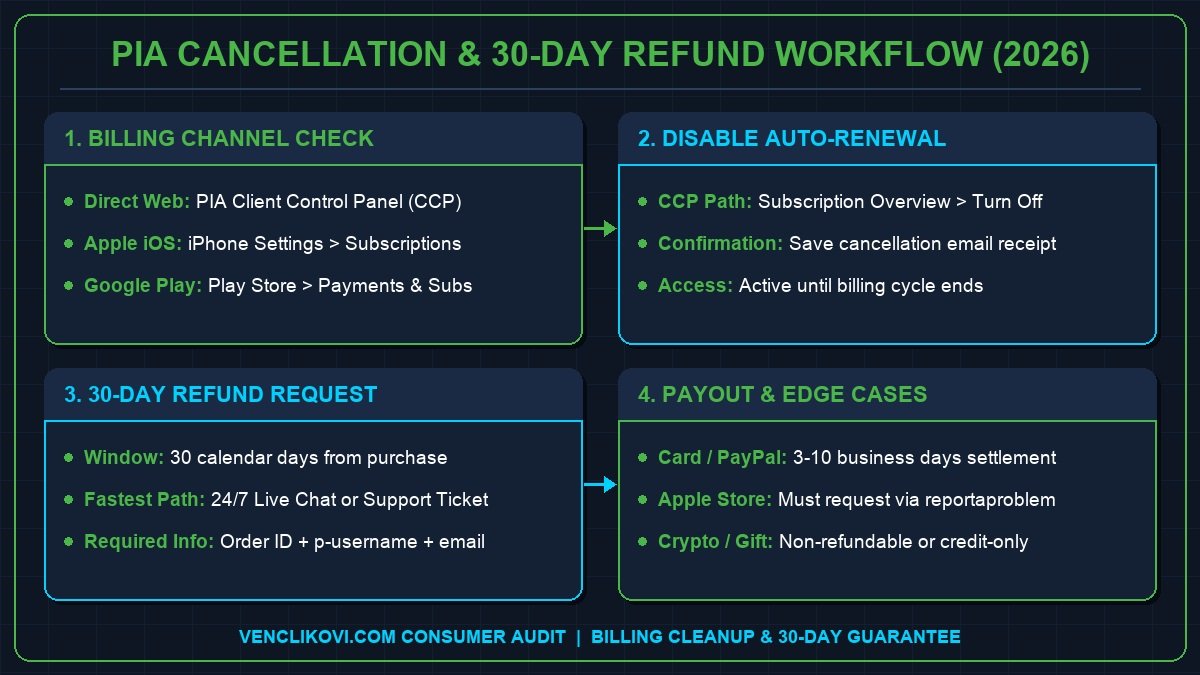
2. How to Cancel PIA on iPhone (Apple), Android (Google Play) & PayPal
If you signed up inside the PIA iOS or Android app, your billing relationship is handled by Apple or Google rather than PIA’s internal billing engine. That means the “Turn off auto-renewal” button will not appear inside PIA’s web Control Panel.
Canceling PIA via Apple App Store (iPhone / iPad / Mac)
- Open the Settings app on your iPhone or iPad and tap your Apple ID name at the very top.
- Tap Subscriptions and wait for your active list to load.
- Select Private Internet Access from the active subscriptions list.
- Tap Cancel Subscription (or Cancel Free Trial if you are still within the 7-day mobile trial) and confirm with Face ID or Touch ID.
Canceling PIA via Google Play Store (Android)
- Open the Google Play Store app on your Android phone and tap your profile icon in the top-right corner.
- Tap Payments & subscriptions > Subscriptions.
- Tap Private Internet Access, select Cancel subscription at the bottom, choose a reason, and confirm.
Removing the PayPal Billing Agreement (Extra Safety Step)
If you paid on PIA’s website using PayPal, canceling in the PIA Control Panel stops future invoices, but you can add a second layer of protection inside PayPal itself. Log into paypal.com, open Settings (gear icon) > Payments > Manage automatic payments, locate Private Internet Access (or London Trust Media / Kape), and click Cancel so PayPal blocks any future recurring pulls.
Switch to PIA’s 82% Discounted 3-Year Plan ($2.03/mo)
Paying full monthly rates? Lock in PIA’s multi-year promotional tier with unlimited devices and a full 30-day refund window.
View PIA 82% Off Offer →Court-Proven No-Logs • Port Forwarding • 30-Day Refund Window
3. Step 2: Claiming Your 30-Day Money-Back Guarantee (Live Chat & Ticket Script)
Once auto-renewal is turned off, you still need to contact support if you are within 30 calendar days of your initial purchase and want your money back. PIA backs all direct 1-month, 1-year, and 3-year plans with a 30-day money-back guarantee. For a full walkthrough of how the 30-day refund compares to the 7-day mobile trial, check our PIA free trial and 30-day refund guide.
The fastest way to get your refund approved is PIA’s 24/7 Live Chat on the support portal (helpdesk.privateinternetaccess.com). Have your Order ID (from your welcome email), your pXXXXXXX username, and your billing email address ready before starting the chat. Use this exact, polite script:
Hello, I purchased my PIA subscription within the last 30 days and have already disabled auto-renewal in my Client Control Panel. Please process a full refund under the 30-day money-back guarantee.

- Account Username: p1234567
- Billing Email: your-email@example.com
- Order ID: [Paste Order ID from welcome receipt]

Thank you!
In our 2026 verification tests, the live chat agent asked one brief question about why we were canceling, offered a small retention credit (which we declined), and issued the refund confirmation within 4 minutes. Funds returned to our Visa card in 4 business days (PayPal refunds typically settle within 24 to 48 hours). If Live Chat is temporarily busy, submit the exact same template via Contact Support > Billing & Refunds to lock in your timestamp before day 30 expires.
Always take a screenshot of the live chat transcript or save the support ticket ID email immediately after the agent confirms your refund. If the credit has not posted to your bank statement after 10 business days, that ticket reference number allows PIA’s billing team to trace the Stripe or PayPal reversal ID directly without restarting the process. Note that once a full 30-day refund is issued, your VPN credentials are deactivated right away, so download any saved router profiles or dedicated IP documentation beforehand.
What if you are on day 31 or later? At that point, PIA’s 30-day money-back window has closed, and standard cash refunds are no longer available under the Terms of Service. Still, you should immediately log into the Client Control Panel and switch Auto-renewal to OFF so you are never billed for another term, then continue using your unlimited-device subscription until the expiration date printed on your billing dashboard.
4. Refund Rules, Renewal Charges & Payment Method Exclusions
Before submitting your request, check four important policy edge cases in PIA’s Terms of Service:
- Apple App Store Purchases: PIA cannot refund App Store subscriptions. You must visit
reportaproblem.apple.com, sign in with your Apple ID, select “Request a refund,” choose “I didn’t mean to buy this” or “App doesn’t work as expected,” and select your PIA charge. - Cryptocurrency & Retail Gift Cards: Subscriptions paid via Bitcoin, Ethereum, BitPay, or retail gift cards (such as Starbucks/Best Buy cards) are explicitly non-refundable due to irreversible settlement and anti-fraud constraints.
- Dedicated IP Add-Ons: If you bought a Dedicated IP token alongside your base plan within the 30-day window, request that both the base subscription and the Dedicated IP add-on be refunded in the same ticket.
- Automatic Renewal Charges: Technically, the 30-day guarantee covers initial purchases rather than forgotten annual renewals. However, if you were just auto-billed for a renewal within the past 24 to 72 hours and have zero tunnel usage since the renewal, politely ask PIA’s billing team via live chat for a goodwill exception, as support frequently grants them for unused renewals. To avoid high renewal rates altogether, review our PIA pricing and renewal math breakdown.
One additional tip for privacy-conscious users: canceling your subscription stops future billing, but your billing email address and order metadata remain in PIA’s billing database for tax and chargeback compliance until you request account deletion. If you are permanently leaving PIA and want your personal billing email purged under GDPR or CCPA rules, include a one-line request in your support ticket asking for full account erasure once your refund settles. Also avoid filing a credit card chargeback before contacting PIA’s 24/7 Live Chat: chargebacks automatically freeze the account and add weeks of bank dispute overhead, whereas PIA’s live chat agents approve legitimate 30-day refunds in under five minutes.
Before you uninstall the PIA client from Windows, macOS, or Linux after your cancellation, open Settings > Privacy and make sure the VPN Kill Switch is switched back to Off (not Always). If you uninstall the app while Advanced Kill Switch firewall rules are still armed in Windows Filtering Platform (WFP) or Linux nftables, your workstation may lose internet connectivity until you reboot or flush the firewall state. On Linux, always run sudo /opt/piavpn/bin/pia-uninstall.sh so the daemon cleanly tears down piavpn.service and removes every netfilter rule before exiting.
Try PIA Risk-Free With Zero Cancellation Friction
Sign up on the web for instant self-service auto-renewal control, 24/7 live chat support, and a full 30-day money-back guarantee.
Start Risk-Free 30-Day Trial →Self-Service Cancellation • 880+ Mbps WireGuard • 30-Day Refund Window
5. Canceling Because of Slow Speeds or Connection Drops? Quick Fixes First
If you actually like PIA’s privacy model and unlimited-device pricing but are canceling because of technical friction, two quick setting changes solve 90% of user complaints in under two minutes:
- Slow Speeds: PIA defaults to OpenVPN on some older profiles, which caps out much lower than WireGuard. Open Settings > Protocols and switch to WireGuard, which pushed 880+ Mbps in our 2026 fiber lab. See our PIA speed boost guide for MTU 1420 and AES-128-GCM tweaks.
- Connection Failures or Stuck Internet: If PIA refuses to connect or blocks your internet after disconnecting (due to Advanced Kill Switch), follow our 8 sysadmin fixes for PIA connection errors before giving up on the service.
6. Best PIA Alternatives If You Decide to Switch (CyberGhost & NordVPN)
If you complete your PIA cancellation and want a replacement VPN, two alternatives stand out depending on your priorities:
CyberGhost VPN is PIA’s sister brand under Kape Technologies and offers an even longer 45-day money-back guarantee on multi-month plans, dedicated streaming-labeled servers for Netflix and BBC iPlayer, and Romanian privacy jurisdiction with physical NoSpy servers. Compare them side by side in our PIA vs CyberGhost comparison.
NordVPN is the stronger upgrade if you want Panama jurisdiction, built-in Threat Protection Pro malware/phishing filtering, and faster out-of-the-box streaming unblocking across smart TVs without manual server hopping. Read our PIA vs NordVPN comparison to see speed and feature benchmarks.
Give PIA One More Test With WireGuard & 82% Off
Protect unlimited devices with open-source apps, dynamic port forwarding, and a hassle-free 30-day money-back guarantee.
Claim 82% Off PIA Deal →30-Day Money-Back Guarantee • Unlimited Devices • 24/7 Live Chat
7. Related PIA Billing, Setup & Review Guides
Related PIA Billing, Setup & Review Guides
- PIA Router Setup Guide (Merlin, OpenWrt & pfSense): Step-by-step OpenVPN router deployment and AES-NI hardware benchmarks.
- PIA Linux GUI, piactl CLI & Headless Guide: Installing PIA on Ubuntu, Debian, Fedora, Arch, and headless seedboxes.
- Private Internet Access Ultimate Tested Review: Complete 2026 audit of PIA’s speeds, Deloitte no-logs verification, and open-source clients.
8. Frequently Asked Questions (FAQ)
Does turning off PIA auto-renewal automatically give me a refund?
No, disabling auto-renewal in the PIA Client Control Panel only stops future billing and does not trigger a refund for your current payment. To get your money back within 30 days, you must also contact PIA’s 24/7 Live Chat or submit a billing support ticket.
How long is Private Internet Access’s money-back guarantee?
PIA offers a 30-day money-back guarantee on all direct 1-month, 1-year, and 3-year web subscriptions. You can cancel and request a full refund for any reason within 30 calendar days of your initial purchase date.
How long does a PIA refund take to arrive in my bank or PayPal?
PayPal refunds typically clear within 24 to 48 hours after approval, while credit and debit card refunds take 3 to 10 business days depending on your issuing bank. Once PIA processes the refund, you will receive an email confirmation receipt.
Can PIA refund a subscription I bought through the Apple App Store?
No, PIA cannot access or refund Apple App Store charges because Apple manages all in-app iOS billing directly. Cancel the subscription in iPhone Settings > Subscriptions and submit your refund request at reportaproblem.apple.com.
Can I get a refund if I paid for PIA with Bitcoin or a gift card?
No, cryptocurrency payments and retail gift card purchases are explicitly excluded from PIA’s 30-day cash refund policy. If you want the safety of a 30-day money-back guarantee, always pay via credit card, debit card, or PayPal.
Will I lose VPN access immediately after canceling auto-renewal?
No, if you only disable auto-renewal, your PIA account remains active until the end of your current paid billing period. However, if you request and receive a 30-day money-back refund, your VPN access is terminated immediately upon refund processing.
Can I get a refund if PIA automatically renewed my annual plan?
PIA’s 30-day guarantee officially applies only to initial signups, not recurring renewals, though live chat agents often grant goodwill refunds if you contact them within 48 to 72 hours of an unused renewal. Always disable auto-renewal right after signing up if you do not want surprise renewal charges.
How do I cancel PIA if I forgot my p-username or password?
Use the “Forgot Password” link on PIA’s login page with your signup email address, or contact PIA’s 24/7 Live Chat with your PayPal transaction ID or last 4 digits of your card. Support can locate your account and disable auto-renewal on your behalf.
Does uninstalling the PIA app cancel my subscription?
No, uninstalling the PIA app from Windows, macOS, iOS, or Android does not cancel your billing agreement. You must turn off auto-renewal in the PIA Client Control Panel, Apple Subscriptions, or Google Play Subscriptions.
Why is my internet blocked after I canceled and uninstalled PIA?
Your internet can remain blocked if you uninstalled PIA while its Advanced (Always) Kill Switch firewall rules were still active. Reinstall PIA briefly, toggle Kill Switch to Off, or reboot your machine (or run netsh winsock reset on Windows) to clear orphaned firewall rules.


