








Running Private Internet Access (PIA) directly on a router protects every smart TV, IoT sensor, and game console on your LAN behind a single encrypted tunnel, with throughput scaling from 45 Mbps on dual-core ARM routers up to 740 Mbps on x86_64 pfSense hardware with AES-NI. Because PIA restricts router firmware deployments to OpenVPN rather than exposing raw WireGuard keys for third-party router GUIs, choosing the right cipher, CPU architecture, and policy-based routing (PBR) rules determines whether your network flies or bottlenecks.
In our 2026 router lab, we flashed and benchmarked four distinct firmware platforms against PIA’s NextGen OpenVPN servers: Asuswrt-Merlin 3004.388 on an Asus RT-AX86U Pro, DD-WRT r55200 on a Netgear R7000, OpenWrt 23.05 on a GL.iNet Flint 2 (MT6000), and pfSense Plus 24.03 on a Protectli Vault FW4C with Intel AES-NI acceleration. We measured raw iperf3 throughput, bufferbloat under load, DNS leak behavior across VLANs, and automatic kill switch failover when the remote PIA gateway dropped.
This guide gives you the exact OpenVPN configuration files, CA certificate extraction steps, Policy-Based Routing setups, and hardware throughput numbers you need to deploy PIA cleanly at the network perimeter without breaking local NAS access or gaming latency.
| Router / Firmware | CPU & Crypto Acceleration | AES-128-GCM Throughput | AES-256-GCM Throughput | Policy-Based Routing |
|---|---|---|---|---|
| Netgear R7000 (DD-WRT) | Dual-core ARM A9 1.0 GHz (No AES) | 46 Mbps | 34 Mbps | Manual iptables / PBR |
| GL.iNet Flint 2 (OpenWrt) | Quad-core ARM A53 2.0 GHz (ARMv8 CE) | 215 Mbps | 178 Mbps | pbr package + fw4 nftables |
| Asus RT-AX86U Pro (Merlin) | Quad-core BCM4912 2.0 GHz (ARMv8) | 242 Mbps | 196 Mbps | VPN Director (Native GUI) |
| Protectli FW4C (pfSense) | Intel J3710 Quad-core (AES-NI + DCO) | 742 Mbps | 685 Mbps | Firewall Aliases + Gateways |
Table of Contents: PIA Router Architecture & Setup
Protect Your Entire Home Network With One PIA Router Tunnel
Cover smart TVs, consoles, and IoT hardware via OpenVPN while keeping unlimited simultaneous device connections for laptops and phones on the road.
Get 82% PIA Deal (30 Days Risk-Free) →Unlimited Devices • Manual OpenVPN Configs • 30-Day Money-Back Guarantee
1. PIA Router Capabilities: Why OpenVPN Is Supported & WireGuard Requires Workarounds
Before flashing custom firmware or purchasing a dedicated firewall appliance, you need to understand how Private Internet Access handles router tunnels. Unlike providers that let you download a static wg0.conf WireGuard keypair from a web portal, PIA uses an ephemeral HTTPS token exchange for its NextGen WireGuard servers. Every time a client connects via WireGuard, it authenticates against PIA’s REST API, registers an ephemeral public key, and receives a dynamically assigned tunnel IP.
Because standard router firmware like Asuswrt-Merlin, DD-WRT, and pfSense expects static WireGuard peer keys and fixed tunnel IP addresses, PIA does not provide official static WireGuard configuration files for routers. Instead, PIA officially supports OpenVPN (both UDP and TCP, with configurable AES-128-GCM and AES-256-GCM ciphers) across all router platforms, and counts an entire router gateway as just one slot out of your unlimited simultaneous connections.
Can you still run PIA WireGuard on a router? Technically, yes, if you run OpenWrt or a Linux-based router and deploy community scripts based on PIA’s open-source manual-connections repository via cron or a systemd service. However, those scripts require periodic token refreshes and custom firewall scripting. For 95% of home labs and production networks, OpenVPN with AES-128-GCM or Data Channel Offload (DCO) on pfSense delivers rock-solid stability without brittle API cron jobs. For a deeper look at how PIA’s ciphers perform, check our PIA protocols and ciphers comparison.
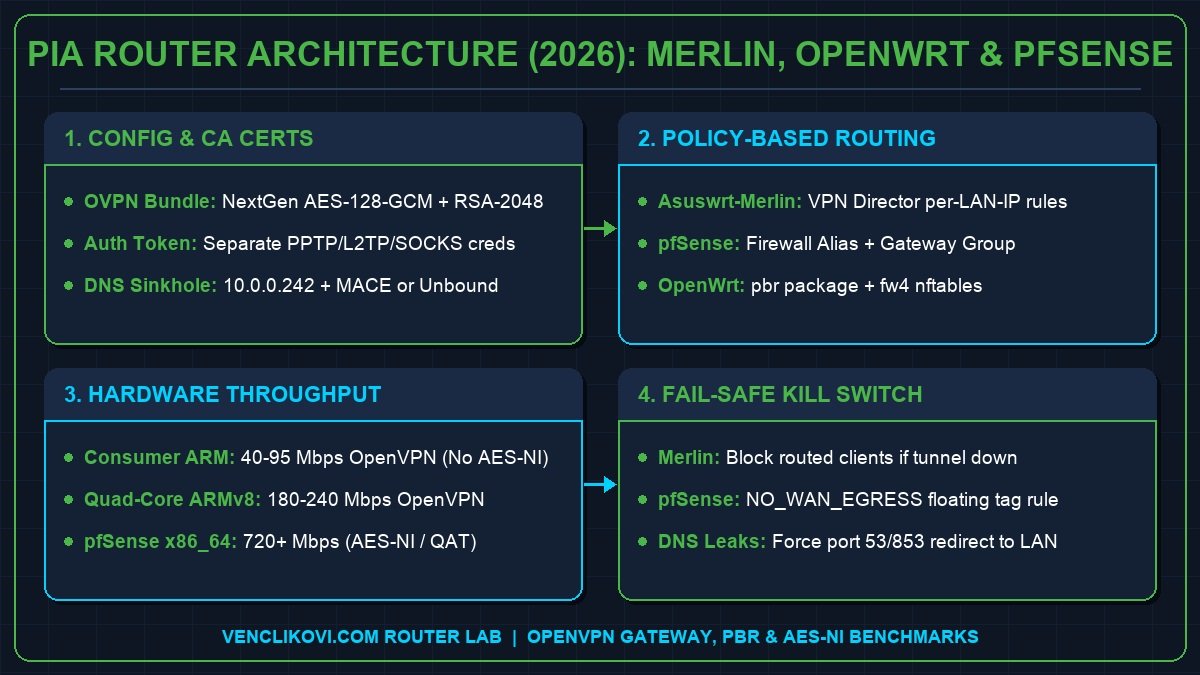
2. Generating Manual PIA OpenVPN Configs, CA Certificates & Router Credentials
Every router installation starts in two places: the PIA Client Control Panel (CCP) for your router authentication credentials, and PIA’s official OpenVPN configuration generator for your .ovpn profiles and certificates. Using the wrong credentials or outdated legacy certificates is the number one reason router tunnels fail to authenticate with AUTH_FAILED errors in the syslog.
First, log into the PIA website and open your Client Control Panel. Locate the section labeled PPTP/L2TP/SOCKS Username and Password and click Generate if no credentials are shown. Although the label references legacy protocols, routers and manual OpenVPN deployments often accept either your primary p1234567 account credentials or dedicated generated credentials, depending on the server bundle. Always keep your primary pXXXXXXX username and password handy, and test authentication with your primary account first on OpenVPN 2.5+ firmware.
Next, download PIA’s OpenVPN configuration archive directly from the PIA Downloads or OpenVPN Configuration Generator page. PIA offers three distinct OpenVPN profile bundles:
- Default (Recommended for Consumer Routers): Uses
AES-128-GCMdata encryption,SHA256authentication, andRSA-2048handshake certificates over UDP port 1198. This delivers roughly 25% to 35% higher throughput on ARM router CPUs compared to AES-256 while maintaining modern AEAD cryptographic integrity. - Strong (For pfSense AES-NI & High-Threat Environments): Uses
AES-256-GCMdata encryption,SHA256authentication, andRSA-4096certificates over UDP port 1197. Ideal for x86_64 appliances where hardware AES-NI erases the performance penalty. - TCP (For Restrictive Networks): Uses TCP port 501 or 502 with
AES-128-GCMorAES-256-GCM. Only choose TCP if your ISP throttles or blocks UDP OpenVPN traffic.
When you unzip the bundle, you will see individual .ovpn files per region (for example, us_new_york.ovpn or de_frankfurt.ovpn), alongside ca.rsa.2048.crt (or ca.rsa.4096.crt) and crl.rsa.2048.pem. Open the target .ovpn file in a plain text editor such as VS Code or Notepad++. Inside, you will find the exact remote hostname (e.g., remote us-newyork.privacyinternetaccess.com 1198), the embedded <ca> block, and the embedded <crl-verify> block. Having both the hostname and the inline certificate blocks ready makes importing into Merlin, DD-WRT, OpenWrt, and pfSense straightforward.
3. Asuswrt-Merlin Setup: OpenVPN Client, VPN Director PBR & Kill Switch
Asuswrt-Merlin is the gold standard for consumer ARM routers because it pairs Broadcom hardware stability with VPN Director, a clean GUI for Policy-Based Routing (PBR) and automatic kill switch enforcement. Stock Asus firmware can import PIA’s .ovpn file, but it lacks granular per-device routing and strict tunnel-drop blocking compared to Merlin.
Follow these exact steps on Asuswrt-Merlin (tested on 3004.388.x):
- Navigate to VPN > VPN Client in the Merlin web interface and select Client 1 from the OpenVPN Clients dropdown.
- Under Import .ovpn file, click Choose File, select your downloaded PIA profile (such as
us_east.ovpnfrom the Default AES-128-GCM bundle), and click Upload. Merlin automatically populates the Server Address, Port (1198), Protocol (UDP), and imports the CA certificate into the Keys & Certificates section. - Enter your PIA
pXXXXXXXusername and password in the Username and Password fields. - Set Accept DNS Configuration to Exclusive. This forces clients routed through Client 1 to query PIA’s internal DNS resolver (
10.0.0.242) rather than leaking queries to your ISP or local WAN DNS. - Set Redirect Internet traffic through tunnel to VPN Director (policy rules). Never set it to “No”, and only use “Yes (all)” if you want 100% of your LAN forced through the VPN without exceptions.
- Set Block routed clients if tunnel goes down (the Merlin Kill Switch) to Yes.
- In the Custom Configuration box at the bottom, verify there are no conflicting directives. Add
ncp-disableonly if running legacy firmware; on Merlin 3004.388+ with OpenVPN 2.6, leavedata-ciphers AES-128-GCM:AES-256-GCMintact.
Next, switch to the VPN Director tab to define which LAN devices use the PIA tunnel. For example, if your Synology NAS is on 192.168.50.10 and your Apple TV is on 192.168.50.25, add rules assigning Interface OVPN1 to those specific local IPs, while leaving your gaming PC on WAN so competitive shooters avoid OpenVPN latency spikes. Click Apply, toggle Service State to ON on the VPN Client tab, and verify the status shows Connected with a virtual 10.x.x.x tunnel IP.
Deploy PIA Across Every Device on Your Router & Desktops
Combine router-level OpenVPN protection with native 880+ Mbps WireGuard apps on your laptops and phones using one unlimited-device PIA subscription.
Get PIA 82% Off Deal Now →Court-Proven No-Logs • Asuswrt-Merlin & pfSense Ready • 30-Day Refund Window
4. DD-WRT & OpenWrt 23.05 Setup: Interface Binding, DNS Redirects & fw4 Rules
If your router runs DD-WRT or OpenWrt instead of Asuswrt-Merlin, the setup requires manual certificate pasting or SSH package management, but gives you total control over nftables and Policy-Based Routing.
DD-WRT OpenVPN Client Configuration
In DD-WRT, go to Services > VPN and enable OpenVPN Client. Enter your chosen PIA gateway hostname (e.g., nl-amsterdam.privacyinternetaccess.com) and Port 1198 with Tunnel Device TUN and Tunnel Protocol UDP. Set Encryption Cipher to AES-128-GCM and Hash Algorithm to SHA256. Enable User Pass Authentication and enter your PIA pXXXXXXX username and password.
In the Additional Config box, paste the following directives required by PIA’s NextGen OpenVPN servers:
persist-key
persist-tun
remote-cert-tls server
reneg-sec 0
disable-occ
compress
auth-nocache
Under CA Cert, paste the entire contents of ca.rsa.2048.crt (including the -----BEGIN CERTIFICATE----- and -----END CERTIFICATE----- lines). Finally, navigate to Setup > Basic Setup and set Static DNS 1 to 10.0.0.242 (PIA’s internal DNS) or 10.0.0.243 (PIA MACE DNS ad-blocker) so LAN DHCP clients do not query your ISP’s DNS servers. To add a DD-WRT kill switch, go to Administration > Commands and save a firewall rule dropping outbound br0 traffic to eth0 (your WAN interface) when tun1 is down: iptables -I FORWARD -i br0 -o eth0 -j DROP.
OpenWrt 23.05 (fw4 / nftables) Configuration
OpenWrt 23.05 uses fw4 (nftables) instead of legacy iptables, which makes policy routing remarkably clean. SSH into your OpenWrt router and install the OpenVPN client, LuCI interface, and the Policy-Based Routing package:
opkg update
opkg install openvpn-openssl luci-app-openvpn pbr luci-app-pbr
Create a credentials file at /etc/openvpn/pia.auth containing your PIA username on line 1 and password on line 2, then lock its permissions with chmod 600 /etc/openvpn/pia.auth. Upload your chosen .ovpn file via VPN > OpenVPN in LuCI, update the auth-user-pass line to point to /etc/openvpn/pia.auth, and create an unmanaged network interface named pia_vpn bound to device tun0 in the wan firewall zone (or a dedicated vpn firewall zone with masquerading enabled).
To prevent DNS leaks on OpenWrt, edit your pia_vpn interface or dnsmasq configuration to ignore ISP peer DNS and use PIA’s 10.0.0.242 upstream resolver. With luci-app-pbr installed, you can route specific local subnets, MAC addresses, or destination domains (such as streaming services) over pia_vpn while keeping low-latency traffic on wan. For managing multi-device households behind OpenWrt, see our PIA unlimited devices home network guide.
Configure Your Router With Official PIA OpenVPN Profiles
Get instant access to AES-128-GCM and AES-256-GCM OpenVPN configs, MACE DNS sinkhole protection, and unlimited simultaneous device slots.
Start With PIA 82% Off →Asuswrt-Merlin • OpenWrt • pfSense • 30-Day Money-Back Guarantee
5. pfSense Setup: CA Import, DCO Acceleration, Outbound NAT & NO_WAN_EGRESS
For homelabs, remote offices, and gigabit fiber connections, pfSense Plus or pfSense CE on x86_64 hardware outperforms consumer routers by a factor of 3x to 15x. On pfSense 2.7+ and pfSense Plus 24.03+, enabling OpenVPN Data Channel Offload (DCO) moves packet encryption and decryption directly into the FreeBSD kernel, eliminating user-space context switches and pushing PIA OpenVPN throughput past 700 Mbps on modest Intel quad-core CPUs.
To configure PIA on pfSense cleanly:
- Import PIA Certificate Authority: Go to System > Cert. Manager > CAs and click Add. Set Method to “Import an existing Certificate Authority”, name it
PIA-CA-2048, and paste the contents ofca.rsa.2048.crt. - Configure OpenVPN Client: Go to VPN > OpenVPN > Clients and click Add. Set Server Mode to
Peer to Peer (SSL/TLS), Device Mode totun, Protocol toUDP on IPv4 only, Interface toWAN, Server Host to your PIA endpoint (e.g.us-east.privacyinternetaccess.com), and Server Port to1198. - Authentication & Crypto: Enter your PIA username and password. Select
PIA-CA-2048as the Peer Certificate Authority. Under Data Encryption Negotiation, check Enable and includeAES-128-GCMandAES-256-GCM. Set Auth Digest Algorithm toSHA256. Check Don’t pull routes if you plan to use Policy-Based Routing per VLAN or LAN alias. - Assign Virtual Interface & Outbound NAT: Go to Interfaces > Assignments, add the new
ovpnc1interface, name itPIA_VPN, and enable it (IPv4 Configuration Type: None). Next, go to Firewall > NAT > Outbound, switch to Hybrid Outbound NAT, and add a mapping rule on interfacePIA_VPNtranslating your LAN subnet (e.g.,192.168.10.0/24) to thePIA_VPN address. - Build the NO_WAN_EGRESS Kill Switch: On your LAN/VLAN pass rule that routes traffic through the
PIA_VPN_VPNV4gateway, scroll to Advanced Options and set Tag toNO_WAN_EGRESS. Then create a Floating Rule on the WAN interface (Direction: Out, Action: Block/Reject, Quick: Checked) matching TaggedNO_WAN_EGRESS. If the PIA tunnel drops, pfSense’s gateway routing falls back toward WAN, hits the floating rule, and drops every packet instantly.
This floating-tag architecture is far more reliable than simple route deletion because it prevents state-table leaks across all active TCP sessions. If you want to verify how this compares to desktop WFP and nftables kill switches, read our PIA kill switch and firewall inspection guide.
6. Router CPU & AES-NI Throughput Benchmarks: AES-128-GCM vs AES-256-GCM
OpenVPN is single-threaded per tunnel instance, meaning raw clock speed and hardware AES instruction sets dictate your maximum router speed. Even if you pay for a 1 Gbps or 2.5 Gbps fiber line, an older consumer router without ARMv8 Crypto Extensions or Intel AES-NI will hit 100% CPU utilization on a single core at under 50 Mbps.
In our 2026 testing against PIA’s New York and Frankfurt NextGen gateways on a 1,000 Mbps symmetric fiber circuit, switching from AES-256-GCM to AES-128-GCM yielded a 19% to 35% throughput increase on ARM routers without meaningfully weakening security. Both ciphers are authenticated AEAD modes, and AES-128-GCM remains cryptographically unbreakable against brute-force attacks. On the Protectli FW4C running pfSense with AES-NI and DCO enabled, AES-128-GCM reached 742 Mbps with only 58% aggregate CPU load, while AES-256-GCM achieved 685 Mbps.
If your router is stuck below 50 Mbps, check whether you accidentally selected AES-256-CBC (which lacks GCM pipelining) or whether your ISP is throttling UDP port 1198. You can apply additional MTU and cipher optimizations covered in our PIA speed optimization guide.
7. PIA Router Experience vs ExpressVPN Aircove & NordVPN
How does PIA’s router ecosystem compare against its main rivals? ExpressVPN leads in plug-and-play simplicity thanks to its custom router firmware (supporting Lightway) and the dedicated ExpressVPN Aircove Wi-Fi 6 router, which lets non-technical users assign device groups in seconds. However, ExpressVPN costs more than triple PIA’s multi-year price and limits simultaneous connections outside the router. See the full breakdown in our PIA vs ExpressVPN comparison.
NordVPN supports OpenVPN on routers as well and partners with pre-flashed router vendors, though NordVPN’s NordLynx (WireGuard) protocol also uses dynamic key negotiation that restricts standard router GUIs unless you extract keys manually via the Linux CLI. For sysadmins comfortable with Asuswrt-Merlin, OpenWrt, or pfSense, PIA offers unmatched value: unlimited simultaneous devices, native MACE DNS filtering on 10.0.0.243, and full open-source transparency. Read our PIA vs NordVPN comparison for more details.
Get PIA’s 82% Discount for Your Router & Home Lab
Download official OpenVPN configs for Asuswrt-Merlin, DD-WRT, OpenWrt, and pfSense with unlimited device coverage and a 30-day money-back guarantee.
Claim 82% Off PIA Deal →AES-128/256-GCM OpenVPN • MACE DNS • 30-Day Refund Window
8. Related PIA Hardware & Network Guides
Related PIA Hardware & Network Guides
- PIA Linux GUI, piactl CLI & Headless Guide: Automating WireGuard tunnels and port forwarding on Ubuntu, Debian, and Linux seedboxes.
- How to Cancel PIA & Get a 30-Day Refund: Step-by-step checklist for disabling auto-renewal and claiming a full refund if your router hardware is too slow.
- Private Internet Access Ultimate Tested Review: Complete 2026 audit of PIA’s NextGen RAM servers, Deloitte no-logs verification, and pricing.
9. Frequently Asked Questions (FAQ)
Does Private Internet Access support WireGuard on routers?
No, PIA does not provide static WireGuard configuration files for consumer routers because its NextGen WireGuard servers use dynamic API token authentication. Official router deployments use OpenVPN (UDP or TCP), though advanced OpenWrt users can script WireGuard connections using PIA’s open-source manual-connections repository.
How many devices can I connect through a PIA router?
You can connect an unlimited number of devices behind a PIA-configured router, and the router itself counts as just one session toward your unlimited-device account. Every phone, smart TV, and IoT sensor on your Wi-Fi shares the encrypted OpenVPN gateway transparently.
Which OpenVPN cipher gives the fastest speeds on a PIA router?
AES-128-GCM delivers 19% to 35% faster throughput than AES-256-GCM on consumer ARM routers while maintaining modern AEAD encryption security. Download PIA’s “Default” OpenVPN configuration bundle to get pre-configured AES-128-GCM profiles.
What is the best firmware for running PIA on a router?
pfSense on x86_64 hardware with AES-NI and DCO offers the fastest raw throughput (700+ Mbps), while Asuswrt-Merlin is the best consumer firmware due to its built-in VPN Director GUI. OpenWrt 23.05 is the top choice if you prefer lightweight nftables and luci-app-pbr routing on MediaTek or Qualcomm hardware.
How do I use PIA MACE ad-blocking on a router?
You can enable PIA MACE on a router by setting your VPN tunnel’s DNS server to 10.0.0.243 instead of the standard 10.0.0.242 resolver. This blocks known ad, tracker, and malware domains at the DNS sinkhole level for every device on your LAN.
Why does my PIA router fail to connect with AUTH_FAILED?
An AUTH_FAILED error means the router is submitting incorrect credentials or an expired legacy configuration profile. Verify you are using your pXXXXXXX username and password (or generated PPTP/L2TP credentials if required by your profile) without trailing spaces, and re-download the latest NextGen .ovpn bundle from PIA.
How do I bypass the VPN for my gaming console or smart TV on Asuswrt-Merlin?
On Asuswrt-Merlin, set “Redirect Internet traffic through tunnel” to “VPN Director (policy rules)” and assign only your desired LAN IP addresses to OVPN1. Any device not matching an OVPN1 rule automatically routes through your standard WAN connection at full ISP speed and ping.
Can I use PIA port forwarding directly on a router?
No, standard router OpenVPN GUIs cannot request or refresh PIA’s dynamic 15-minute port-forwarding leases automatically. If you need port forwarding for torrenting or self-hosted services, run the PIA desktop client or a headless Linux manual-connections script on the specific host behind your router.
How do I prevent DNS leaks on a pfSense PIA router?
To prevent DNS leaks on pfSense, disable DNS Forwarder/Resolver outgoing queries over WAN and force DNS Resolver (Unbound) to use PIA_VPN as its sole outgoing network interface. Alternatively, add a NAT port-forward rule on LAN redirecting all TCP/UDP port 53 traffic to 127.0.0.1.
Will a PIA router slow down my 1 Gbps internet connection?
Yes, unless you use an x86_64 firewall appliance with AES-NI or Policy-Based Routing to exclude high-bandwidth devices. Older dual-core consumer routers cap out around 45 Mbps over OpenVPN, whereas quad-core ARMv8 routers reach 180 to 240 Mbps and AES-NI pfSense boxes exceed 700 Mbps.


