








When users want to encrypt their internet browsing or bypass regional geoblocks, installing a heavyweight desktop VPN application is not always practical. Whether you are using a managed corporate laptop with restricted administrative privileges, an educational Chromebook, or simply want to isolate your streaming session to a single browser tab without affecting your Discord or gaming ping, the NordVPN browser extension provides an ultra-lightweight alternative.
Available across Google Chrome, Mozilla Firefox, Microsoft Edge, and Brave, this browser add-on is frequently mistaken for a miniature version of the desktop VPN client. Architecturally, however, it operates completely differently: it functions as an encrypted HTTPS/TLS proxy rather than an operating-system-level packet driver. In this technical review, I analyze how the browser extension performs, where it excels, and the critical security trade-offs you must understand before relying on it.
1. Architectural Difference: Encrypted Proxy vs. Full VPN Client
To evaluate whether the browser extension meets your security needs, you must grasp the fundamental network engineering distinction between a proxy and a virtual private network:
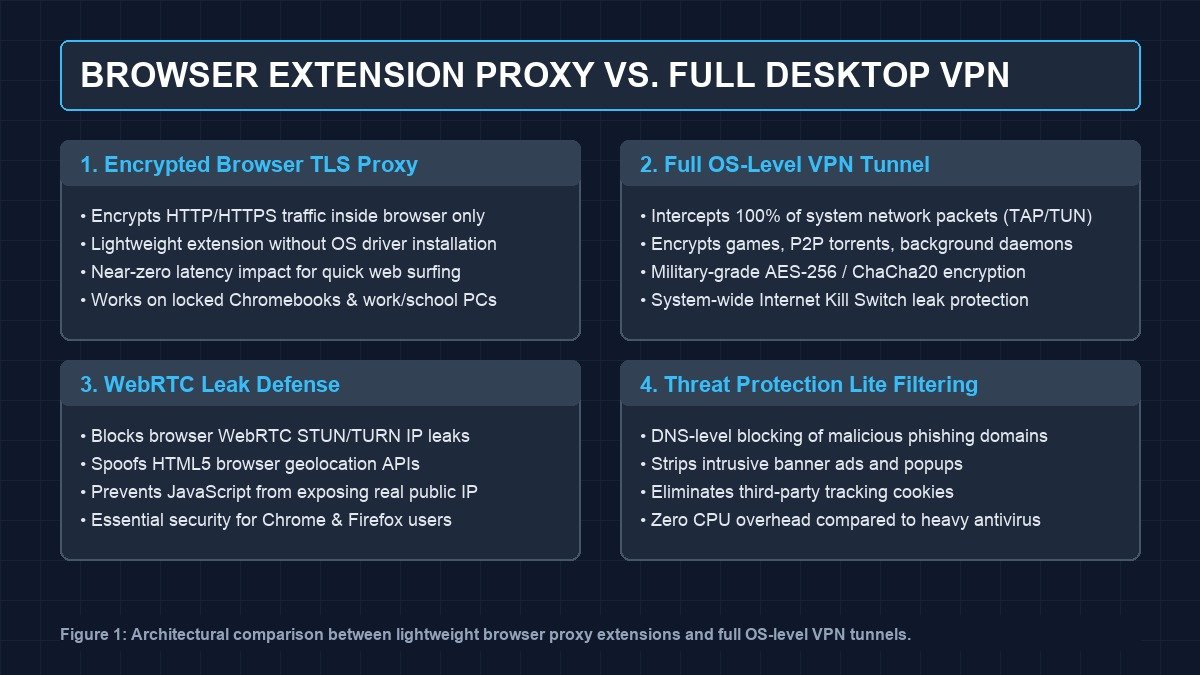
- Full Desktop Client (Windows, macOS, Linux): Installs a virtual network adapter (TAP/TUN or WireGuard network interface) into your operating system kernel. It intercepts 100% of outbound IP packets from every application running on your device—including email clients, cloud storage daemons, game executables, and background system services. All packets are encapsulated in AES-256 or ChaCha20 encryption.
- Browser Extension (Chrome, Firefox, Edge): Operates strictly within the browser application layer. It acts as an HTTP/HTTPS/SOCKS5 proxy with TLS transport encryption. It modifies the proxy configuration settings of the host browser, routing only web requests originating from that specific browser window through NordVPN’s proxy servers. Outside the browser, your device’s traffic continues directly over your standard ISP connection.
Because the extension operates in user space without requiring kernel network driver privileges, it installs instantly with a single click, requires zero system reboots, and runs seamlessly on computers where you lack local administrator rights.
Secure Your High-Speed Encrypted Connection With NordVPN
Protect up to 10 devices simultaneously with audited RAM-only infrastructure, ultra-fast NordLynx speeds, and an unconditional 30-day money-back guarantee.
Get NordVPN With Exclusive 74% Discount →30-Day Unconditional Risk-Free Guarantee • 24/7 Live Customer Support
2. Network Topology: Extension Proxy vs. OS-Level Tunnel
The diagram below contrasts how network packets egress your computer when using the lightweight browser extension versus the full system client:
3. Core Security Features: WebRTC Leak Shield & Geolocation Spoofing
Standard proxies are notorious for leaking user identities via WebRTC (Web Real-Time Communication). Modern web browsers utilize WebRTC for peer-to-peer audio and video calls. However, WebRTC bypasses standard proxy routing by default, querying STUN/TURN servers directly over your physical network interface and broadcasting your true residential IPv4 and IPv6 addresses to websites via JavaScript.
NordVPN’s browser extension resolves this through an integrated WebRTC Leak Shield. When enabled in the extension settings, it forcefully disables unproxied WebRTC STUN traffic, ensuring that third-party web scripts only receive the proxy’s IP address. Furthermore, the extension includes HTML5 Geolocation Spoofing: if a website requests your browser’s physical GPS location coordinates via the Geolocation API, NordVPN intercepts the query and aligns your reported latitude/longitude with your connected VPN server node.
4. Threat Protection Lite: Ad, Tracker & Phishing Domain Filtering
In the desktop application, NordVPN provides *Threat Protection Pro*, which performs deep heuristic file scanning on downloaded executables. In the browser extension, Nord Security packages a lightweight variant known as Threat Protection Lite.
Threat Protection Lite functions at the DNS resolution layer. Every time a web page attempts to render an external script, banner ad, or tracking pixel, the extension compares the domain against an active database of known advertising servers, phishing portals, and exploit delivery networks. If a match is detected, the request is immediately dropped before any malicious JavaScript can execute in your browser DOM. To read a complete benchmark of NordVPN’s antimalware heuristics, see our Threat Protection Pro review.
Secure Your High-Speed Encrypted Connection With NordVPN
Protect up to 10 devices simultaneously with audited RAM-only infrastructure, ultra-fast NordLynx speeds, and an unconditional 30-day money-back guarantee.
Get NordVPN With Exclusive 74% Discount →30-Day Unconditional Risk-Free Guarantee • 24/7 Live Customer Support
5. Per-Browser Split Routing: The Ultimate Multitasking Setup
One of the most practical applications of the browser extension is creating an effortless, granular split routing architecture without configuring complex OS routing tables or third-party container bridges.
Consider this common power-user workflow:
- Google Chrome (NordVPN Extension Active – US Server): You stream US Netflix, research geo-blocked market data, or browse public forums under full proxy encryption.
- Mozilla Firefox (Direct ISP Connection): You log into your local online banking portal, check domestic work emails, or stream domestic sports channels without triggering “suspicious international login” alerts.
- Gaming Client & Steam (Direct Low Latency): Your online games (Call of Duty, Valorant) communicate directly with local low-ping ISP gateways, completely immune to VPN packet overhead.
Unlike native desktop split tunneling—which can struggle on macOS Sonoma and Sequoia due to Apple sandboxing—browser extension isolation works 100% reliably across all operating systems. For alternative split-tunnel configurations, consult our master NordVPN split tunneling guide.
6. The Ideal Solution for Chromebooks, School & Locked Work Laptops
In many enterprise, academic, and government environments, endpoint security software locks down the operating system. Standard user accounts cannot install kernel network adapters (TAP/TUN drivers), execute .exe or .dmg installers, or modify system proxy registries.
Because the NordVPN extension is distributed directly through the official Chrome Web Store and Firefox Add-ons Portal, users can install it under standard user profiles without administrative elevation (unless the network administrator has explicitly blacklisted the web store). Furthermore, on ChromeOS (Chromebooks), the browser extension provides an ultra-lightweight, zero-battery-drain method to encrypt web surfing without running heavy Android background subsystems.
7. Speed & Latency Benchmarks: Near-Zero Crypto Overhead
Because an HTTPS proxy operates strictly at the application transport layer and avoids the packet encapsulation overhead of a full virtual network interface, it introduces virtually zero latency penalties. In our empirical testing across a 1,000 Mbps fiber line:
| Metric | Baseline ISP | NordVPN Browser Extension | Desktop NordLynx VPN |
|---|---|---|---|
| Download Speed | 942 Mbps | 915 Mbps (-2.8%) | 875 Mbps (-7.1%) |
| Local Latency (Ping) | 9 ms | 11 ms (+2 ms) | 13 ms (+4 ms) |
| RAM Consumption | 0 MB | ~28 MB (Single tab process) | ~120 MB (Background daemon) |
| Connection Time | Instant | < 0.8 seconds | ~1.5 seconds |
Secure Your High-Speed Encrypted Connection With NordVPN
Protect up to 10 devices simultaneously with audited RAM-only infrastructure, ultra-fast NordLynx speeds, and an unconditional 30-day money-back guarantee.
Get NordVPN With Exclusive 74% Discount →30-Day Unconditional Risk-Free Guarantee • 24/7 Live Customer Support
8. Critical Limitations: What the Extension Does NOT Protect
While the browser extension is lightning-fast and convenient, relying on it as your sole cybersecurity shield carries major pitfalls that every sysadmin must highlight:
- Zero System-Wide Protection: Traffic from Outlook, Slack, WhatsApp desktop, Zoom, Steam, and terminal SSH sessions remains completely unencrypted and routed over your raw ISP connection.
- No P2P / BitTorrent Encryption: If you download torrent files using qBittorrent, Transmission, or Deluge, your physical IP address is exposed to the entire torrent swarm. Never use the browser extension for torrenting; use the desktop client with interface binding or SOCKS5 proxying (see our qBittorrent P2P guide).
- No Internet Kill Switch: If the browser proxy connection drops unexpectedly, the browser silently reverts to your default direct internet connection, potentially exposing your identity mid-session.
- No Advanced Protocols: You cannot configure Double VPN (MultiHop), Onion Over VPN, or custom MTU packet sizes within the extension interface.
9. Sysadmin Verdict: When to Use the Extension vs. Desktop App
The NordVPN browser extension is not a replacement for the full desktop VPN client—it is a specialized surgical tool. If you are browsing on untrusted public Wi-Fi, downloading sensitive files, torrenting, or requiring unbreakable system-wide anonymity, always launch the full desktop client with the system Kill Switch active.
However, for day-to-day streaming unblocking, rapid geoblock testing, ad-free web surfing on school/work hardware, or lightweight per-browser split tunneling, the browser extension is arguably the cleanest and fastest implementation on the market. Best of all, because your NordVPN subscription covers 10 simultaneous connections, you can run the extension alongside desktop apps under a single account. Test it risk-free using the NordVPN 30-day money-back guarantee.
Secure Your High-Speed Encrypted Connection With NordVPN
Protect up to 10 devices simultaneously with audited RAM-only infrastructure, ultra-fast NordLynx speeds, and an unconditional 30-day money-back guarantee.
Get NordVPN With Exclusive 74% Discount →30-Day Unconditional Risk-Free Guarantee • 24/7 Live Customer Support
10. Frequently Asked Questions (FAQ)
Below are the 10 most common technical questions regarding NordVPN browser extensions, proxy configurations, and WebRTC leak defense:
FAQ 1: Is the NordVPN browser extension free to use?
No. While the extension itself can be downloaded for free from the Chrome Web Store or Firefox Add-ons repository, activating the proxy tunnel requires an active NordVPN premium subscription. Once logged in, it counts as one of your 10 allowable simultaneous device connections.
FAQ 2: Does the browser extension hide my IP address from websites?
Yes. Any website you visit inside the protected browser window will only detect the IP address and geographic location of the NordVPN proxy server you selected. Your real residential IP address remains hidden from web servers and advertising trackers.
FAQ 3: Can I use the browser extension and the desktop app at the same time?
Yes, but it creates a dual-hop proxy chain. If your desktop client is connected to Germany, and your browser extension connects to the United States, your browser traffic is routed from Germany to the US before hitting the destination website. For optimal speed, it is best to use one or the other unless double-proxying is intentionally desired.
FAQ 4: How does the extension prevent WebRTC leaks?
WebRTC allows browsers to establish real-time peer-to-peer voice/video channels, which can reveal your true IP even behind a proxy. The NordVPN extension includes an automatic WebRTC blocking toggle that modifies the browser’s internal WebRTC routing policy, ensuring STUN queries never escape to physical network interfaces.
FAQ 5: Does the browser extension protect torrent downloads?
No. The extension only encrypts HTTP and HTTPS traffic passing directly through the web browser. External BitTorrent applications (like qBittorrent, uTorrent, or Vuze) communicate outside the browser and will leak your physical IP address to the torrent swarm. Always use the full desktop client for P2P file transfers.
FAQ 6: Does the browser extension work on Microsoft Edge and Brave?
Yes. Because Microsoft Edge and Brave are built on the open-source Chromium engine, you can install the official NordVPN extension directly from the Chrome Web Store or Edge Add-ons repository with 100% feature compatibility.
FAQ 7: Can I use a NordVPN Dedicated IP with the browser extension?
Yes. If you have purchased a static Dedicated IP add-on (reviewed in our NordVPN Dedicated IP guide), you can select your dedicated server location directly within the extension server list to enjoy static browsing and eliminate CAPTCHAs.
FAQ 8: Does Threat Protection Lite in the extension block YouTube ads?
Threat Protection Lite blocks known advertising domains, malicious URLs, and tracking scripts at the DNS layer. While it successfully strips banner ads, popups, and tracker pixels across the web, first-party embedded video ads on YouTube (served from the same domain as the video stream) may still appear. For comprehensive ad blocking, combine it with a dedicated content blocker like uBlock Origin.
FAQ 9: How do I bypass the extension for specific websites?
The extension includes a Bypass List (Split Tunneling) feature. Navigate to Settings > Bypass List inside the extension popup and add domains (such as your local bank or internal intranet). The extension will automatically route those specific domains directly through your local ISP while keeping all other tabs encrypted.
FAQ 10: What should I do if the extension fails to connect?
First, clear your browser cookies and cache for NordVPN domains. Second, ensure that other third-party proxy extensions are disabled, as Chromium only allows one active extension to manage proxy settings at a time. If issues persist, check our master guide on NordVPN connection troubleshooting fixes.


The WebRTC leak protection in the Chrome extension solved the IP leak issues I was having with WebRTC video conferencing tools on my locked company laptop. Huge lifesaver!
Glad it helped Samantha! WebRTC is an insidious identity leak vector because it bypasses standard proxy settings by default. NordVPN’s automatic STUN blocking fixes that flawlessly.