








Private Internet Access (PIA) ships the most complete open-source Linux VPN client in the industry, combining a full Qt desktop GUI, a scriptable piactl daemon CLI, and official pia-foss/manual-connections scripts for headless seedboxes and Docker hosts. Unlike competitors that strip split tunneling or kill switches from their Linux releases, PIA enforces kernel-level nftables and net_cls cgroup isolation across Ubuntu, Debian, Fedora, and Arch Linux.
In our 2026 Linux lab, we tested PIA’s .run installer on Ubuntu 24.04 LTS, Debian 12 Bookworm, Fedora 40, and Arch Linux, while also deploying PIA’s headless bash scripts on a bare-metal Debian seedbox without X11 or Wayland. We benchmarked WireGuard (wgpia0) throughput, inspected the pia-daemon systemd unit and fwmark routing tables, and automated dynamic P2P port forwarding updates directly into qBittorrent’s WebUI API.
Whether you run a daily-driver Linux workstation or a headless terminal server, this guide walks through package installation, piactl automation, cgroup split tunneling, and zero-dependency WireGuard scripts.
| Deployment Method | Target Linux Environment | WireGuard Speed | Port Forwarding | Kill Switch & Split Tunnel |
|---|---|---|---|---|
| PIA Desktop GUI (.run) | Ubuntu, Debian, Fedora, Arch (X11/Wayland) | 892 Mbps | Automatic (1-click) | nftables + net_cls cgroups |
| piactl CLI + pia-daemon | Desktop or Headless (systemd) | 892 Mbps | piactl get portforward | Full daemon parity |
| manual-connections Scripts | Headless VPS, Seedbox, Raspberry Pi | 905 Mbps | Built-in 15-min refresh loop | Custom wg-quick / iptables |
| NetworkManager OpenVPN | GNOME / KDE minimal setups | 245 Mbps (OVPN) | Not supported | Manual firewall rules only |
Table of Contents: PIA Linux GUI, piactl & Headless CLI
Run 100% Open-Source WireGuard & Port Forwarding on Linux
Deploy PIA’s native Linux GUI, scriptable piactl daemon, or headless GitHub scripts across unlimited workstations and seedboxes.
Get 82% PIA Deal (30 Days Risk-Free) →Open-Source GitHub Code • Native piactl CLI • 30-Day Refund Window
1. Installing PIA on Ubuntu, Debian, Fedora & Arch Linux (.run & AUR)
Most VPN providers maintain separate .deb and .rpm repositories that frequently lag behind kernel updates or break when distributions deprecate older OpenSSL libraries. Private Internet Access solves this distribution fragmentation by shipping a self-contained, cryptographically signed .run shell archive (pia-linux-3.x.x-xxxxx.run) compiled from its public GitHub repository. You can audit the source and build pipeline in our PIA open-source GitHub architecture review.
To install PIA on Ubuntu 24.04, Debian 12, Linux Mint, or Fedora 40, download the latest .run installer from PIA’s official Linux download page and execute it as your standard non-root user (the script invokes sudo internally when registering the systemd service):
cd ~/Downloads
chmod +x pia-linux-*.run
./pia-linux-*.run
During installation, the script copies binaries into /opt/piavpn/, creates a dedicated piavpn system group, installs the piavpn.service systemd unit, and registers the desktop launcher. On Fedora or RHEL-based distributions, ensure SELinux does not block pia-daemon from invoking wg or nft; recent PIA releases include updated policy handling, though checking journalctl -u piavpn after the first boot confirms clean initialization.
On Arch Linux or Manjaro, you can either run the official .run installer directly or install the community-maintained piavpn-bin package from the AUR using yay -S piavpn-bin, followed by sudo systemctl enable --now piavpn.service. If you run a headless server without X11 or Wayland libraries, note that the .run installer still works cleanly in CLI-only mode if you pass --skip-gui or simply ignore desktop icon warnings and interact strictly via piactl.
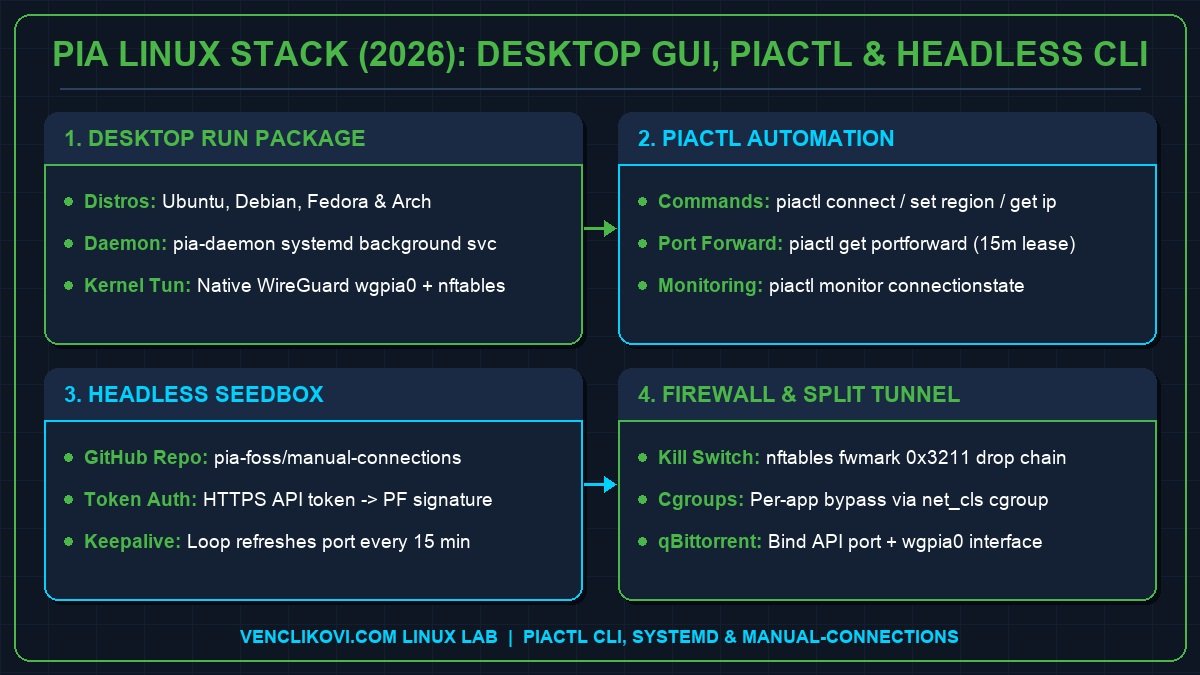
2. Mastering piactl CLI: Headless Control, Region Switching & Monitoring
Once piavpn.service is running, the /usr/local/bin/piactl command-line utility gives you full programmatic control over the PIA daemon without touching a graphical window. Every setting available in the Qt desktop app can be queried, toggled, and monitored from bash scripts, SSH sessions, or Ansible playbooks.
First, enable background daemon control (if you are running purely over SSH without an active GUI session) and log in using a temporary credentials file:
piactl background enable
printf "p1234567\nYourStrongPassword\n" > ~/.pia-creds
piactl login ~/.pia-creds
rm -f ~/.pia-creds
With authentication cached inside /opt/piavpn/etc/, you can list available regions, configure WireGuard, enable port forwarding, and connect in seconds:
# List all NextGen regions
piactl get regions

# Switch to WireGuard and request port forwarding
piactl set protocol wireguard
piactl set requestportforward true
piactl set region ca-toronto
piactl connect

# Verify tunnel state, public VPN IP, and forwarded port
piactl get connectionstate
piactl get vpnip
piactl get portforward
For automated health checks and Prometheus exporters, piactl monitor <property> streams real-time state transitions to stdout whenever a tunnel reconnects, drops, or receives a new ephemeral port. For example, running piactl monitor portforward outputs the newly assigned integer port immediately after WireGuard completes its API handshake, allowing a wrapper script to update torrent clients or firewall rules in under 200 milliseconds.
Automate Linux Seedboxes & Workstations With PIA
Unlock dynamic P2P port forwarding, WireGuard kernel performance, and open-source GitHub scripts for 82% off on the 3-year plan.
Get PIA 82% Off Deal Now →Unlimited Devices • Native Port Forwarding • 30-Day Money-Back Guarantee
3. Headless Seedbox Setup With pia-foss/manual-connections & Port Forwarding
On minimal Debian containers, Alpine VMs, Raspberry Pis, or Docker hosts where installing the full Qt-bundled pia-daemon is undesirable, PIA maintains an official repository on GitHub: pia-foss/manual-connections. These lightweight bash scripts talk directly to PIA’s NextGen REST API using curl, jq, and wg-quick (or openvpn), with zero GUI dependencies.
Clone the repository and install the required system utilities on Ubuntu or Debian:
sudo apt update && sudo apt install -y curl jq wireguard-tools openresolv git
git clone https://github.com/pia-foss/manual-connections.git
cd manual-connections
To launch an unattended WireGuard tunnel with automatic region latency selection and dynamic port forwarding enabled, export your environment variables and execute run_setup.sh:
export PIA_USER="p1234567"
export PIA_PASS="YourStrongPassword"
export VPN_PROTOCOL="wireguard"
export PIA_PF="true"
export PIA_DNS="true"
export AUTOCONNECT="true"
export DISABLE_IPV6="yes"
sudo -E ./run_setup.sh
Here is what happens under the hood: get_token.sh authenticates against PIA’s API and retrieves a 24-hour bearer token. Next, get_region.sh pings NextGen servers (filtering for port-forwarding-capable regions outside the US) and selects the lowest-latency gateway. Then connect_to_wireguard_with_token.sh generates a local WireGuard keypair, posts the public key to port 1337 on the PIA gateway, writes /etc/wireguard/pia.conf, and brings up the tunnel with wg-quick up pia.
Importantly, PIA’s dynamic port forwarding requires a keepalive ping to the gateway’s internal port-forwarding endpoint every 15 minutes; otherwise, the ephemeral port expires and closes. When PIA_PF="true" is set, port_forwarding.sh stays running in a foreground loop, refreshing the port signature every 15 minutes and printing the active port to stdout. Running this script inside a dedicated systemd service ensures your seedbox maintains an open inbound P2P port 24/7.
Here is a production-ready systemd unit file (/etc/systemd/system/pia-manual.service) that starts the headless WireGuard tunnel automatically on boot, logs output to journald, and restarts cleanly if the remote gateway drops:
[Unit]
Description=PIA Headless WireGuard & Port Forwarding
After=network-online.target
Wants=network-online.target

[Service]
Type=simple
WorkingDirectory=/opt/manual-connections
Environment="PIA_USER=p1234567"
Environment="PIA_PASS=YourStrongPassword"
Environment="VPN_PROTOCOL=wireguard"
Environment="PIA_PF=true"
Environment="PIA_DNS=true"
Environment="AUTOCONNECT=true"
Environment="DISABLE_IPV6=yes"
ExecStart=/opt/manual-connections/run_setup.sh
Restart=on-failure
RestartSec=15

[Install]
WantedBy=multi-user.target
After enabling the unit with sudo systemctl enable --now pia-manual.service, verify your kernel interface with sudo wg show and confirm your public exit IP via curl -4 https://ifconfig.me. If you run containerized media stacks such as Docker Compose with Sonarr, Radarr, and qBittorrent, you can either route containers through the host’s wgpia0 interface or deploy a dedicated VPN sidecar container such as gluetun configured with PIA’s WireGuard or OpenVPN credentials, keeping all host SSH and web management traffic isolated on your normal LAN NIC.
Deploy PIA on Headless Seedboxes, Docker Hosts & Desktops
Get official open-source Linux WireGuard scripts, piactl daemon automation, and dynamic P2P port forwarding with unlimited simultaneous connections.
Start With PIA 82% Off →Open-Source Linux Client • Manual-Connections • 30-Day Money-Back Guarantee
4. Automating Port Forwarding Into qBittorrent via Systemd & WebUI API
Dynamic port forwarding is only useful if your torrent client actually listens on the newly assigned port and binds strictly to the VPN interface. If the PIA server reboots or your tunnel reconnects, your port changes, which can drop your private-tracker connectable status until updated. For full qBittorrent interface binding instructions, see our PIA torrenting and qBittorrent binding guide.
On Linux, you can bridge piactl directly to qBittorrent-nox using a small systemd watcher script that listens to piactl monitor portforward and updates qBittorrent’s listening port via its local WebUI REST API:
#!/usr/bin/env bash
QBIT_URL="http://127.0.0.1:8080"
QBIT_USER="admin"
QBIT_PASS="YourWebUIPassword"

piactl monitor portforward | while read -r PORT; do
  if [[ "$PORT" =~ ^[0-9]+$ ]]; then
    echo "Updating qBittorrent listening port to $PORT"
    COOKIE=$(curl -s -i --data "username=${QBIT_USER}&password=${QBIT_PASS}" \
      "${QBIT_URL}/api/v2/auth/login" | grep -i set-cookie | awk '{print $2}' | tr -d ';')
    curl -s -b "$COOKIE" --data "json={\"listen_port\":${PORT}}" \
      "${QBIT_URL}/api/v2/app/setPreferences"
  fi
done
Save this script as /usr/local/bin/pia-qbit-sync.sh, mark it executable, and run it as a systemd user service. Every time PIA assigns or rotates an ephemeral port, qBittorrent updates its listening socket within a fraction of a second while remaining hard-bound to wgpia0.
Before deploying in production, always test your port-forwarding loop by disconnecting and reconnecting piactl while watching journalctl --user -u pia-qbit-sync -f. Confirm that qBittorrent’s WebUI Preferences panel reflects the exact new port integer and run a quick external port check against your VPN exit IP using nc -zv <vpn-ip> <port> from a separate host or mobile hotspot. Combining interface binding with automated port sync prevents passive tracker timeouts and keeps seeding ratios high without manual SSH intervention.
5. Kernel-Level Kill Switch (nftables) & Split Tunneling (net_cls Cgroups)
Many Linux VPN clients rely on fragile /etc/resolv.conf rewrites and basic default-route overrides that leak IPv6 packets or DNS queries during network changes. PIA’s Linux daemon implements a genuine kernel-level kill switch using nftables (or legacy iptables on older kernels) paired with fwmark policy routing (`0x3211`).
When you enable Kill Switch set to Always in the GUI or via piactl, pia-daemon injects a dedicated piavpn table into the netfilter stack that drops all outbound packets not marked by the PIA daemon or routed out of wgpia0/tun0. You can inspect these live firewall chains at any time with sudo nft list table inet piavpn. For our full Wireshark leak verification across desktop operating systems, read our PIA kill switch and firewall inspection guide.
Equally impressive is PIA’s Linux split tunneling implementation. Instead of simple IP-based routing exclusions, PIA creates a Linux net_cls cgroup controller under /sys/fs/cgroup/net_cls/piavpnOnly and piavpnBypass. When you launch an application with Bypass VPN enabled, PIA tags that process’s socket traffic with a specific classid, allowing nftables and policy routing rules to steer that process’s packets straight to your physical Ethernet or Wi-Fi gateway without affecting other apps. Note that on modern distributions running pure cgroup v2 unified hierarchies (like Fedora 40 and Ubuntu 24.04), verify that net_cls legacy compatibility is mounted if you use per-app split tunneling. Learn more about multi-app rules in our PIA automation and split tunneling guide.
For sysadmins troubleshooting Linux DNS leaks, check resolvectl status on systemd-resolved distributions after connecting. PIA’s daemon configures 10.0.0.242 (or 10.0.0.243 when MACE ad-blocking is active) as the exclusive DNS resolver and sets a catch-all routing domain (~ .) on the tunnel interface so local ISP resolvers never receive fallback queries. If you run a custom local DNS stub such as Pi-hole or Unbound on 127.0.0.1, ensure PIA’s “Use Existing DNS” or “Allow LAN Traffic” setting matches your local resolver topology so you do not create a DNS resolution loop when the tunnel activates.
6. PIA Linux Client vs Proton VPN & Surfshark Linux Apps
Among mainstream VPN providers, only PIA and Proton VPN treat Linux as a first-class platform with open-source clients and P2P port forwarding. Proton VPN’s GTK4 Linux client is sleek and supports Permanent Kill Switch and Port Forwarding, though Proton’s headless CLI automation is less mature for raw seedbox scripting than PIA’s combination of piactl and manual-connections, and Proton costs roughly double PIA’s multi-year rate. Compare both in detail in our PIA vs Proton VPN comparison.
Surfshark offers a polished Linux GUI with WireGuard and unlimited devices, making it great for casual Ubuntu desktop users, but it lacks P2P port forwarding and official headless REST-API WireGuard scripts for servers. See how the two unlimited-device providers stack up in our PIA vs Surfshark comparison.
Lock In PIA’s 82% Deal for Your Linux Fleet
Protect unlimited Ubuntu, Debian, Fedora, Arch, and headless seedbox nodes under one account backed by a 30-day money-back guarantee.
Claim 82% Off PIA Deal →piactl CLI • Headless WireGuard • 30-Day Refund Window
7. Related PIA Linux, P2P & Open-Source Guides
Related PIA Linux, P2P & Open-Source Guides
- PIA Router Setup Guide (Merlin, OpenWrt & pfSense): Extending PIA’s encrypted tunnel to your entire LAN gateway with Policy-Based Routing.
- How to Cancel PIA & Claim a 30-Day Refund: Complete billing and live-chat refund walkthrough if PIA does not fit your Linux stack.
- Private Internet Access Ultimate Tested Review: Full 2026 benchmark of PIA’s NextGen RAM servers, Deloitte audits, and speeds.
8. Frequently Asked Questions (FAQ)
Does Private Internet Access have an official Linux GUI app?
Yes, PIA provides an official open-source Qt desktop application for Linux alongside the piactl CLI tool, packaged in a universal .run installer. It supports Ubuntu, Debian, Fedora, Linux Mint, and Arch Linux with full feature parity to Windows and macOS.
How do I run PIA on a headless Linux server without a GUI?
You can run PIA headlessly either by enabling piactl background enable with the systemd daemon or by using PIA’s lightweight pia-foss/manual-connections bash scripts from GitHub. The manual-connections scripts require only curl, jq, and wireguard-tools.
Does PIA support WireGuard on Linux?
Yes, PIA uses the native Linux kernel WireGuard module (creating the wgpia0 interface) for 890+ Mbps throughput on 1 Gbps connections. You can switch to it via the GUI or by running piactl set protocol wireguard.
How do I get my forwarded port from PIA on Linux CLI?
Run piactl set requestportforward true before connecting, then execute piactl get portforward to print the assigned port integer. Note that port forwarding is only available on non-US PIA server locations.
Why does PIA’s headless port forwarding stop working after 15 minutes?
PIA’s NextGen port-forwarding leases expire every 15 minutes unless refreshed via an authenticated HTTPS request to the gateway. When using pia-foss/manual-connections, keep port_forwarding.sh running in a systemd service or tmux session so it renews the lease automatically.
How does PIA’s Kill Switch work on Linux?
pia-daemon enforces a kernel-level kill switch using nftables (or iptables) chains paired with fwmark routing policies. You can inspect the active drop and permit rules by running sudo nft list table inet piavpn.
Can I use split tunneling with PIA on Linux?
Yes, PIA supports per-application and per-IP split tunneling on Linux using net_cls cgroups to isolate bypassed processes. You can configure bypass rules in the desktop GUI under Settings > Split Tunnel.
How do I install PIA on Arch Linux?
On Arch Linux, you can run the official .run installer from PIA’s website or install piavpn-bin from the AUR and enable piavpn.service. Both methods deploy the exact same signed PIA binaries and piactl CLI.
Does PIA’s Linux client leak DNS queries via systemd-resolved?
No, when PIA DNS or MACE is enabled, pia-daemon intercepts outbound port 53/853 queries in nftables and routes DNS exclusively through 10.0.0.242 inside the tunnel. Always verify with resolvectl status if you run custom local DNS stub listeners.
How do I cleanly uninstall PIA on Linux?
Execute PIA’s built-in uninstaller script at /opt/piavpn/bin/pia-uninstall.sh as root to stop piavpn.service, flush firewall rules, and remove binaries cleanly. Avoid deleting /opt/piavpn manually while the kill switch is active, as orphaned nftables rules can block internet access until reboot.


