University Wi-Fi might be free, but it often comes with a hidden cost: blocked websites, broken apps, and random VPN leaks that expose your real IP — even when you think you’re protected.
If you’re seeing geo-blocks, buffering issues, or “you’re not in the right country” errors, don’t panic. I’ve dealt with this mess on multiple campuses, and I can tell you one thing straight up:
It’s not always your VPN’s fault.
But you do need to know how to fix it – properly.
Let’s go through exactly why your VPN might be leaking on campus Wi-Fi, and how to make it bulletproof.
The Real Problem: Campus Firewalls + Weak Configurations
University networks are built to control you. They use:
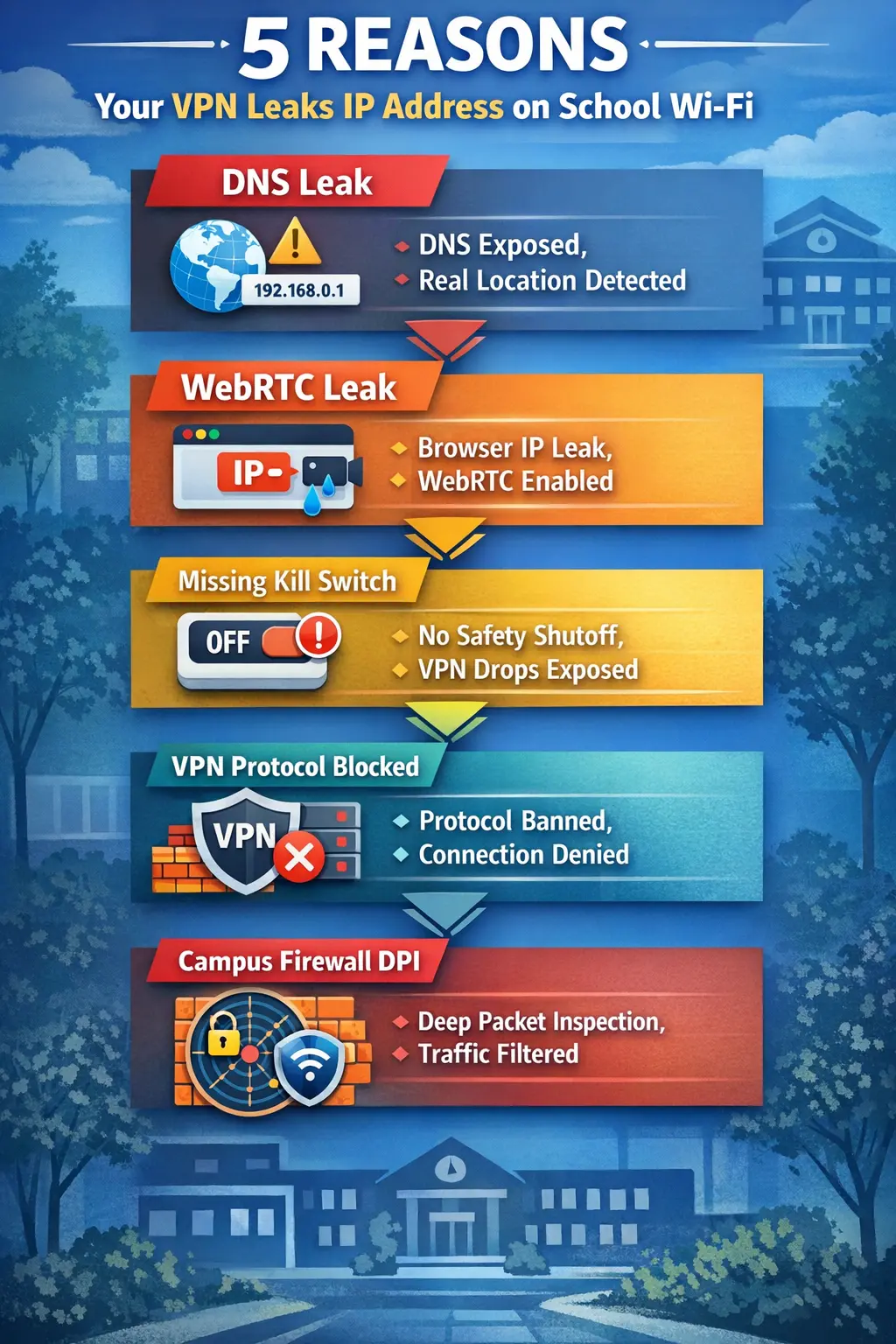
- Deep Packet Inspection (DPI) to detect and throttle VPNs
- Strict DNS rules to block non-educational content
- Real-time filtering of protocols and IP ranges
And even if you’re using a good VPN, you might still get:
- IP leak warnings
- DNS leaks
- WebRTC leaks
- VPN server blacklisting
- Failed connections or auto-disconnects
The fix is not “just switch VPNs” — it’s fixing your entire setup.
Step-by-Step: How to Stop IP Leaks on School Wi-Fi
Step 1: Enable Kill Switch
A kill switch blocks your internet completely if the VPN disconnects. Without it, your device might reconnect through the university network — leaking your real IP instantly.
Where to find it:
Most top VPNs have this in their Settings > Security tab. Turn it ON. Always.
Step 2: Use Your VPN’s DNS Servers
If your device uses the school’s DNS (instead of your VPN’s), websites can still detect your true location.
Fix:
Enable “DNS Leak Protection” in your VPN settings. Make sure your system isn’t overriding DNS with default values.
Step 3: Block WebRTC Leaks in Browser
WebRTC can expose your local IP even with a VPN on — especially in Chrome, Edge, and Firefox.
Fix:
Install extensions like WebRTC Leak Prevent, or use Brave browser which blocks it natively.
Step 4: Clear Cookies and Browser Fingerprints
Your browser stores session data — and some websites use device fingerprinting to identify you beyond your IP.
Fix:
- Use incognito/private mode
- Switch to privacy-first browsers (Brave, Firefox + extensions)
- Regularly clear cookies and cache
- Consider anti-tracking tools like uBlock Origin, Privacy Badger, or DuckDuckGo extension
Step 5: Switch VPN Protocol (To Avoid Detection)
Standard VPN protocols like OpenVPN are easy for universities to detect and block. You need stealth modes.
Recommended Protocols:
- NordLynx (NordVPN) – fast and stealthy
- Lightway (ExpressVPN) – great for mobile
- WireGuard + obfuscation (Surfshark, ProtonVPN)
Pro tip: If your VPN has an “obfuscated” or “stealth” server mode — use it.
Why Free or Weak VPNs Always Fail on Campus
Free VPNs often:
- Have no kill switch
- Leak DNS or WebRTC
- Use shared blacklisted IPs
- Can’t bypass DPI
- Are painfully slow
On university networks, they’re not just useless — they can be dangerous.
Best VPNs That Actually Work on University Wi-Fi
Here’s what works in the real world — tested on locked-down Wi-Fi at major US and EU universities:
| VPN | Best For | Key Features | Works on Campus? |
|---|---|---|---|
| NordVPN | Best overall | Obfuscated servers, kill switch, NordLynx, DNS & WebRTC protection | Yes |
| ExpressVPN | Fast & reliable | Lightway protocol, strong encryption, no logs | Yes |
| Surfshark | Best value | Unlimited devices, Camouflage Mode, CleanWeb | Yes |
| ProtonVPN | Privacy-focused | Stealth protocol, secure core, open-source | Yes |
👉 All of them support Windows, macOS, iOS, Android, and work with school firewalls when set up correctly.
Want Full Control? Run Your Own VPN Server
Still getting blocked? Some campuses block all commercial VPNs, no matter how stealthy.
One advanced option: set up your own VPN server using WireGuard or OpenVPN at home or on a VPS.
- Residential IP = no blocklists
- Zero VPN detection
- Fully encrypted tunnel
⚙️ Tools: Algo VPN, Streisand, or cloud providers like Hetzner, DigitalOcean, Linode
Bonus: Smart VPN Tricks for Campus Users
- Use split tunneling for school portals, VPN for everything else
- Connect VPN before joining campus Wi-Fi (some tricks bypass filters)
- Randomize your MAC address if possible
- Use mobile hotspot when Wi-Fi fails
- Consider ShadowSocks or Tor bridges in extreme cases
TL;DR Summary
| Problem | Fix |
|---|---|
| Real IP leaks | Use kill switch + block WebRTC |
| Geo-blocked content | Use obfuscated/stealth servers |
| VPN gets blocked | Switch protocols (WireGuard, Lightway) |
| Tracking despite VPN | Clear cookies, block fingerprinting |
| VPN disconnects randomly | Use stable providers, not free apps |
Ready to Stay Private on Campus?
If you want peace of mind, no leaks, and full access even on a locked-down university network:
Go with:
- [NordVPN] – Best stealth & security
- [ExpressVPN] – Fast and easy
- [Surfshark] – Unlimited devices, great value
- [ProtonVPN] – Full privacy focus
Set them up with kill switch, DNS & WebRTC protection, and you’re good to go.
No more leaks. No more blocks. Just a free, private internet — even behind the toughest campus firewall.