“What’s in your wallet?”
If you are a traveler, the answer is probably a Capital One card. Whether it’s the Venture X, the Quicksilver, or the Savor, Capital One has positioned itself as the undisputed king of travel banking. They market “No Foreign Transaction Fees” and “Unlimited Miles” aggressively.
So, here is the scenario that drives loyal customers crazy:
You land in Lisbon or Mexico City. You swipe your Venture card for a coffee. It works perfectly. You sit down, open the Capital One app to pay your balance or check your rewards… and you get a blank screen. Or a spinning wheel. Or a generic “Something went wrong” error.
It feels like a betrayal. You are using a card designed for travel, yet the banking app seems terrified that you have left the country.
Here is the reality: There is a massive disconnect between Capital One’s credit card network (which works everywhere) and their digital security team (which is paranoid about foreign IP addresses).
If you are locked out of your account while traveling, you aren’t alone. Here is why the “Travel Bank” is blocking you and the specific steps to force the digital door open.
The Disconnect: Why “Travel Friendly” Doesn’t Mean “Login Friendly”
Capital One isn’t broken; it is protecting itself. But it is doing it in a way that hurts legitimate users.
1. The “Eno” Algorithm
Capital One uses an AI security assistant named Eno. Eno monitors everything. When you log in from a hotel Wi-Fi network in Thailand, Eno sees three red flags:
- Unfamiliar Device: (Maybe you cleared your cookies).
- Unfamiliar Network: An ISP (Internet Service Provider) that Eno doesn’t recognize.
- High-Risk Location: Countries with high rates of cybercrime (parts of Southeast Asia, Eastern Europe, South America) are often geofenced by default.
Eno’s logic is simple: “Better to lock the customer out than let a hacker in.”
2. The Card vs. The App
This is what confuses most travelers.
- The Card: Runs on the Visa or Mastercard network. These networks are truly global. They expect you to travel.
- The App/Website: Runs on Capital One’s proprietary servers in Virginia, USA. These servers are constantly under attack by foreign botnets. To defend the fortress, they simply drop connections coming from “suspicious” non-US IP addresses.
So, yes, you can buy the coffee. But you can’t log in to pay for it.
The Solution: Bring Your “Location” Home
Asking Capital One to lower its shields is impossible. Instead, you must trick Eno into believing you are still sitting in your living room in the United States.
The tool for this job is a VPN (Virtual Private Network). By connecting to a US server, you change your digital fingerprint; your traffic stops looking like ‘User from Vietnam’ and instantly transforms into ‘User from Chicago.
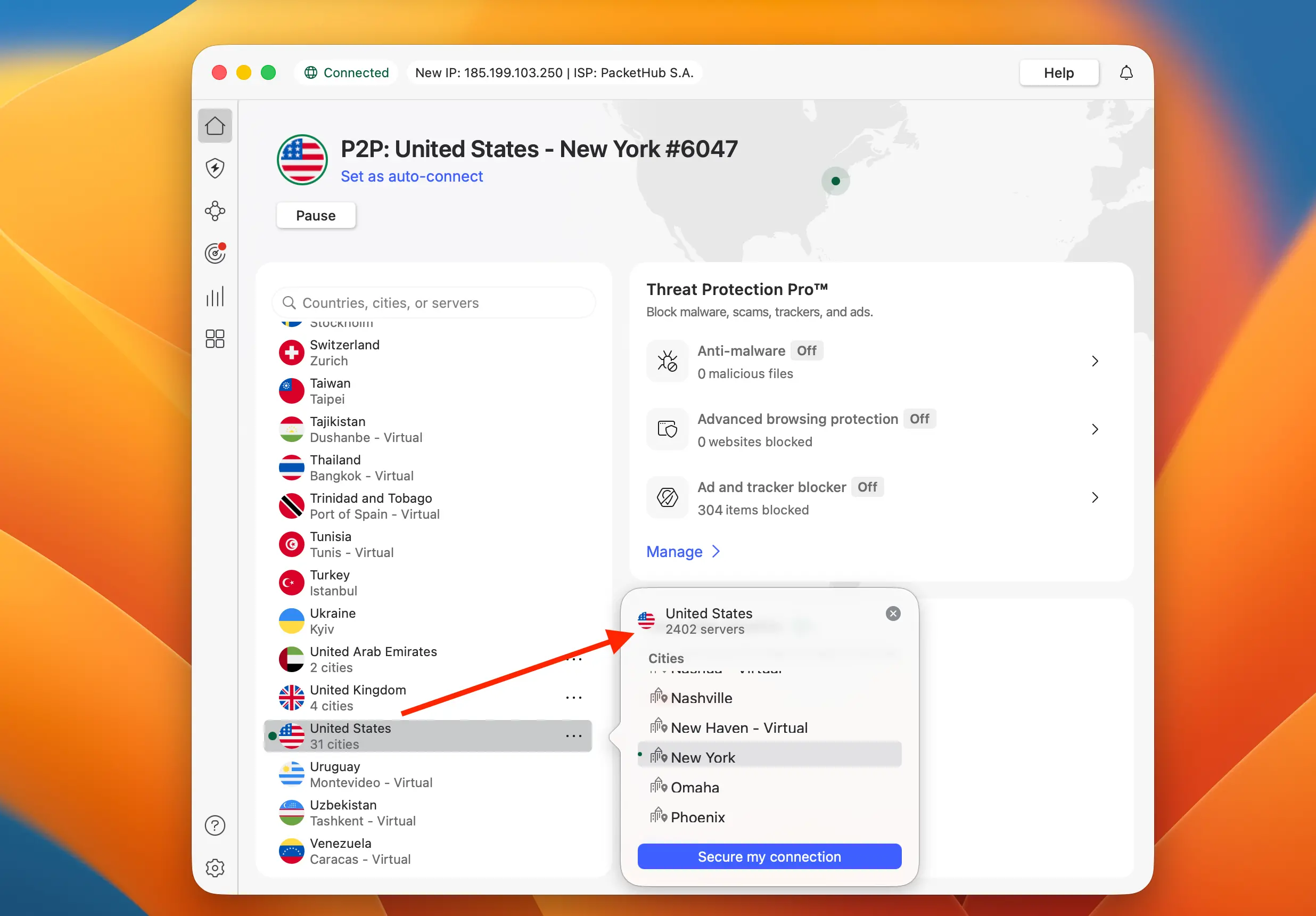
The “Capital One” Bypass Protocol
Capital One’s app is stickier than most. It caches location data aggressively. If you just turn on a VPN and open the app, it might still fail. Follow this sequence:
Step 1: The Purge
- On iPhone/Android: Force close the Capital One app. Do not just minimize it; swipe it away so it restarts completely.
- On Browser: Clear your cache and cookies. If you don’t want to lose your history, open an Incognito (Chrome) or Private (Safari) window.
Step 2: The Connection
- Open your VPN app.
- Connect to a US Server.
- Pro Tip: If you usually live on the East Coast, pick a New York or Ashburn server. If you live out West, pick LA or Seattle. Keeping the distance short helps reduce lag and looks more natural to the security AI.
Step 3: The Login (Browser First!)
- We strongly recommend logging in via
capitalone.comon a mobile browser before trying the app again. The browser environment is easier to control. The app has access to GPS data, which can sometimes override the VPN IP address.
Best VPNs for Capital One (Ranked by Success Rate)
Capital One actively tries to block known VPN IP addresses. You need a service that refreshes its IPs often and uses “obfuscation” (technology that hides the VPN itself).
| Best VPN for Banks | Offer + Discount | URL |
|---|---|---|
| SurfShark | 87% off + 2 months free | Try SurfShark |
| NordVPN | 77% off + 3 months free | Try NordVPN |
| ExpressVPN | 73% off + 4 months free | Try ExpressVPN |
1. Surfshark (The Smart Choice)

Surfshark is currently the #1 recommendation for Capital One users for one specific reason: CleanWeb 2.0 and Camouflage Mode.
- Why it works: Eno is sensitive. If it detects you are using a proxy, it will block you. Surfshark’s Camouflage Mode removes the “VPN Header” from your data packets. To Capital One, you just look like a normal American user with a standard internet connection.
- Value: It allows unlimited device connections. This means you can secure your phone, your laptop, and your family’s devices on a single subscription.
2. NordVPN (The Heavy Hitter)

NordVPN is a powerhouse when it comes to speed and security.
- Why it works: Nord offers Dedicated IP options (for an extra fee). A Dedicated IP is an IP address that only youuse. This is the “God Mode” for banking. Since no one else is using that IP, Capital One’s fraud filters never flag it.
- Threat Protection: It blocks malicious scripts that might try to steal your login credentials on public Wi-Fi.
3. ExpressVPN (The Simple Solution)

If you don’t want to mess with settings, ExpressVPN is the “easy button.”
- Why it works: They have a massive network of US servers. If Server A is blocked by Capital One, you can switch to Server B, C, or D instantly. Their apps are incredibly user-friendly—literally just a big “On/Off” switch.
The “Verify It’s You” Trap (2FA)
You have successfully tricked the location filter. Now you face the final boss: Two-Factor Authentication.
Capital One will almost certainly ask to send a 6-digit code to verify your identity because it detects a “new login” (due to the VPN).
The Problem: The code goes to your US mobile number. The Situation: Your US SIM card is not in your phone.
How to Retrieve the Code:
1. The Mobile App Verification (The Loophole) If you have the app installed on another device (like an iPad) that is already logged in:
- Try to log in on your phone.
- Capital One might ask: “Approve this login on your other device?”
- Tap “Yes” on the iPad. No SMS needed.
2. The Email Option (Rare) Check the “Try another way” link. occasionally, Capital One allows verification via email, but they have been phasing this out for security reasons.
3. The Virtual Number (Google Voice) This is the ultimate traveler hack. If you ported your US number to Google Voice before leaving, the SMS will arrive via the Google Voice app over Wi-Fi. Capital One is one of the few banks that generally accepts VoIP numbers for verification.
4. The “Call Me” Feature If you can’t get texts, select “Call Me.”
- Answer the call using Wi-Fi Calling (if your carrier supports it) or Skype/Google Voice.
- A robotic voice will read the code to you.
Summary: Don’t Let “Eno” Ruin Your Vacation
It is ironic that the bank asking “What’s in your wallet?” often prevents you from opening it digitally.
Capital One’s aggressive security is a double-edged sword. It keeps your money safe, but it makes accessing it a nightmare when you are actually doing the thing the card was designed for: Traveling.
Your Action Plan:
- Download Surfshark (or NordVPN) before you leave the US.
- Clear your browser cache if you get an error message.
- Connect to a US Server to bypass the “Eno” security filter.
Now you can go back to enjoying your trip, knowing you have full control over your finances again.
FAQ
Why does my Capital One card work, but the app doesn’t?
Your credit card operates on the global Visa/Mastercard network, which is designed for international use. The app, however, connects directly to Capital One’s US servers. The bank’s security AI (“Eno”) often blocks foreign IP addresses to prevent hacking attempts, causing the app to fail even while the card works.
Will using a VPN get my Capital One account banned?
No. Using a VPN is not against Capital One’s terms of service. It is a standard security tool. However, if you switch locations too quickly (e.g., London to New York in 5 seconds), it might trigger a temporary fraud alert. Keep your VPN connected to one US location consistently.
Can I tell Capital One I am traveling to prevent this?
No. Capital One has removed the “Set Travel Notice” feature. They claim their algorithms are smart enough to detect travel automatically. Unfortunately, while they detect credit card swipes well, they are still very aggressive about blocking online logins from foreign IPs.
Which VPN is best for Capital One?
Surfshark is the top recommendation because its “Camouflage Mode” hides the fact that you are using a VPN, which helps bypass Capital One’s strict firewalls. NordVPN is also a strong choice for its speed and security features.
Similar Articles:
- Can’t Access Your Chase Account Abroad? Here Is The Fix
- How to Log In to Bank of America as If You Were Still in the US
- Why Your Citibank Account Is Locked Abroad (How to Fix It)
- How to Login to Your Wells Fargo Account Abroad: Full Guide