






A practical look at the update that finally fixes long standing issues
ProtonVPN doesn’t push updates just for the sake of it. Most versions bring small tweaks, but every once in a while they release something that genuinely changes the day to day experience. Version 4.3.7 is exactly that kind of update. It brings several features users have been asking for over the years, and it finally smooths out some frustrating limitations that always felt like unfinished business.
If you’ve ever tried using split tunneling and kill switch at the same time, you already know why this update matters. And if you’re someone who wants a VPN to stay out of your way and simply work, this version gets you much closer to that.
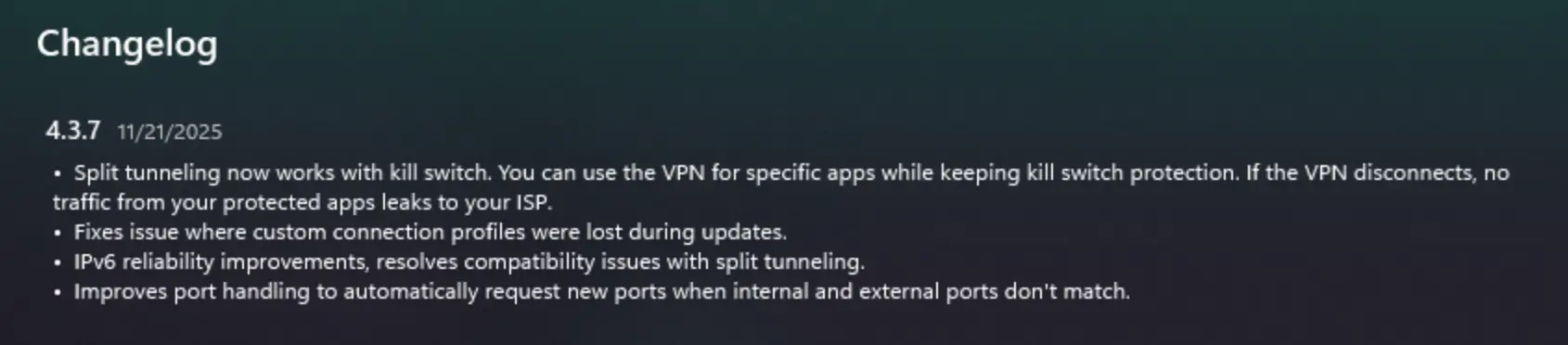
Split tunneling now works with kill switch
This is easily the headline feature. Split tunneling lets you decide which apps should use the VPN tunnel and which ones can connect normally. It’s great for people who want a secure browser but don’t want their games or local apps slowed down. The problem until now was simple. The moment you turned on the kill switch, split tunneling was basically disabled.
In 4.3.7 the two features finally cooperate. If the VPN disconnects, apps assigned to the tunnel won’t leak any traffic. Everything else behaves exactly the way you configured it. It’s a cleaner, safer and more flexible setup. And honestly, this is how it always should have worked.
For anyone who relies on VPN protection for remote work, traveling or streaming, this is a genuinely useful improvement.
Custom profiles no longer vanish during updates
It’s a small thing on paper, but a huge quality of life fix. Some users noticed that their custom profiles would disappear after major updates. If you’re the type who carefully sets up profiles for specific servers, countries or streaming platforms, losing them is annoying at best and disruptive at worst.
Version 4.3.7 fixes this for good. Your profiles stay exactly where you left them. If you’re using ProtonVPN every day, this consistency matters a lot more than fancy marketing features.
Improved IPv6 support
IPv6 adoption is slowly becoming the norm, and VPN services need to keep pace. Earlier versions of ProtonVPN handled IPv6 reasonably well, but with split tunneling enabled, some setups were more fragile than they should have been.
This update strengthens IPv6 behavior across the board. You’ll feel it mostly in the form of smoother browsing and fewer odd network interruptions. It’s one of those improvements that doesn’t scream for attention, but it quietly makes everything more reliable.
Automatic port remapping
Another behind the scenes upgrade is the new port handling logic. Previously, if an internal and external port didn’t match, ProtonVPN struggled to maintain stable tunnels. The result was occasional drops or connection oddities that were hard to diagnose unless you were technically inclined.
The app now recognizes mismatches automatically and adjusts the ports without asking you to do anything. This helps keep connections stable even with apps that use more complex networking behavior, including P2P tools and certain remote access software.
It’s not a flashy feature, but it’s an important one for users who want the VPN to simply stay connected without interruptions.
What this update means in real everyday use
Taken together, these changes make ProtonVPN feel noticeably more polished. The service was already strong in terms of privacy and security, but some of the friction points were obvious to anyone who used it regularly. ProtonVPN 4.3.7 smooths out those rough edges and brings the app closer to the effortless, predictable experience people expect from a top tier VPN.
If you watch streaming platforms while traveling, split tunneling now gives you far more flexibility. If you work online all day, the kill switch integration ensures you stay protected without breaking your workflow. And if you’re bouncing between different networks, IPv6 improvements and automatic port remapping help avoid random hiccups.
All of these upgrades mean ProtonVPN becomes easier to recommend not just to technical users, but to anyone who wants a more stable and controlled VPN setup.
Who benefits most from this update
This version is especially appealing for:
- Users who rely heavily on split tunneling
- People who want kill switch protection without losing flexibility
- Travellers who switch between networks frequently
- Gamers who need a clean and stable connection
- Anyone who sets up multiple custom profiles
ProtonVPN’s core strengths – strong encryption, solid speeds, transparent security practices – are still at the heart of the service. But 4.3.7 finally removes several long standing quirks that used to get in the way.
If you’re comparing VPNs and deciding what to use long term, this update puts ProtonVPN in a stronger position. It’s a good moment to highlight this in your affiliate funnel.
Final thoughts
ProtonVPN 4.3.7 isn’t just a maintenance update. It’s a practical step forward that brings real world improvements to how people actually use the app. More reliable IPv6 behavior, smarter port handling, preserved profiles and the long awaited split tunneling plus kill switch combination make this one of the most meaningful updates the app has seen in a while.
If you’re already a ProtonVPN user, update as soon as you can. If you’re considering switching or testing multiple services, this is the version that makes ProtonVPN a stronger contender in everyday usability.