I’ve tested over 85 VPNs by now and I keep tabs on their server infrastructure all the time. So trust me when I say this. I know exactly when it makes sense to turn on Secure Core in Proton VPN. And no, it’s not just some feature for paranoid geeks.
It’s built into Proton VPN Plus and Unlimited. If you’re already paying for it, you might as well use it when it actually matters.
Here are ten real-life situations where Secure Core makes a huge difference. I’d bet you’ll recognize yourself in at least one of them.
1. You’re a journalist covering authoritarian regimes
Let’s say you’re reporting on China, Russia, Iran or any country that keeps a tight grip on information. Maybe you’re exchanging messages with people inside those countries. The problem? A regular Plus server isn’t enough.
Why not? Because services like China’s Great Firewall can detect VPN traffic based on timing patterns. Things like how long it takes to connect, how steady the signal is, and even how the connection flows. It’s kind of like recognizing someone by the way they walk, even if they’re wearing a mask.
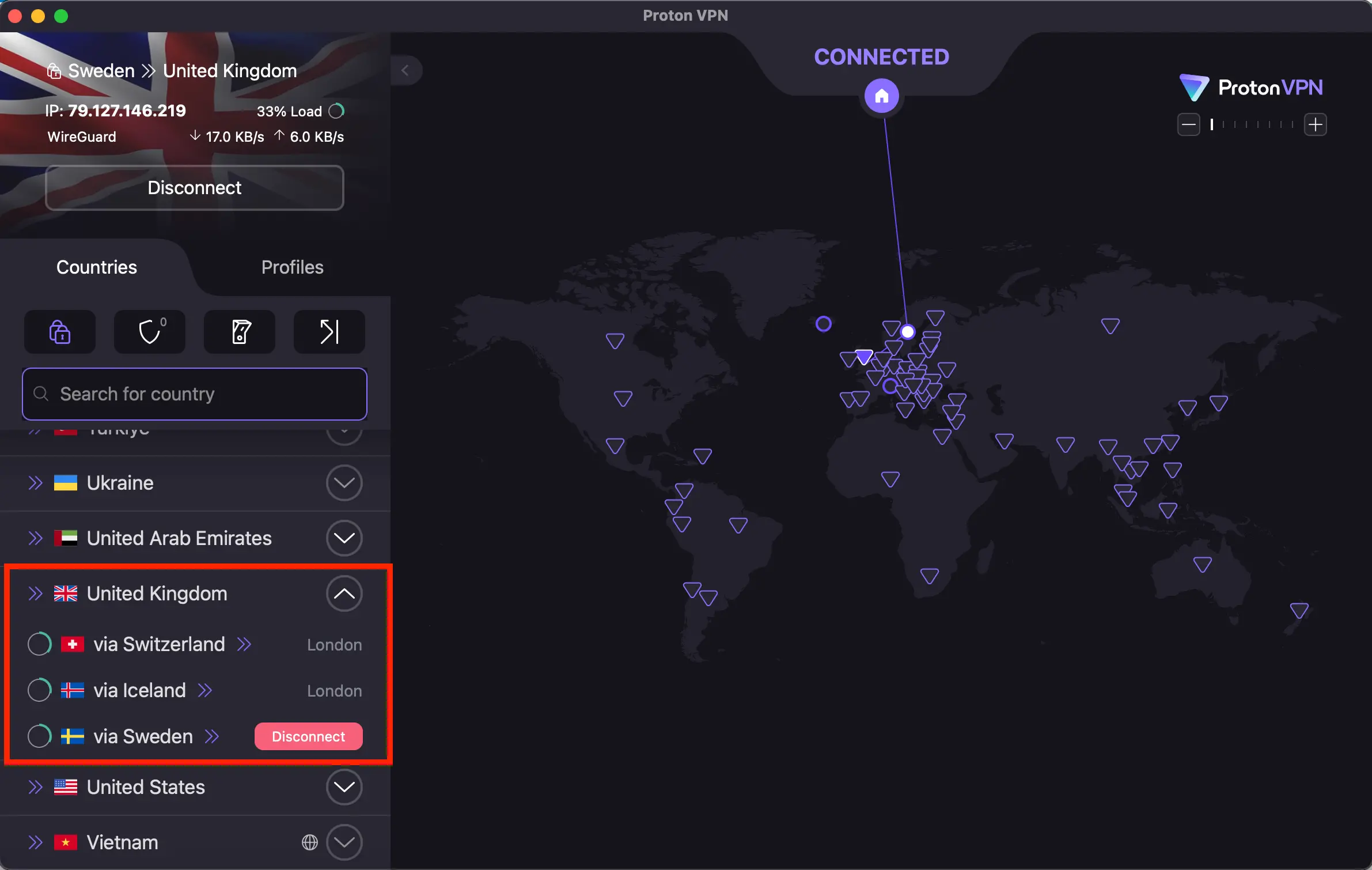
Secure Core routes your traffic through places like Iceland or Switzerland before it goes anywhere else. That alone changes how it looks on the network. Instead of screaming “this is someone trying to bypass censorship,” it just looks like normal internet traffic coming from Europe.
If you’re talking to activists or reporting on political issues, that little detour can protect you in a big way.
2. You’re traveling to a risky country as a journalist
Heading to Belarus, Russia, Iran, Syria or any other place that doesn’t play nice with press freedom? You’ll want more than just a basic VPN server.
In these countries, the authorities watch everything. What you download, who you message, which websites you visit. If you get arrested and they inspect your device, they might trace your connection.
But if Secure Core is active, your connection starts in Iceland. That changes the whole game.
In some places, VPNs are already banned or blocked. Secure Core helps mask your connection so it looks less suspicious.
Let’s say you’re taking photos at a protest. Secure Core could be the reason you walk away safely.
3. You work in activism or human rights
Maybe you’re working with refugees. Maybe you’re supporting political prisoners. Or maybe you’re just trying to help organize a peaceful demonstration. In all of those cases, your communication should not be traceable.
Secure Core makes that harder for anyone trying to follow your digital trail. It helps prevent what’s called a correlation attack. That’s when someone monitors traffic at different points in the network and figures out who’s talking to whom.
This is why organizations like Human Rights Watch recommend features like Secure Core.
If you’re talking to people in oppressive countries, your connection should never go directly from your real location to theirs.
If you’re doing sensitive work, turn it on. It’s already part of your Plus plan. Use it.
4. You’re a government worker or diplomat working abroad
Maybe you work for a foreign ministry. Maybe you’re a cybersecurity consultant or you’re a diplomat. Either way, your traffic shouldn’t be easily visible to local infrastructure when you’re overseas.
With Secure Core, your connection gets routed through a trusted country first. So even if someone’s watching the network in your host country, all they see is a standard connection from Iceland or Switzerland. Not your home IP. Not your real office.
This is standard procedure for diplomats. It’s part of the plan. No need for extra tools. Just activate it.
5. You’re a regular person talking to someone in Russia or China
You’re not an activist and not a journalist. Maybe you’re just texting your cousin in Shanghai. Or doing business with a supplier in Moscow.
But here’s what most people forget. In countries like China, internet service providers are required to give the government access to metadata. That includes who you talk to, when, and how often.
Secure Core makes sure your traffic doesn’t look like it’s coming from your country at all. It starts in a different part of the world.
That way, even if someone looks at the logs, there’s no direct link to you.
You’ve already got this feature in Proton VPN Plus. It costs nothing extra. If you’re handling any kind of communication with those countries, use it.
6. You’re a security researcher or penetration tester on the move
You travel a lot, maybe for audits, maybe for work in cybersecurity. You use a VPN because that’s just common sense, but if you’re serious about privacy, you already know that timing analysis and traffic flow analysis are real threats.
Even if your IP is masked, the way your traffic moves through the network can reveal your location. With Secure Core, your connection starts in a neutral and secure country like Iceland. That makes it way harder to pinpoint where you actually are.
If you’re testing network vulnerabilities or doing remote audits, Secure Core helps make sure your connection doesn’t give away your physical location.
7. You run a business or freelance and talk to US clients
Say you’re a company owner or freelancer based in Europe and working with clients in the United States.
You probably want to keep those talks private. Not because you’re doing anything shady, but because your competition doesn’t need to know what you’re working on.
With Secure Core active, your ISP won’t see that you’re talking to servers in the US. They’ll just see encrypted traffic going through a European route. That can be enough to protect your business strategy.
This isn’t illegal. It’s just smart. If you care about confidentiality, turn it on. It’s included in the Plus plan.
8. You’re an investigative journalist working on a sensitive story
You’re digging into corruption. Maybe a story about government contracts. Maybe a politician or something even bigger.
In that case, you don’t want your connection to be traced. If someone tries to track your traffic, Secure Core masks your origin and location. Even if your device is compromised, it adds one more layer of protection.
If you’re working on a story that powerful people don’t want to see the light of day, Secure Core is a no-brainer.
9. You want to hide your location while traveling
A regular VPN will change your IP address and make you appear in another country. That’s good enough for basic stuff like bypassing region blocks or accessing news sites.
But if you want to go deeper and make it harder for someone to even guess where you are physically, Secure Core helps with that too. It shields your location before it reaches your exit server.
If someone is trying to track you in real time based on network patterns, Secure Core makes the job way harder.
Whether you’re traveling for work or personal reasons, and you just want to keep a low profile, it’s worth switching it on.
10. You just want peace of mind
Maybe no one’s after you. Maybe you’re not doing anything sensitive at all. But you still want to know that your ISP isn’t logging your traffic.
You don’t want metadata being stored or sold. You don’t want to leave digital footprints all over the place.
Secure Core is built for people like you too. It’s the most secure feature Proton VPN offers as part of the Plus and Unlimited plans. Everything else is a compromise. This one isn’t.
If you’re the type who likes to know you’re covered, turn it on. That’s what it’s there for.
When to skip Secure Core and just use regular Plus servers
Secure Core is great, but it’s not always the right tool for the job. Here’s when I turn it off:
- When I’m watching Netflix or other streaming services. The extra hop can slow things down, and streaming platforms often block these servers anyway
- When I’m browsing everyday websites or checking email. A standard Plus server is enough
- When I’m working from home and just want to block ISP snooping. Regular VPN works fine
- When I’m downloading legal torrents. I just use a Plus server with P2P support
- When I want the fastest speed with the lowest latency. Secure Core adds about 100 to 200 milliseconds depending on the route
How to turn on Secure Core ProtonVPN
If you’ve got Proton VPN Plus or Unlimited, you already have access to Secure Core. Here’s how to activate it.
Secure Core on Windows, Mac, or Linux:
- Open Proton VPN
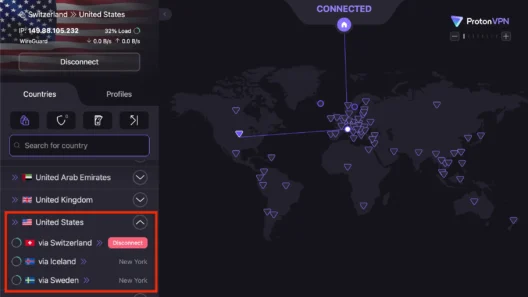
- Click on the Secure Core toggle (top left or in the settings)
- Turn it on
- Choose your country
- Connect
Secure Core on iOS or Android:
- Open the app
- Find the Secure Core switch
- Tap to enable it
- Select a country
- Hit Connect
What to expect:
- Latency: around 100 – 200 milliseconds depending on the route
- Speed: typically between 80 and 150 Mbps, depending on server load
- Stability: very solid, especially with nearby Secure Core entry points
What you should know
Secure Core is part of the Proton VPN Plus and Unlimited plans. You don’t need to pay anything extra. It’s already there, ready to use whenever you want.
Here’s a quick overview:
- Secure Core routes your traffic through one of Proton’s hardened servers before it reaches the public internet
- It’s available in countries like Iceland, Switzerland, and Sweden
- Iceland’s servers are located in a former military base
- The Swiss servers are inside a data center with high security
- The Swedish location is underground with physical protection on top of digital
You can use it 24 hours a day. You decide when it makes sense. Not every connection needs this level of protection, but when it does, it’s good to have it ready.
Support is available via email in English. It’s quick and helpful if you run into any issues.
You can use Secure Core on:
- Windows, macOS, Linux
- iOS and Android
- Also available in the browser extensions for Chrome and Firefox
My final thought
Secure Core is not a separate product. It’s a built-in feature. It’s already included in the plan you’re paying for.
I personally use it in situations like these when:
- I’m writing about regimes that don’t like free press
- In contact with activists or friends in China or Russia
- I’m abroad and working on something sensitive
- Testing security and I don’t want my real location exposed
In every other case, I just use the regular Plus servers. They’re faster and totally fine for daily use.
If you’re wondering whether to turn on Secure Core, ask yourself one thing. Are you doing something that someone might want to track?
If the answer is yes or even maybe, turn it on.
Most of the time, no one is watching. But when they are, Secure Core is the strongest privacy shield you’ve got in your plan.
Bonus tip
Already on Proton VPN Plus? Great. That means you have Secure Core. Try switching it on next time you’re abroad or when you’re dealing with contacts in high-risk countries.
Check the latency, test your speed. Then decide for yourself. But I’d bet once you try it in the right situation, you’ll keep it on regularly.